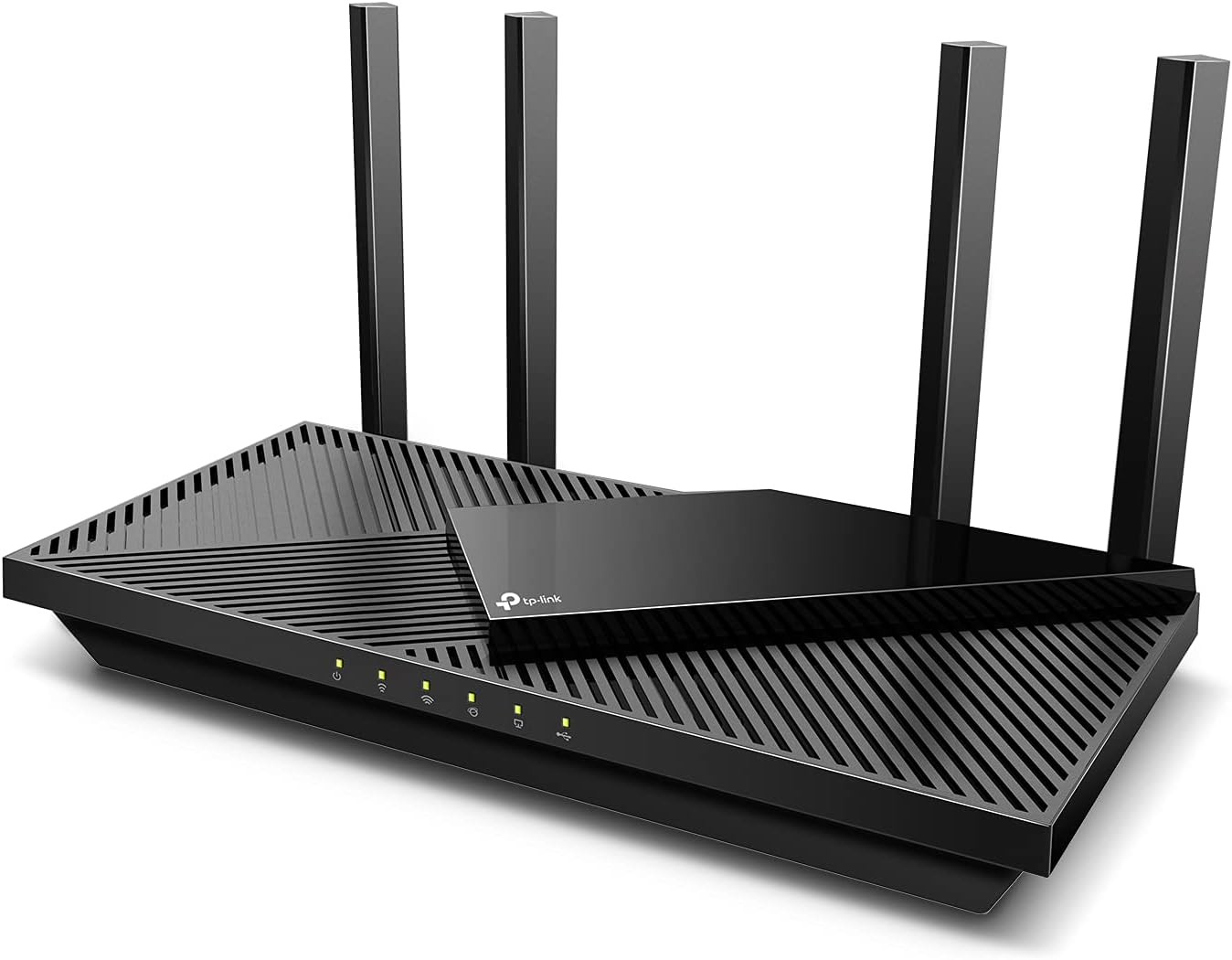
TP-Link Dual-Band AX3000 Wi-Fi 6 Router Archer AX55 | Wireless Gigabit Internet Router for Home | EasyMesh Compatible | VPN Clients & Server | HomeShield, OFDMA, MU-MIMO | USB 3.0 | Secure by Design
Want the best price and purchase timing?
Our AI advisor analyzes real-time pricing across all channels to find you the best deal.
AI Verdict
This AX3000 Wi-Fi 6 dual-band router delivers 2402 Mbps on 5 GHz and 574 Mbps on 2.4 GHz, ideal for homes with multiple streaming and gaming devices needing EasyMesh or VPN.
This router is a strong fit for modern homes with numerous connected devices due to its Wi-Fi 6 (802.11ax) standard, dual-band frequency, and OFDMA technology, which efficiently handles simultaneous connections. Its EasyMesh compatibility also provides a clear upgrade path for expanded coverage.
If you have a multi-gigabit internet plan or many Wi-Fi 6E/7 devices, look for a router with a 6GHz band and a higher AX rating.
Regret Score™
Very Low RiskLower is better — measures purchase-regret risk from real buyer complaints, review credibility, and product maturity
Issues discovered after purchase
Critically weak dimension
Amazon rating vs actual quality
Chance this product isn't for you
Pros
- Achieves 2402 Mbps on the 5 GHz band and 574 Mbps on the 2.4 GHz band for faster streaming and downloads.
- OFDMA technology allows simultaneous transmission to multiple devices, increasing capacity by 4 times.
- Four high-gain external antennas and Beamforming technology extend Wi-Fi coverage throughout a home.
- Supports both VPN client and VPN server functionalities for secure network access.
- Includes a USB 3.0 port for easy file sharing or creating personal cloud storage.
- Features an improved cooling design with a larger heat sink to prevent throttling under heavy use.
Cons
- Some users report it may not fully utilize gigabit internet speeds, with one user getting 215 Mbps download on 5G network with a 500 Mbps service.
- The physical design with external antennas is not universally considered aesthetically pleasing.
- Advanced features like VPN client setup require user configuration, not pre-configured out of the box.
- Lacks a 6GHz band, meaning it doesn't support Wi-Fi 6E or Wi-Fi 7 devices for even faster speeds.
- Range can drop linearly at greater distances from the router without additional EasyMesh devices.
Dimension Scores
It delivers 2402 Mbps on 5 GHz and 574 Mbps on 2.4 GHz bands with four high-gain external antennas and Beamforming, providing good coverage for typical homes.
The router features an improved cooling design with a larger heat sink and a Qualcomm chipset with high memory, ensuring stable connections without overheating or throttling.
Setup is reported as easy via the TP-Link Tether app, and it's compatible with Alexa for voice commands, simplifying management.
It includes TP-Link HomeShield for enhanced security, supports the WPA3 protocol, and offers both VPN client and server capabilities.
Best For
- Households with multiple devices simultaneously streaming 4K content, gaming, and video calling.
- Users wanting to build a flexible whole-home Wi-Fi system using EasyMesh compatible devices.
- Individuals prioritizing online privacy and secure browsing with VPN client and server support.
- Home offices needing stable connections for work-from-home tasks and video conferencing.
Not Recommended For
- Users with very basic internet needs who won't utilize Wi-Fi 6 speeds or advanced features.
- Homes requiring a DSL modem, as this device is solely a router.
- Early adopters seeking the absolute latest Wi-Fi 6E or Wi-Fi 7 technology with a 6GHz band.
Watch Out For
- VPN client and server capabilities require manual configuration by the user; it's not a plug-and-play VPN solution.
- This device is a router only and does not function as a DSL modem, so you'll need a separate modem for DSL internet.
- While coverage is extended by four external antennas, its range as a standalone unit can decrease linearly with distance, potentially requiring EasyMesh extenders for very large or multi-story homes.
- The AX3000 speed rating might not fully saturate a gigabit internet connection for all users, with some reporting around 215 Mbps download on a 500 Mbps service.
Full Specifications
| ASIN | B09G5W9R6R |
| Brand | TP-Link |
| Color | Black |
| Series | Archer AX55 |
| Voltage | 240 Volts |
| Model Name | Archer AX55 |
| Item Weight | 1.66 pounds |
| Manufacturer | TP-Link |
| Wireless Type | 802.11ac, 802.11ax, 802.11b, 802.11g, 802.11n |
| Special Feature | Guest Mode, Internet Security, QoS, Remote Access, WPS |
| Operating System | TP-Link firmware |
| Item model number | Archer AX55 |
| Compatible Devices | Gaming Console, Personal Computer, Security Camera, Smart Television, Smartphone, Tablet |
| Product Dimensions | 12.99 x 9.45 x 2.87 inches |
| Included Components | Power Adapter, Quick Installation Guide, RJ45 Ethernet Cable, Wi-Fi Router Archer AX55 |
| Frequency Band Class | Dual-Band |
| Item Dimensions LxWxH | 12.99 x 9.45 x 2.87 inches |
| Connectivity Technology | Ethernet, USB, Wi-Fi |
| Number of USB 3.0 Ports | 1 |
| Recommended Uses For Product | Gaming, Home |
| Wireless Communication Standard | 802.11ac, 802.11ax, 802.11b, 802.11g, 802.11n |
What Buyers Say
Many users found this router to be a significant upgrade, especially for handling multiple devices without lag, thanks to its Wi-Fi 6 capabilities. The setup process via the Tether app consistently received praise for its simplicity. While it provides solid coverage for most homes, some noted that in larger or more complex layouts, additional EasyMesh devices were needed to eliminate dead zones. The USB 3.0 port for network storage was a pleasant surprise for many, adding unexpected utility.
“Dude, this router actually made my 4K streaming stop buffering, even with my kid on Fortnite and my wife on a video call. Setup was a breeze, thank god, because I hate messing with network stuff.”
Common Praise
- Devices load and stream content effortlessly with no lagging, even with many connected.
- The Tether app makes setup incredibly easy, even for non-tech-savvy users.
- It handles multiple clients simultaneously without slowing down, making gaming and streaming smooth.
- The four high-gain external antennas and Beamforming extend Wi-Fi to previously unreachable areas in a home.
- The USB 3.0 port is useful for sharing files or creating a personal cloud.
Common Complaints
- Some users with gigabit internet service don't see speeds fully reaching 1000 Mbps, reporting closer to 215-461 Mbps on 5G network.
- The router's design, with its prominent antennas, isn't considered subtle or particularly attractive by some.
- Setting up the VPN client or server requires manual configuration, which can be a hurdle for some users.
- In very large or multi-story homes, the standalone router may still have dead zones, necessitating EasyMesh extenders.
Ownership Tips
- The router stays cool even under heavy load, preventing performance drops over time.
- The Tether app remains user-friendly and stable for ongoing network management.
- WPA3 security provides a noticeable bump in peace of mind for network protection.
- Using the USB 3.0 port for a shared network drive is surprisingly convenient for quick file access across devices.
Frequently Asked Questions
Does the TP-Link Archer AX55 support mesh Wi-Fi?
Yes, it is EasyMesh compatible and can form a seamless whole-home Wi-Fi network by adding other EasyMesh-compatible routers or range extenders.
What are the Wi-Fi speeds of this router?
It offers Wi-Fi 6 speeds of 2402 Mbps on the 5 GHz band and 574 Mbps on the 2.4 GHz band.
Can I connect a USB drive to this router?
Yes, it has a USB 3.0 port that allows you to easily share files between connected devices or create a personal cloud storage.
Is the Archer AX55 easy to set up?
Users report that setup is straightforward using the TP-Link Tether mobile app, which guides you through the process step-by-step.
Does this router have parental controls?
Yes, it includes TP-Link HomeShield, which offers parental controls to manage online time and block inappropriate content.
Buying Guide
When you're looking at a router like this, you need to think about how many devices you have and what you do online. Wi-Fi 6 is the current standard, and it's designed to handle more gadgets at once without everything slowing down. Dual-band means it uses two different frequencies, 2.4 GHz for longer range and 5 GHz for faster speeds, so your devices can pick the best one. If you have a big house, EasyMesh compatibility is key because you can add more Wi-Fi points to cover every corner without buying a whole new system.
Wi-Fi 6 (802.11ax)
This is the latest common Wi-Fi standard, like upgrading from an old highway to a multi-lane one. It means faster speeds and, more importantly, it's much better at handling lots of devices at the same time without congestion, so your smart home gadgets, phones, and laptops all get a smoother connection.
Dual-Band (2.4 GHz and 5 GHz)
Think of these as two different radio channels. The 2.4 GHz band travels further and through walls better, but it's slower. The 5 GHz band is faster but has a shorter range. Having both lets your router assign devices to the best channel for their needs, like putting your streaming TV on the fast 5 GHz and your smart thermostat on the longer-range 2.4 GHz.
OFDMA & MU-MIMO
These are like traffic controllers for your Wi-Fi. OFDMA lets the router talk to multiple devices simultaneously on a single channel, reducing latency. MU-MIMO lets it send data to multiple devices at once. Together, they make your network much more efficient, especially in busy households with many connected devices, like a well-organized delivery service making multiple stops at once.
EasyMesh Compatible
If your home has Wi-Fi dead zones, EasyMesh means you can easily add another compatible router or range extender to create a seamless mesh network. This expands your Wi-Fi coverage under a single network name, so you don't have to manually switch networks as you move around your house.
Alternatives
If this router doesn't meet your needs, look for models with a higher AX rating for faster theoretical speeds, Wi-Fi 6E or Wi-Fi 7 for a less congested 6GHz band, or more Gigabit Ethernet ports for additional wired connections.
You Might Also Like

Amazon eero Pro 7 with 1 month free eero Business (auto-renews annually) - Supports internet plans up to 5 Gbps, Coverage up to 6,000 sq. ft., Connect 600+ devices, 3-pack
$600+This 3-pack Wi-Fi 7 tri-band mesh system delivers up to 3.9 Gbps wireless speeds and 5 Gbps wired speeds, covering 6,000 sq. ft. for businesses needing high-capacity networking.

Amazon eero 6 mesh wifi add-on extender - Add up to 1,500 sq. ft. of Wi-Fi 6 coverage. Required eero mesh wifi system not included
A Wi-Fi 6 mesh extender that adds up to 1,500 sq. ft. of coverage, exclusively for existing eero network users.

TP-Link Deco S4 Mesh AC1900 WiFi System - Up to 5,500 Sq.ft. Coverage, Replaces WiFi Router and Extender, Gigabit Ports, Works with Alexa, Deco S4(3-Pack)
A 3-pack AC1900 dual-band mesh system covering 5,500 sq ft with Gigabit Ethernet, for homes needing broad Wi-Fi 5 coverage on a budget.

TP-Link Deco X55 Pro AX3000 Whole Home Wi-Fi 6 Mesh System - Coverage up to 6500 Sq.Ft & up to 150 Devices, 2x2.5G WAN/LAN Ports, 4 Streams, Wired Ethernet Backhaul, Ideal for 1Gig+ Internet, 3-Pack
A Wi-Fi 6 mesh system with AX3000 speed and 2x 2.5G ports per unit, covering 6500 sq. ft. for homes with 1Gig+ internet.