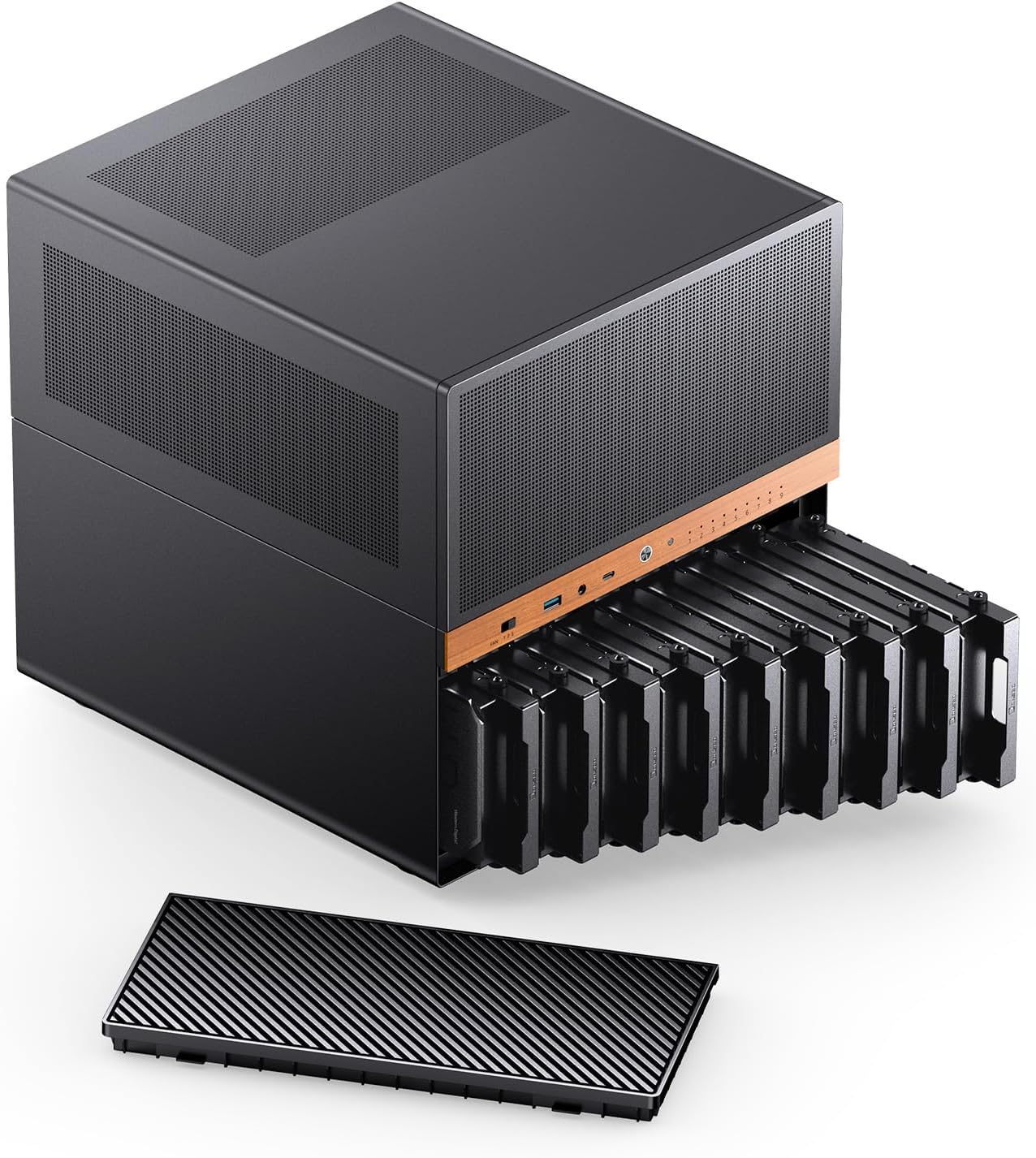
JONSBO N6 NAS Case, Micro ATX Pc Case,9HDD/SSD Drive Bay (hot-swap),Support 3 Power Supply Installation Positions,ATX/SFX PSU,with 2 Fans Pre-Installed,GPU305mm,Multi-Fan Position, Supporting 240AIO
Want the best price and purchase timing?
Our AI advisor analyzes real-time pricing across all channels to find you the best deal.
AI Verdict
This JONSBO N6 case packs 9 hot-swap drive bays and supports Micro ATX/ITX boards, but expect a tight build for anything beyond basic ITX setups.
This case is a strong fit for a specific niche: home NAS or server builders who need to cram nine hot-swap drives into a relatively compact Micro ATX/ITX chassis. Its dual PSU support and 240 AIO compatibility are nice, but the tight clearances for M-ATX boards and certain PSU configurations mean it's not a casual build. You're trading ease of assembly for storage density.
If you want an easier build experience with M-ATX, look for cases with more internal volume, especially around the motherboard and PSU areas, or consider a dedicated ITX board if 9 drives isn't a hard requirement.
Regret Score™
Very High RiskLower is better — measures purchase-regret risk from real buyer complaints, review credibility, and product maturity
Issues discovered after purchase
Critically weak dimension
Amazon rating vs actual quality
Chance this product isn't for you
Pros
- Accommodates nine 3.5-inch hot-swap drives for extensive storage.
- Supports both ATX (up to 220mm) and SFX (up to 100mm) power supplies with multiple installation positions.
- Includes a USB3.2 Gen2 Type-C port (10 Gbps) and a USB3.0 port (5 Gbps) on the front I/O.
- Features a three-speed fan controller on the front panel for adjustable cooling.
- Constructed with 0.7mm+1.0 steel and a sturdy metal frame, accented by a North American black walnut veneer.
- Supports CPU coolers up to 160mm and GPUs up to 320mm.
Cons
- M-ATX motherboards are a super tight fit, requiring careful build order and potentially complex cable routing.
- SFX power supply placement in the front can be difficult due to cable and component interference.
- The case only has room for a single-slot half-height expansion card, limiting certain add-ons.
- The HDD trays are reported to be of low quality by at least one user.
- Fitting a 3-fan GPU or larger components in the last PCIe slot might require removing a case fan.
Dimension Scores
The case efficiently houses nine 3.5-inch hot-swap drives, providing extensive storage capacity in a relatively compact footprint.
The pre-installed 120mm fans are described as 'fine', suggesting they are average, but users might need to upgrade them for quieter operation with high HDD activity.
Constructed from 0.7mm+1.0 steel and featuring a sturdy metal frame, the case feels robust, though the HDD trays are reported to be of lower quality.
Cable management is challenging, especially with M-ATX motherboards and SFX PSUs in the front, leading to a 'super tight fit'.
Best For
- Building a dedicated home NAS or media server with high storage capacity (9 drives).
- Users who need hot-swap drive functionality for frequent drive changes.
- Compact server builds where storage density is a top priority.
- Enthusiasts comfortable with meticulous planning and tight component clearances.
Not Recommended For
- First-time PC builders or those looking for a straightforward, spacious build experience.
- Users needing multiple full-height or multi-slot PCIe expansion cards.
- Anyone prioritizing silent operation without planning for aftermarket fan upgrades.
Watch Out For
- M-ATX motherboards are a 'super tight fit', making installation challenging and requiring a specific build order.
- The SFX PSU can be mounted in the front, but cable management around it is 'impossible' for some users.
- The pre-installed 120mm fans might need to be swapped for higher static pressure models if you're running many HDDs, as the stock ones are just 'fine'.
- The HDD trays 'frankly suck', which could be a pain during installation or drive maintenance.
- You might need a 90° power cord for the power supply to ensure the case stands upright.
Full Specifications
| ASIN | B0G2GVQSFL |
| Brand | Jonsbo |
| Color | Black |
| Series | N6 |
| Material | Metal |
| Case Type | Mid Tower |
| Model Name | N6 |
| Item Weight | 20 pounds |
| Manufacturer | JONSBO |
| Cooling Method | FAN |
| Item model number | N6 |
| Product Dimensions | 13.9 x 12.01 x 12.52 inches |
| Item Dimensions LxWxH | 13.9 x 12.01 x 12.52 inches |
| Number of USB 3.0 Ports | 1 |
| Motherboard Compatability | Micro ATX, ITX |
| Power Supply Mounting Type | Multiple Mount |
| Recommended Uses For Product | Home Server, NAS Network Storage, High Performance Computing |
What Buyers Say
What really jumps out is how much storage this thing crams in, with nine hot-swap bays being a huge draw for anyone building a NAS. But, be warned, that density comes at a cost: building in this case, especially with a Micro ATX board, sounds like a puzzle. Users consistently mention the tight clearances and the need for a specific build order to avoid headaches. The quality of the HDD trays also seems to be a recurring complaint, which is a bummer for a case designed around drives.
“Man, this case holds SO many drives, it's exactly what I needed for my Plex server, but getting everything in there was a nightmare, especially the M-ATX board, felt like I needed tiny robot hands.”
Common Praise
- The ability to fit nine 3.5-inch hot-swap drives is a game-changer for storage.
- The case has a sturdy metal frame and thick steel construction.
- The wooden front panel accent gives it a unique, aesthetically pleasing look.
- Supports both ATX and SFX power supplies, offering flexibility.
- The front I/O includes a fast USB-C 10Gbps port.
Common Complaints
- Installing a Micro ATX motherboard is a 'super tight fit' and requires careful planning.
- The HDD trays are 'frankly suck' and feel cheap.
- Cable management can be difficult, particularly with SFX PSUs in the front.
- Limited to a single-slot half-height expansion card.
- Fitting a 3-fan GPU might mean sacrificing a case fan.
Ownership Tips
- You'll spend more time than you think planning cable routes, especially for the SATA and power cables to the backplane.
- Consider upgrading the pre-installed fans if you're sensitive to noise or have a lot of spinning rust drives.
- The physical fan controller is there, but you'll probably end up using software for fan speed control anyway.
- Seriously, plug in all your SATA and Molex cables to the backplane *before* you put anything else in, even if you don't use them all immediately.
Frequently Asked Questions
What motherboard sizes does this case support?
The JONSBO N6 supports both ITX and Micro ATX motherboards. Be aware that Micro ATX boards will be a very tight fit.
Can I use a large graphics card in this case?
Yes, the case supports GPUs up to 320mm in length. However, a 3-fan GPU might require you to remove a case fan for clearance.
What kind of power supplies can I use?
You can use either ATX power supplies up to 220mm or SFX power supplies up to 100mm. There are multiple installation positions.
Does it come with fans?
Yes, it comes with two 120mm fans pre-installed. There's also a three-speed fan controller on the front panel.
Are the drive bays hot-swappable?
Yes, all nine 3.5-inch drive bays feature hot-swap functionality.
Buying Guide
When you're looking at a NAS case like this, you're really thinking about how many hard drives you need and how easy it'll be to get them in and out. Hot-swap bays are a big deal because you can replace drives without shutting down your whole system. Also, pay attention to the motherboard size it supports; Micro ATX gives you more options than ITX, but it can also make things super cramped in smaller cases.
9 Drive Bay (hot-swap)
This tells you how many hard drives you can install and if you can swap them out while the system is running. Nine bays is a lot for a home server, letting you store tons of data. Hot-swap means less downtime if a drive fails or you want to add more storage.
Compatible: Micro ATX, ITX
This is about the size of the computer's 'brain' (motherboard) that fits inside. ITX boards are tiny, Micro ATX are a bit bigger. If you need more expansion slots or a more powerful CPU, Micro ATX is better, but it'll be a tighter squeeze in this case.
Support 3 Power Supply Installation Positions, ATX/SFX PSU
This means you have options for your power supply unit (PSU). ATX PSUs are standard, SFX are smaller. Having multiple positions gives you flexibility, but also means you need to think about how it affects cable routing and airflow.
GPU 305mm, Supporting 240 AIO
This tells you the maximum length of a graphics card you can install and if you can fit a 240mm All-In-One liquid cooler. Even for a NAS, you might want a GPU for transcoding video, and an AIO can keep a powerful CPU cool in a compact space.
Alternatives
If this case doesn't fit, look for cases with more internal volume for easier M-ATX builds, or cases that explicitly support more than one full-height PCIe card. If you don't need 9 drives, a smaller ITX-only NAS case might be simpler to build in.
You Might Also Like

Micro ATX PC Case | Mini Tower Computer case | Pre-Installed 120mm*1 RGB Fan | ITX Desktop Chassis for MATX/ITX | 240 RAD | 280mm GPU | 160mm CPU Cooler Height - White S6
$0-$49This MAQUY S6 is a budget Micro ATX case with a pre-installed 120mm RGB fan, supporting 280mm GPUs and 240mm top radiators for entry-level builds.

Micro ATX Case, Mini PC ITX Desktop Computer Case MATX Case Support ATX PSU/250mm GPU/135mm CPU Cooler/1x 3.5’’HDD or 2X 2.5’’SSD/USB 3.0 Port
$0-$49This is a compact 38.5x19.5x32.5cm Micro ATX case supporting 250mm GPUs and 135mm CPU coolers, designed for budget workstation builds.

Small PC Case, ITX Mini Computer Case with 360 Degree Ventilation, 10.5L Compact Design for ITX Motherboard, SFX Power Supply, 4 x 2.5 Inch SSDs
$50-$99This 10.5L acrylic ITX case supports SFX/SFX-L PSUs, ITX motherboards, and GPUs up to 210mm, designed for compact builds.

Micro ATX PC Case | Mini Tower Computer case Support Vertical GPU Mount | Pre-Installed 120mm*1 RGB Fan | ITX Desktop Chassis for MATX/ITX | 240 RAD | 320mm GPU | 165mm CPU Cooler Height-Black
$0-$49A budget Micro ATX case with a mesh front, tempered glass, and support for 320mm GPUs and 240mm AIOs, but only one pre-installed 120mm RGB fan.