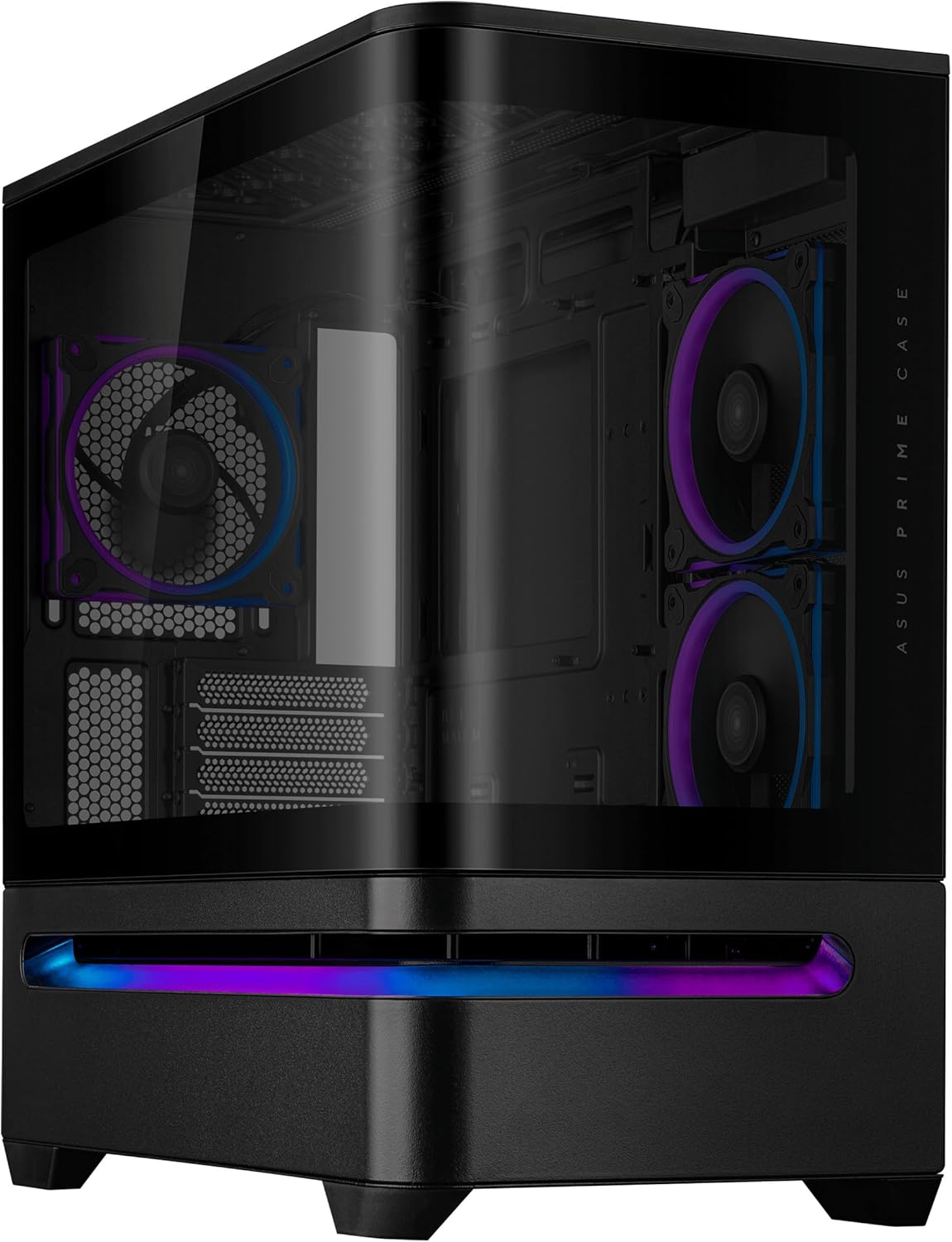
ASUS Prime AP202 ARGB Black mATX pc case with Fully Tempered Curved Glass, Supports Graphics Cards up to 420mm Long, 360mm Long radiators, Easy-Detach Rail, Patented Slot Vent, 3 Built-in ARGB Fans
Want the best price and purchase timing?
Our AI advisor analyzes real-time pricing across all channels to find you the best deal.
AI Verdict
This mATX case with a curved tempered glass panel supports 420mm GPUs and 360mm radiators, featuring three pre-installed ARGB fans.
This case is a situational fit for mATX builders prioritizing aesthetics and large component support, like 420mm GPUs and 360mm radiators. However, its out-of-the-box cooling configuration requires user adjustment for optimal thermal performance.
If you need top-tier thermal performance without user intervention, look for cases with a more optimized default airflow design and front mesh panels.
Regret Score™
Medium RiskLower is better — measures purchase-regret risk from real buyer complaints, review credibility, and product maturity
Issues discovered after purchase
Critically weak dimension
Amazon rating vs actual quality
Chance this product isn't for you
Pros
- The curved tempered glass panel extends seamlessly from front to side, offering a panoramic view of internal components from almost any angle.
- It supports graphics cards up to 420mm long, accommodating most high-end GPUs.
- The case allows for 360mm long radiators at the top, enabling robust liquid cooling setups.
- An easy-detach rail mechanism makes panel removal and reattachment safe and simple.
- Three 120mm ARGB fans are pre-installed (two side, one rear), simplifying initial setup and providing out-of-the-box lighting.
- The integrated ARGB light band works seamlessly with Aura Sync for synchronized lighting effects.
Cons
- Cooling performance requires user intervention, as the case's default airflow configuration (side fans as exhaust) is suboptimal for GPU temperatures.
- It does not include a GPU support bracket, which is a noticeable omission given its support for graphics cards up to 420mm long.
- The case lacks rubber grommets on the right side of the motherboard tray, which can make cable routing less tidy.
- Some users report awkward hardware compatibility limitations beyond just the GPU bracket, potentially requiring careful component selection.
Dimension Scores
While it supports large components and 360mm radiators, the default fan configuration requires user intervention to achieve optimal cooling performance for the GPU.
The case includes three pre-installed ARGB PWM fans, which offer some control over noise, but specific dB levels under load were reported at 47dB in one review.
Constructed from alloy steel, plastic, and tempered glass, reviews note the materials feel substantial, panel fitment is precise, and the overall construction feels premium.
It offers 30mm of space behind the motherboard tray and includes Velcro straps and tie-down points, making cable routing straightforward.
Best For
- Compact, high-performance mATX builds showcasing internal components.
- Users planning to install large graphics cards up to 420mm in length.
- Builds incorporating 360mm AIO liquid coolers at the top.
- Enthusiasts who want synchronized ARGB lighting with Aura Sync.
Not Recommended For
- Users needing ATX motherboard support, as it only fits Micro-ATX and Mini-ITX boards.
- Budget-conscious builders, given its mid-range price point and potential need for additional cooling fans.
- Users who prefer a completely silent system without adjusting fan curves or replacing stock fans.
Watch Out For
- The pre-installed side fans are set to exhaust by default, which can negatively impact GPU cooling and requires manual reorientation to intake for better thermal performance.
- Despite supporting GPUs up to 420mm, the case does not include a GPU support bracket, meaning you might need to purchase one separately for heavy cards.
- The curved glass panel, while visually appealing, needs careful handling when removing as it slides on a rail and can pull away completely at the end.
- Cable routing on the right side of the motherboard tray lacks rubber grommets, which can expose cables and make a clean aesthetic harder to achieve.
Full Specifications
| ASIN | B0FGGNR82S |
| Brand | ASUS |
| Color | BLACK |
| Series | PRIME AP202 TG ARGB BLACK |
| Material | Alloy Steel, Plastic, Tempered Glass |
| Case Type | Mid Tower |
| Model Name | PRIME AP202 TG ARGB BLACK |
| Item Weight | 20.1 pounds |
| Manufacturer | ASUS |
| Cooling Method | Air |
| Item model number | PRIME AP202 TG ARGB BLACK |
| Product Dimensions | 9.3 x 17.4 x 18.1 inches |
| Item Dimensions LxWxH | 9.3 x 17.4 x 18.1 inches |
| Number of USB 3.0 Ports | 1 |
| Motherboard Compatability | Micro-ATX, Mini-ITX |
| Power Supply Mounting Type | competible PSU length up to 200mm |
| Recommended Uses For Product | Business, Gaming, Personal |
What Buyers Say
The most surprising finding is that despite its airflow-focused design claims, the case's default fan setup (side fans exhausting) actually hinders GPU cooling, requiring users to reconfigure them for better thermal performance. Builders appreciate the premium feel of the materials and the seamless curved glass panel, which effectively showcases components. However, the absence of a GPU support bracket for long cards and the lack of rubber grommets for cable routing are recurring points of contention. Ultimately, it's a case that looks better than its out-of-the-box cooling performance suggests.
“Man, this case looks sick with that curved glass, but seriously, I had to flip those side fans around myself 'cause my GPU was cooking. Why no bracket for my huge card, ASUS?!”
Common Praise
- The curved tempered glass panel provides a clear, panoramic view of the internal components.
- Build quality is perceived as premium, with substantial materials and precise panel fitment.
- It accommodates large graphics cards up to 420mm and 360mm radiators.
- Cable management is straightforward due to 30mm of space and included tie-downs.
- The pre-installed ARGB PWM fans simplify the initial build process and lighting setup.
- The integrated ARGB light band and Aura Sync compatibility offer appealing ambient lighting.
Common Complaints
- The default side fan configuration (exhaust) negatively impacts GPU cooling and needs to be changed to intake.
- A GPU support bracket is not included, despite the case supporting very long graphics cards.
- The absence of rubber grommets for cable pass-throughs on the motherboard tray makes some cable runs less clean.
- Some users found overall cooling performance to be less than optimal without user modifications.
- Awkward hardware compatibility issues were noted beyond just the GPU bracket.
Ownership Tips
- You'll likely need to flip the two pre-installed side fans to intake for improved GPU cooling, as they come configured as exhaust.
- The curved glass panel slides off easily on its rail, but be ready to catch it at the end, it just pulls away.
- Cable management is actually pretty easy with the 30mm space and Velcro straps, even without grommets.
- The pre-installed ARGB fans are convenient, only needing one ARGB and one PWM header on your motherboard.
- If you have a heavy, long GPU, you'll definitely notice the lack of an included support bracket.
Frequently Asked Questions
What motherboard sizes does the ASUS Prime AP202 ARGB support?
It supports Micro-ATX and Mini-ITX motherboards.
How many fans are included with the case?
The case comes with three pre-installed 120mm ARGB fans: two on the side and one at the rear.
What is the maximum graphics card length this case can accommodate?
It supports graphics cards up to 420mm long.
Can I install a 360mm liquid cooler in this case?
Yes, the case supports 360mm radiators at the top.
Does the front I/O panel include a USB-C port?
Yes, the front I/O features one USB 3.2 Gen 2x2 Type-C port, two USB 3.2 Gen 1 ports, and a headphone/microphone jack.
Buying Guide
When you're looking at a PC case like this, you need to think about more than just how it looks. For mATX cases, space is always a premium, so check if your big GPU and CPU cooler will actually fit. Airflow is huge for keeping your components cool, especially if you're pushing them hard, so don't just assume a case with lots of vents will cool well out of the box. Also, consider the front I/O ports – do they have everything you need for your peripherals?
Motherboard Support (Micro-ATX, Mini-ITX)
This tells you exactly which size motherboards will fit. If you have a standard ATX board, it won't work. Micro-ATX and Mini-ITX are smaller, so they're for more compact builds.
Max GPU Length (420mm)
This is critical for your graphics card. High-performance GPUs are often very long, so measure your card to make sure it won't hit the front of the case or a radiator.
Radiator Support (360mm Top)
If you're planning on using an All-in-One (AIO) liquid cooler, this spec tells you the largest size radiator you can mount. A 360mm radiator can cool powerful CPUs, but ensure your motherboard's VRM heatsinks don't interfere.
Cable Management Space (30mm)
This is the gap behind the motherboard tray where you route all your power and data cables. More space means an easier, cleaner build, preventing bulging side panels and improving airflow.
Alternatives
If this case doesn't fit, look for mATX cases with optimized out-of-the-box airflow, potentially with a mesh front panel, or consider a case that explicitly includes a GPU support bracket for long cards.
You Might Also Like

Micro ATX PC Case | Mini Tower Computer case | Pre-Installed 120mm*1 RGB Fan | ITX Desktop Chassis for MATX/ITX | 240 RAD | 280mm GPU | 160mm CPU Cooler Height - White S6
$0-$49This MAQUY S6 is a budget Micro ATX case with a pre-installed 120mm RGB fan, supporting 280mm GPUs and 240mm top radiators for entry-level builds.

Micro ATX Case, Mini PC ITX Desktop Computer Case MATX Case Support ATX PSU/250mm GPU/135mm CPU Cooler/1x 3.5’’HDD or 2X 2.5’’SSD/USB 3.0 Port
$0-$49This is a compact 38.5x19.5x32.5cm Micro ATX case supporting 250mm GPUs and 135mm CPU coolers, designed for budget workstation builds.

Small PC Case, ITX Mini Computer Case with 360 Degree Ventilation, 10.5L Compact Design for ITX Motherboard, SFX Power Supply, 4 x 2.5 Inch SSDs
$50-$99This 10.5L acrylic ITX case supports SFX/SFX-L PSUs, ITX motherboards, and GPUs up to 210mm, designed for compact builds.

Micro ATX PC Case | Mini Tower Computer case Support Vertical GPU Mount | Pre-Installed 120mm*1 RGB Fan | ITX Desktop Chassis for MATX/ITX | 240 RAD | 320mm GPU | 165mm CPU Cooler Height-Black
$0-$49A budget Micro ATX case with a mesh front, tempered glass, and support for 320mm GPUs and 240mm AIOs, but only one pre-installed 120mm RGB fan.