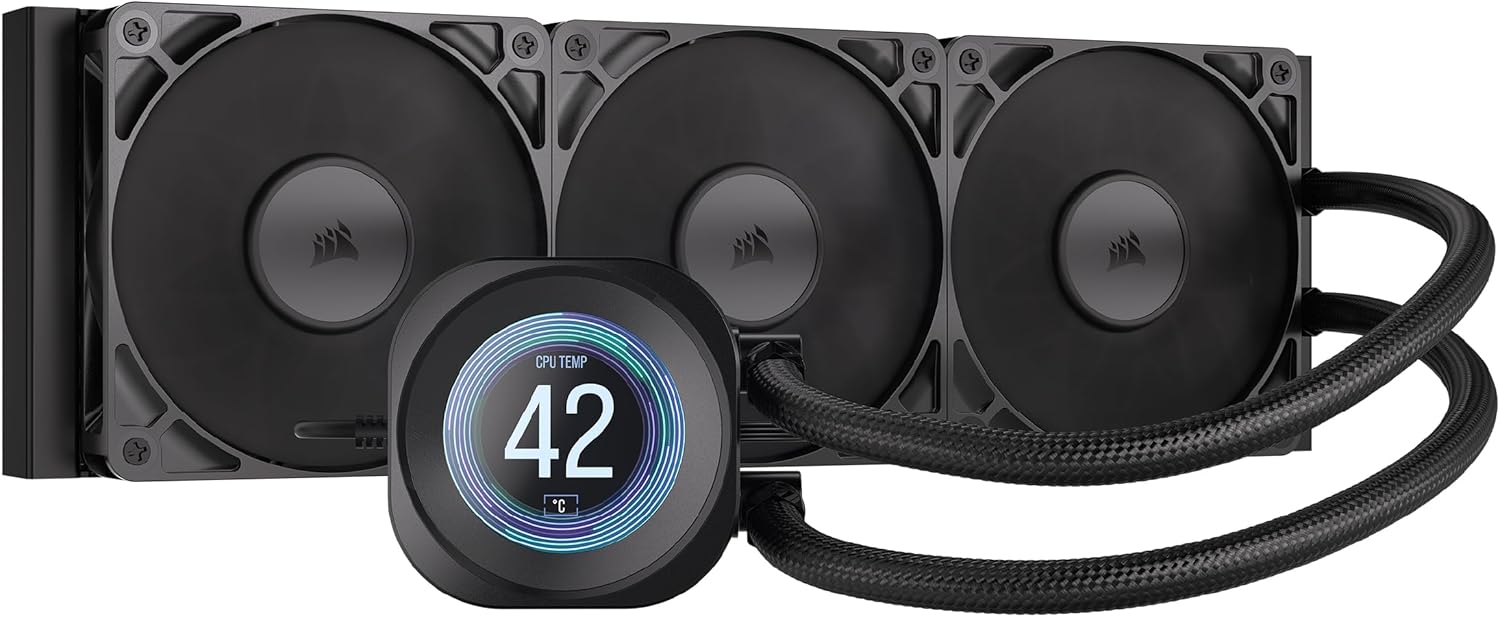
CORSAIR Nautilus 360 RS LCD Liquid CPU Cooler – 2.1" IPS LCD Screen, 360mm AIO, Low-Noise, Daisy-Chain, Intel LGA 1851/1700, AMD AM5/AM4 – 3X RS120 Fans Included – Black
Want the best price and purchase timing?
Our AI advisor analyzes real-time pricing across all channels to find you the best deal.
AI Verdict
This 360mm AIO with a 2.1" IPS LCD and 20 dBA pump is for builders prioritizing quiet cooling and visual customization without needing Corsair's iCUE LINK ecosystem.
This AIO is a strong fit for users seeking efficient, low-noise CPU cooling with visual customization. Its 360mm radiator and 20 dBA pump deliver solid thermal performance while maintaining quiet operation. The daisy-chainable fans and pre-applied thermal paste simplify the build process.
If you need deeper integration with a Corsair ecosystem, look for coolers explicitly supporting iCUE LINK.
Regret Score™
Very Low RiskLower is better — measures purchase-regret risk from real buyer complaints, review credibility, and product maturity
Issues discovered after purchase
Critically weak dimension
Amazon rating vs actual quality
Chance this product isn't for you
Pros
- The pump operates at a whisper-quiet 20 dBA, contributing to low system noise levels.
- RS120 fans daisy-chain to a single 4-pin PWM header, simplifying cable routing.
- The 2.1" IPS LCD screen with 480x480 resolution and 600cd/m² backlight allows for displaying temperatures, GIFs, or custom images.
- Pre-applied thermal paste and a convex cold plate design streamline installation and ensure maximum CPU contact.
- Users report CPU temperatures around 40-50°C during 4K gaming and 48°C max under load with a Core i7 Ultra 265K.
- The cooler is backed by a 5-year warranty.
Cons
- It does not integrate with Corsair's iCUE LINK ecosystem, meaning it won't sync with other LINK-compatible components.
- Some users have reported issues with the LCD screen's web URL and YouTube video display features not functioning.
- One user experienced the pump as audibly loud regardless of temperatures.
- Without iCUE LINK, fan curves must be set using CPU or motherboard sensors, as there's no liquid temperature sensor.
Dimension Scores
Users report CPU temperatures around 40-50°C during 4K gaming and 48°C max under load with an Intel Core i7 Ultra 265K.
The pump is rated at 20 dBA and many users describe the cooler as quiet, with fans remaining nearly silent, though one user reported a loud pump.
The cooler features a well-finished aluminum radiator, robust block, and magnetic dome bearings in the fans, contributing to a premium feel.
The RS120 fans are daisy-chainable, allowing them to connect to a single 4-pin PWM header, significantly reducing cable clutter.
Best For
- PC builders aiming for a clean aesthetic with minimal cable clutter due to daisy-chainable fans.
- Users who want to monitor CPU temperatures or personalize their build with custom GIFs on an integrated LCD screen.
- Systems requiring high-performance CPU cooling for Intel LGA 1851/1700 or AMD AM5/AM4 platforms.
- Enthusiasts who prefer direct motherboard control over proprietary software ecosystems for their cooling.
Not Recommended For
- Users deeply invested in Corsair's iCUE LINK ecosystem who expect full integration and control.
- Anyone needing a liquid temperature sensor for precise fan curve adjustments.
- Those who prioritize absolute silence, given one report of a loud pump.
Watch Out For
- The LCD screen's web URL and YouTube video display function may not work, showing an error message instead of content.
- While generally quiet, a minority of users have experienced the pump producing noticeable noise levels.
- Fan curves rely on CPU or motherboard temperature sensors, as the cooler lacks a dedicated liquid temperature sensor for more granular control.
Full Specifications
| UPC | 840440400356 |
| ASIN | B0FGDJ3QP1 |
| Brand | Corsair |
| Color | Black |
| Language | English, English, English, English, English |
| Material | Metal, Plastic |
| Item Weight | 3.51 pounds |
| Noise Level | 20 Decibels |
| Manufacturer | Corsair |
| Cooling Method | Water |
| Number of Items | 1 |
| Item model number | CW-9061033-WW |
| Compatible Devices | Desktop |
| Product Dimensions | 15.59"L x 4.72"W x 1.06"H |
| Power Connector Type | 4-Pin |
| Item Dimensions LxWxH | 15.59 x 4.72 x 1.06 inches |
| Maximum Rotational Speed | 2100 RPM |
| Global Trade Identification Number | 00840440400356 |
What Buyers Say
The biggest takeaway here is that this Nautilus 360 RS cooler isn't part of Corsair's iCUE LINK ecosystem, which is actually a huge plus for many users who want to avoid proprietary controllers and software, opting for direct motherboard control instead. People are consistently reporting solid cooling performance, with CPU temps staying low even under heavy loads like 4K gaming. The pump is generally described as whisper-quiet, and the daisy-chainable fans make for a much cleaner build experience. The 2.1" IPS LCD screen is a definite highlight for personalization, though some users have hit a snag trying to get web videos to play on it.
“Dude, this AIO just works, and I don't have to deal with a million cables or some weird software hub, my CPU stays chill even when I'm hammering it, and the screen is actually pretty sick for showing my temps.”
Common Praise
- The pump operates at a low 20 dBA, contributing to a quiet system.
- CPU temperatures remain low, with reports of 40-50°C during 4K gaming.
- Installation is straightforward due to pre-applied thermal paste and daisy-chainable fans.
- The 2.1" IPS LCD screen offers bright, customizable visuals for monitoring or aesthetics.
- The daisy-chaining feature for the fans significantly reduces cable clutter.
- Users appreciate not needing Corsair's iCUE LINK ecosystem for control.
Common Complaints
- The LCD screen's web URL and YouTube video playback feature may not work.
- One user reported the pump being audibly loud regardless of temperature.
- The cooler lacks a liquid temperature sensor, relying on CPU or motherboard sensors for fan curves.
- It does not integrate with Corsair's iCUE LINK ecosystem, which is a drawback for some existing Corsair users.
Ownership Tips
- The daisy-chaining of the fans genuinely simplifies wiring, making for a much tidier build than other AIOs.
- The pre-applied thermal paste is actually effective enough that you likely won't need to re-apply your own.
- The LCD screen is bright and clear, making custom GIFs or system stats easily visible.
- You'll control the fans and pump directly through your motherboard's fan headers, which means less software running in the background.
- While the LCD is cool, don't expect to stream YouTube videos directly to it; that feature seems buggy.
Frequently Asked Questions
Does this cooler require Corsair iCUE software?
Yes, you'll need iCUE software to customize the 2.1" IPS LCD screen for displaying temperatures, GIFs, or custom images.
Is this cooler compatible with Intel LGA 1851 sockets?
Yes, the CORSAIR Nautilus 360 RS LCD Liquid CPU Cooler is compatible with Intel LGA 1851, LGA 1700, and AMD AM5/AM4 sockets.
How quiet is the pump?
The pump is rated at a whisper-quiet 20 dBA. Many users report it's extremely quiet, even under load.
Do the fans have RGB lighting?
The product title specifies 'Black' and '3X RS120 Fans Included' without mentioning ARGB. Some users specifically chose a non-RGB version for a clean build.
Does it come with thermal paste pre-applied?
Yes, the cooler features a convex cold plate with pre-applied thermal paste, speeding up installation.
Buying Guide
When you're looking at an AIO liquid cooler like this, you're basically getting a self-contained cooling system for your CPU. The '360mm' refers to the radiator size, which is pretty big and means it can handle a lot of heat. The main things to care about are how well it cools your CPU, how loud it gets, and how easy it is to install and manage the cables. Don't get caught up in flashy features if the core cooling isn't there.
360mm Radiator
This is the size of the heat exchanger. A 360mm radiator has more surface area than smaller ones (like 240mm or 280mm), allowing it to dissipate more heat and keep your CPU cooler, especially under heavy loads. Think of it like a bigger car radiator for a more powerful engine.
20 dBA Pump Noise
This number tells you how loud the pump, which circulates the liquid, is supposed to be. 20 dBA is very quiet; for comparison, a whisper is around 30 dBA. A lower number means your PC will be less distracting during quiet moments or intense focus.
Daisy-Chainable Fans
This means you can connect multiple fans to each other, and then only one cable from the last fan needs to go to your motherboard. It drastically reduces the number of cables you have to route and hide in your PC case, making for a much cleaner build.
2.1" IPS LCD Screen
This is a small, high-quality display on the CPU block itself. It lets you show off custom images, GIFs, or important system information like your CPU temperature, adding a personalized touch to your build without needing extra monitoring software on your main screen.
Alternatives
If this cooler doesn't fit, look for other 360mm AIOs with low dBA pump ratings and daisy-chainable fans for similar performance and ease of installation. If you need deeper software integration, seek models explicitly compatible with your preferred ecosystem.
You Might Also Like

Micro ATX PC Case | Mini Tower Computer case | Pre-Installed 120mm*1 RGB Fan | ITX Desktop Chassis for MATX/ITX | 240 RAD | 280mm GPU | 160mm CPU Cooler Height - White S6
$0-$49This MAQUY S6 is a budget Micro ATX case with a pre-installed 120mm RGB fan, supporting 280mm GPUs and 240mm top radiators for entry-level builds.

Micro ATX Case, Mini PC ITX Desktop Computer Case MATX Case Support ATX PSU/250mm GPU/135mm CPU Cooler/1x 3.5’’HDD or 2X 2.5’’SSD/USB 3.0 Port
$0-$49This is a compact 38.5x19.5x32.5cm Micro ATX case supporting 250mm GPUs and 135mm CPU coolers, designed for budget workstation builds.

Small PC Case, ITX Mini Computer Case with 360 Degree Ventilation, 10.5L Compact Design for ITX Motherboard, SFX Power Supply, 4 x 2.5 Inch SSDs
$50-$99This 10.5L acrylic ITX case supports SFX/SFX-L PSUs, ITX motherboards, and GPUs up to 210mm, designed for compact builds.

Micro ATX PC Case | Mini Tower Computer case Support Vertical GPU Mount | Pre-Installed 120mm*1 RGB Fan | ITX Desktop Chassis for MATX/ITX | 240 RAD | 320mm GPU | 165mm CPU Cooler Height-Black
$0-$49A budget Micro ATX case with a mesh front, tempered glass, and support for 320mm GPUs and 240mm AIOs, but only one pre-installed 120mm RGB fan.