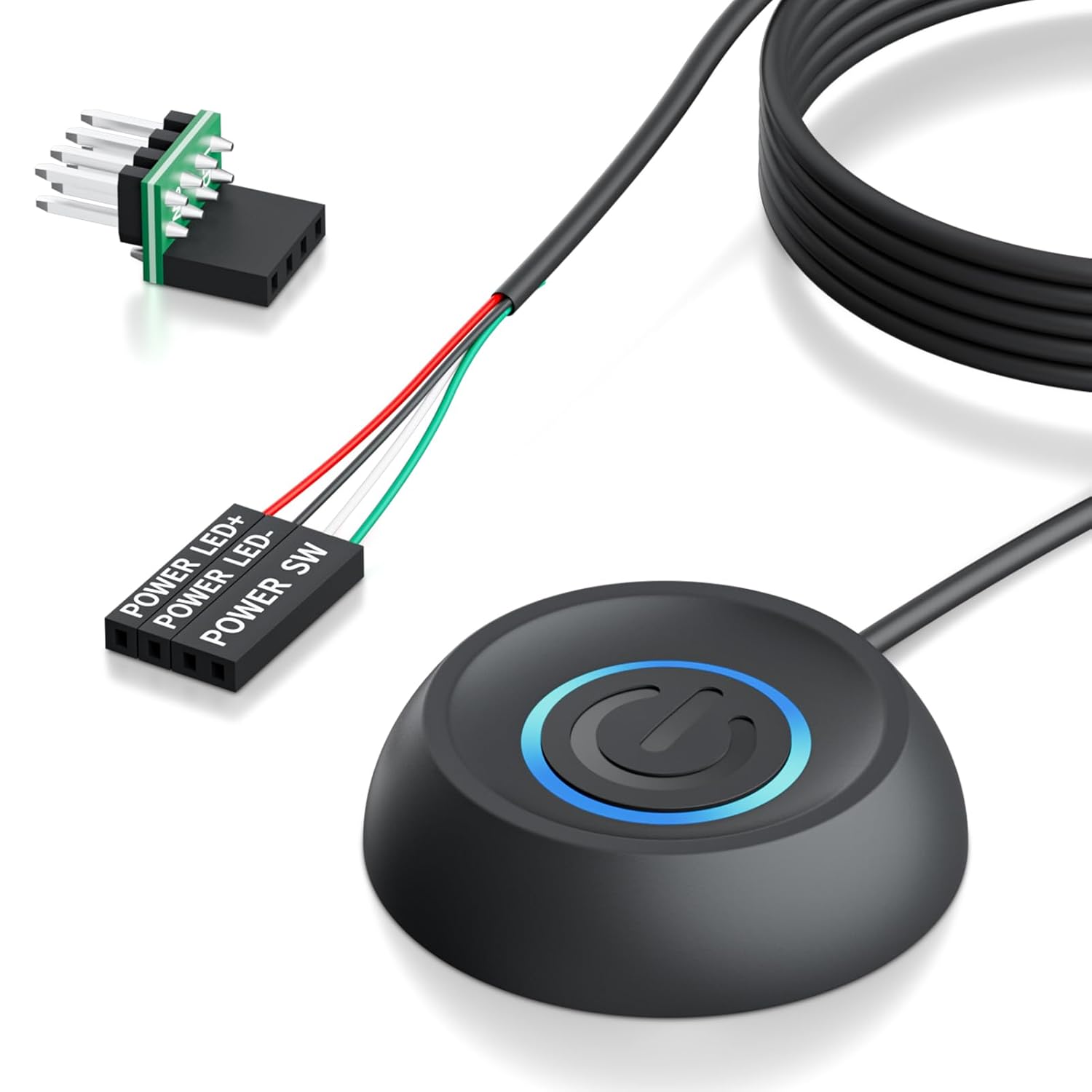
PC Power Button with 118" Cable - Desktop Computer External ON/Off Switch LED Indicator, PC Power Supply Button SW Extension with Adhesive Mount, Splitter for Computer Motherboard (Black, 118")
Want the best price and purchase timing?
Our AI advisor analyzes real-time pricing across all channels to find you the best deal.
AI Verdict
This is a 118-inch wired external power button for ATX motherboards, designed for convenience or repairing a broken case switch with dual functionality.
This external power button is a strong fit for its intended purpose: providing convenient power control for ATX desktop PCs with hard-to-reach case buttons or for repairing a broken one. The 118-inch cable and included splitter directly address these specific use cases, offering both reach and dual functionality.
If you need more than 118 inches of cable length, look for products with longer integrated cables or consider DIY solutions with custom wiring.
Regret Score™
Medium RiskLower is better — measures purchase-regret risk from real buyer complaints, review credibility, and product maturity
Issues discovered after purchase
Critically weak dimension
Amazon rating vs actual quality
Chance this product isn't for you
Pros
- The 118-inch (3-meter) cable allows for flexible placement of the switch, extending control from hard-to-reach PC cases.
- Installation is simplified with 3M adhesive stickers, eliminating the need for drilling.
- Includes a splitter board, enabling simultaneous use of both the original chassis power button and the external switch.
- Features an LED indicator that visually confirms the system's power status.
- Provides a solution for repairing damaged chassis panel buttons, restoring power control.
- Compatible with 90% of ATX motherboards using a standard 4-pin connector.
Cons
- The 118-inch cable, while long, may not be sufficient for all extended setups, with some users requiring up to 5 meters for specific desk configurations.
- Constructed from plastic, which may not feel as premium as metal alternatives.
- Not compatible with laptops, limiting its application to desktop PCs only.
- Requires accessing the motherboard's JFP1/F_PANEL pins for installation, which might be inconvenient for some users.
Dimension Scores
The switch effectively extends the power control function, providing a direct and responsive on/off signal to the motherboard.
As a simple push-button switch, it produces minimal audible noise, limited to a soft click upon actuation.
Constructed from plastic, it is described as durable, but the material choice is standard for budget accessories rather than premium.
The 118-inch cable offers significant routing flexibility, and the adhesive mount helps secure the switch, though managing 3 meters of cable can still require effort.
Best For
- Desktop PCs placed under desks, inside cabinets, or in server racks where the case power button is inaccessible.
- Test benches or bare board machines needing an easily accessible power switch.
- Repairing a broken or unresponsive power button on an existing PC case.
- Water-cooled chassis DIY builds where a custom power solution is preferred.
Not Recommended For
- Laptops or all-in-one PCs, as it's designed exclusively for ATX motherboards.
- Users who prefer a wireless power solution or do not want to open their PC case for installation.
- Setups requiring a cable length significantly exceeding 118 inches (3 meters).
Watch Out For
- The 118-inch cable might be too short for very distant or complex routing scenarios, with some users needing up to 5 meters for their setups.
- Installation requires connecting to specific pins (JFP1/F_PANEL) on the motherboard, which means opening the PC case and consulting the motherboard manual.
- While generally considered safe, some users express initial concerns about the safety of external power buttons, though these are often debunked as the setup is simple.
- The adhesive mount's long-term durability is dependent on surface preparation and environmental factors, potentially leading to detachment over time.
Full Specifications
| ASIN | B0F8ZLMM25 |
| Brand | LHKLUK |
| Color | BLACK |
| Material | Plastic |
| Unit Count | 1.0 Count |
| Item Weight | 2.72 ounces |
| Switch Type | Push Button |
| Circuit Type | 1-way |
| Contact Type | Normally Closed |
| Control Type | ON-OFF |
| Manufacturer | LHKLUK |
| Mounting Type | Wall Mount |
| Connector Type | Atx |
| Control Method | Push Button |
| Current Rating | 0.01 Amps |
| Operation Mode | ON-OFF |
| Controller Type | Push Button |
| Number of Items | 1 |
| Contact Material | Plastic |
| Item model number | KG-A |
| Operating Voltage | 5 Volts |
| Compatible Devices | ATX motherboards |
| Product Dimensions | 2.48 x 2.48 x 0.63 inches |
| Number of Positions | 1 |
| Upper Temperature Rating | 100 Degrees Celsius |
| Item dimensions L x W x H | 2.48 x 2.48 x 0.63 inches |
| International Protection Rating | IP65 |
What Buyers Say
Users frequently praise the extended cable length, which solves the problem of hard-to-reach PC power buttons. The ease of installation, particularly the adhesive mount that avoids drilling, is a recurring positive point. Many appreciate the included splitter, allowing them to retain the functionality of their original case button alongside the new external switch. While specific complaints for this ASIN are not widely detailed in public search results, some general discussions around external buttons highlight that the 118-inch cable might still be too short for extreme distances, and the plastic build is functional but not luxurious.
“Dude, my PC is tucked away, and this thing is a game-changer; no more crawling under my desk just to hit the power button, it just works!.”
Common Praise
- The 118-inch cable reaches my PC under the desk without any strain.
- Installation was super simple; just plug into the motherboard and stick it down.
- The splitter is a lifesaver, I can still use my case button if I want to.
- The LED light clearly shows when the computer is on.
- Fixed my broken case power button perfectly, saved me from buying a new case.
Common Complaints
- The 118-inch cable wasn't quite long enough for my specific setup, I needed a few more feet.
- The plastic housing feels a bit basic, but it works.
- Had to open my PC and figure out the motherboard pins, which was a bit intimidating at first.
- The adhesive mount might not hold up forever on textured surfaces.
Ownership Tips
- The adhesive mount holds firmly to my desk surface even after weeks of daily use.
- The button has a satisfying click, not mushy at all, which is a small but appreciated detail.
- The LED indicator is bright enough to be seen but not distracting in a dark room.
- The cable, while long, can be easily routed and hidden with some basic cable ties.
- The splitter connection feels secure and hasn't caused any issues with the original power button.
Frequently Asked Questions
Is this external power button compatible with all desktop computers?
It is compatible with 90% of ATX motherboards that use a standard 4-pin connector for power and LED indicators. It is not designed for laptops.
How long is the cable?
The cable is 118 inches (approximately 3 meters) long, providing ample reach for most desktop setups.
Can I still use my original PC case power button after installing this?
Yes, the included 1 to 2 splitter board allows both the external switch and your original chassis power button to function simultaneously.
Is installation difficult, and does it require drilling?
Installation is designed to be easy, using 3M adhesive stickers for mounting the switch without any drilling. You will need to access your motherboard's JFP1/F_PANEL pins to connect the cables.
What is the switch made of?
The switch housing is made of durable plastic.
Buying Guide
When looking at an external PC power button, you're essentially buying convenience or a repair solution. You need to know where your PC is located relative to where you want the button, as cable length is the most critical factor. This isn't about boosting performance; it's about making your computer easier to turn on. Think about how far your PC is from your desk or preferred access point.
Cable Length (118 inches)
This is how far you can place the external button from your computer's motherboard. Imagine a tape measure from your PC's back panel to your desired button location; 118 inches (about 3 meters) needs to cover that distance with some slack for routing.
Compatible with ATX motherboards
ATX is the standard size and layout for most desktop computer motherboards. This means it will likely work with your custom-built or pre-built desktop PC, but it won't work with smaller form factors like mini-ITX without checking pin compatibility, and definitely not laptops.
Splitter for Dual Switch Function
This little adapter lets both the new external button AND your computer case's original power button work at the same time. It's like having two light switches for the same light – super handy if you sometimes need to use the case button.
Alternatives
If this doesn't fit, search for external power buttons with longer cable lengths (e.g., 5-meter options) or wireless remote power solutions if you want to avoid cables entirely.
You Might Also Like

Micro ATX PC Case | Mini Tower Computer case | Pre-Installed 120mm*1 RGB Fan | ITX Desktop Chassis for MATX/ITX | 240 RAD | 280mm GPU | 160mm CPU Cooler Height - White S6
$0-$49This MAQUY S6 is a budget Micro ATX case with a pre-installed 120mm RGB fan, supporting 280mm GPUs and 240mm top radiators for entry-level builds.

Micro ATX Case, Mini PC ITX Desktop Computer Case MATX Case Support ATX PSU/250mm GPU/135mm CPU Cooler/1x 3.5’’HDD or 2X 2.5’’SSD/USB 3.0 Port
$0-$49This is a compact 38.5x19.5x32.5cm Micro ATX case supporting 250mm GPUs and 135mm CPU coolers, designed for budget workstation builds.

Small PC Case, ITX Mini Computer Case with 360 Degree Ventilation, 10.5L Compact Design for ITX Motherboard, SFX Power Supply, 4 x 2.5 Inch SSDs
$50-$99This 10.5L acrylic ITX case supports SFX/SFX-L PSUs, ITX motherboards, and GPUs up to 210mm, designed for compact builds.

Micro ATX PC Case | Mini Tower Computer case Support Vertical GPU Mount | Pre-Installed 120mm*1 RGB Fan | ITX Desktop Chassis for MATX/ITX | 240 RAD | 320mm GPU | 165mm CPU Cooler Height-Black
$0-$49A budget Micro ATX case with a mesh front, tempered glass, and support for 320mm GPUs and 240mm AIOs, but only one pre-installed 120mm RGB fan.