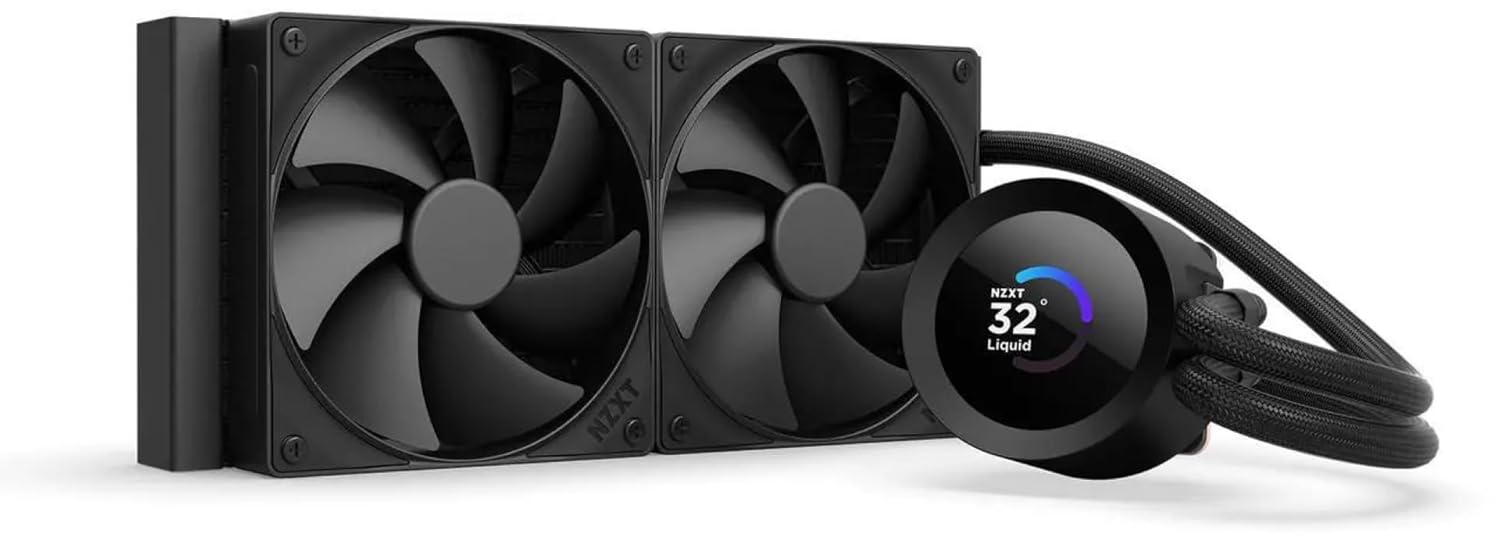
NZXT Kraken Plus 240 – AIO CPU Liquid Cooler – 240mm Radiator – 2 x F120P Fans – Customizable 1.54" Square LCD – AMD® AM5, AM4 – Intel® LGA 1851/1700, 1200/115X – Black
Want the best price and purchase timing?
Our AI advisor analyzes real-time pricing across all channels to find you the best deal.
AI Verdict
This 240mm AIO with a 1.54" 240x240px LCD and 30.0 dBA F120P fans delivers efficient cooling for AM5/LGA 1851 builds, but NZXT CAM software can be problematic.
This 240mm AIO offers effective cooling with its NZXT Turbine pump and F120P fans, suitable for modern AMD AM5 and Intel LGA 1851/1700 CPUs. The 1.54" LCD provides a unique aesthetic, but potential NZXT CAM software issues and the screen's limited resolution compared to higher-end models make it a situational choice.
If the 1.54" LCD isn't enough, look for AIOs with larger, higher-resolution displays, typically 2.36" or more.
Regret Score™
Low RiskLower is better — measures purchase-regret risk from real buyer complaints, review credibility, and product maturity
Issues discovered after purchase
Critically weak dimension
Amazon rating vs actual quality
Chance this product isn't for you
Pros
- Efficient cooling performance is delivered by the NZXT Turbine pump and F120P static pressure fans.
- The customizable 1.54" 240x240px LCD displays system temperatures, animated GIFs, or web integrations.
- Zero RPM Mode allows the fans to stop completely at low CPU loads for silent operation.
- Installation is simplified with pre-applied thermal paste and a single breakout cable from the pump cap.
- Wide compatibility includes tool-free mounting brackets for Intel LGA 1851/1700, 1200/115X and AMD AM5, AM4 sockets.
- Reinforced rubber tubing with nylon-braided sleeving ensures durability and easy routing.
Cons
- The 1.54" LCD display is smaller and offers less customization compared to the Kraken Elite's 2.36" screen.
- NZXT CAM software can experience connection issues or display incorrect CPU temperatures, affecting control.
- The pump can produce noticeable noise when operating at its maximum 2800 RPM.
- Color reproduction on the LCD may be inaccurate, with yellow appearing green-tinged or orange looking yellow.
Dimension Scores
The NZXT Turbine pump and F120P static pressure fans deliver effective cooling for modern CPUs under heavy workloads.
F120P fans operate up to 30.0 dBA with Zero RPM Mode for silence at low loads, but pump noise can be noticeable at 100% RPM.
It features a copper cold plate, aluminum radiator, and reinforced nylon-braided rubber tubing for durability.
A single breakout cable from the pump cap and integrated fan control simplify cable routing and reduce clutter.
Best For
- PC builders prioritizing a customizable visual element on their CPU cooler's pump head.
- Systems needing efficient CPU cooling for modern AMD AM5 or Intel LGA 1851/1700 processors.
- Users who want simplified installation due to pre-applied thermal paste and streamlined cabling.
Not Recommended For
- Users requiring a larger, higher-resolution LCD display for extensive visual customization.
- Anyone sensitive to potential software stability issues with cooling control applications.
- Builds where absolute silence at all fan and pump speeds is a critical requirement.
Watch Out For
- NZXT CAM software sometimes loses connection to the cooler, making fan and pump control unavailable until a restart.
- The 1.54" LCD's 240x240px resolution can make complex custom images or GIFs appear cropped or less detailed.
- Reported color inaccuracies on the LCD mean that colors like yellow might appear with a green tinge, and orange can look yellow.
- Some users report the pump can be audibly noisy when running at 100% RPM.
Full Specifications
| UPC | 810074845281 |
| ASIN | B0F5SGK5Q7 |
| Brand | NZXT |
| Voltage | 12 Volts (DC) |
| Material | Plastic, Aluminum, Metal, Glass |
| Item Weight | 4.5 pounds |
| Manufacturer | NZXT |
| Cooling Method | Water |
| Number of Items | 1 |
| Item model number | RL-KN240-B2 |
| Compatible Devices | Desktop |
| Product Dimensions | 13.46 x 8.35 x 5.47 inches |
| Power Connector Type | 4-Pin |
| Global Trade Identification Number | 05056547205199 |
What Buyers Say
Many users highlight the NZXT CAM software as a recurring pain point, with reports of it losing connection to the cooler or displaying inaccurate CPU temperatures. Despite this, the cooler's ability to keep CPUs cool, even under heavy loads, is frequently praised. The 1.54" LCD screen, while smaller than some alternatives, is a popular feature for displaying system stats or custom visuals. Installation is often described as straightforward due to pre-applied thermal paste and simplified cabling.
“Man, this thing cools my 7800X3D like a champ, but seriously, NZXT, fix your CAM software, it's driving me nuts with the disconnects!”
Common Praise
- Effective cooling performance, keeping CPUs cool under heavy workloads.
- Customizable 1.54" LCD display for system temperatures and personalized images.
- Straightforward installation process with pre-applied thermal paste.
- Quiet operation of fans at low loads due to Zero RPM Mode.
- Aesthetic appeal of the pump head and screen.
Common Complaints
- NZXT CAM software frequently disconnects or fails to recognize the cooler.
- LCD screen color reproduction can be inaccurate, with yellow appearing green.
- Pump can produce noticeable noise when running at 100% speed.
- The 1.54" screen resolution (240x240px) can make some images look cropped.
Ownership Tips
- The screen's small size means complex GIFs or detailed images don't always look as sharp as expected.
- Monitoring liquid temperature instead of CPU package temperature provides more stable fan curves.
- The default silent profile in CAM software is a good starting point for noise-conscious users.
- The tubing is flexible enough for routing but feels durable with its braided sleeve.
Frequently Asked Questions
Does it come with thermal paste?
Yes, thermal paste is pre-applied to the cold plate, which simplifies the installation process.
What CPU sockets does it support?
It supports a wide range of Intel sockets including LGA 1851/1700, 1200/115X, and AMD sockets AM5, AM4.
Can I display custom images or GIFs on the screen?
Yes, the 1.54" square LCD is fully customizable via NZXT CAM software, allowing you to display animated GIFs, custom images, or real-time system statistics.
How noisy are the fans?
The F120P fans have a maximum noise level of 30.0 dBA, and they feature a Zero RPM Mode that stops them completely at low loads for silent operation.
Is the NZXT CAM software required?
Yes, the NZXT CAM software is necessary to customize the LCD screen's content and to control the fan and pump speeds.
What are the radiator dimensions?
The aluminum radiator measures 281 x 120 x 27 mm.
Buying Guide
When picking an AIO cooler, you're balancing how well it cools your CPU with how much noise it makes and how it looks. The radiator size, like this 240mm one, dictates how much heat it can dissipate, so bigger generally means better cooling potential. Pay attention to fan static pressure, as that's how well the fans push air through the radiator fins.
Radiator Size (240mm)
This is the size of the heat exchanger, similar to a car's radiator. A 240mm radiator has space for two 120mm fans and is a common size for balancing cooling performance with case compatibility.
Static Pressure Fans (F120P)
Unlike airflow fans, static pressure fans are specifically designed to push air effectively through restrictive spaces, like the dense fins of a radiator, ensuring heat gets carried away efficiently.
1.54" Square LCD
This small screen on the pump head lets you display system information or custom visuals, turning your cooler into a personalized aesthetic element in your PC build.
Alternatives
If you need more cooling capacity, look for AIOs with 360mm or 420mm radiators; if a larger, higher-resolution display is a priority, seek models with 2.36" or bigger screens.
You Might Also Like

Micro ATX PC Case | Mini Tower Computer case | Pre-Installed 120mm*1 RGB Fan | ITX Desktop Chassis for MATX/ITX | 240 RAD | 280mm GPU | 160mm CPU Cooler Height - White S6
$0-$49This MAQUY S6 is a budget Micro ATX case with a pre-installed 120mm RGB fan, supporting 280mm GPUs and 240mm top radiators for entry-level builds.

Micro ATX Case, Mini PC ITX Desktop Computer Case MATX Case Support ATX PSU/250mm GPU/135mm CPU Cooler/1x 3.5’’HDD or 2X 2.5’’SSD/USB 3.0 Port
$0-$49This is a compact 38.5x19.5x32.5cm Micro ATX case supporting 250mm GPUs and 135mm CPU coolers, designed for budget workstation builds.

Small PC Case, ITX Mini Computer Case with 360 Degree Ventilation, 10.5L Compact Design for ITX Motherboard, SFX Power Supply, 4 x 2.5 Inch SSDs
$50-$99This 10.5L acrylic ITX case supports SFX/SFX-L PSUs, ITX motherboards, and GPUs up to 210mm, designed for compact builds.

Micro ATX PC Case | Mini Tower Computer case Support Vertical GPU Mount | Pre-Installed 120mm*1 RGB Fan | ITX Desktop Chassis for MATX/ITX | 240 RAD | 320mm GPU | 165mm CPU Cooler Height-Black
$0-$49A budget Micro ATX case with a mesh front, tempered glass, and support for 320mm GPUs and 240mm AIOs, but only one pre-installed 120mm RGB fan.