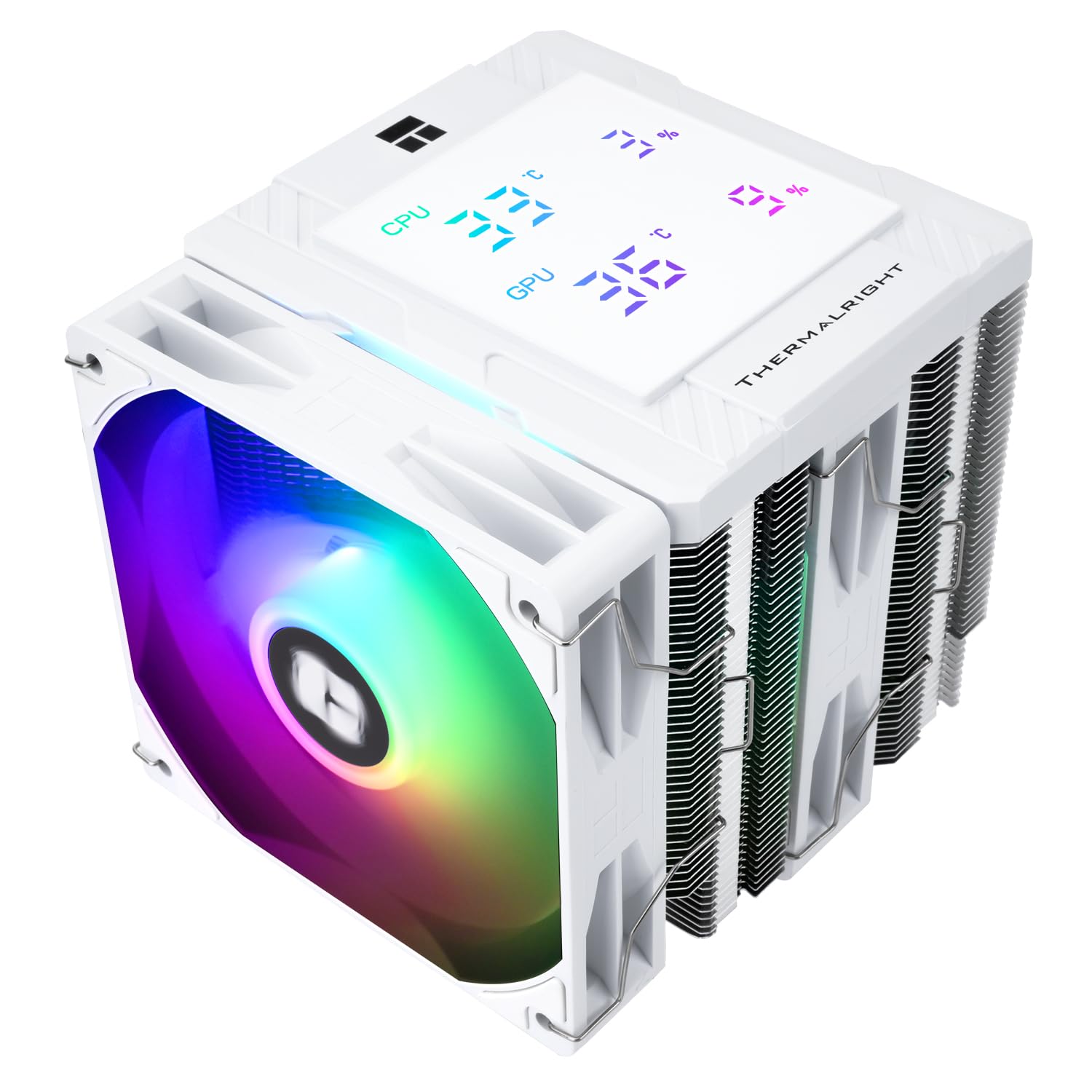
Thermalright Peerless Assassin 120 Digital ARGB White CPU Cooler, Dual Towers and Dual Fans Cooling, CPU Air Cooler, Digital Display Top Cover, 1850RPM+10%, for AM4/AM5,Intel LGA1851/1700, 5V ARGB Led
Want the best price and purchase timing?
Our AI advisor analyzes real-time pricing across all channels to find you the best deal.
AI Verdict
This is a budget-friendly 162mm dual-tower air cooler with a 25.6 dBA max noise level and a magnetic digital display, best for builders prioritizing cooling performance and aesthetics over software po
This cooler is a strong performer for its budget price, offering dual-tower cooling and a unique digital display. However, its software issues for the display and potential RAM clearance problems make it a situational fit, requiring users to be aware of these trade-offs. The 162mm height also limits its compatibility to mainstream ATX chassis.
If the digital display's software reliability is a dealbreaker, look for a Peerless Assassin model without the digital display or consider a cooler with a more robust software ecosystem.
Regret Score™
Medium RiskLower is better — measures purchase-regret risk from real buyer complaints, review credibility, and product maturity
Issues discovered after purchase
Critically weak dimension
Amazon rating vs actual quality
Chance this product isn't for you
Pros
- Delivers strong cooling performance for its price, handling 120W and 150W loads effectively.
- Features a magnetic top cover with a digital display that shows CPU and GPU temperature and occupancy.
- Includes dual fans with ARGB lighting effects, controllable via motherboard 5V 3PIN ARGB software.
- Operates at a low maximum noise level of 25.6 dBA.
- Offers broad compatibility with AMD AM4/AM5 and Intel LGA1851/1700/1150/1151/1155/1156/1200 sockets.
- ARGB wiring includes splitters and is long, simplifying cable management.
Cons
- The digital display's control software is prone to issues like startup permission requests, .NET errors, and the screen not activating reliably.
- Some users report a noticeable whining sound from the fan positioned between the fin stacks at 1000+ RPM.
- Installation can be problematic with tall RAM modules or RGB heat spreaders, potentially requiring fan adjustment.
- The included installation manual is described as unhelpful.
- AMD platform installations require the motherboard's original backplate, which is not provided.
Dimension Scores
The cooler features 6 pure copper heat pipes, a pure copper base, dual fans operating at 1850RPM+10%, and an air volume of 88.89CFM, allowing it to handle 150W loads effectively.
With a maximum operating noise level of ≤25.6DB (A), it's considered relatively quiet under proper PWM fan curve management.
It uses aluminum fins, copper heat pipes, and S-FDB bearings for the fans, offering a surprisingly good build for its price point, though not top-tier.
The ARGB wiring includes splitters and is quite long, providing flexibility and ease in routing cables.
Best For
- Gaming PCs needing efficient air cooling for CPUs up to 150W TDP without breaking the bank.
- Builds where a white aesthetic and ARGB lighting are desired, complementing other components.
- Users who want a quick visual check of CPU/GPU temperatures directly on the cooler, despite potential software quirks.
Not Recommended For
- Users who demand flawless software integration and a completely silent cooling solution at all fan speeds.
- Compact ITX or mATX builds where the 162mm height and dual-tower footprint might cause clearance issues.
- First-time builders who rely heavily on clear, detailed installation instructions.
Watch Out For
- The digital display software frequently prompts for permissions on startup and can encounter '.NET issues' or 'array too big' errors, sometimes preventing the screen from working.
- A whining noise from the middle fan at speeds above 1000 RPM has been reported by at least one user.
- If you have RAM sticks with tall heat spreaders, you might need to adjust the front fan's position, potentially impacting its effectiveness or aesthetics.
- The installation guide is unhelpful, making assembly more challenging than necessary.
- For AMD AM4/AM5 installations, you must use your motherboard's existing backplate; the cooler does not include one.
Full Specifications
| UPC | 769047389911 |
| ASIN | B0DR8PSFHB |
| Brand | Thermalright |
| Voltage | 12 Volts (DC) |
| Material | Aluminum |
| Item Weight | 3.5 pounds |
| Noise Level | 25.6 Decibels |
| Manufacturer | Thermalright |
| Cooling Method | Air |
| Number of Items | 1 |
| Air Flow Capacity | 88.89 Cubic Feet Per Minute |
| Item model number | PA120 Digital ARGB WHITE |
| Compatible Devices | Desktop |
| Product Dimensions | 5.43 x 4.92 x 6.38 inches |
| Power Connector Type | 4-Pin |
| Maximum Rotational Speed | 1850 RPM |
What Buyers Say
The biggest surprise with this cooler is how often users mention the digital display's software being a pain, with constant permission requests and error messages preventing it from working right. Despite that, the actual cooling performance gets a lot of praise, with people saying it keeps CPUs cool even under heavy loads, especially for the price. The ARGB lighting is a hit, and the overall white aesthetic looks clean in builds. Just be ready to wrestle with the software or ignore the display if it acts up.
“Man, this thing cools like crazy for what I paid, but seriously, that display software is a headache, always popping up with errors or just not turning on, makes me wanna just rip it out sometimes!”
Common Praise
- Keeps CPU temperatures low even during demanding tasks and gaming.
- The ARGB lighting on the dual fans is bright and looks really good.
- The digital display, when working, is large and easy to read CPU and GPU temperatures.
- Offers exceptional cooling performance for its budget price point, often compared favorably to more expensive options.
- The white color scheme and magnetic top cover give it a clean, premium look.
- Comes with all necessary mounting hardware for a wide range of Intel and AMD sockets.
Common Complaints
- The software for the digital display is buggy, frequently asking for permissions, showing .NET errors, or failing to activate the screen.
- Some users have experienced a noticeable whining sound from the fan located between the two fin stacks.
- Installation can be tricky, especially with tall RAM modules, requiring fan adjustment.
- The included installation manual is not helpful, making the setup process frustrating.
- The digital display sometimes remains off after startup, requiring manual intervention to get it working.
Ownership Tips
- After a few weeks, the digital display software might still be a persistent annoyance, requiring restarts or manual intervention to show temperatures.
- The fan whining, if present, tends to be most noticeable under specific RPM ranges, often around 1000+ RPM.
- You'll likely forget about the manual after the initial install, but the RAM clearance issue might resurface if you upgrade memory.
- The ARGB lighting remains consistent and vibrant, assuming your motherboard software is stable.
- The cooler's performance holds up over time, maintaining low CPU temperatures even with prolonged use.
Frequently Asked Questions
Does this cooler come with thermal paste?
Yes, it typically includes a small tube of thermal compound in the box.
Can I control the ARGB lighting?
Yes, the dual fans have ARGB lighting effects that can be adjusted using your motherboard's built-in lighting software via a 5V 3PIN ARGB interface.
Is this cooler compatible with Intel LGA1700 and AMD AM5?
Yes, it is compatible with both Intel LGA1700/1851 and AMD AM4/AM5 platforms, and includes dual-platform mounting clips.
How accurate is the digital temperature display?
The digital display shows CPU and GPU temperature and occupancy. While it's adjustable and easy to read, some users have questioned its accuracy and reported software issues that can prevent it from working reliably.
Will this fit in my PC case?
The cooler has an overall height of 162mm, which is compatible with most mainstream ATX chassis. You should measure your case's CPU cooler clearance to ensure it fits.
Buying Guide
When you're looking at CPU air coolers, you're essentially buying a big chunk of metal and fans to pull heat away from your processor. The bigger the heatsink and the more fans, generally the better it cools. You need to make sure it fits in your case (check the height!) and that it's compatible with your CPU socket. Don't forget about RAM clearance; those tall RGB RAM sticks can sometimes get in the way of the front fan.
Overall Size (138x125x162mm)
This is the physical size of the cooler. The 162mm height is especially important because it dictates whether the cooler will fit inside your PC case without hitting the side panel. Think of it like trying to fit a tall vase into a cabinet – you need to measure both.
Fan Speed (1850RPM+10%) and Air Volume (88.89CFM)
Fan speed (RPM) tells you how fast the fans spin, and air volume (CFM) indicates how much air they can move. Higher numbers generally mean more cooling power, but also potentially more noise. It's like a car's engine: more horsepower (CFM) means it can do more work, but a higher RPM might make it louder.
Operating Noise (≤25.6DB (A))
This is how loud the cooler gets at its maximum fan speed. Lower decibel (dB) numbers mean a quieter PC. For comparison, a quiet library is around 40 dB, so 25.6 dB is pretty hushed, but some users might still notice specific fan noises.
6 Pure Copper Heat Pipes and Pure Copper Base
Heat pipes and the base are critical for transferring heat away from your CPU. Copper is an excellent thermal conductor, so more copper pipes and a direct copper base mean more efficient heat transfer from your CPU to the heatsink fins, like a super-efficient highway for heat.
Alternatives
If this cooler's digital display software issues are a concern, look for dual-tower air coolers with similar 162mm height and 25.6 dBA max noise levels but without the integrated display, or consider liquid coolers if you need even lower temperatures and have case space.
You Might Also Like

Micro ATX PC Case | Mini Tower Computer case | Pre-Installed 120mm*1 RGB Fan | ITX Desktop Chassis for MATX/ITX | 240 RAD | 280mm GPU | 160mm CPU Cooler Height - White S6
$0-$49This MAQUY S6 is a budget Micro ATX case with a pre-installed 120mm RGB fan, supporting 280mm GPUs and 240mm top radiators for entry-level builds.

Micro ATX Case, Mini PC ITX Desktop Computer Case MATX Case Support ATX PSU/250mm GPU/135mm CPU Cooler/1x 3.5’’HDD or 2X 2.5’’SSD/USB 3.0 Port
$0-$49This is a compact 38.5x19.5x32.5cm Micro ATX case supporting 250mm GPUs and 135mm CPU coolers, designed for budget workstation builds.

Small PC Case, ITX Mini Computer Case with 360 Degree Ventilation, 10.5L Compact Design for ITX Motherboard, SFX Power Supply, 4 x 2.5 Inch SSDs
$50-$99This 10.5L acrylic ITX case supports SFX/SFX-L PSUs, ITX motherboards, and GPUs up to 210mm, designed for compact builds.

Micro ATX PC Case | Mini Tower Computer case Support Vertical GPU Mount | Pre-Installed 120mm*1 RGB Fan | ITX Desktop Chassis for MATX/ITX | 240 RAD | 320mm GPU | 165mm CPU Cooler Height-Black
$0-$49A budget Micro ATX case with a mesh front, tempered glass, and support for 320mm GPUs and 240mm AIOs, but only one pre-installed 120mm RGB fan.