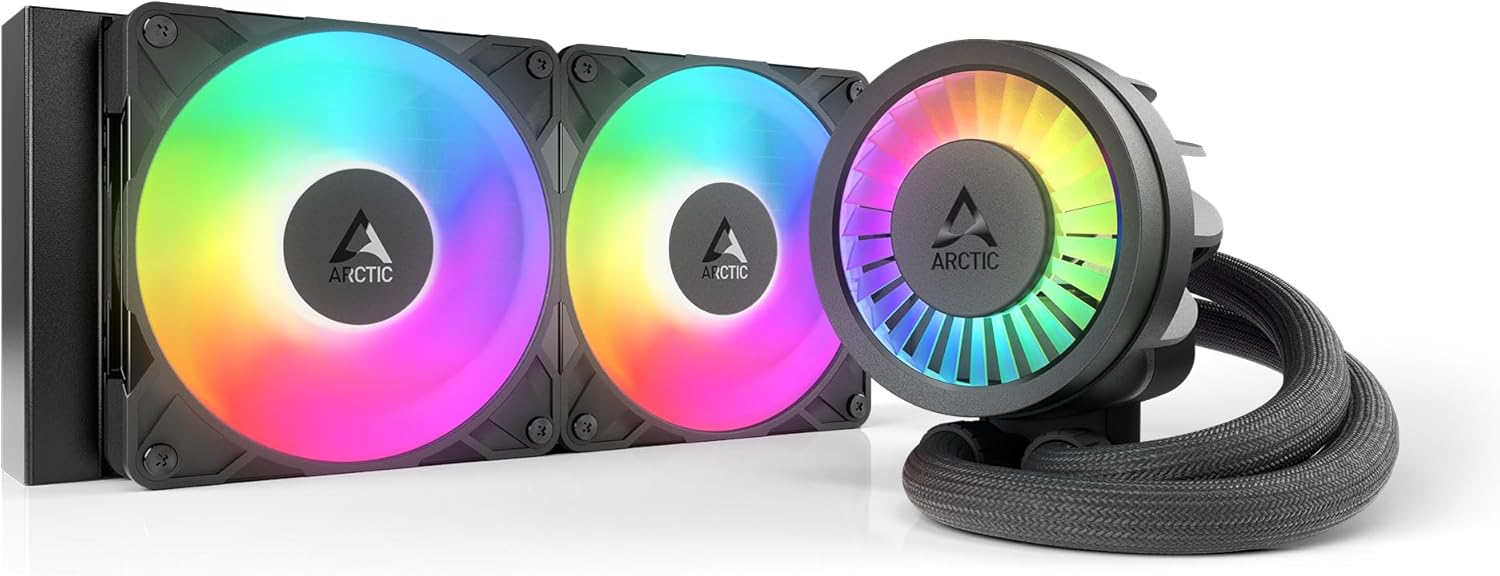
ARCTIC Liquid Freezer III Pro 240 A-RGB - 240 mm AIO CPU Cooler, Water Cooling, 38 mm Radiator, PWM Pump, VRM Fan, for AMD AM5/AM4, Intel LGA1851/1700 Contact Frame - Black
Want the best price and purchase timing?
Our AI advisor analyzes real-time pricing across all channels to find you the best deal.
AI Verdict
A 240 mm AIO with a 38 mm radiator and integrated VRM fan, designed for high-TDP AMD AM5/AM4 and Intel LGA1851/1700 CPUs.
This AIO offers strong cooling performance with its 38 mm radiator and dedicated VRM fan, making it suitable for demanding CPUs. However, its physical dimensions and potential motherboard M.2 slot interference mean you need to check case and motherboard compatibility carefully before buying.
If you need even more cooling capacity for extreme overclocking, look for AIOs with 360mm or 420mm radiators.
Regret Score™
Medium RiskLower is better — measures purchase-regret risk from real buyer complaints, review credibility, and product maturity
Issues discovered after purchase
Critically weak dimension
Amazon rating vs actual quality
Chance this product isn't for you
Pros
- Features a 38 mm radiator that enhances heat dissipation and holds more liquid than conventional 27 mm radiators.
- Includes an integrated, PWM-controlled VRM fan that lowers voltage converter temperatures for stable performance.
- Comes with an Intel contact frame for LGA1851/1700, optimizing contact pressure and improving heat dissipation.
- Utilizes ARCTIC's P12 Pro fans, which offer more performance and quieter operation at low speeds compared to the P12.
- Offers native offset mounting for Intel and AMD, shifting the cold plate center towards the CPU hotspot for efficient heat transfer.
- Features integrated cable management, routing radiator fan PWM cables within the hose sheathing for a cleaner build.
Cons
- The VRM fan cannot be stopped, even when receiving a 0% PWM signal or if its cable is unplugged.
- Some motherboards may be incompatible due to oversized SSD coolers in the M.2_1 slot.
- The tubes are long and stiff, which can make routing and positioning challenging in some cases.
- The pump block is described as pretty tall, potentially causing clearance issues in smaller builds.
- Radiator fittings are fixed, meaning there's no rotation option for tube orientation.
Dimension Scores
The 38 mm radiator, P12 Pro fans (600–3000 rpm), and integrated VRM fan (400–2500 rpm) provide substantial cooling capacity for high-TDP CPUs.
While P12 Pro fans are quieter at low speeds, the pump can be loud at 100% speed, and the VRM fan cannot be turned off, contributing to constant noise.
It features a durable aluminium radiator, copper micro skived fins on the cold plate, and reinforced EPDM tubing with braided sheathing.
The PWM cables for the radiator fans are integrated into the hose sheathing, requiring only a single visible cable connection to the motherboard.
Best For
- Users with high-performance AMD AM5/AM4 or Intel LGA1851/1700 CPUs requiring robust cooling under load.
- PC builders prioritizing VRM cooling to ensure stable performance during overclocking or heavy workloads.
- Enthusiasts seeking an AIO with optimized CPU contact and efficient heat transfer via a contact frame and offset mounting.
- Those who appreciate integrated cable management for a tidier internal PC aesthetic.
Not Recommended For
- Mini-ITX or other small form factor builds where the 38 mm radiator thickness and tall pump block may cause clearance issues.
- Users highly sensitive to pump noise, especially if running the pump at 100% speed.
- Motherboards with oversized SSD coolers in the M.2_1 slot, which might interfere with the cooler's installation.
Watch Out For
- The VRM fan cannot be turned off, even with a 0% PWM signal, meaning it will always be running.
- Some motherboards might have compatibility issues due to oversized SSD coolers in the M.2_1 slot.
- The tubing is long and stiff, which can make it difficult to route neatly or position in certain case layouts.
- The pump block is relatively tall, requiring at least 63 mm of clearance for installation, which can be an issue in compact cases.
- Radiator fittings are fixed and do not rotate, limiting flexibility in tube orientation.
Full Specifications
| UPC | 840033402903 |
| ASIN | B0DLWGL38S |
| Size | Liquid Freezer III Pro 240 A-RGB |
| Brand | ARCTIC |
| Color | black |
| Voltage | 12 Volts |
| Wattage | 3.96 watts |
| Material | Aluminium (Radiator), Copper, Micro Skived Fins (Cold Plate) |
| Item Weight | 3.67 pounds |
| Part Number | ACFRE00182A |
| Manufacturer | ARCTIC |
| Cooling Method | Water |
| Number of Items | 1 |
| Air Flow Capacity | 77 Cubic Feet Per Minute |
| Item model number | Liquid Freezer III Pro 240 A-RGB (Black) |
| Compatible Devices | AMD, Intel |
| Product Dimensions | 10.9"L x 4.7"W x 1.5"H |
| Batteries Included? | No |
| Batteries Required? | No |
| Included Components | ARCTIC Liquid Freezer III Pro 240 A-RGB (black) |
| Power Connector Type | 4-Pin |
| Warranty Description | 6 years |
| Item Package Quantity | 1 |
| Maximum Rotational Speed | 1 RPM |
| Global Trade Identification Number | 04895265000225 |
What Buyers Say
Users frequently report that this AIO delivers exceptional thermal performance, especially for demanding CPUs like the i9-14900K, showing significant temperature drops compared to older models. The integrated VRM fan is a recurring highlight, effectively cooling motherboard components. However, some users note that the pump can be audibly loud when running at maximum speeds, and the VRM fan, while effective, cannot be silenced. Installation is generally considered straightforward, partly due to pre-installed fans and included MX-6 thermal paste.
“Dude, this thing absolutely crushes temps on my 14900K, like, way better than my old AIO, but man, that pump can get whiny if you crank it all the way up, and the VRM fan is just always on, no chill.”
Common Praise
- Provides massive thermal improvement, with reported drops of up to -15°C under load compared to previous versions.
- The integrated VRM fan effectively cools voltage regulators, ensuring stable system performance.
- Installation is straightforward, aided by pre-installed fans and included MX-6 thermal paste.
- The integrated cable management simplifies wiring, leading to a cleaner build.
- The P12 Pro fans are quieter and more powerful at lower speeds.
- The Intel contact frame is effective in improving CPU contact and heat dissipation.
Common Complaints
- The pump can be noticeably loud when operating at 100% speed.
- The VRM fan cannot be turned off, even with a 0% PWM signal, contributing to constant background noise.
- The tubing is long and stiff, which can make routing challenging in certain PC cases.
- There are reports of potential motherboard incompatibility due to oversized M.2 SSD coolers.
- The pump block is relatively tall, requiring careful consideration for case clearance.
Ownership Tips
- The included MX-6 thermal paste performs well, often eliminating the need for a separate purchase.
- The pre-installed fans and integrated cabling genuinely speed up the build process, saving time and frustration.
- The stiffness of the tubes means you need to plan your routing carefully, as they don't bend easily into tight spaces.
- Monitoring pump and fan speeds is key to balancing cooling performance with noise levels, as max settings can be audible.
- Checking motherboard compatibility, especially around the M.2_1 slot, is crucial to avoid installation headaches.
Frequently Asked Questions
Is the ARCTIC Liquid Freezer III Pro 240 A-RGB compatible with Intel LGA1700 and AMD AM5 sockets?
Yes, it is compatible with both Intel LGA1700 and LGA1851, and AMD AM5 and AM4 sockets. It includes a contact frame specifically for Intel LGA1851/1700.
Does this cooler come with thermal paste?
Yes, ARCTIC includes a tube of MX-6 thermal paste in the box. You apply it in a cross pattern, and the cold plate distributes it evenly.
What is the thickness of the radiator?
The radiator is 38 mm thick, which is thicker than many conventional AIO radiators. This design allows it to hold more liquid and dissipate heat more effectively.
Can I control the pump, VRM fan, and radiator fans separately?
Yes, the cooler provides two control options. With the included splitter cable, you can control the pump, VRM fan, and radiator fans individually or synchronize them via a single PWM signal.
Is the VRM fan always running?
Yes, the integrated VRM fan cannot be stopped, even if you send a 0% PWM signal or unplug its dedicated cable.
Buying Guide
When looking at AIO CPU coolers like this one, you're essentially getting a self-contained liquid cooling system. The '240 mm' refers to the radiator size, which dictates how many fans it can hold (two 120mm fans here) and its overall cooling potential. A thicker radiator, like this 38 mm one, means more surface area and liquid to absorb heat, which is a big deal for keeping your CPU cool under pressure. The integrated VRM fan is a bonus, directly cooling the power delivery components on your motherboard, which can get hot with powerful CPUs.
cooling_method: Water
Instead of just a metal heatsink and fan, this uses a liquid loop to transfer heat from your CPU to a radiator, where fans then dissipate it. This method is generally more efficient for high-heat CPUs than air cooling.
fan_size: 240 mm
This indicates the size of the radiator and the fans it accommodates (two 120mm fans). A 240mm radiator is a common size, offering a balance between cooling performance and case compatibility, but it's not the largest available.
38 mm Radiator
This is the thickness of the radiator. A 38 mm radiator is thicker than many standard AIO radiators (which are often 27 mm). This extra thickness allows for more cooling liquid and a larger surface area for heat exchange, leading to better thermal performance.
Integrated VRM fan
VRMs (Voltage Regulator Modules) on your motherboard can get very hot, especially with powerful CPUs. This dedicated fan on the pump block blows air directly onto them, helping to keep your motherboard's power delivery stable and cool.
Alternatives
If you need even more cooling for extreme overclocking or hotter CPUs, look for AIOs with 360mm or 420mm radiators. If your case is compact, consider AIOs with thinner radiators or smaller fan sizes (e.g., 120mm or 280mm) and a lower pump block height.
You Might Also Like

Micro ATX PC Case | Mini Tower Computer case | Pre-Installed 120mm*1 RGB Fan | ITX Desktop Chassis for MATX/ITX | 240 RAD | 280mm GPU | 160mm CPU Cooler Height - White S6
$0-$49This MAQUY S6 is a budget Micro ATX case with a pre-installed 120mm RGB fan, supporting 280mm GPUs and 240mm top radiators for entry-level builds.

Micro ATX Case, Mini PC ITX Desktop Computer Case MATX Case Support ATX PSU/250mm GPU/135mm CPU Cooler/1x 3.5’’HDD or 2X 2.5’’SSD/USB 3.0 Port
$0-$49This is a compact 38.5x19.5x32.5cm Micro ATX case supporting 250mm GPUs and 135mm CPU coolers, designed for budget workstation builds.

Small PC Case, ITX Mini Computer Case with 360 Degree Ventilation, 10.5L Compact Design for ITX Motherboard, SFX Power Supply, 4 x 2.5 Inch SSDs
$50-$99This 10.5L acrylic ITX case supports SFX/SFX-L PSUs, ITX motherboards, and GPUs up to 210mm, designed for compact builds.

Micro ATX PC Case | Mini Tower Computer case Support Vertical GPU Mount | Pre-Installed 120mm*1 RGB Fan | ITX Desktop Chassis for MATX/ITX | 240 RAD | 320mm GPU | 165mm CPU Cooler Height-Black
$0-$49A budget Micro ATX case with a mesh front, tempered glass, and support for 320mm GPUs and 240mm AIOs, but only one pre-installed 120mm RGB fan.