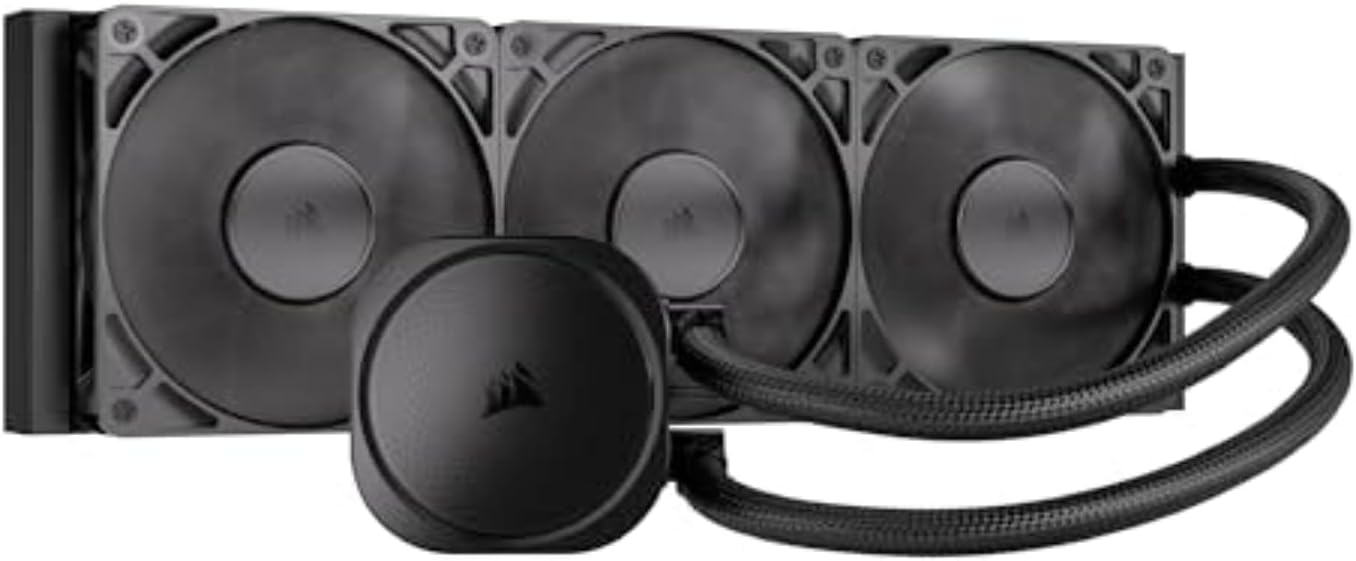
CORSAIR Nautilus 360 RS Liquid CPU Cooler – 360mm AIO – Low-Noise – Direct Motherboard Connection – Daisy-Chain – Intel LGA 1851/1700, AMD AM5/AM4 – 3X RS120 Fans Included – Black
Want the best price and purchase timing?
Our AI advisor analyzes real-time pricing across all channels to find you the best deal.
AI Verdict
A 360mm AIO with a 20 dBA pump and daisy-chainable RS120 fans, designed for straightforward motherboard connection without proprietary software.
This cooler is a strong fit for users seeking a straightforward, low-noise AIO with a 360mm radiator and broad CPU socket compatibility. Its direct motherboard connection and daisy-chainable fans simplify installation and reduce cable management complexity, making it appealing for a clean build without proprietary software. The 20 dBA pump is a standout feature for quiet operation.
If maximum cooling performance under extreme loads with minimal fan noise is critical, look for models with larger, lower RPM fans or thicker radiators.
Regret Score™
Very Low RiskLower is better — measures purchase-regret risk from real buyer complaints, review credibility, and product maturity
Issues discovered after purchase
Critically weak dimension
Amazon rating vs actual quality
Chance this product isn't for you
Pros
- The pump operates at a whisper-quiet 20 dBA, contributing to low system noise.
- RS120 fans feature daisy-chain connections, reducing cable clutter to a single 4-pin PWM header.
- Installation is simplified by pre-applied thermal paste on a convex cold plate, ensuring maximum CPU contact.
- Direct motherboard connection means no proprietary software or additional controllers are needed for fan and pump control.
- Compatible with current Intel LGA 1851/1700 and AMD AM5/AM4 sockets, offering broad platform support.
Cons
- RS120 fans can generate significant noise at their maximum 2100 RPM speed, with some users describing them as loud.
- The cooler lacks RGB lighting, which may not suit builds focused on aesthetics.
- There is no integrated coolant temperature monitoring, which some users consider important for advanced control.
- Fans are not pre-installed on the radiator, requiring an extra step during assembly.
Dimension Scores
The 360mm radiator and RS120 fans deliver strong cooling performance, keeping CPUs around 50-70°C under load, which is comparable to competitors.
The pump operates at a quiet 20 dBA, but the RS120 fans can become loud at their maximum 2100 RPM, impacting overall system acoustics.
Users describe the build quality as premium, with well-formed radiator threads and a robust design, despite the primary material being listed as plastic.
Daisy-chainable RS120 fans and direct motherboard connection significantly reduce the number of cables, simplifying routing and contributing to a cleaner build.
Best For
- PC builders prioritizing quiet pump operation and simplified wiring.
- Systems needing effective cooling for Intel LGA 1851/1700 or AMD AM5/AM4 CPUs.
- Users who prefer to avoid proprietary software ecosystems for their cooling solutions.
- Stealth or non-RGB PC builds where lighting is not a factor.
Not Recommended For
- Users who require RGB lighting for system aesthetics.
- Enthusiasts demanding the absolute lowest fan noise at maximum cooling performance.
- Builders who want integrated coolant temperature sensors for fine-tuned fan curves.
Watch Out For
- Fans can be loud at higher speeds; users report them sounding like 'jet planes at 100%'.
- The magnetic plate covering the pump head might not align or stick perfectly for some users.
- Some users of the ARGB version reported compatibility issues with certain motherboards, which might extend to this model.
- The RS120 fans have short leads, which could complicate cable routing if not daisy-chained effectively.
Full Specifications
| UPC | 840006687535 |
| ASIN | B0DF7B7324 |
| Brand | Corsair |
| Color | Black |
| Voltage | 12 Volts |
| Material | Plastic |
| Item Weight | 3.51 pounds |
| Noise Level | 36 Decibels |
| Manufacturer | Corsair |
| Cooling Method | Water |
| Number of Items | 1 |
| Item model number | CW-9060089-WW |
| Compatible Devices | Desktop, Laptop |
| Product Dimensions | 15.59"L x 4.72"W x 1.06"H |
| Computer Memory Type | DIMM |
| Power Connector Type | 4-Pin |
| Item Dimensions LxWxH | 15.59 x 4.72 x 1.06 inches |
| Maximum Rotational Speed | 2100 RPM |
| Global Trade Identification Number | 00840006687535 |
What Buyers Say
Many users highlight the straightforward installation process, often mentioning the pre-applied thermal paste and daisy-chaining as key time-savers. The pump's quiet operation is frequently praised, though the fans can be noticeable at higher speeds. Performance is generally considered effective for its price point, keeping CPU temperatures well within acceptable limits. The absence of iCUE software requirements is a recurring positive, appealing to those who prefer simpler setups.
“Honestly, I was kinda surprised how easy this thing was to get in, and my CPU temps are chill, but man, those fans can really kick up a fuss when it's working hard. Still, no iCUE is a win!”
Common Praise
- The pump is dead silent, making it one of the quietest pumps users have experienced.
- Installation is incredibly easy, even for first-time builders, thanks to clear instructions and pre-applied thermal paste.
- Daisy-chainable fans simplify wiring, reducing cable clutter significantly.
- Cooling performance keeps CPU temperatures low, often around 50-70°C under heavy load.
- Does not require proprietary software like iCUE, plugging directly into the motherboard.
Common Complaints
- The RS120 fans can be loud at 100% speed, with some comparing the noise to 'jet planes'.
- The magnetic pump head cover might not always sit perfectly or align easily.
- Fans are not pre-installed on the radiator, adding an extra step to the assembly process.
- Lacks RGB lighting, which is a drawback for users who want illuminated components.
Ownership Tips
- After a few weeks, the pump remains consistently quiet, a noticeable improvement over previous AIOs.
- Managing fan curves through motherboard software is crucial to keep fan noise in check, especially under load.
- The pre-applied thermal paste holds up well, with no immediate need for reapplication after initial use.
- The lack of RGB means a cleaner, more understated look that some users appreciate long-term.
Frequently Asked Questions
Does the CORSAIR Nautilus 360 RS have RGB lighting?
No, this specific 'Black' model of the CORSAIR Nautilus 360 RS does not include RGB lighting, making it suitable for non-RGB builds.
Is the CORSAIR Nautilus 360 RS difficult to install?
Installation is considered straightforward due to pre-applied thermal paste, a convex cold plate, and daisy-chainable fans that simplify wiring.
Does this cooler require CORSAIR iCUE software?
No, the CORSAIR Nautilus 360 RS connects directly to your motherboard via a 4-pin PWM header, eliminating the need for iCUE software or additional controllers.
What CPU sockets are compatible with this cooler?
It is compatible with Intel LGA 1851, LGA 1700, and AMD AM5, AM4 sockets, supporting a wide range of modern CPUs.
How loud is the pump on the CORSAIR Nautilus 360 RS?
The pump is designed for low-noise operation, circulating coolant at a whisper-quiet 20 dBA.
Can the fans be controlled?
Yes, the RS120 fans support PWM control, allowing you to set their speed up to 2,100 RPM via your motherboard's fan header, with support for Zero RPM mode.
Buying Guide
When you're looking at liquid CPU coolers, you're essentially trying to move heat away from your CPU as efficiently and quietly as possible. A 360mm AIO like this one uses a liquid loop to transfer heat from your CPU to a large radiator, which then dissipates it into your case with fans. You want to make sure it fits your case and your CPU socket, and that the noise levels won't drive you crazy. Don't get hung up on tiny temperature differences; focus on consistent cooling and acoustics.
cooling_method: Water
This means it uses a liquid (coolant) to transfer heat, which is generally more effective than air coolers for high-performance CPUs, especially in smaller spaces. Think of it like your car's radiator, but for your computer.
fan_size: 360mm
This refers to the length of the radiator, which typically accommodates three 120mm fans. A larger radiator means more surface area for heat dissipation, leading to better cooling performance. It's like having a bigger exhaust pipe for your car – more heat gets out faster.
connector: 4-Pin
This is a standard PWM (Pulse Width Modulation) connector. It allows your motherboard to precisely control the speed of the fans and pump based on CPU temperature, letting you balance cooling performance and noise levels. It's like having cruise control for your cooler, adjusting as needed.
Low-Noise Pump: 20 dBA
This spec tells you how quiet the pump itself is. 20 dBA is very low, meaning you'll barely hear the pump working. A quiet pump is crucial because a noisy one can be very distracting, even if the fans are quiet.
Alternatives
If this cooler doesn't fit your needs, consider searching for 360mm AIOs with integrated RGB lighting and software control for aesthetics, or models with thicker radiators and lower RPM fans for absolute quietness under load.
You Might Also Like

Micro ATX PC Case | Mini Tower Computer case | Pre-Installed 120mm*1 RGB Fan | ITX Desktop Chassis for MATX/ITX | 240 RAD | 280mm GPU | 160mm CPU Cooler Height - White S6
$0-$49This MAQUY S6 is a budget Micro ATX case with a pre-installed 120mm RGB fan, supporting 280mm GPUs and 240mm top radiators for entry-level builds.

Micro ATX Case, Mini PC ITX Desktop Computer Case MATX Case Support ATX PSU/250mm GPU/135mm CPU Cooler/1x 3.5’’HDD or 2X 2.5’’SSD/USB 3.0 Port
$0-$49This is a compact 38.5x19.5x32.5cm Micro ATX case supporting 250mm GPUs and 135mm CPU coolers, designed for budget workstation builds.

Small PC Case, ITX Mini Computer Case with 360 Degree Ventilation, 10.5L Compact Design for ITX Motherboard, SFX Power Supply, 4 x 2.5 Inch SSDs
$50-$99This 10.5L acrylic ITX case supports SFX/SFX-L PSUs, ITX motherboards, and GPUs up to 210mm, designed for compact builds.

Micro ATX PC Case | Mini Tower Computer case Support Vertical GPU Mount | Pre-Installed 120mm*1 RGB Fan | ITX Desktop Chassis for MATX/ITX | 240 RAD | 320mm GPU | 165mm CPU Cooler Height-Black
$0-$49A budget Micro ATX case with a mesh front, tempered glass, and support for 320mm GPUs and 240mm AIOs, but only one pre-installed 120mm RGB fan.