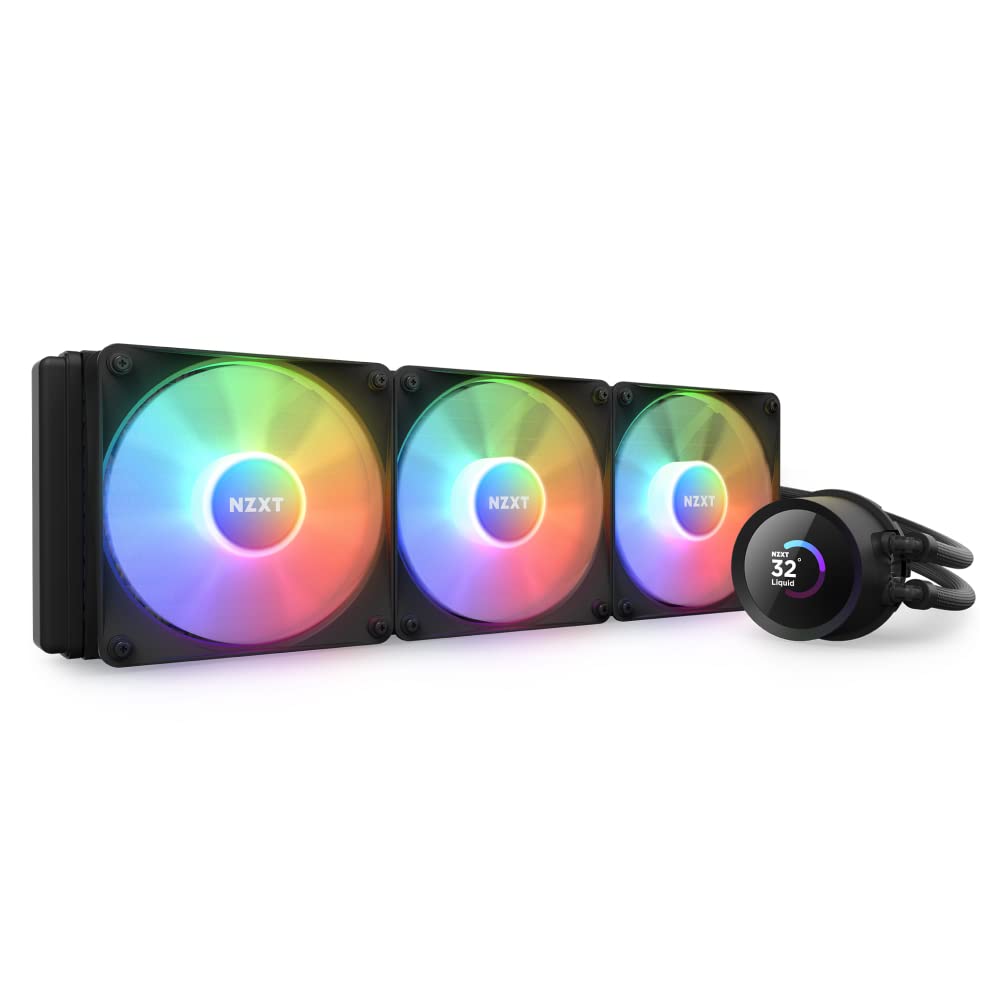
NZXT Kraken 360 RGB - 360mm AIO CPU Liquid Cooler - Customizable 1.54" Square LCD Display for Images, Performance Metrics - High-Performance Pump - 3 x F120 RGB Core Fans - Black
Want the best price and purchase timing?
Our AI advisor analyzes real-time pricing across all channels to find you the best deal.
AI Verdict
This 360mm AIO with a 1.54" LCD and 2800 RPM Asetek pump is for builders prioritizing aesthetics and display customization over raw cooling value.
This 360mm AIO offers a unique 1.54" LCD display for personalization and integrates well within the NZXT ecosystem via CAM software. While it provides adequate cooling with its 2800 RPM Asetek pump and 78.86 CFM fans, some user experiences indicate its cooling performance might not significantly outperform much cheaper alternatives, making its value proposition tied heavily to its aesthetic features and display.
If raw cooling performance per dollar is your main concern, look for AIOs with larger radiator thickness or higher static pressure fans, or consider high-end air coolers.
Regret Score™
Low RiskLower is better — measures purchase-regret risk from real buyer complaints, review credibility, and product maturity
Issues discovered after purchase
Critically weak dimension
Amazon rating vs actual quality
Chance this product isn't for you
Pros
- 1.54" square LCD display with 240x240 resolution and 300 cd/m² backlight for custom images and metrics.
- High-performance Asetek pump operates up to 2,800 RPM for efficient coolant circulation.
- Three F120 RGB Core Fans provide 78.86 CFM airflow and 2.57 mm H2O static pressure with fluid dynamic bearings.
- Pre-applied thermal paste and a single breakout cable from pump to motherboard simplify installation.
- Screen content can be rotated via NZXT CAM software to match tube orientation.
- NZXT offers a leak guarantee, covering damaged components if a leak occurs.
Cons
- Pump can become audible above 1,600 RPM, and fans reach a max noise of 30.88 dB.
- Some users report cooling performance comparable to significantly cheaper air coolers like the Hyper 212 Evo.
- The Asetek mounting system has been criticized for poor contact pressure by some users.
- Requires NZXT CAM software for full customization of the LCD and fan/pump curves.
- The 1.54" screen does not cover the entire pump block surface, unlike the larger Elite variant.
Dimension Scores
The 2800 RPM Asetek pump and 78.86 CFM fans provide competent cooling, but some users report performance comparable to much cheaper air coolers.
While some users find it quiet, the pump can become audible above 1600 RPM, and fans reach 30.88 dB, which is average for an AIO.
Features like durable nylon-braided sleeves on rubber tubing, pre-applied thermal paste, and a leak guarantee suggest a focus on quality.
The "single breakout cable from pump to motherboard" simplifies one aspect, but the proprietary fan cables connecting to the pump add a layer of specific routing.
Best For
- PC builds where visual aesthetics and a customizable LCD display are primary considerations.
- Users who want to display system metrics, animated GIFs, or custom images directly on their CPU cooler.
- Enthusiasts building with other NZXT components for integrated software control via CAM.
- Systems requiring a 360mm radiator for heat dissipation, though performance may vary.
Not Recommended For
- Budget-conscious builders prioritizing raw cooling performance per dollar.
- Users who prefer minimal software installations or dislike proprietary ecosystem control.
- Those seeking the absolute quietest pump operation at all RPMs, as it can be audible above 1600 RPM.
Watch Out For
- The pump may produce a grinding noise when operating below 100% speed for some users.
- Cooling performance for some users was reported to be similar to a Hyper 212 Evo, despite the 360mm AIO form factor.
- The Asetek mounting system has been noted by some users to have poor contact pressure, potentially affecting thermal transfer.
- Overtightening mounting screws during installation can cause a "dent" in the cooler.
- Full customization of the LCD display and fan/pump curves is dependent on the NZXT CAM software, which some users may prefer to avoid.
Full Specifications
| UPC | 810074842785 |
| ASIN | B0BY3FD274 |
| Brand | NZXT |
| Voltage | 12 Volts |
| Wattage | 2.76 watts |
| Material | Rubber |
| Item Weight | 3.44 pounds |
| Noise Level | 33.88 Decibels |
| Manufacturer | Nzxt |
| Cooling Method | Water |
| Number of Items | 1 |
| Air Flow Capacity | 78.86 Cubic Feet Per Minute |
| Item model number | RL-KR360-B1 |
| Compatible Devices | Desktop |
| Product Dimensions | 4.76"L x 15.51"W x 1.06"H |
| Power Connector Type | 4-Pin |
| Maximum Rotational Speed | 2800 RPM |
What Buyers Say
The NZXT Kraken 360 RGB often draws buyers in with its customizable 1.54" LCD screen, which many users find visually appealing for displaying system stats or GIFs. However, user experiences regarding its core cooling performance are mixed, with some finding it on par with significantly less expensive air coolers. The reliance on NZXT CAM software for full control is a recurring point, and while some praise its integration, others dislike the need for proprietary software. Pump noise at certain RPMs is also a reported concern for a subset of users.
“Man, this thing looks sick with my GIFs on the screen, but honestly, my old air cooler kept my CPU just as cool, and the pump sometimes makes a weird hum if I don't crank it.”
Common Praise
- The 1.54" LCD display is bright and customizable for images, GIFs, and performance metrics.
- Aesthetics are frequently cited as a primary reason for purchase, with the cooler looking "outstanding".
- Installation is relatively straightforward due to pre-applied thermal paste and a simplified pump-to-motherboard connection.
- The pump is described as "reliable as my trusty old Nokia brick phone" by some users.
- NZXT's leak guarantee, covering damaged components, provides peace of mind.
Common Complaints
- Some users report the pump producing a grinding noise when operating below 100% speed.
- Cooling performance is sometimes perceived as "subpar" or no better than basic air coolers.
- The Asetek mounting system has been criticized for potentially poor contact pressure.
- The need for NZXT CAM software for full functionality is a drawback for users who prefer minimal software.
- The pump can become audibly noticeable when exceeding 1600 RPM.
Ownership Tips
- The 1.54" screen is smaller than the Elite version's, so it doesn't fill the entire pump block.
- Managing the proprietary fan cables that connect to the pump requires careful routing.
- You'll be spending time in NZXT CAM to get the display and fan curves exactly how you want them.
- The pre-applied thermal paste is convenient but might not be optimal for extreme overclocking.
- The braided tubing feels durable and flexible enough for routing in most cases.
Frequently Asked Questions
What kind of display does this cooler have?
It features a 1.54" square LCD display with a 240x240 resolution, a 30 Hz refresh rate, and a 300 cd/m² backlight.
Is the NZXT Kraken 360 RGB compatible with my CPU?
It is compatible with Intel LGA 1700/1200/115X and AMD AM4/AM5 sockets.
How quiet is the pump?
The Asetek pump operates up to 2,800 RPM and is generally quiet, though some users report it becoming audible above 1,600 RPM or experiencing grinding noises at lower speeds.
Do I need software to control the cooler?
Yes, the NZXT CAM software is required to customize the LCD display, fan speeds, and pump curves.
What is the fan noise level?
The F120 RGB Core Fans have a maximum noise level of 30.88 dB.
Does it come with thermal paste?
Yes, it comes with pre-applied NZXT High-Performance Thermal Paste.
Buying Guide
When looking at AIO liquid coolers like the Kraken 360 RGB, you're primarily balancing cooling capacity with aesthetics and features. A 360mm radiator like this one is generally for higher-end CPUs or overclocking, but the actual cooling performance can vary between brands and models. The LCD screen is a major draw here, letting you personalize your build, but remember that this customization relies on software.
fan_size (360mm)
LCD Display (1.54" square, 240x240 resolution)
High-Performance Pump (up to 2,800 RPM)
F120 RGB Core Fans (fluid dynamic bearings)
Alternatives
If the customizable screen isn't a must-have, look for 360mm AIOs that prioritize radiator thickness or come with higher static pressure fans for maximum thermal performance, or consider high-end air coolers for similar performance at a lower cost.
You Might Also Like

Micro ATX PC Case | Mini Tower Computer case | Pre-Installed 120mm*1 RGB Fan | ITX Desktop Chassis for MATX/ITX | 240 RAD | 280mm GPU | 160mm CPU Cooler Height - White S6
$0-$49This MAQUY S6 is a budget Micro ATX case with a pre-installed 120mm RGB fan, supporting 280mm GPUs and 240mm top radiators for entry-level builds.

Micro ATX Case, Mini PC ITX Desktop Computer Case MATX Case Support ATX PSU/250mm GPU/135mm CPU Cooler/1x 3.5’’HDD or 2X 2.5’’SSD/USB 3.0 Port
$0-$49This is a compact 38.5x19.5x32.5cm Micro ATX case supporting 250mm GPUs and 135mm CPU coolers, designed for budget workstation builds.

Small PC Case, ITX Mini Computer Case with 360 Degree Ventilation, 10.5L Compact Design for ITX Motherboard, SFX Power Supply, 4 x 2.5 Inch SSDs
$50-$99This 10.5L acrylic ITX case supports SFX/SFX-L PSUs, ITX motherboards, and GPUs up to 210mm, designed for compact builds.

Micro ATX PC Case | Mini Tower Computer case Support Vertical GPU Mount | Pre-Installed 120mm*1 RGB Fan | ITX Desktop Chassis for MATX/ITX | 240 RAD | 320mm GPU | 165mm CPU Cooler Height-Black
$0-$49A budget Micro ATX case with a mesh front, tempered glass, and support for 320mm GPUs and 240mm AIOs, but only one pre-installed 120mm RGB fan.