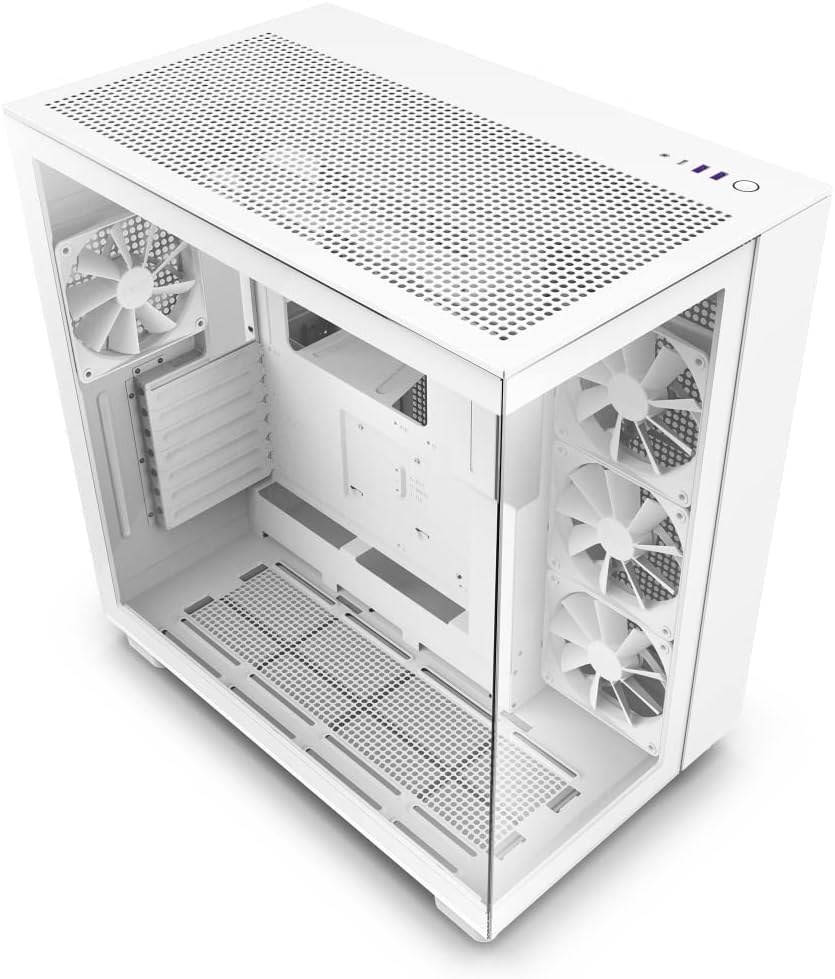
NZXT H9 Flow Dual-Chamber ATX Mid-Tower PC Gaming Case – High-Airflow Perforated Top Panel – Tempered Glass Front & Side Panels – 360mm Radiator Support – Cable Management – White
Want the best price and purchase timing?
Our AI advisor analyzes real-time pricing across all channels to find you the best deal.
AI Verdict
This is a dual-chamber ATX mid-tower case with seamless tempered glass panels and support for up to three 360mm radiators, designed for visually striking builds with extensive cooling capacity.
The NZXT H9 Flow is a situational fit because its dual-chamber design and panoramic glass excel for showcasing components and managing cables, supporting up to three 360mm radiators. However, its large size and potential GPU cable interference with the glass mean it's not for every setup.
If you need a smaller footprint or prioritize maximum raw air-cooling performance without liquid cooling, look for cases with a full mesh front panel and a more compact design.
Regret Score™
Low RiskLower is better — measures purchase-regret risk from real buyer complaints, review credibility, and product maturity
Issues discovered after purchase
Critically weak dimension
Amazon rating vs actual quality
Chance this product isn't for you
Pros
- Dual-chamber design separates PSU and cables, maximizing airflow to main components and simplifying cable management.
- Seamless tempered glass on the front and side panels provides an unobstructed view of internal components.
- Supports up to three 360mm radiators in the top, side, and bottom panels for extensive liquid cooling configurations.
- Accommodates up to 10 x 120mm fans or 6 x 140mm fans plus 1 x 120mm fan for high-performance airflow.
- Features intuitive cable management with extra-wide channels and built-in Velcro straps, making routing effortless.
- Fits GPUs up to 435mm in length, allowing for installation of large graphics cards.
Cons
- The case has a large physical footprint, requiring significant desk space.
- Tempered glass side panel can press against GPU power cables, especially with larger RTX 40-series cards, potentially requiring a vertical GPU mount.
- Installing a 360mm radiator at the top can be challenging due to tight clearance with CPU power cables.
- The four included 120mm fans are not RGB, necessitating replacement for builds requiring integrated lighting.
- Routing the 24-pin motherboard cable can be difficult due to a small gap near the cable management bar.
Dimension Scores
The case supports up to three 360mm radiators and ten 120mm fans, providing extensive cooling potential for high-performance components.
The included four 120mm fans are described as 'Quiet Airflow' fans, but overall noise depends heavily on the user's component choices and fan curve settings.
It features seamless tempered glass panels and a dual-chamber design, though some users report individual pieces can flex under pressure.
The dual-chamber design, extra-wide channels, dedicated SSD wall panel, and built-in Velcro straps provide exceptional space and features for clean cable routing.
Best For
- PC builders prioritizing a clean aesthetic with a clear view of internal components.
- Systems utilizing custom liquid cooling loops with multiple 360mm radiators.
- High-performance gaming PCs with large GPUs that benefit from dedicated airflow channels.
- Users who need extensive space for cable routing and storage drives.
Not Recommended For
- Compact desk setups where space is limited.
- Budget-focused builds where the cost of additional RGB fans or a vertical GPU mount is a concern.
- Users prioritizing raw air-cooling performance above all else, as the glass front can restrict some airflow compared to full mesh designs.
Watch Out For
- The tempered glass panel can touch GPU power cables with larger graphics cards, potentially requiring a vertical GPU mount to prevent bending.
- Top-mounting a 360mm radiator is a tight squeeze, especially with CPU power cables, making installation difficult.
- This case is physically large for a mid-tower, so measure your space before buying.
- The four included 120mm fans are standard and lack RGB lighting, meaning you'll need to buy more if you want a fully lit build.
Full Specifications
| ASIN | B0BG1GQKKY |
| Brand | NZXT |
| Color | White |
| Series | CM-H91FW-01 23959168 |
| Fan Size | 120 Millimeters |
| Material | Tempered Glass |
| Case Type | Mid Tower |
| Model Name | CM-H91FW-01 23959168 |
| Item Weight | 26.6 pounds |
| Manufacturer | NZXT |
| Cooling Method | Air |
| Item model number | CM-H91FW-01 |
| Product Dimensions | 23 x 23 x 15 inches |
| Computer Memory Type | DIMM |
| Item Dimensions LxWxH | 23 x 23 x 15 inches |
| Number of USB 2.0 Ports | 2 |
| Number of USB 3.0 Ports | 1 |
| Motherboard Compatability | Micro ATX |
| Power Supply Mounting Type | Bottom Mount |
| Recommended Uses For Product | Gaming |
What Buyers Say
The NZXT H9 Flow really nails the 'fishbowl' aesthetic with its seamless glass panels, making your build the star of the show. The dual-chamber design is a lifesaver for cable management, keeping everything super tidy and out of sight. However, that sleek glass can get a bit cozy with larger GPUs, sometimes pushing against power cables. Also, while it's a cooling powerhouse on paper with all those radiator mounts, actually fitting a 360mm radiator at the top can be a real struggle due to tight clearances.
“Man, this case looks absolutely sick with all the glass, but I swear, getting that 360mm AIO in the top was a nightmare, and my 4080's cables are practically kissing the side panel, might need that vertical mount after all.”
Common Praise
- The panoramic tempered glass offers an unobstructed view of all internal components.
- Dual-chamber design makes cable management incredibly easy and clean.
- Supports multiple 360mm radiators, providing extensive liquid cooling options.
- Accommodates very large graphics cards without issue, up to 435mm.
- The case's overall aesthetic is modern and visually appealing, especially in white.
Common Complaints
- Large GPUs, especially RTX 40-series, can have their power cables pressed against the tempered glass side panel.
- Installing a 360mm radiator in the top position is often difficult due to limited space and interference with CPU cables.
- The case is quite large for a mid-tower, taking up a significant amount of desk space.
- The included four 120mm fans are not RGB, requiring additional purchases for a fully lit build.
- Some users found the 24-pin motherboard cable difficult to route due to a narrow gap.
Ownership Tips
- You'll probably want a vertical GPU mount if you have a chunky graphics card to avoid cable bending against the glass.
- Plan your radiator and fan placement carefully, especially if you're going for a top-mounted 360mm AIO, because space is tighter than it looks.
- The case is bigger than you expect from pictures, so make sure your desk or setup has enough room for its footprint.
- If you're into RGB, factor in the cost of replacing the included fans, as they're basic 120mm units.
Frequently Asked Questions
How many fans does the NZXT H9 Flow support?
The H9 Flow supports up to 10 x 120mm fans, or 6 x 140mm fans plus 1 x 120mm fan. It comes with four 120mm fans pre-installed.
What size radiators can I install in the H9 Flow?
You can install radiators up to 360mm in the top, side, and bottom panels.
Does the H9 Flow come with RGB fans?
No, the four included 120mm fans are not RGB. If you want RGB lighting, you'll need to purchase additional RGB fans.
What is the maximum GPU length supported?
The case supports GPUs up to 435mm in length.
Is the NZXT H9 Flow compatible with ATX motherboards?
Yes, despite some specifications listing only Micro ATX, the H9 Flow is designed as an ATX mid-tower and supports ATX, Micro-ATX, and Mini-ITX motherboards.
What is the purpose of the dual-chamber design?
The dual-chamber design separates the power supply, storage drives, and cables from the main components like the motherboard and GPU. This improves thermal performance by maximizing airflow to heat-generating parts and creates a cleaner aesthetic.
Buying Guide
When picking a PC case, you're essentially choosing the home for all your expensive components. Think about airflow: how easily can cool air get in and hot air get out? This impacts how cool your CPU and GPU stay. Also, consider radiator support if you're into liquid cooling, and cable management features, because nobody wants a tangled mess inside their beautiful build. Finally, the size matters – a 'mid-tower' can still be huge, so check dimensions against your space.
Dual-Chamber Design
This is like having a separate basement for your furnace and plumbing. It hides the power supply and all your messy cables in one compartment, leaving the main chamber clean and open for your CPU, GPU, and motherboard to breathe better and look fantastic.
360mm Radiator Support
A 360mm radiator is a large heat exchanger for liquid cooling. If you're running a high-end CPU or plan on overclocking, having support for multiple 360mm radiators means you can keep those components much cooler than with air cooling, leading to better performance and stability.
Tempered Glass Panels
These aren't just for looks; they offer a clear, durable window into your PC. If you've spent money on RGB components or a custom loop, tempered glass lets you show off your build without worrying about scratches like acrylic panels.
Alternatives
If this case doesn't fit, look for cases with full mesh front panels for maximum unrestricted airflow, or smaller form factors if desk space is a primary concern.
You Might Also Like

Micro ATX PC Case | Mini Tower Computer case | Pre-Installed 120mm*1 RGB Fan | ITX Desktop Chassis for MATX/ITX | 240 RAD | 280mm GPU | 160mm CPU Cooler Height - White S6
$0-$49This MAQUY S6 is a budget Micro ATX case with a pre-installed 120mm RGB fan, supporting 280mm GPUs and 240mm top radiators for entry-level builds.

Micro ATX Case, Mini PC ITX Desktop Computer Case MATX Case Support ATX PSU/250mm GPU/135mm CPU Cooler/1x 3.5’’HDD or 2X 2.5’’SSD/USB 3.0 Port
$0-$49This is a compact 38.5x19.5x32.5cm Micro ATX case supporting 250mm GPUs and 135mm CPU coolers, designed for budget workstation builds.

Small PC Case, ITX Mini Computer Case with 360 Degree Ventilation, 10.5L Compact Design for ITX Motherboard, SFX Power Supply, 4 x 2.5 Inch SSDs
$50-$99This 10.5L acrylic ITX case supports SFX/SFX-L PSUs, ITX motherboards, and GPUs up to 210mm, designed for compact builds.

Micro ATX PC Case | Mini Tower Computer case Support Vertical GPU Mount | Pre-Installed 120mm*1 RGB Fan | ITX Desktop Chassis for MATX/ITX | 240 RAD | 320mm GPU | 165mm CPU Cooler Height-Black
$0-$49A budget Micro ATX case with a mesh front, tempered glass, and support for 320mm GPUs and 240mm AIOs, but only one pre-installed 120mm RGB fan.