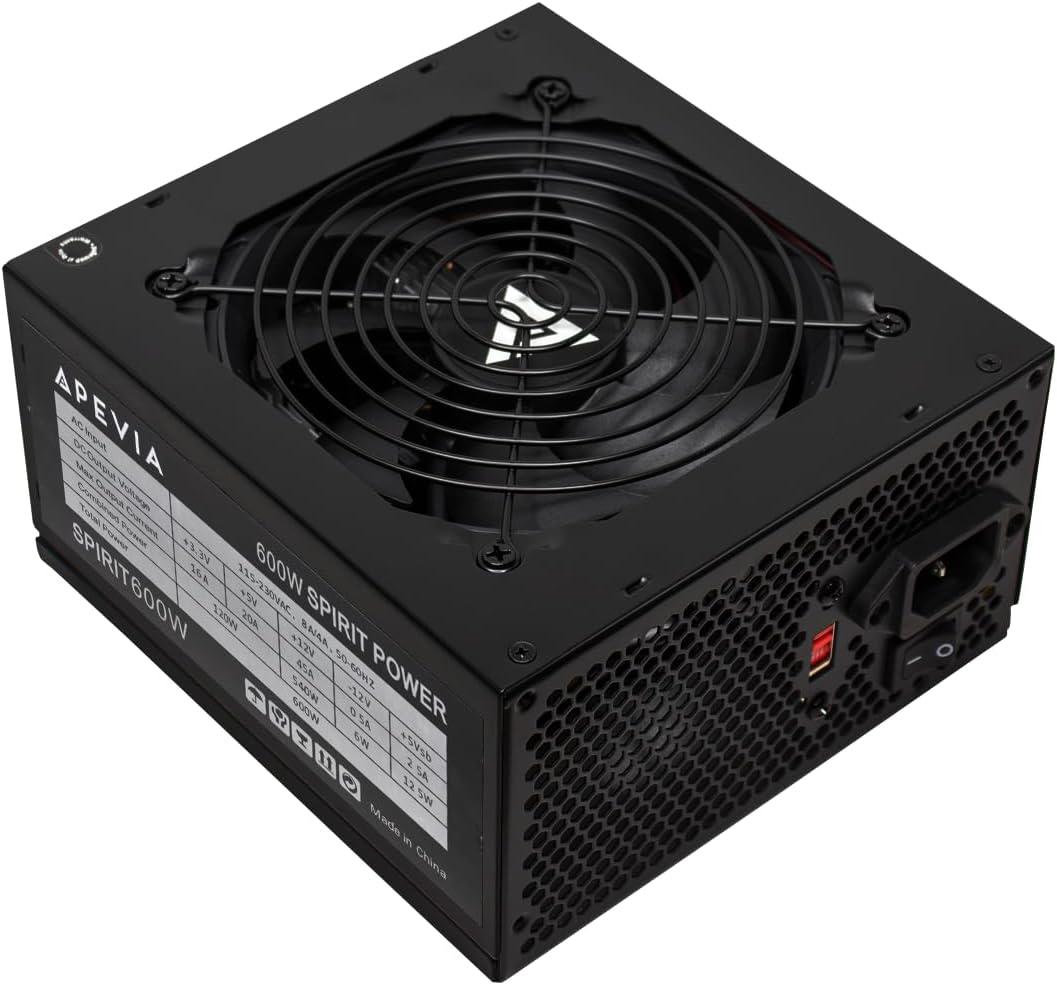
Apevia SPIRIT600W Spirit 600W ATX Power Supply with Auto-Thermally Controlled 120mm Fan, 115/230V Switch, All Protections
Want the best price and purchase timing?
Our AI advisor analyzes real-time pricing across all channels to find you the best deal.
AI Verdict
A 600W ATX power supply with a 120mm auto-thermally controlled fan, suitable for budget mid-range PC builds that prioritize cost over 80 Plus efficiency certification.
This 600W ATX power supply is a situational fit for budget-focused mid-range PC builds. While it delivers adequate power and includes essential protections, its non-modular design and lack of 80 Plus certification are significant compromises for users seeking cleaner builds or higher energy efficiency. The reported fan noise under load also limits its appeal for quiet setups.
If a cleaner build and better energy efficiency are priorities, look for power supplies with at least an 80 Plus Bronze certification and a semi-modular or fully modular cable design.
Regret Score™
Very High RiskLower is better — measures purchase-regret risk from real buyer complaints, review credibility, and product maturity
Issues discovered after purchase
Critically weak dimension
Amazon rating vs actual quality
Chance this product isn't for you
Pros
- Provides stable power delivery for connected components.
- Operates quietly under light to medium system workloads.
- Includes a comprehensive array of connectors: 1x 20/24pin Main Power, 1x 4+4pin 12V, 2x PCI 6+2pin, 4x SATA, 4x Molex.
- Features heavy-duty protections including Short-Circuit, Over-Current, Over-Voltage, Over-Power, Under-Voltage, and Over-Temperature.
- The black sandblasted casing and black cable sleeving contribute to a cleaner internal aesthetic.
Cons
- Non-modular design means all cables are permanently attached, complicating cable management and potentially restricting airflow.
- Lacks an 80 Plus efficiency certification, suggesting lower energy efficiency compared to certified alternatives.
- The auto-thermally controlled 120mm fan can become noisy under heavy system loads.
- Comes with a short 1-year warranty period, which is less than many competitors offer.
- Some users have reported units failing shortly after purchase, with instances of burning smells.
Dimension Scores
The 600W output is sufficient for mid-range systems, but the absence of an 80 Plus certification indicates lower energy efficiency compared to many competitors.
While quiet at low to medium loads, the 120mm fan is reported to become noisy under heavy system demands.
Despite some reports of quality construction, the short 1-year warranty and user complaints of early failures and burning smells suggest inconsistent build quality.
The non-modular design means all cables are fixed, making clean cable routing difficult and potentially impacting internal airflow.
Best For
- Mid-range gaming PC builds with moderate power requirements.
- General-purpose business PCs that do not demand high-end components.
- Budget-conscious builders looking to minimize initial component costs.
- Systems where the potential for fan noise under load is not a primary concern.
Not Recommended For
- High-end PC builds with multiple power-hungry components or overclocking.
- Environments requiring near-silent PC operation, especially under heavy workloads.
- Users prioritizing maximum energy efficiency to reduce electricity consumption.
Watch Out For
- The non-modular cabling can lead to a messy build and obstruct internal airflow if not carefully managed.
- Absence of an 80 Plus certification means it may not be as energy efficient, potentially leading to higher electricity bills over time.
- The 120mm fan can generate noticeable noise when the system is under heavy load, which can be distracting.
- The 1-year warranty period is shorter than many competing power supplies, raising concerns about long-term durability.
- There are user reports of units failing prematurely, with some experiencing burning smells, indicating potential reliability issues.
- The power supply will not power on by simply connecting the power cord; all internal PC cables must be properly connected for it to function.
Full Specifications
| ASIN | B0B9VGG83Z |
| Brand | Apevia |
| Wattage | 600 watts |
| Model Name | spirit,spirit600w |
| Form Factor | ATX |
| Item Weight | 3.67 pounds |
| Manufacturer | Apevia Corp |
| Connector Type | ATX |
| Cooling Method | Air |
| Output Wattage | 600 Watts |
| Item model number | SPIRIT600W |
| Compatible Devices | Personal Computer |
| Product Dimensions | 6.3 x 5.91 x 3.35 inches |
| Power Supply Design | Non-Modular |
| Item dimensions L x W x H | 6.3 x 5.91 x 3.35 inches |
What Buyers Say
Many users report that the Apevia SPIRIT600W delivers stable power for their mid-range PC builds, especially considering its budget price point. However, the non-modular cables are a recurring frustration, making clean cable management a challenge. The fan noise under heavy system load is another common complaint, with some users noting it becomes quite audible during intense gaming sessions. The lack of an 80 Plus efficiency rating and the short 1-year warranty are also frequently mentioned concerns, alongside a few reports of units failing prematurely or emitting burning smells.
“Look, it powers my budget gaming PC, but trying to hide all these extra cables was a nightmare and the fan gets LOUD when I'm actually playing. For the price, it works, but next time I'm spending more for something modular and quieter.”
Common Praise
- Provides stable power for system components.
- Operates quietly when the PC is under light or medium workloads.
- Offers a comprehensive set of connectors for various PC components.
- The black sandblasted finish and sleeved cables offer a visually appealing aesthetic inside the case.
Common Complaints
- The 120mm fan generates noticeable noise when the system is under heavy load.
- Non-modular cables make cable management difficult and can clutter the PC case.
- Lacks an 80 Plus efficiency certification, which is standard on many other power supplies.
- The warranty period is only 1 year, which is shorter than many alternatives.
- Some users experienced unit failures or burning smells shortly after purchase.
Ownership Tips
- The 115/230V switch on the back needs to be manually set to match your local voltage before first use.
- The power supply requires all internal PC cables to be properly connected to the motherboard and components before it will power on, not just plugged into the wall.
- The black sandblasted casing can show scratches or fingerprints easily if not handled with care during installation.
- Achieving a truly clean and organized build is difficult due to the non-modular nature, especially in smaller form factor cases.
Frequently Asked Questions
Does the Apevia SPIRIT600W have an 80 Plus efficiency rating?
No, the Apevia SPIRIT600W does not carry an 80 Plus certification, meaning it may not be as energy efficient as models with such ratings.
Is this power supply modular?
No, the Apevia SPIRIT600W is a non-modular power supply, which means all its cables are permanently attached and cannot be removed.
How loud is the fan on this power supply?
The 120mm auto-thermally controlled fan operates quietly under light to medium workloads, but users report it can become noisy when the system is under heavy load.
What types of protections does this power supply offer?
It includes heavy-duty protections such as Short-Circuit, Over-Current, Over-Voltage, Over-Power, Under-Voltage, and Over-Temperature Protections.
What is the warranty period for the Apevia SPIRIT600W?
The Apevia SPIRIT600W comes with a 1-year warranty period.
Can the CPU and PCI-E connectors be split?
Yes, the 8-pin CPU connector can be split into a 4+4-pin configuration, and the 8-pin PCI-E GPU connector can be split into a 6+2-pin configuration.
Buying Guide
When you're picking a power supply, you're essentially choosing the heart of your PC. It takes the electricity from your wall and converts it into the specific voltages your components need. You need enough wattage to power everything, but also consider how efficiently it does that job, as inefficient PSUs waste more energy as heat and can cost more on your electricity bill. How tidy your PC looks and how loud it gets also depend a lot on your PSU's cable design and fan.
Wattage
This number, like 600W here, tells you the maximum power the PSU can supply. If your CPU, GPU, and other parts collectively need more power than the PSU can provide, your system might crash or not even turn on. Always aim for a PSU with a bit more wattage than your estimated total system draw to allow for upgrades and stability.
Form Factor (ATX)
This refers to the physical size and shape of the power supply. ATX is the most common standard and will fit in almost all standard desktop PC cases. If you have a smaller, specialized case, you'll need to check if it requires a different form factor like SFX or TFX.
Connectors
These are the cables that plug into your motherboard (20/24-pin), CPU (4+4-pin), graphics card (6+2-pin), and storage drives (SATA, Molex). You need to make sure the PSU has all the specific connectors your chosen components require, and enough of them, especially for graphics cards which often need multiple PCI-E connectors.
Cooling Method (Air, 120mm fan)
This describes how the PSU stays cool. A 120mm fan is a common size; larger fans can generally move more air at lower RPMs, which can result in quieter operation. An 'auto-thermally controlled' fan adjusts its speed based on the PSU's temperature, aiming for a balance between cooling and noise.
Alternatives
If you're looking for better energy efficiency, search for power supplies with an 80 Plus Bronze, Gold, or Platinum certification. For easier installation and improved internal airflow, consider models with a modular or semi-modular cable design. If quiet operation is a top priority, look for PSUs specifically marketed for low noise levels, often featuring larger or fluid dynamic bearing fans.
You Might Also Like

Micro ATX PC Case | Mini Tower Computer case | Pre-Installed 120mm*1 RGB Fan | ITX Desktop Chassis for MATX/ITX | 240 RAD | 280mm GPU | 160mm CPU Cooler Height - White S6
$0-$49This MAQUY S6 is a budget Micro ATX case with a pre-installed 120mm RGB fan, supporting 280mm GPUs and 240mm top radiators for entry-level builds.

Micro ATX Case, Mini PC ITX Desktop Computer Case MATX Case Support ATX PSU/250mm GPU/135mm CPU Cooler/1x 3.5’’HDD or 2X 2.5’’SSD/USB 3.0 Port
$0-$49This is a compact 38.5x19.5x32.5cm Micro ATX case supporting 250mm GPUs and 135mm CPU coolers, designed for budget workstation builds.

Small PC Case, ITX Mini Computer Case with 360 Degree Ventilation, 10.5L Compact Design for ITX Motherboard, SFX Power Supply, 4 x 2.5 Inch SSDs
$50-$99This 10.5L acrylic ITX case supports SFX/SFX-L PSUs, ITX motherboards, and GPUs up to 210mm, designed for compact builds.

Micro ATX PC Case | Mini Tower Computer case Support Vertical GPU Mount | Pre-Installed 120mm*1 RGB Fan | ITX Desktop Chassis for MATX/ITX | 240 RAD | 320mm GPU | 165mm CPU Cooler Height-Black
$0-$49A budget Micro ATX case with a mesh front, tempered glass, and support for 320mm GPUs and 240mm AIOs, but only one pre-installed 120mm RGB fan.