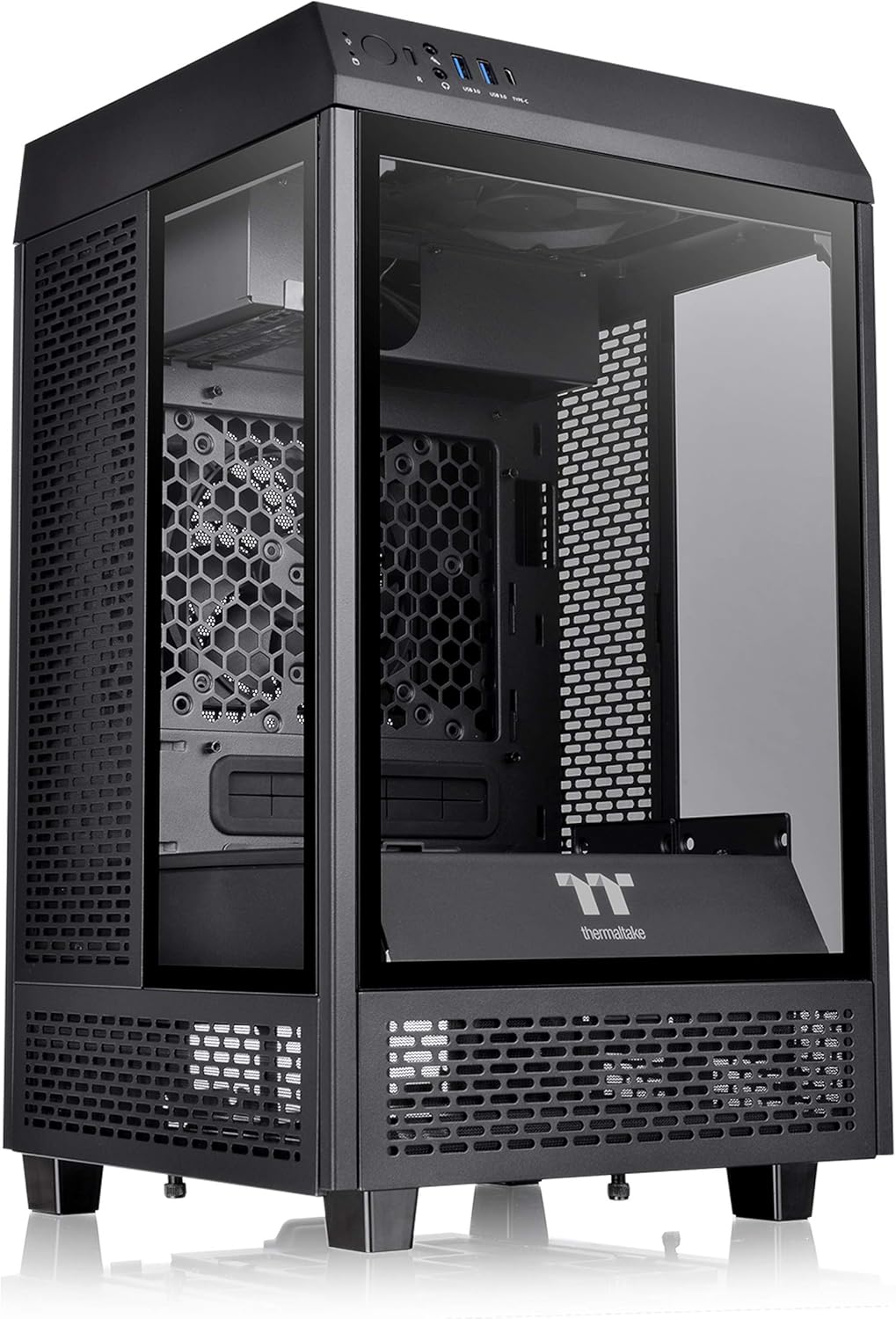
Thermaltake Tower 100 Black Edition Tempered Glass Type-C (USB 3.1 Gen 2) Mini Tower Computer Chassis supports Mini-ITX CA-1R3-00S1WN-00
Want the best price and purchase timing?
Our AI advisor analyzes real-time pricing across all channels to find you the best deal.
AI Verdict
A 462.8mm tall Mini-ITX chassis with three 4mm tempered glass panels, for builders prioritizing display over a compact footprint.
This chassis is a situational fit because its 462.8mm height and 266mm width/depth are substantial for a Mini-ITX case, making it unsuitable for truly compact setups. It excels as a display piece with its three 4mm tempered glass panels and vertical design, but its cooling capabilities are average, especially with only 120mm AIO support.
If you need a genuinely small Mini-ITX case, look for models under 20 liters volume and with smaller physical dimensions.
Regret Score™
Medium RiskLower is better — measures purchase-regret risk from real buyer complaints, review credibility, and product maturity
Issues discovered after purchase
Critically weak dimension
Amazon rating vs actual quality
Chance this product isn't for you
Pros
- Features a USB 3.2 Gen 2 Type-C port and two USB 3.0 ports on the top panel for quick access.
- Accommodates CPU coolers up to 190mm tall, allowing for substantial air cooling solutions.
- Supports graphics cards up to 330mm in length, fitting many high-performance GPUs.
- Includes eight easily removable super fine dust filters on multiple sides for component protection.
- Constructed with solid steel and three 4mm thick tempered glass panels, contributing to its structural integrity.
- The PSU cover is removable, aiding in cable management and component installation.
Cons
- Its 462.8 x 266 x 266 mm dimensions make it considerably larger than many other Mini-ITX cases, not fitting typical small form factor expectations.
- Limited AIO liquid cooling support, officially only a single 120mm radiator, despite its large size.
- Mounting 3.5-inch HDDs can obstruct the rear exhaust fan, impacting cooling efficiency.
- The two included 120mm exhaust fans operate at a fixed 1500rpm and lack PWM control, limiting noise optimization.
- Rear I/O ports face upwards, requiring the top cover to be removed for access, which can be inconvenient for frequent peripheral changes.
Dimension Scores
The vertical design aids in thermal extraction via a chimney effect, but limited AIO support to a single 120mm radiator and potential GPU-to-glass proximity can restrict high-end component cooling.
The two pre-installed 120mm fans operate at a fixed 1500rpm and 35.8 dBA without PWM control, which can lead to a constant, audible noise profile.
Constructed with solid steel and three 4mm thick tempered glass panels, users report it feels robust and well-assembled.
The case offers a 'sophisticated space design' and a removable PSU cover, providing ample room and flexibility for routing cables.
Best For
- Showcase builds where internal components are meant to be prominently displayed through glass panels.
- Desk setups with ample vertical space, not constrained by traditional small form factor dimensions.
- Users who prefer air cooling with large tower coolers over liquid cooling solutions.
- First-time builders seeking a Mini-ITX case with generous internal space for easier component installation.
Not Recommended For
- Enthusiasts requiring advanced liquid cooling with multiple or larger radiators.
- Users with limited desk space or those seeking a truly compact small form factor PC.
- Builds with high-wattage GPUs that generate significant heat, without careful fan configuration and potential power limits.
Watch Out For
- The case is physically large for a Mini-ITX, measuring 462.8mm tall, which might surprise those expecting a tiny footprint.
- Installing 3.5-inch hard drives can block the rear 120mm exhaust fan, potentially reducing airflow from the case's chimney effect.
- The two pre-installed 120mm fans run at a fixed 1500rpm and are not PWM controlled, meaning they can't dynamically adjust speed for quieter operation.
- Large graphics cards can sit very close to the tempered glass side panel, potentially restricting airflow to the GPU cooler.
- Accessing motherboard rear I/O ports requires removing the top panel, which is less convenient than cases with direct rear access.
Full Specifications
| ASIN | B08SQF9HGH |
| Brand | Thermaltake |
| Color | Black |
| Series | The Tower 100 Black |
| Fan Size | 120 Millimeters |
| Material | Tempered Glass |
| Case Type | Mini-Tower |
| Model Name | The Tower 100 Black |
| Item Weight | 16.65 pounds |
| Manufacturer | Thermaltake |
| Cooling Method | Air |
| Item model number | CA-1R3-00S1WN-00 |
| Product Dimensions | 10.47 x 10.47 x 18.22 inches |
| Item Dimensions LxWxH | 10.47 x 10.47 x 18.22 inches |
| Number of USB 2.0 Ports | 2 |
| Number of USB 3.0 Ports | 2 |
| Motherboard Compatability | Mini ITX |
| Power Supply Mounting Type | Bottom Mount |
| Recommended Uses For Product | Business |
| Standing screen display size | 7 Inches |
| Is Discontinued By Manufacturer | No |
What Buyers Say
Many users are drawn to the Tower 100 for its unique vertical aesthetic and panoramic glass panels, often overlooking its larger-than-average Mini-ITX footprint. While it offers generous space for air coolers and GPUs, the fixed-speed stock fans and limited liquid cooling options are recurring points of discussion. Builders frequently mention the need for careful component selection to avoid thermal issues, especially with powerful graphics cards that can sit very close to the glass. The upward-facing motherboard I/O is a design quirk that some find inconvenient for frequent access.
“Look, it's pretty, yeah, but this 'mini' case is a chonk! My 3060 Ti runs warmer than I'd like, and those stock fans are always humming. If you want a display piece and don't mind the size, it's fine, but don't expect SFF magic.”
Common Praise
- The three 4mm tempered glass panels provide an unobstructed view of internal components.
- Generous clearance for CPU air coolers, supporting heights up to 190mm.
- The vertical design and small footprint on a desk are appealing to some users, despite its overall height.
- Dismantlable modular design makes building and accessing components straightforward.
- Includes a high-speed USB 3.2 Gen 2 Type-C port on the front panel.
Common Complaints
- The case is significantly larger than expected for a Mini-ITX form factor.
- Limited to a single 120mm radiator for AIO liquid cooling, which is restrictive for its size.
- Stock fans are not PWM controlled and can be audible at their fixed 1500rpm.
- Rear I/O access is awkward, requiring removal of the top panel.
- High-wattage GPUs can run hot due to proximity to the glass panel and limited exhaust options.
- Mounting 3.5-inch HDDs can block the rear exhaust fan.
Ownership Tips
- The top panel, while removable for I/O access, can feel a bit flimsy when frequently handled.
- Dust filters are effective but require regular cleaning, especially the bottom one, to maintain airflow.
- Cable management, while aided by the removable PSU cover, still requires patience due to the vertical layout and limited routing channels.
- The tempered glass panels are prone to fingerprints, requiring frequent cleaning to maintain the showcase aesthetic.
- The case's weight of 6.1 kg / 13.45 lbs makes it feel substantial, but also less portable than other Mini-ITX options.
Frequently Asked Questions
How is the airflow in the Thermaltake Tower 100?
Airflow is generally considered adequate due to its vertical design and chimney effect, drawing cold air from the bottom and exhausting hot air from the top. However, some users report it's not exceptional, and high-wattage components might require careful fan configuration or power limits.
Can I use a large CPU air cooler in this case?
Yes, the case supports CPU coolers up to 190mm in height, which accommodates many large tower air coolers.
What kind of liquid cooling can I install?
The case officially supports only a single 120mm all-in-one (AIO) liquid cooler, which is a limitation given its overall size.
Is it difficult to access the rear I/O ports on the motherboard?
The motherboard's I/O ports face upwards, requiring you to remove the top cover to access them. While not impossible, it's less convenient than a traditional rear-facing I/O.
How many storage drives can I install?
You can install up to two 3.5-inch HDDs or four 2.5-inch SSDs. Be aware that 3.5-inch HDDs can block the rear exhaust fan.
Are the included fans quiet?
The two pre-installed 120mm fans run at a fixed 1500rpm and produce 35.8 dBA, which some users might find noticeable, especially under load, as they lack PWM control for speed adjustment.
Buying Guide
When looking at PC cases, especially Mini-ITX ones, you need to think about more than just looks. You're trying to fit powerful components into a smaller space, so how well it cools everything is crucial. Also, consider how easy it is to build in and how much noise it makes, because a cramped case with poor airflow can lead to loud fans and hot parts.
Compatible Motherboard (Mini-ITX)
This tells you the smallest motherboard size the case supports. Mini-ITX boards are compact, but the case itself might still be large, like this one, so don't assume 'Mini-ITX' means 'tiny case'.
Dimension (H x W x D)
These numbers tell you the actual physical size of the case. For a Mini-ITX, you'd typically expect smaller dimensions, but this case is 462.8mm tall, which is quite large for the category, so measure your desk space.
Fan Support / AIO Support
This indicates how many and what size fans or liquid coolers (AIOs) you can install. More and larger fans generally mean better cooling, and AIO support is key if you plan on liquid cooling your CPU. This case is limited to a single 120mm AIO, which is a significant constraint.
Alternatives
If this case doesn't fit your needs, look for Mini-ITX cases with a smaller volume (measured in liters) for true compactness, or those with better radiator support for more robust liquid cooling options.
You Might Also Like

Micro ATX PC Case | Mini Tower Computer case | Pre-Installed 120mm*1 RGB Fan | ITX Desktop Chassis for MATX/ITX | 240 RAD | 280mm GPU | 160mm CPU Cooler Height - White S6
$0-$49This MAQUY S6 is a budget Micro ATX case with a pre-installed 120mm RGB fan, supporting 280mm GPUs and 240mm top radiators for entry-level builds.

Micro ATX Case, Mini PC ITX Desktop Computer Case MATX Case Support ATX PSU/250mm GPU/135mm CPU Cooler/1x 3.5’’HDD or 2X 2.5’’SSD/USB 3.0 Port
$0-$49This is a compact 38.5x19.5x32.5cm Micro ATX case supporting 250mm GPUs and 135mm CPU coolers, designed for budget workstation builds.

Small PC Case, ITX Mini Computer Case with 360 Degree Ventilation, 10.5L Compact Design for ITX Motherboard, SFX Power Supply, 4 x 2.5 Inch SSDs
$50-$99This 10.5L acrylic ITX case supports SFX/SFX-L PSUs, ITX motherboards, and GPUs up to 210mm, designed for compact builds.

Micro ATX PC Case | Mini Tower Computer case Support Vertical GPU Mount | Pre-Installed 120mm*1 RGB Fan | ITX Desktop Chassis for MATX/ITX | 240 RAD | 320mm GPU | 165mm CPU Cooler Height-Black
$0-$49A budget Micro ATX case with a mesh front, tempered glass, and support for 320mm GPUs and 240mm AIOs, but only one pre-installed 120mm RGB fan.