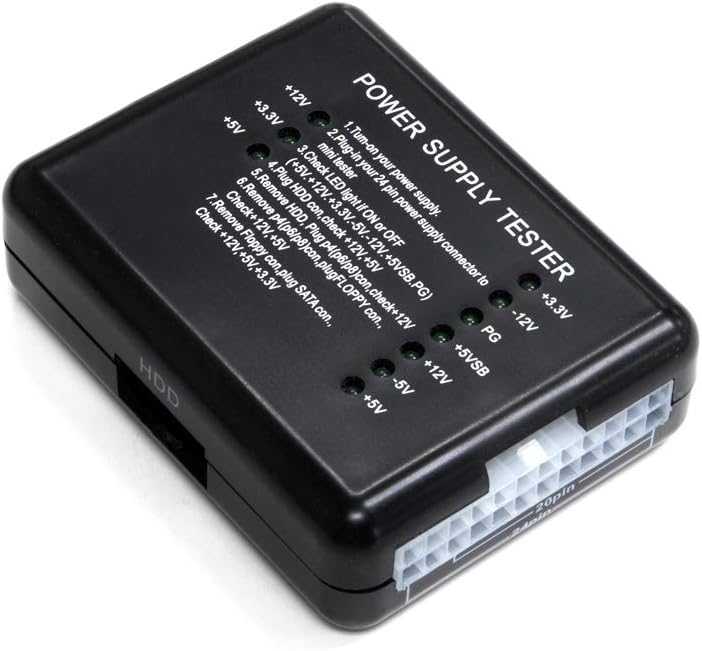
Kingwin Power Supply Tester KPST-02
Want the best price and purchase timing?
Our AI advisor analyzes real-time pricing across all channels to find you the best deal.
AI Verdict
A dirt-cheap, dummy-light diagnostic tool that instantly confirms if a PC power supply is completely dead, though it won't catch voltage drops under heavy gaming loads.
This is a binary 'is it dead or alive' checker. It's perfect for confirming a PSU isn't bricked before plugging it into a motherboard, but useless for diagnosing intermittent power delivery issues under load.
If you need exact voltage readouts to diagnose stability issues, upgrade to the Kingwin KPST-01 which features a digital LCD screen.
Regret Score™
Medium RiskLower is better — measures purchase-regret risk from real buyer complaints, review credibility, and product maturity
Issues discovered after purchase
Critically weak dimension
Amazon rating vs actual quality
Chance this product isn't for you
Pros
- Instantly tests 20/24-pin ATX, SATA, Molex, and PCIe cables without needing a multimeter
- Requires zero batteries—it runs directly off the 20/24-pin ATX cable of the PSU being tested
- Compact 3 x 2.75 x 1.125 inch ABS plastic shell easily fits in a toolkit or pocket
- Foolproof LED system lights up green for +12V, -12V, +5V, -5V, +3.3V, and 5VSB rails
Cons
- Tests at zero load, meaning a failing PSU might pass this test but still crash your PC during gaming
- Lacks an LCD screen to show exact voltage readouts—you only get a pass/fail LED light
- The 24-pin ATX socket is notoriously tight, requiring serious force to unplug the cable
- Doesn't test the newer 16-pin 12VHPWR cables used on modern RTX 40-series GPUs
Dimension Scores
Only confirms basic voltage presence at zero load, completely missing voltage droop issues.
It has no moving parts or fans, making it completely silent during operation.
The ABS plastic shell is lightweight, but the ATX socket is overly tight and prone to stressing the plastic.
It's a standalone block measuring just 3x2.75 inches, requiring no extra cables or batteries to store.
Best For
- IT helpdesk techs who need to quickly triage completely dead office PCs
- First-time PC builders checking if their used eBay power supply actually turns on
- Flippers testing bulk lots of older ATX power supplies before selling them
Not Recommended For
- Diagnosing random PC crashes or blue screens caused by voltage droop under heavy GPU loads
- Testing modern ATX 3.0 power supplies with 16-pin 12VHPWR connectors
Watch Out For
- It tests at idle with practically no load. Your PSU might light up all the green LEDs here, but still fail the moment your graphics card pulls heavy wattage.
- The 24-pin connector is incredibly stiff. You have to wiggle the cable aggressively to get it out, which feels like you might snap the ABS plastic casing.
- No exact voltage numbers. If your 12V rail is sagging to 11.4V, the green LED still turns on, masking a potential stability issue.
Full Specifications
| UPC | 812348013679 |
| ASIN | B07VVTVRYT |
| Brand | Kingwin |
| Color | Black |
| Style | NON-LCD |
| Item Weight | 20 pounds |
| Manufacturer | Kingwin |
| Power Source | Corded Electric |
| Measurement Type | Voltmeter |
| Item model number | KPST-02 |
| Package Dimensions | 6.06 x 1.1 x 0.31 inches |
| Global Trade Identification Number | 00812348013679 |
What Buyers Say
Most buyers buy this expecting a deep diagnostic tool and quickly realize it's just a basic continuity checker. The biggest recurring complaint is the sheer physical force required to remove the 24-pin ATX cable from the tester's socket. IT techs and hobbyists praise it for saving them from doing the 'paperclip test' on dead power supplies. It's widely considered a cheap $10-$15 insurance policy before plugging a questionable PSU into an expensive motherboard, even if it can't diagnose load-based crashes.
“Saved me from throwing out a good motherboard, but getting the 24 pin cable back out of this thing almost broke my fingers.”
Common Praise
- Eliminates the need to use a paperclip to jump-start a power supply
- Instantly confirms if a dead PC is due to the PSU or the motherboard
- Small enough at 3 inches long to live permanently in a basic PC toolkit
- Tests all peripheral cables including SATA and older Molex connections
Common Complaints
- The 24-pin socket grips the cable way too hard, making removal a struggle
- Green lights turn on even if the voltage is slightly out of ATX spec
- Doesn't put any load on the PSU, missing intermittent failure issues
- The ABS plastic casing feels hollow and cheap
Ownership Tips
- The plastic around the 24-pin socket starts to show stress marks after a dozen uses
- You have to plug the 24-pin in first before testing peripheral cables, or it won't turn on
- The PG (Power Good) light is the most important one to watch—if it doesn't light up, the PSU is dead
Frequently Asked Questions
Does this test the power supply under load?
No. It only tests the PSU at idle with practically zero load. If your PC crashes during gaming, this tester won't help you find the problem.
Do I need to plug it into the wall?
No, the tester draws its power directly from the 20/24-pin ATX cable of the power supply you are testing.
Will this tell me the exact voltage of my 12V rail?
No, this is the KPST-02 model which only uses green indicator LEDs. You need the KPST-01 model for an LCD screen with exact numbers.
Can I test my SATA and Molex cables with this?
Yes, it has dedicated ports to plug in SATA, Molex (HDD), and Floppy connectors to verify they are delivering power.
Does it work with SFX power supplies?
Yes, as long as the SFX power supply uses standard 20/24-pin ATX and PCIe connectors, it will read them exactly the same as an ATX unit.
Buying Guide
You need to understand the difference between a 'no-load' tester and a 'load' tester. This device only tells you if electricity is flowing through the cables while the power supply is sitting idle. It will not tell you if your power supply is failing when your graphics card spikes to 100% usage. Buy this to check if a PSU is completely dead, but don't rely on it to diagnose random blue screens or gaming crashes.
No-Load Testing
It's like revving a car engine in neutral. It proves the engine turns on, but doesn't prove it can actually pull a trailer up a hill.
LED Indicators
Instead of giving you a specific number like 11.8V, it just gives you a green light if the voltage is roughly in the right neighborhood.
PG (Power Good) Signal
This is the signal the power supply sends to the motherboard saying 'my power is stable, you can boot now'. If this LED doesn't light up, your PC will never turn on.
Alternatives
If you are trying to diagnose random PC reboots during gaming, skip this and buy a digital multimeter to test the rails under load, or a digital LCD tester for exact idle voltage readouts.
You Might Also Like

Micro ATX PC Case | Mini Tower Computer case | Pre-Installed 120mm*1 RGB Fan | ITX Desktop Chassis for MATX/ITX | 240 RAD | 280mm GPU | 160mm CPU Cooler Height - White S6
$0-$49This MAQUY S6 is a budget Micro ATX case with a pre-installed 120mm RGB fan, supporting 280mm GPUs and 240mm top radiators for entry-level builds.

Micro ATX Case, Mini PC ITX Desktop Computer Case MATX Case Support ATX PSU/250mm GPU/135mm CPU Cooler/1x 3.5’’HDD or 2X 2.5’’SSD/USB 3.0 Port
$0-$49This is a compact 38.5x19.5x32.5cm Micro ATX case supporting 250mm GPUs and 135mm CPU coolers, designed for budget workstation builds.

Small PC Case, ITX Mini Computer Case with 360 Degree Ventilation, 10.5L Compact Design for ITX Motherboard, SFX Power Supply, 4 x 2.5 Inch SSDs
$50-$99This 10.5L acrylic ITX case supports SFX/SFX-L PSUs, ITX motherboards, and GPUs up to 210mm, designed for compact builds.

Micro ATX PC Case | Mini Tower Computer case Support Vertical GPU Mount | Pre-Installed 120mm*1 RGB Fan | ITX Desktop Chassis for MATX/ITX | 240 RAD | 320mm GPU | 165mm CPU Cooler Height-Black
$0-$49A budget Micro ATX case with a mesh front, tempered glass, and support for 320mm GPUs and 240mm AIOs, but only one pre-installed 120mm RGB fan.