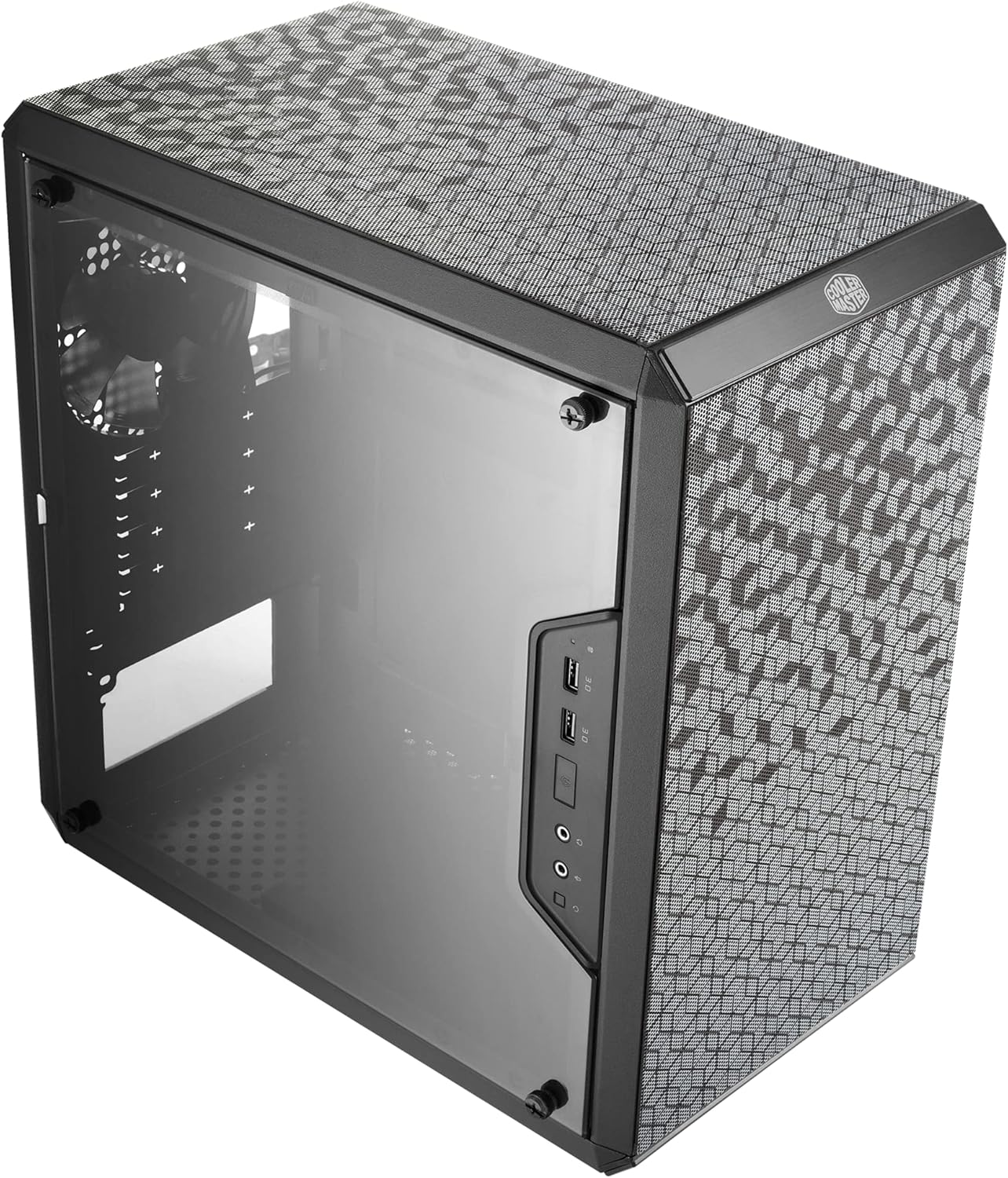
Cooler Master MasterBox Q300L Micro-ATX Tower with Magnetic Design Dust Filter, Transparent Acrylic Side Panel, Adjustable I/O & Fully Ventilated Airflow, Black (MCB-Q300L-KANN-S00)
Want the best price and purchase timing?
Our AI advisor analyzes real-time pricing across all channels to find you the best deal.
AI Verdict
The Cooler Master Q300L is an ultra-cheap, highly modular Micro-ATX case best suited for low-heat budget builds where price and desk placement flexibility matter more than premium airflow.
This case is a lifesaver if you have exactly $40 to spend and need to fit a full-size ATX power supply and a 360mm GPU into a compact space. The restrictive front panel design means it will struggle to cool high-wattage hardware without sounding like a jet engine. It's perfect for a budget 65W CPU build, but a liability for a hot-running gaming rig.
If you are running components that pull more than 300W combined, look for a case with a true mesh front panel and pre-installed 140mm fans.
Regret Score™
High RiskLower is better — measures purchase-regret risk from real buyer complaints, review credibility, and product maturity
Issues discovered after purchase
Critically weak dimension
Amazon rating vs actual quality
Chance this product isn't for you
Pros
- Accommodates massive GPUs up to 360mm, easily fitting cards like the RTX 4090 Founders Edition.
- The modular I/O panel can be relocated to six different spots along the edges to match your desk setup.
- Offers a generous 28mm of clearance behind the motherboard tray for hiding cables.
- Rubber-padded thumbscrews double as case feet, allowing you to lay the chassis completely flat horizontally.
Cons
- The steel chassis holes are too small, and the magnetic dust filters severely choke intake airflow.
- PCIe slot covers are the snap-off, disposable kind—leaving permanent holes if you change your hardware.
- The transparent side panel is made of cheap acrylic that scratches easily, not tempered glass.
- Only supports a single 3.5-inch hard drive, mounted behind the motherboard tray with zero ventilation.
Dimension Scores
Small chassis holes and thick magnetic filters severely restrict intake airflow.
The restricted airflow forces you to run case fans at higher RPMs to keep components cool.
Uses cheap acrylic for the window and snap-off disposable PCIe covers.
Provides an excellent 28mm of routing space behind the motherboard tray.
Best For
- Ultra-budget Micro-ATX builds using low-TDP components like a Ryzen 5600 or Core i3.
- Home theater PCs (HTPCs) that need to lay horizontally on a TV stand.
- Builders who need a compact footprint but still want to use a standard ATX power supply up to 160mm.
Not Recommended For
- High-end gaming rigs with hot components that require massive airflow.
- Builders who frequently swap out PCIe expansion cards or GPUs.
- Storage servers requiring multiple 3.5-inch mechanical hard drives.
Watch Out For
- The magnetic dust filters look cool but suffocate the fans—users report GPU temps dropping by 10°C just by taking the front filter off.
- The PCIe slot covers are breakaway metal; once you snap them off to install a GPU, you can't put them back if you change your build.
- The acrylic side panel is extremely soft and will develop micro-scratches even if you wipe it carefully with a microfiber cloth.
- Removing a single PCIe card requires unscrewing a master metal bracket that holds all the slots in place, making quick swaps a massive headache.
Full Specifications
| ASIN | B0785GRMPG |
| Brand | Cooler Master |
| Color | Black |
| Series | Q300L |
| Material | Alloy Steel, Plastic |
| Case Type | Mini-Tower |
| Department | Computer Cases |
| Model Name | Q300L |
| Item Weight | 1.06 pounds |
| Manufacturer | Cooler Master |
| Wireless Type | 802.11a |
| Cooling Method | Air |
| Item model number | MCB-Q300L-KANN-S00 |
| Product Dimensions | 15.39 x 9.06 x 15 inches |
| Item Dimensions LxWxH | 15.39 x 9.06 x 15 inches |
| Number of USB 3.0 Ports | 2 |
| Motherboard Compatability | Micro-ATX and Mini-ITX |
| Power Supply Mounting Type | Bottom Mount |
| Recommended Uses For Product | Gaming |
| Is Discontinued By Manufacturer | No |
What Buyers Say
The most surprising thing about the Q300L is how much hardware you can cram into it, with users successfully fitting massive 330mm+ GPUs and standard ATX power supplies. The 'fully ventilated' marketing is highly misleading; owners constantly complain that the small steel punch-holes and magnetic dust filters choke intake fans. Cable management is a major bright spot, with 28mm of rear clearance making it easy to hide a messy non-modular PSU. The modular I/O panel is a hit for custom desk setups, but the breakaway PCIe covers and easily scratched acrylic panel remind you exactly why this case is so cheap.
“Great size and cable management for the price, but the airflow is a joke—I had to take the front dust filter off just to keep my GPU from cooking itself at 80C.”
Common Praise
- The 28mm gap behind the motherboard tray makes hiding thick PSU cables incredibly easy.
- Moving the I/O panel to the bottom or top edge is perfect for unconventional desk placements.
- Fits massive graphics cards up to 360mm despite the compact Micro-ATX footprint.
- Laying the case horizontally on its rubberized thumbscrews works great for TV stand HTPC setups.
Common Complaints
- The magnetic dust filters block too much air, causing GPU temperatures to spike.
- Breakaway PCIe slot covers leave permanent, ugly holes in the back of the case.
- The acrylic side panel scratches easily during basic cleaning.
- The single 3.5-inch hard drive mount gets zero airflow behind the motherboard tray.
Ownership Tips
- The acrylic side panel attracts dust statically and will show micro-scratches after your first time wiping it down.
- You'll likely need to buy high static pressure fans for the front, which eats into the budget savings of the case.
- If you break off the wrong PCIe slot cover by mistake, you have to buy aftermarket magnetic covers to seal the hole.
Frequently Asked Questions
Does this case have good airflow?
No. Despite the perforated look, the actual holes in the steel are small, and the magnetic dust filter restricts intake heavily. You'll need high static pressure fans to force air through.
Can I fit a standard ATX power supply?
Yes, it fits standard ATX power supplies up to 160mm in length. Using a shorter PSU makes cable management much easier.
Is the side panel tempered glass?
No, this specific model (MCB-Q300L-KANN-S00) uses a transparent acrylic side panel. It is lightweight but scratches very easily.
How many fans are included?
It only comes with one standard 120mm exhaust fan pre-installed at the rear. You will need to buy your own intake fans for the front.
Can I mount this case horizontally?
Yes. The rubberized thumbscrews on the side panel double as feet, allowing you to lay the case flat like a desktop console.
Buying Guide
When buying an ultra-budget PC case, you are usually trading material quality for space. The Q300L gives you excellent room for big graphics cards and standard power supplies, but cuts corners with snap-off metal pieces and an acrylic window. Because the front metal panel has small punch-holes rather than a wide-open mesh, your fans have to work harder to pull air in. Plan to spend an extra $15-$20 on a couple of good intake fans, or stick to low-power components that don't generate much heat.
159mm CPU Cooler Clearance
This dictates how tall your processor heatsink can be. 159mm fits most standard tower coolers like the Cooler Master Hyper 212, but massive dual-tower coolers won't let you close the side panel.
Micro-ATX / Mini-ITX Compatibility
This case only fits smaller motherboards. If you buy a standard, full-size ATX motherboard, it physically will not fit inside this box.
360mm GPU Clearance
This is the maximum length for a graphics card. 360mm is huge—meaning you can fit almost any modern, high-end graphics card without it hitting the front fans.
Alternatives
If you need better cooling out of the box, look for a Micro-ATX case with a true mesh front panel and a tempered glass side window to avoid scratches.
You Might Also Like

Micro ATX PC Case | Mini Tower Computer case | Pre-Installed 120mm*1 RGB Fan | ITX Desktop Chassis for MATX/ITX | 240 RAD | 280mm GPU | 160mm CPU Cooler Height - White S6
$0-$49This MAQUY S6 is a budget Micro ATX case with a pre-installed 120mm RGB fan, supporting 280mm GPUs and 240mm top radiators for entry-level builds.

Micro ATX Case, Mini PC ITX Desktop Computer Case MATX Case Support ATX PSU/250mm GPU/135mm CPU Cooler/1x 3.5’’HDD or 2X 2.5’’SSD/USB 3.0 Port
$0-$49This is a compact 38.5x19.5x32.5cm Micro ATX case supporting 250mm GPUs and 135mm CPU coolers, designed for budget workstation builds.

Small PC Case, ITX Mini Computer Case with 360 Degree Ventilation, 10.5L Compact Design for ITX Motherboard, SFX Power Supply, 4 x 2.5 Inch SSDs
$50-$99This 10.5L acrylic ITX case supports SFX/SFX-L PSUs, ITX motherboards, and GPUs up to 210mm, designed for compact builds.

Micro ATX PC Case | Mini Tower Computer case Support Vertical GPU Mount | Pre-Installed 120mm*1 RGB Fan | ITX Desktop Chassis for MATX/ITX | 240 RAD | 320mm GPU | 165mm CPU Cooler Height-Black
$0-$49A budget Micro ATX case with a mesh front, tempered glass, and support for 320mm GPUs and 240mm AIOs, but only one pre-installed 120mm RGB fan.