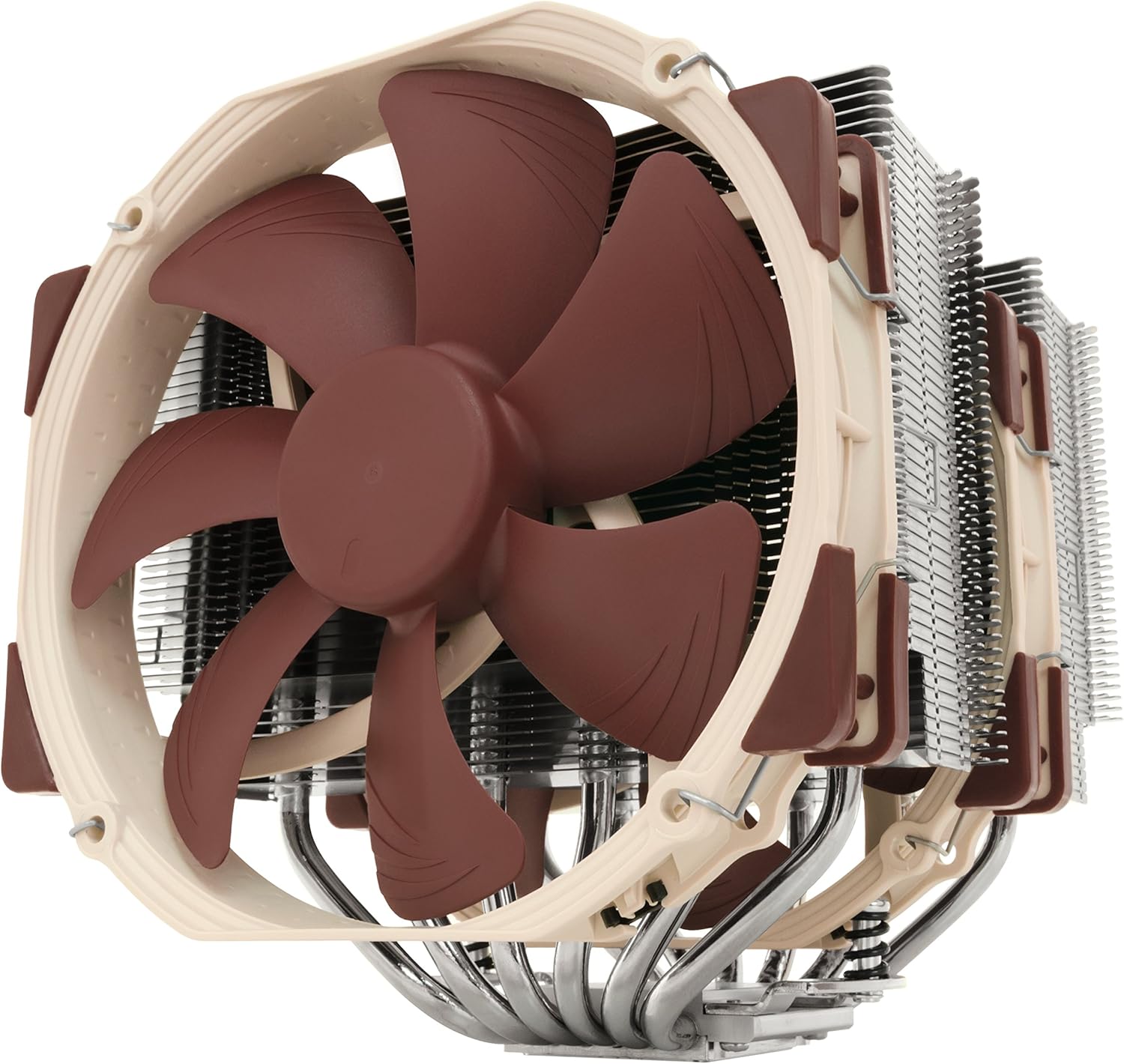
Noctua NH-D15, Premium CPU Cooler with 2X NF-A15 PWM 140mm Fans (Brown)
Want the best price and purchase timing?
Our AI advisor analyzes real-time pricing across all channels to find you the best deal.
AI Verdict
The Noctua NH-D15 is a massive air cooler that rivals 360mm liquid AIOs, built specifically for overclockers and silent PC enthusiasts with massive cases.
This cooler delivers undisputed thermal performance, but its massive physical footprint dictates your entire build. You must meticulously verify your case's maximum CPU cooler height and your RAM module height before buying. If your case only supports 165mm coolers and your RAM is 44mm tall, the front fan simply will not fit.
If you have tall RGB RAM or a tight case, buy the Noctua NH-D15S instead—it drops the front fan and uses an asymmetrical layout to guarantee PCIe and memory clearance.
Regret Score™
Very Low RiskLower is better — measures purchase-regret risk from real buyer complaints, review credibility, and product maturity
Issues discovered after purchase
Critically weak dimension
Amazon rating vs actual quality
Chance this product isn't for you
Pros
- Matches 360mm AIO liquid cooler performance without the risk of pump failure or leaks.
- SecuFirm2 mounting system uses built-in motherboard backplates and requires just two spring-loaded screws.
- Includes two NF-A15 140mm PWM fans that push 82.5 CFM each.
- Bundled Low-Noise Adaptors physically cap the fan speed at 1200 RPM for near-silent operation.
- Soldered joints between the six copper heatpipes and aluminum fins prevent thermal degradation over years of use.
Cons
- Base RAM clearance is only 32mm, forcing you to raise the front fan and increase the 165mm total height.
- The 150mm width completely blocks the top PCIe x16 slot on many micro-ATX and some ATX motherboards.
- Weighs 1320 grams fully assembled, which puts noticeable stress on the motherboard during transport.
- At the absolute maximum 1500 RPM, the dual 140mm fans produce a highly audible 24.6 dBA hum.
Dimension Scores
Six soldered heatpipes and dual 140mm fans keep 250W+ CPUs like the 14900K from thermal throttling under sustained loads.
The NF-A15 fans are virtually inaudible below 1000 RPM, though they do produce a noticeable 24.6 dBA hum at their 1500 RPM maximum.
Every copper heatpipe is nickel-plated and directly soldered to the aluminum fins to prevent long-term thermal degradation.
You have to route two separate 4-pin PWM cables and optionally hide the included Y-splitter and Low-Noise Adaptors around the massive heatsink.
Best For
- Cooling power-hungry flagship CPUs like the Intel Core i9-14900K or AMD Ryzen 9 9950X.
- Zero-maintenance workstation builds running 24/7 rendering workloads.
- Ultra-quiet recording studio PCs where pump whine from liquid coolers is unacceptable.
Not Recommended For
- Mini-ITX or compact mid-tower cases with less than 170mm of CPU cooler clearance.
- Builds using tall RGB memory kits like Corsair Dominator or G.Skill Trident Z.
- Motherboards where the primary GPU slot is the absolute top PCIe position.
Watch Out For
- The front 140mm fan sits directly over your RAM slots. If your memory sticks are taller than 32mm, you have to slide the fan up the heatsink, which easily pushes the total cooler height past 175mm and prevents your case side panel from closing.
- You have to completely remove the center fan to access the two mounting screws during installation, which means you'll be clipping it back on in a very tight space between the two metal towers.
- The cooler's 150mm width overhangs the top PCIe slot on many motherboards, forcing you to move your graphics card down to a slower slot or buy the offset NH-D15S version instead.
- Shipping a pre-built PC with this 1.3kg chunk of metal attached to the motherboard is incredibly risky and can literally rip the socket out during transit.
Full Specifications
| UPC | 807320186861 803983039766 842431012456 |
| ASIN | B00L7UZMAK |
| Brand | Noctua |
| Color | Brown |
| Series | NH-D15 |
| Voltage | 12 Volts |
| Wattage | 1.56 watts |
| Language | English |
| Material | Copper (base and heat-pipes), aluminium (cooling fins), soldered joints & nickel plating |
| Batteries | Unknown batteries required. |
| Department | Adults |
| Item Weight | 2.86 pounds |
| Noise Level | 24.6 Decibels |
| Manufacturer | Noctua |
| Cooling Method | Air |
| Number of Items | 1 |
| Air Flow Capacity | 140.2 Cubic Meters Per Hour |
| Item model number | NH-D15 |
| Compatible Devices | Desktop |
| Product Dimensions | 9.33"L x 8.62"W x 6.53"H |
| Power Connector Type | 4-Pin |
| Item Dimensions LxWxH | 6.34 x 5.91 x 6.5 inches |
| Maximum Rotational Speed | 1500 RPM |
| Is Discontinued By Manufacturer | No |
| Global Trade Identification Number | 00807320186861, 00842431012456, 04716123315360 |
What Buyers Say
The sheer size of the NH-D15 catches a lot of first-time builders off guard. The most common shock is realizing the front fan rests directly on the RAM slots, forcing you to either leave your case side panel off or run the cooler with only the middle fan. You get identical temperatures to liquid AIOs without the pump whine or failure anxiety. Installation is universally praised thanks to the SecuFirm2 hardware, though clipping the fans on in a cramped case requires serious patience. It is a buy-it-for-life component that outlasts multiple CPU upgrades.
“I had to take a dremel to my case side panel because my Trident Z RAM pushed the front fan up too high, but my 13900K hasn't broken 80C since I installed this absolute unit.”
Common Praise
- Matches or beats 360mm liquid coolers without any pump noise or leak anxiety.
- The SecuFirm2 mounting system is incredibly intuitive and requires zero guesswork for tension.
- Included NT-H1 thermal paste and long screwdriver mean you don't need any extra tools to install it.
- Idles in complete silence and only ramps up to a smooth, low-pitch hum under heavy gaming loads.
Common Complaints
- The front 140mm fan completely covers the RAM slots, hiding expensive RGB memory.
- Sliding the front fan up to clear tall RAM makes the cooler too tall to fit in popular cases like the Corsair 4000D.
- The 150mm width blocks the top PCIe slot on many micro-ATX boards, forcing the GPU into a slower x8 slot.
- The sharp aluminum fins easily slice your knuckles when trying to attach the wire fan clips in a tight case.
Ownership Tips
- Dust buildup on the front fin stack is highly visible after a few months, requiring a long-bristled brush to clean.
- The wire fan clips lose some of their tension if you repeatedly remove and reinstall the fans.
- Running the cooler with just the single middle fan only costs about 2°C in performance but completely solves RAM clearance.
- The sheer weight of the cooler can cause slight motherboard flex if you don't tighten the backplate evenly.
Frequently Asked Questions
Will this fit with Corsair Vengeance RGB or G.Skill Trident Z RAM?
Only if your case is massive. Those RAM sticks are 44mm tall, meaning you have to slide the NH-D15's front fan up by 12mm. This pushes the cooler's total height to 177mm, which is too tall for most standard mid-tower cases.
Do I need to buy thermal paste?
No. Noctua includes a full-sized tube of their NT-H1 thermal compound in the box, which is enough for about 4-5 applications.
Is this better than a 240mm or 360mm AIO liquid cooler?
It easily beats almost all 240mm AIOs and performs within 2-3°C of 360mm AIOs under heavy load. It has zero risk of leaking and no pump to die after five years.
Why is it blocking my top PCIe slot?
The heatsink is 150mm wide and expands symmetrically from the CPU socket. On motherboards where the top PCIe x16 slot is very close to the CPU, the metal fins will physically touch your GPU backplate.
Can I run it with just the middle fan?
Yes. Removing the front fan solves all RAM clearance issues and only increases CPU temperatures by about 1-3°C under maximum load.
Does it come with the LGA1700 or AM5 mounting brackets?
Yes, all current retail boxes include the SecuFirm2 hardware for Intel LGA1700/1851 and AMD AM4/AM5 sockets.
Buying Guide
When buying a dual-tower air cooler of this size, your case dimensions and motherboard layout dictate everything. You cannot just look at the '165mm height' spec on the box; that measurement assumes you are using bare, low-profile RAM. If you buy tall memory sticks with RGB light bars, you will be forced to slide the front fan upward, which increases the total height of the cooler. Always measure your case's maximum CPU cooler clearance and subtract your RAM height to see if this will actually fit.
165mm Height (with 32mm RAM clearance)
This is the physical distance from your CPU to the glass side panel of your case. If your RAM is taller than 32mm, the fan moves up, and the cooler will smash into your glass panel.
150mm Width
This determines how close the metal fins get to your graphics card. On smaller motherboards, this width will physically block you from plugging your GPU into the top slot.
1320g Weight
This is nearly 3 pounds of metal hanging off your motherboard. It's fine for a stationary desk PC, but moving or shipping the PC fully assembled can snap your motherboard in half.
Alternatives
If you have tall RGB memory or a narrower mid-tower case, look for an asymmetrical single-fan dual-tower cooler, or a high-end 120mm dual-tower cooler that doesn't overhang the RAM slots.
You Might Also Like

Micro ATX PC Case | Mini Tower Computer case | Pre-Installed 120mm*1 RGB Fan | ITX Desktop Chassis for MATX/ITX | 240 RAD | 280mm GPU | 160mm CPU Cooler Height - White S6
$0-$49This MAQUY S6 is a budget Micro ATX case with a pre-installed 120mm RGB fan, supporting 280mm GPUs and 240mm top radiators for entry-level builds.

Micro ATX Case, Mini PC ITX Desktop Computer Case MATX Case Support ATX PSU/250mm GPU/135mm CPU Cooler/1x 3.5’’HDD or 2X 2.5’’SSD/USB 3.0 Port
$0-$49This is a compact 38.5x19.5x32.5cm Micro ATX case supporting 250mm GPUs and 135mm CPU coolers, designed for budget workstation builds.

Small PC Case, ITX Mini Computer Case with 360 Degree Ventilation, 10.5L Compact Design for ITX Motherboard, SFX Power Supply, 4 x 2.5 Inch SSDs
$50-$99This 10.5L acrylic ITX case supports SFX/SFX-L PSUs, ITX motherboards, and GPUs up to 210mm, designed for compact builds.

Micro ATX PC Case | Mini Tower Computer case Support Vertical GPU Mount | Pre-Installed 120mm*1 RGB Fan | ITX Desktop Chassis for MATX/ITX | 240 RAD | 320mm GPU | 165mm CPU Cooler Height-Black
$0-$49A budget Micro ATX case with a mesh front, tempered glass, and support for 320mm GPUs and 240mm AIOs, but only one pre-installed 120mm RGB fan.