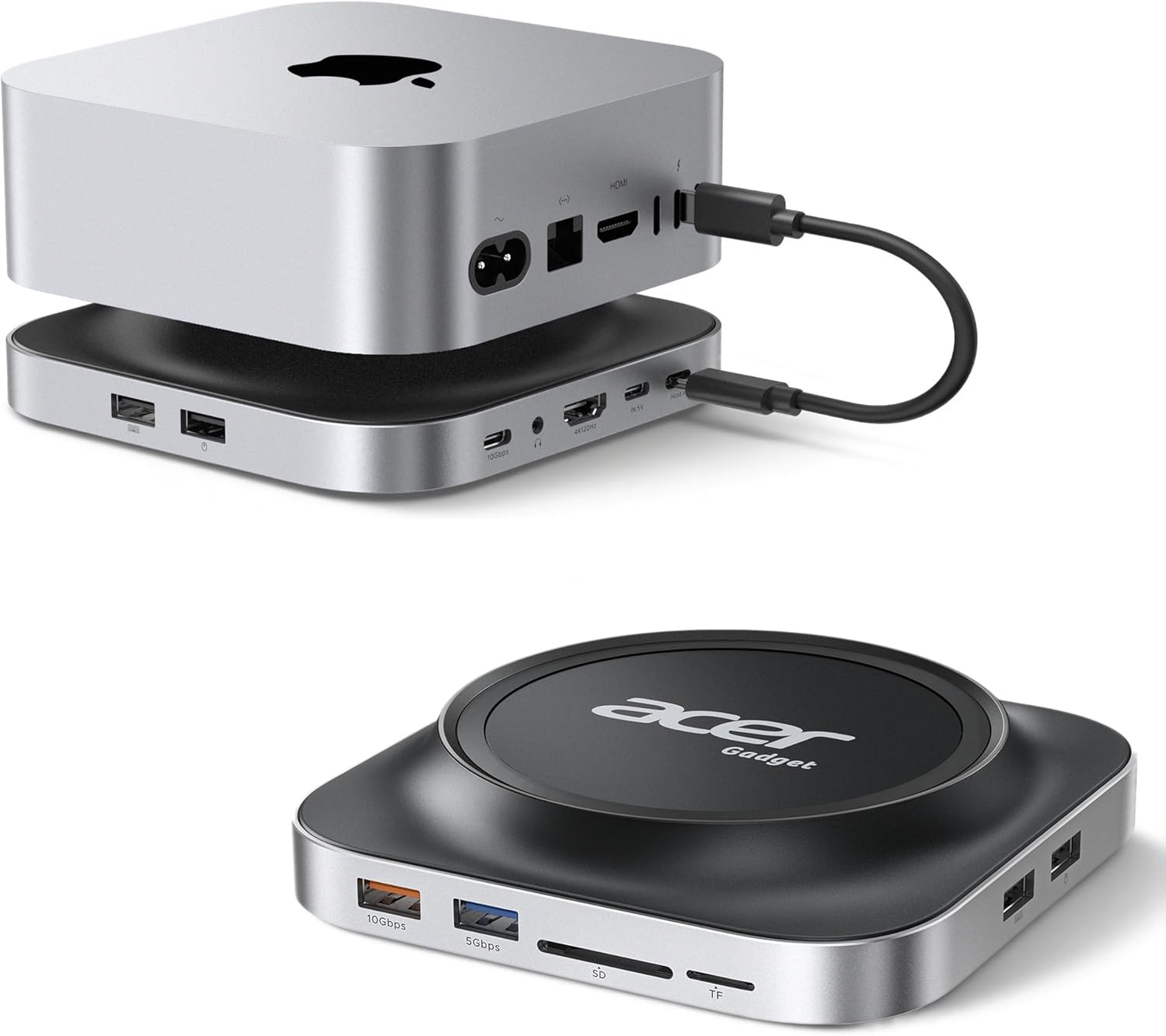
Acer Gadget Mac Mini M4 Dock, 8TB M.2 NVMe/SATA SSD Enclosure & Stand, 4K@144Hz HDMI, 10Gbps USB-C & USB-A Hub, SD/TF Card Reader, 3.5mm Audio, Aluminum Docking Station for Mac Mini M4 & M4 Pro, Black
Want the best price and purchase timing?
Our AI advisor analyzes real-time pricing across all channels to find you the best deal.
AI Verdict
This is a 8TB M.2 NVMe/SATA SSD enclosure and stand with 4K@144Hz HDMI, 10Gbps USB-C/A, and card readers, for Mac Mini M4 users needing storage and port expansion.
This dock is a strong fit for Mac Mini M4/M4 Pro users who need to expand storage up to 8TB and add essential ports like 10Gbps USB-C/A, SD/TF card readers, and an additional 4K@144Hz HDMI output. Its elevated design also helps with Mac Mini cooling and cable management.
If you need multiple high-refresh-rate display outputs directly from the dock or an integrated Ethernet port, look for docks with DisplayPort outputs or dedicated Gigabit Ethernet ports.
Regret Score™
Very High RiskLower is better — measures purchase-regret risk from real buyer complaints, review credibility, and product maturity
Issues discovered after purchase
Critically weak dimension
Amazon rating vs actual quality
Chance this product isn't for you
Pros
- Expands Mac Mini storage by up to 8TB with M.2 NVMe/SATA SSD support for all standard sizes (2230/2242/2260/2280) and interface keys (M-Key/B&M Key).
- Adds a 4K@144Hz HDMI 2.1 output with HDR, enabling dual-screen setups when combined with the Mac Mini's native HDMI port.
- Provides 10Gbps USB-C and USB-A ports for rapid file transfers, suitable for 4K video editing and large data backups.
- Includes SD/TF card readers with up to 104MB/s transfer speeds, useful for photographers and videographers.
- Features a dedicated side USB 2.0 port to minimize 2.4GHz wireless interference for peripherals.
- Elevated aluminum design improves Mac Mini airflow and acts as a passive heat sink for the internal SSD, reducing operating temperatures.
Cons
- Requires an external 5V/3A power adapter, adding another cable to the setup.
- SSD is not included, requiring an additional purchase to utilize the storage expansion feature.
- The included USB-C cable is 23cm, which might be too short for some desk configurations.
- Lacks an Ethernet port, a common feature found on many docking stations for wired network connectivity.
- Only one 4K@144Hz HDMI output is provided by the dock itself; dual-screen at this resolution requires using the Mac Mini's native port as well.
Dimension Scores
The elevated design creates a high-velocity airflow channel for the Mac Mini, preventing thermal throttling and providing easy access to the power button.
The dock acts as a fixed stand for the Mac Mini and offers no adjustable features for itself or the connected computer.
Crafted from premium aluminum alloy, the casing acts as a passive heat sink for the internal SSD, indicating durable construction and thermal management.
Designed to sit directly under the Mac Mini, its black aluminum finish and minimalist form factor integrate seamlessly with the Mac's design.
Best For
- Mac Mini M4/M4 Pro users needing significant storage expansion for large media libraries or backups.
- Creative professionals (video editors, photographers) requiring high-speed data transfer and card reader access.
- Users aiming for a cleaner, more organized desk setup by integrating a dock directly under their Mac Mini.
- Individuals needing to add a second 4K@144Hz display to their Mac Mini M4 setup.
Not Recommended For
- Users who primarily need multiple high-refresh-rate display outputs directly from the dock.
- Anyone requiring a wired Ethernet connection for their Mac Mini.
- Users seeking a highly portable docking solution due to the external power requirement.
Watch Out For
- Specific user complaints were not found in the search results for this product. However, potential pitfalls for similar devices often include: the 23cm USB-C cable might be too short for some desk layouts, forcing users to buy a longer one.
- The 4K@144Hz HDMI performance is dependent on the quality of your monitor and HDMI cable, so you might not hit peak performance without compatible accessories.
- While it supports up to 8TB SSD, the SSD itself is a separate purchase, adding to the total cost.
- The single dedicated USB 2.0 port for wireless receivers, while reducing interference, means one less high-speed USB port for other peripherals.
Full Specifications
| UPC | 195133350143 |
| ASIN | B0GGZ44MYN |
| Brand | acer |
| Color | Black |
| Wattage | 15 |
| Item Weight | 14 ounces |
| Manufacturer | acer |
| Number of Ports | 11 |
| Total USB Ports | 7 |
| Total HDMI Ports | 1 |
| Item model number | ODK5R0 |
| Compatible Devices | Mac mini 2024, Mac mini M4, Mac mini M4 Pro |
| Hardware Interface | 3.5mm Audio, HDMI, MicroSD, USB 3.1 Type A, USB Type C |
| Package Dimensions | 9.06 x 6.42 x 1.85 inches |
What Buyers Say
Specific user feedback for the Acer Gadget Mac Mini M4 Dock was not readily available in the search results. However, the product maintains a 5.0/5 rating across 41 reviews, suggesting high user satisfaction. The dock is designed to significantly expand storage with up to 8TB M.2 SSD support and enhance connectivity with 10Gbps USB ports, 4K@144Hz HDMI, and card readers. Its elevated aluminum design also aims to improve Mac Mini cooling and maintain a clean workspace.
“This thing is exactly what my Mac Mini needed, finally got all my external drives consolidated and a second monitor running smooth, no more reaching around the back!”
Common Praise
- The ability to add up to 8TB of M.2 NVMe/SATA storage directly under the Mac Mini is a huge plus for media professionals.
- The inclusion of 10Gbps USB-C and USB-A ports makes transferring large files incredibly fast.
- The 4K@144Hz HDMI output with HDR is a welcome addition for high-resolution display needs.
- The dedicated USB 2.0 port for wireless peripherals helps prevent interference, keeping mouse and keyboard responsive.
- The aluminum construction and elevated design for cooling are appreciated for maintaining Mac Mini performance and SSD longevity.
Common Complaints
- The absence of an integrated Ethernet port means users still need a separate adapter or rely on Wi-Fi.
- Having to purchase the M.2 SSD separately adds to the overall cost and setup time.
- The 23cm USB-C cable might be too short for some users, requiring a longer replacement.
- Requires an external power brick, which can contribute to cable clutter.
Ownership Tips
- The external 5V/3A power adapter is essential for stable operation, especially with an SSD installed and multiple peripherals connected.
- The thermal pad included for the SSD is important for heat dissipation, make sure it's installed correctly.
- The dedicated USB 2.0 port does seem to help with wireless mouse/keyboard responsiveness, especially in congested areas.
- The aluminum casing does get warm when the SSD is under heavy load, confirming its function as a passive heat sink.
Frequently Asked Questions
Does this dock include an SSD?
No, the dock does not include an M.2 SSD. You will need to purchase an M.2 NVMe or SATA SSD separately to utilize the storage expansion feature.
Can I connect two external monitors to this dock?
The dock provides one HDMI 2.1 port supporting up to 4K@144Hz. For a dual-monitor setup, you would use this port along with the native HDMI port on your Mac Mini M4.
Is this dock compatible with older Mac Mini models?
This dock is specifically designed for the Mac Mini M4 and M4 Pro models. Compatibility with older models is not guaranteed and may result in limited functionality.
Does this dock require external power?
Yes, the dock comes with a dedicated 5V/3A power adapter and requires external power to function.
What types of M.2 SSDs are supported?
It supports both M.2 PCIe NVMe and NGFF SATA SSDs in standard sizes (2230/2242/2260/2280) and interface keys (M-Key/B&M Key) up to 8TB.
Buying Guide
When looking at Mac Mini docks, you're essentially trying to solve two problems: expanding your storage and adding more ports. Think about how much extra space you need for files and what kind of devices you want to connect. Don't just count ports; check their speed (like 10Gbps USB) and what they're for (like HDMI for a monitor). Also, consider if you want it to sit under your Mac Mini for a cleaner look or if you prefer a separate hub.
8TB M.2 NVMe/SATA SSD Enclosure
This is like adding a huge, fast internal hard drive to your Mac Mini without actually opening it up. 8TB is enough space for tons of 4K video, massive photo libraries, or extensive game collections, making it perfect for creative work or serious backups.
4K@144Hz HDMI 2.1
This means you can connect a high-resolution monitor that refreshes 144 times per second. For comparison, most standard monitors are 60Hz. This results in incredibly smooth visuals, which is a big deal for video editing, gaming, or just a more fluid desktop experience.
10Gbps USB-C & USB-A Hub
10 Gigabits per second is fast! This speed lets you transfer massive files, like a full 4K movie, in seconds. It's crucial for external SSDs, high-speed cameras, or anything where you don't want to wait around for data to move.
Elevated Airflow & Thermal Management
Your Mac Mini and any internal SSD can get warm, especially during intense tasks. This dock's design lifts the Mac Mini and uses its aluminum body to help dissipate heat, like a built-in cooling fan, keeping everything running smoothly and extending component life.
Alternatives
If this dock doesn't fit, search for options with multiple DisplayPort outputs for more advanced multi-monitor setups, or docks that include a Gigabit Ethernet port for a stable wired network connection. Also, consider docks with higher power delivery if you need to charge a laptop through the dock.
You Might Also Like

LYMAX Computer Monitor Light Bar with Wireless Remote, Motion Sensor, Fit for Flat/Curved Monitor, Adjustable Color Temperature with Auto-Dimming, Eye-Care USB-C Monitor Lamp, No Glare Desk Lamp
$50-$99A 15.7-ounce aluminum monitor light bar with motion sensing, auto-dimming, and stepless 2700K-6500K color temperature adjustment for flat or curved screens.

Computer Monitor Lamp, Screen Monitor Light Bar for Eye Caring, Screen Monitor Light Bar with Backlight for Eye Caring, E-Reading LED Task Lamp with Dimming Adjustment, Perfect for Reading and Study
$0-$49This BLYGACN monitor lamp offers 3 color temperatures (3000K-6500K), dimming, and a 60-minute timer, powered by USB, for monitors 15-24 inches.

Monitor Light Bar with Touch Control, RGB Desk Lamp Full Spectrum Screen Lamp, Glare-Free Low Blue Light Monitor Lamp with Memory Mode, USB Powered for Gaming, Office & Work
$0-$49A USB-powered plastic monitor light bar with touch controls, RGB modes, and glare-free illumination for basic desk setups.

RGB Monitor Light Bar, Eye-Care Dual Light Reading Screen Lamp, 9 Modes Gaming Backlight LED Computer Lamp, 3 Colors Dimmable Frontlight, 15.75'' USB Desk Lights for Home, Office
$0-$49This is a budget-focused 6.4-ounce plastic monitor light bar with dual-mode lighting and 9 RGB backlight modes, designed for users needing basic task and ambient lighting without cluttering their desk