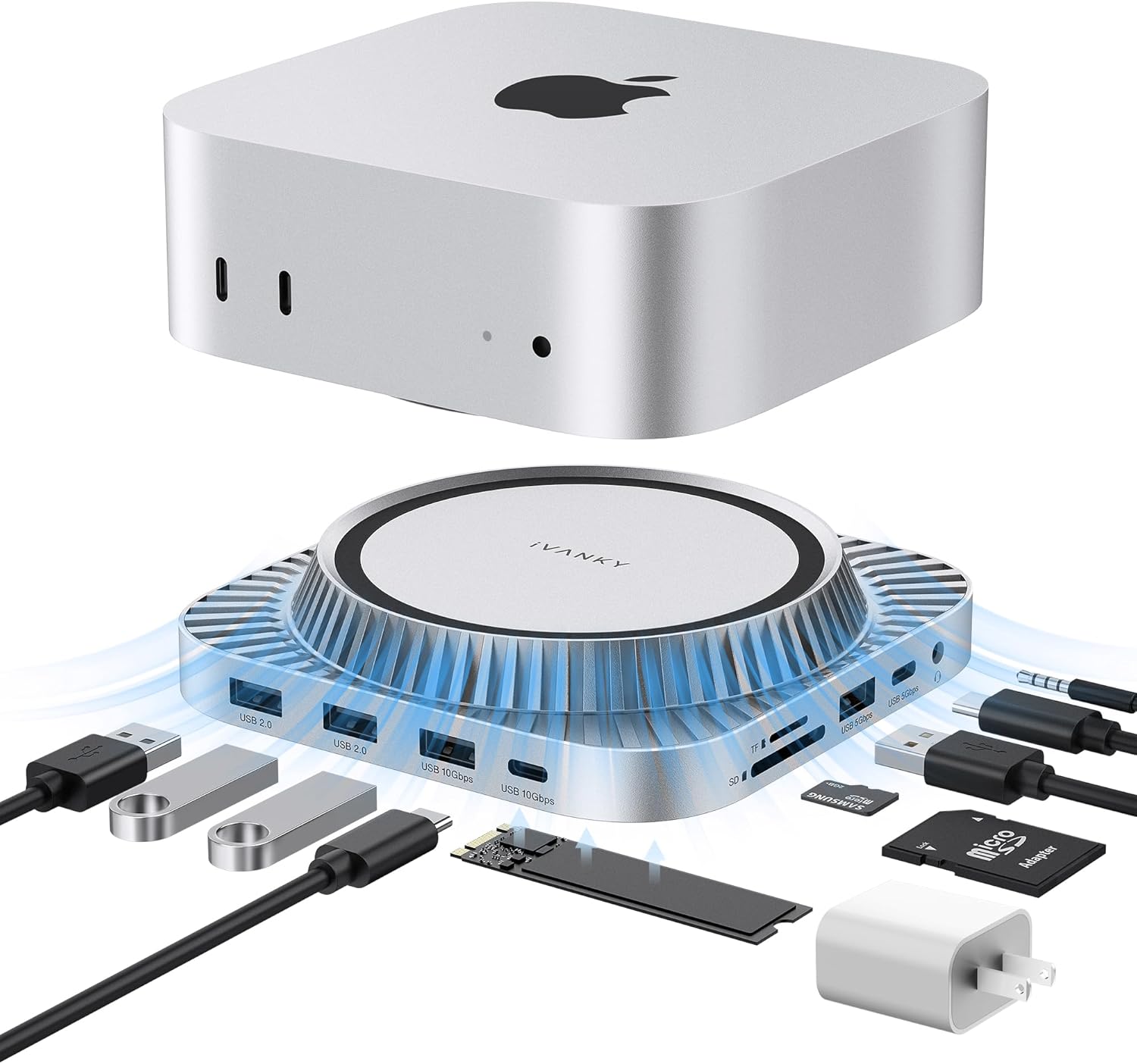
IVANKY 13-in-1 Mac mini M4 Dock, Ultra Docking Station Stand with M.2 NVMe SSD Enclosure, 4K@120Hz HDMI Hub for Mac mini M4 &M4 Pro (2024), 10 Gbps USB, SD/TE, Audio Ports *2, 20W PD Power Adapter *1
Want the best price and purchase timing?
Our AI advisor analyzes real-time pricing across all channels to find you the best deal.
AI Verdict
This 1.37-pound Mac mini M4 dock offers 13 ports including 4K@120Hz HDMI and a 10Gbps M.2 NVMe SSD enclosure, for users needing expanded connectivity and storage.
This dock is a situational fit for Mac mini M4 users who need a specific combination of 4K@120Hz HDMI, 10Gbps USB ports, and an M.2 NVMe SSD enclosure. Its 1.37-pound weight and 20W PD power adapter provide a stable platform for expanded connectivity.
If you need a single-cable solution or higher bandwidth than 10Gbps, look for docks with Thunderbolt 3 or 4 connectivity.
Regret Score™
High RiskLower is better — measures purchase-regret risk from real buyer complaints, review credibility, and product maturity
Issues discovered after purchase
Critically weak dimension
Amazon rating vs actual quality
Chance this product isn't for you
Pros
- Integrated M.2 NVMe SSD enclosure supports up to 8TB capacity with 10Gbps transfer speeds for M.2 NVMe and SATA SSDs.
- Provides a 4K@120Hz HDMI output for smooth visual experiences.
- Includes dedicated 10Gbps USB-A and USB-C ports for high-speed data transfer.
- Comes with a 20W PD power adapter to ensure stable power delivery when connecting multiple devices.
- Features a top-vent design and slight elevation to improve cooling airflow for the Mac mini.
- Offers a 24-month warranty with free returns or replacements.
Cons
- Requires two ports on the Mac mini for full functionality, consuming valuable host connections.
- SSD is not included, requiring an additional purchase for storage expansion.
- Simultaneously using multiple functional ports (USB/SD/TF) can impact transfer speeds.
- The white finish may not seamlessly match the Mac mini's aesthetic for all users.
- Design is bulkier compared to some competing docks.
Dimension Scores
The dock's slight elevation and top-vent design support the Mac mini by creating space for cooling airflow, safeguarding its bottom fan.
The dock is a static stand for the Mac mini and offers no physical adjustability for height, tilt, or swivel.
The dock feels 'pretty hefty' and includes rubber feet on the bottom for stability.
It features a top-vent design intended to complement the Mac's aesthetic, but its white finish might not seamlessly match the Mac mini's color for all users.
Best For
- Mac mini M4 users needing integrated M.2 NVMe SSD storage expansion up to 8TB.
- Professionals requiring a 4K@120Hz display output for editing or design.
- Individuals with numerous USB-A and USB-C peripherals needing 10Gbps data transfer.
- Home office setups where a single, comprehensive docking solution is preferred.
Not Recommended For
- Users with limited Mac mini ports who cannot spare two host connections.
- Those prioritizing a compact, minimalist dock that perfectly matches the Mac mini's footprint and color.
- Individuals needing Thunderbolt 3 or 4 speeds for extremely high-bandwidth peripherals.
Watch Out For
- You need to enable Game Mode/Signal Enhancement Mode on certain high-refresh-rate monitors to achieve 4K@120Hz.
- The dock uses two ports on your Mac mini for full operation, which might be a surprise if you're expecting a single-cable solution.
- Transfer speeds across USB/SD/TF ports can decrease when multiple ports are in use simultaneously.
- The M.2 NVMe SSD for storage expansion is not included, so factor in that extra cost.
Full Specifications
| ASIN | B0G25G961Y |
| Brand | IVANKY |
| Color | Sliver |
| Wattage | 20 |
| Item Weight | 1.37 pounds |
| Manufacturer | Shenzhen Velocity Technology Innovations Co., Ltd. |
| Number of Ports | 13 |
| Total USB Ports | 5 |
| Total HDMI Ports | 1 |
| Item model number | VCD21 |
| Compatible Devices | Mac Mini M4 |
| Hardware Interface | Ethernet |
| Package Dimensions | 7.64 x 6.93 x 2.13 inches |
What Buyers Say
Users report that while the dock offers a lot of ports and storage expansion, it's important to know it uses two ports on your Mac mini, which can be a surprise if you're expecting a single-cable solution. The 4K@120Hz HDMI output is a highlight, though some monitors might need specific settings adjustments. The included 20W power adapter helps maintain stability, but be aware that simultaneous use of many ports can affect transfer speeds.
“Ugh, I thought this would be one cable to my Mac mini, but nope, it eats two ports! Still, that 4K@120Hz is buttery smooth and having the SSD inside is a game-changer for my files, just wish it was all one connection.”
Common Praise
- The 4K@120Hz HDMI output provides smooth visuals for high-resolution content.
- The integrated M.2 NVMe SSD enclosure expands storage up to 8TB with 10Gbps speeds.
- Multiple 10Gbps USB-A and USB-C ports offer fast data transfer for demanding peripherals.
- The included 20W PD power adapter prevents power-related issues with multiple connected devices.
- The top-vent design and elevation help with Mac mini cooling.
Common Complaints
- The dock requires two ports on the Mac mini for full functionality, which can limit other connections.
- Transfer speeds can be impacted when many USB, SD, or TF ports are active simultaneously.
- The M.2 NVMe SSD is not included, adding to the overall cost.
- Some high-refresh-rate monitors need specific 'Game Mode' or 'Signal Enhancement Mode' settings to work correctly with the 4K@120Hz output.
- The dock's white finish and bulkier design might not perfectly integrate with the Mac mini's aesthetic.
Ownership Tips
- You'll need to source your own M.2 NVMe SSD, so factor that into your budget and setup time.
- Be prepared to use two of your Mac mini's ports, one for data/power and another for the display.
- If you're pushing a lot of data through multiple USB and card reader ports at once, expect some speed degradation.
- Check your monitor settings if you're not getting 4K@120Hz right away; it might need a specific mode enabled.
- The dock's elevation does seem to help keep the Mac mini a bit cooler during heavy use.
Frequently Asked Questions
Does this dock include an SSD?
No, the M.2 NVMe SSD for storage expansion is not included with the dock. You will need to purchase one separately.
What kind of SSDs does the enclosure support?
The M.2 NVMe SSD enclosure supports both NVMe and SATA M.2 SSDs in 2230, 2242, 2260, and 2280 form factors, up to 8TB capacity.
How many ports does this dock use on my Mac mini?
This dock requires two ports on your Mac mini for full functionality, one for data/power and another for the display output.
Can I connect two external monitors with this dock?
The dock provides one 4K@120Hz HDMI output. To achieve dual displays, you would connect the dock's HDMI port and utilize another Thunderbolt port on your Mac mini for a second display.
Does it come with a power adapter?
Yes, the iVANKY 13-in-1 Dock includes a 20W PD power adapter to ensure stable power delivery to connected devices.
Buying Guide
When looking at a Mac mini dock, you're essentially expanding your computer's capabilities. You need to consider how many ports it adds, what kind of display outputs it has, and if it offers storage expansion. Pay attention to the data transfer speeds of the USB ports, as 10Gbps is faster than 5Gbps, and 480Mbps is much slower. Also, check if it needs external power, which can help stabilize connections for many devices.
13-in-1 Ports
This number tells you how many different connections the dock provides. More ports mean you can connect more accessories like external drives, keyboards, mice, and memory cards without needing extra adapters, similar to how a power strip gives you more outlets.
M.2 NVMe SSD Enclosure (10 Gbps)
This is a slot where you can install a fast internal storage drive (SSD) directly into the dock, expanding your Mac mini's storage. 10Gbps is the speed at which data can move to and from this SSD, which is quick enough for large files and applications, like a dedicated fast lane on a highway.
4K@120Hz HDMI
This refers to the video output quality. '4K' means a very sharp picture, and '120Hz' means the image refreshes 120 times per second, resulting in incredibly smooth motion, especially noticeable in videos or when scrolling. It's like comparing a standard TV to a high-end gaming monitor.
20W PD Power Adapter
This external power source ensures that all the connected devices and the dock itself receive enough power to function correctly. Without it, high-power devices like external hard drives might not work reliably, similar to how a weak battery can't power many devices at once.
Alternatives
If you need a dock that uses only one port on your Mac mini, search for 'Thunderbolt 3 dock' or 'Thunderbolt 4 dock'. If you need faster storage or display capabilities, look for docks with higher Thunderbolt bandwidth specifications.
You Might Also Like

LYMAX Computer Monitor Light Bar with Wireless Remote, Motion Sensor, Fit for Flat/Curved Monitor, Adjustable Color Temperature with Auto-Dimming, Eye-Care USB-C Monitor Lamp, No Glare Desk Lamp
$50-$99A 15.7-ounce aluminum monitor light bar with motion sensing, auto-dimming, and stepless 2700K-6500K color temperature adjustment for flat or curved screens.

Computer Monitor Lamp, Screen Monitor Light Bar for Eye Caring, Screen Monitor Light Bar with Backlight for Eye Caring, E-Reading LED Task Lamp with Dimming Adjustment, Perfect for Reading and Study
$0-$49This BLYGACN monitor lamp offers 3 color temperatures (3000K-6500K), dimming, and a 60-minute timer, powered by USB, for monitors 15-24 inches.

Monitor Light Bar with Touch Control, RGB Desk Lamp Full Spectrum Screen Lamp, Glare-Free Low Blue Light Monitor Lamp with Memory Mode, USB Powered for Gaming, Office & Work
$0-$49A USB-powered plastic monitor light bar with touch controls, RGB modes, and glare-free illumination for basic desk setups.

RGB Monitor Light Bar, Eye-Care Dual Light Reading Screen Lamp, 9 Modes Gaming Backlight LED Computer Lamp, 3 Colors Dimmable Frontlight, 15.75'' USB Desk Lights for Home, Office
$0-$49This is a budget-focused 6.4-ounce plastic monitor light bar with dual-mode lighting and 9 RGB backlight modes, designed for users needing basic task and ambient lighting without cluttering their desk