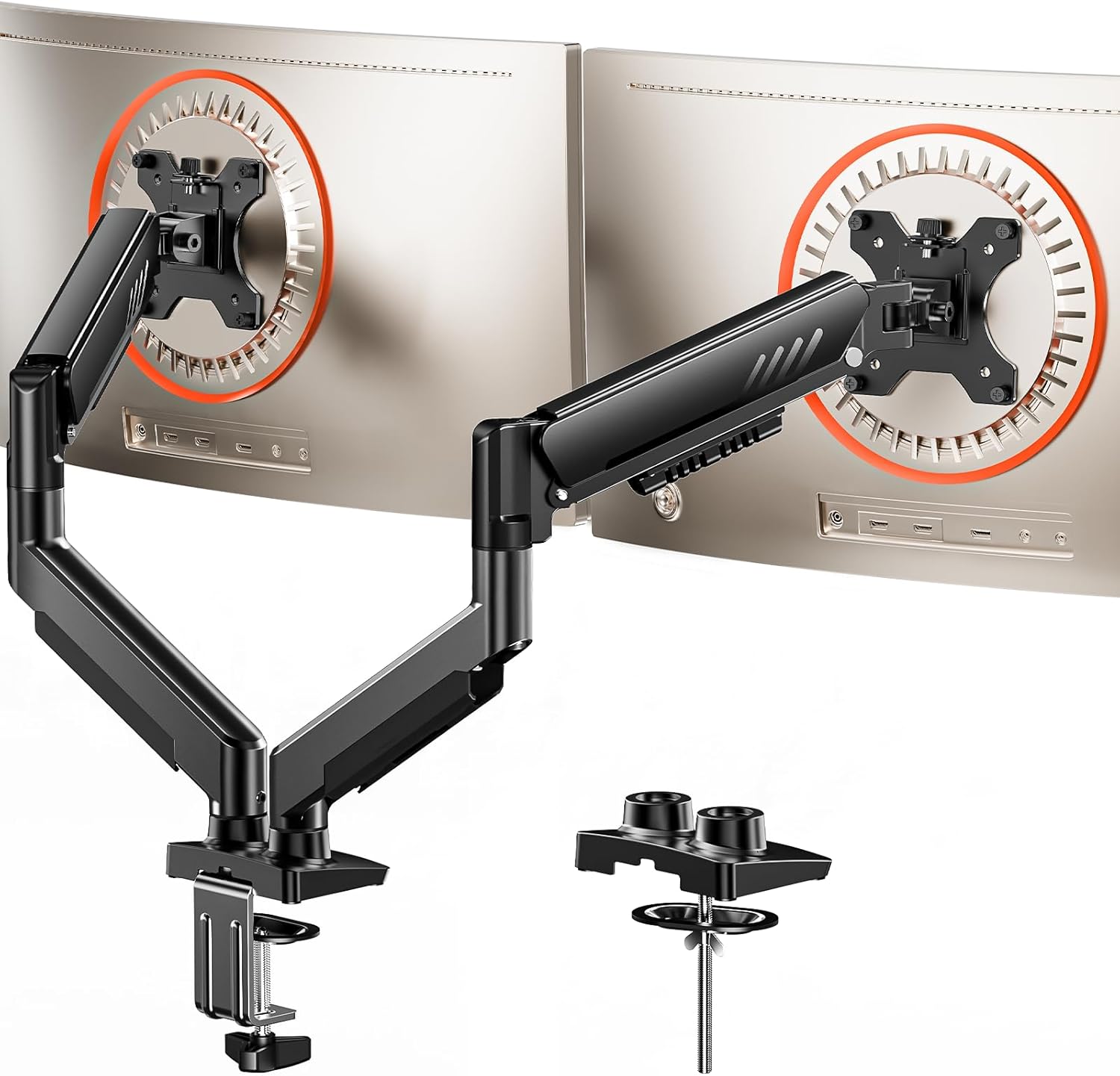
ErGear Dual Monitor Arm, Full Adjustable Monitor Mount for 13–32″ Screens, Fast Install Computer Monitor Stand with Tool-Free VESA Mount, Max Load 19.8 lbs, Max VESA 100x100mm
Want the best price and purchase timing?
Our AI advisor analyzes real-time pricing across all channels to find you the best deal.
AI Verdict
This budget dual monitor arm offers tool-free VESA mounting and extensive articulation for two 13-32" screens, but only if their combined weight is under 19.8 lbs.
This monitor arm is a situational fit because its 19.8 lbs total weight capacity is quite restrictive for a '13-32" screens' claim, especially for dual setups. While it offers extensive adjustability and tool-free VESA, these features are undermined if your monitors collectively push the weight limit, leading to potential sagging or instability. It's a strong contender only if your two monitors are genuinely lightweight.
If your monitors combined weigh more than 19.8 lbs, look for a dual monitor arm with a stated 'per arm' weight capacity of at least 15-20 lbs.
Regret Score™
Very High RiskLower is better — measures purchase-regret risk from real buyer complaints, review credibility, and product maturity
Issues discovered after purchase
Critically weak dimension
Amazon rating vs actual quality
Chance this product isn't for you
Pros
- Tool-free VESA mounting simplifies setup, eliminating complicated assembly steps.
- Supports a wide range of desk thicknesses, from 0.39″ to 2.95″, using either C-clamp or grommet mount.
- Offers extensive articulation with +80°/-50° tilt, ±90° swivel, and 360° rotation for customizable positioning.
- Integrated cable clips open easily without tools, helping maintain a clean workspace.
- Provides up to 17.5″ of height adjustment and 18.1″ extension for ergonomic positioning.
Cons
- The 19.8 lbs maximum load is for both monitors combined, making it unsuitable for two heavier 32" monitors (e.g., two 10lb monitors already exceed this).
- Only recommended for installation on wooden desks, preferably without crossbeams, limiting compatibility for glass or metal desks.
- The 18.1″ extension might be too short for comfortable viewing distances on deeper desks.
- Some users report arms not holding position or sagging when monitors approach the 19.8 lbs total weight limit.
Dimension Scores
While offering extensive adjustability for comfort, user reports of sagging with monitors near the 19.8 lbs total weight limit indicate inconsistent support.
The arm provides a wide range of motion including +80°/-50° tilt, ±90° swivel, 360° rotation, 17.5″ height adjustment, and 18.1″ extension.
Constructed from alloy steel and tested for over 20,000 cycles with an upgraded VESA head, but user complaints about sagging at the stated weight limit suggest a practical limitation.
The design is functional with integrated, tool-free cable clips that contribute to a cleaner, more organized look.
Best For
- Users with two lightweight monitors (e.g., two 24" monitors each under 9 lbs) looking to free up desk space.
- Home office setups prioritizing quick, tool-free installation and basic adjustability.
- Desks between 0.39″ and 2.95″ thick that are made of wood.
- Anyone needing basic cable management to tidy up their workspace.
Not Recommended For
- Users with two 32" monitors, especially if each weighs over 9 lbs, as the combined weight will exceed the 19.8 lbs limit.
- Desks made of glass, metal, or those thicker than 2.95 inches.
- Professionals requiring precise, rock-solid positioning for monitors at the upper end of the weight or size range.
- Users needing significant monitor extension beyond 18.1 inches for very deep desks.
Watch Out For
- The 19.8 lbs max load is for *both* monitors combined, not per arm, which means two 10lb monitors already exceed the capacity.
- Several users reported arms sagging or failing to hold position when monitors were near the advertised weight capacity, particularly with 32" screens.
- Installation is only recommended on wooden desks, and specifically advises against desks with crossbeams blocking the underside, limiting desk compatibility.
- The 18.1" extension might feel restrictive on deeper desks, preventing optimal viewing distances for some users.
Full Specifications
| UPC | 840478843910 |
| ASIN | B0FPXFYG17 |
| Brand | ErGear |
| Color | Black |
| Material | Alloy Steel |
| Brand Name | ErGear |
| Color Name | Black |
| Item Weight | 9.2 pounds |
| Manufacturer | ErGear |
| Mounting Type | Tabletop Mount |
| Movement Type | Tlit, Swivel, Rotation, Height Adjustment |
| Item model number | EGDMA70B-DS-UK |
| Compatible Devices | Monitor |
| Maximum Tilt Angle | 80 Degrees |
| Product Dimensions | 30.71 x 5.91 x 18.11 inches |
What Buyers Say
The most critical takeaway from user feedback, even for similar ErGear models, is the significant discrepancy between the advertised 13-32" screen compatibility and the strict 19.8 lbs *total* weight limit. Many users attempting to mount two larger monitors, even within the stated size range, encountered issues with the arms failing to hold position or sagging. The tool-free VESA mounting and easy assembly are frequently praised, but the weight capacity remains a recurring practical hurdle for dual monitor setups.
“Man, I bought this for my two 27-inch monitors, thinking 19.8 lbs was plenty, but these things just droop after a few hours. So annoying, gotta keep pushing them back up. Should've just spent more for something that actually holds its position!”
Common Praise
- Assembly is straightforward and quick, often taking less than 30 minutes.
- The tool-free VESA mounting system makes attaching monitors simple and fast.
- Cable management clips are effective at keeping cords tidy and out of sight.
- Offers a wide range of motion for tilt, swivel, and rotation, allowing for flexible monitor positioning.
- The C-clamp and grommet options provide secure mounting for various desk types and thicknesses.
Common Complaints
- Arms struggle to hold position or sag when monitors approach the 19.8 lbs total weight limit, especially with two 32" screens.
- The maximum extension of 18.1" can be insufficient for deeper desks, forcing monitors too close to the user.
- Only recommended for wooden desks, which can be a limitation for users with other desk materials.
- Some users found that even after tightening, the tilt mechanism could still allow monitors to droop.
Ownership Tips
- Carefully weigh your monitors individually and calculate their combined weight; do not assume based on screen size alone.
- Regularly check and tighten the tension screws, especially if you frequently adjust monitor positions or notice any sagging.
- Ensure your desk is solid wood and within the specified thickness range to prevent instability or damage.
- If using larger monitors, be prepared for potentially limited forward extension, which might impact ergonomic viewing distance.
Frequently Asked Questions
What is the maximum weight this dual monitor arm can support?
The ErGear Dual Monitor Arm supports a maximum combined weight of 19.8 lbs for both monitors. This is not 19.8 lbs per arm.
What monitor sizes are compatible with this arm?
It is designed to fit most 13″–32″ flat or curved monitors, provided their combined weight does not exceed 19.8 lbs.
What VESA mounting patterns does it support?
This arm is compatible with VESA mounting patterns of 75x75mm or 100x100mm.
Can I install this on any type of desk?
ErGear only recommends installing it on a wooden desk, preferably without a crossbeam blocking the underside. It supports desk thicknesses from 0.39″ to 2.95″.
Does it offer cable management?
Yes, it includes upgraded, tool-free cable clips to help organize and hide your monitor cables.
Buying Guide
When buying a monitor arm, you're looking to free up desk space and get your screens at eye level for better posture. The big things are making sure your monitors fit the arm's weight and size limits, and that the arm can attach securely to your desk. Don't just eyeball it; grab a scale and a tape measure. You also want enough adjustability to move your screens exactly where you need them, whether that's tilting, swiveling, or rotating.
Max Load 19.8 lbs
This is the total weight the arm can support, like a car's towing capacity. If your two monitors combined weigh more than 19.8 lbs, the arm won't hold them securely, and they might sag or even fall. Always check your monitor's weight before buying.
VESA Mount 75x75mm or 100x100mm
This refers to the square pattern of screw holes on the back of your monitor. It's like a standard bolt pattern for wheels; your monitor needs to match the arm's VESA pattern to attach. Most modern monitors use one of these two sizes.
Dynamic Angle Adjustments (+80°/-50° tilt, ±90° swivel, 360° rotation)
These numbers tell you how much you can move your screen around. Tilt is up and down, swivel is side to side (like turning your head), and rotation lets you switch between landscape and portrait. More range means more flexibility to find your perfect viewing angle and share your screen.
Alternatives
If you have two monitors that combined exceed 19.8 lbs, search for dual monitor arms with a higher 'per arm' weight capacity, typically 15-20 lbs per arm. If you have a non-wooden or very thick desk, look for arms specifically designed for those materials or with wider clamp/grommet ranges.
You Might Also Like

LYMAX Computer Monitor Light Bar with Wireless Remote, Motion Sensor, Fit for Flat/Curved Monitor, Adjustable Color Temperature with Auto-Dimming, Eye-Care USB-C Monitor Lamp, No Glare Desk Lamp
$50-$99A 15.7-ounce aluminum monitor light bar with motion sensing, auto-dimming, and stepless 2700K-6500K color temperature adjustment for flat or curved screens.

Computer Monitor Lamp, Screen Monitor Light Bar for Eye Caring, Screen Monitor Light Bar with Backlight for Eye Caring, E-Reading LED Task Lamp with Dimming Adjustment, Perfect for Reading and Study
$0-$49This BLYGACN monitor lamp offers 3 color temperatures (3000K-6500K), dimming, and a 60-minute timer, powered by USB, for monitors 15-24 inches.

Monitor Light Bar with Touch Control, RGB Desk Lamp Full Spectrum Screen Lamp, Glare-Free Low Blue Light Monitor Lamp with Memory Mode, USB Powered for Gaming, Office & Work
$0-$49A USB-powered plastic monitor light bar with touch controls, RGB modes, and glare-free illumination for basic desk setups.

RGB Monitor Light Bar, Eye-Care Dual Light Reading Screen Lamp, 9 Modes Gaming Backlight LED Computer Lamp, 3 Colors Dimmable Frontlight, 15.75'' USB Desk Lights for Home, Office
$0-$49This is a budget-focused 6.4-ounce plastic monitor light bar with dual-mode lighting and 9 RGB backlight modes, designed for users needing basic task and ambient lighting without cluttering their desk