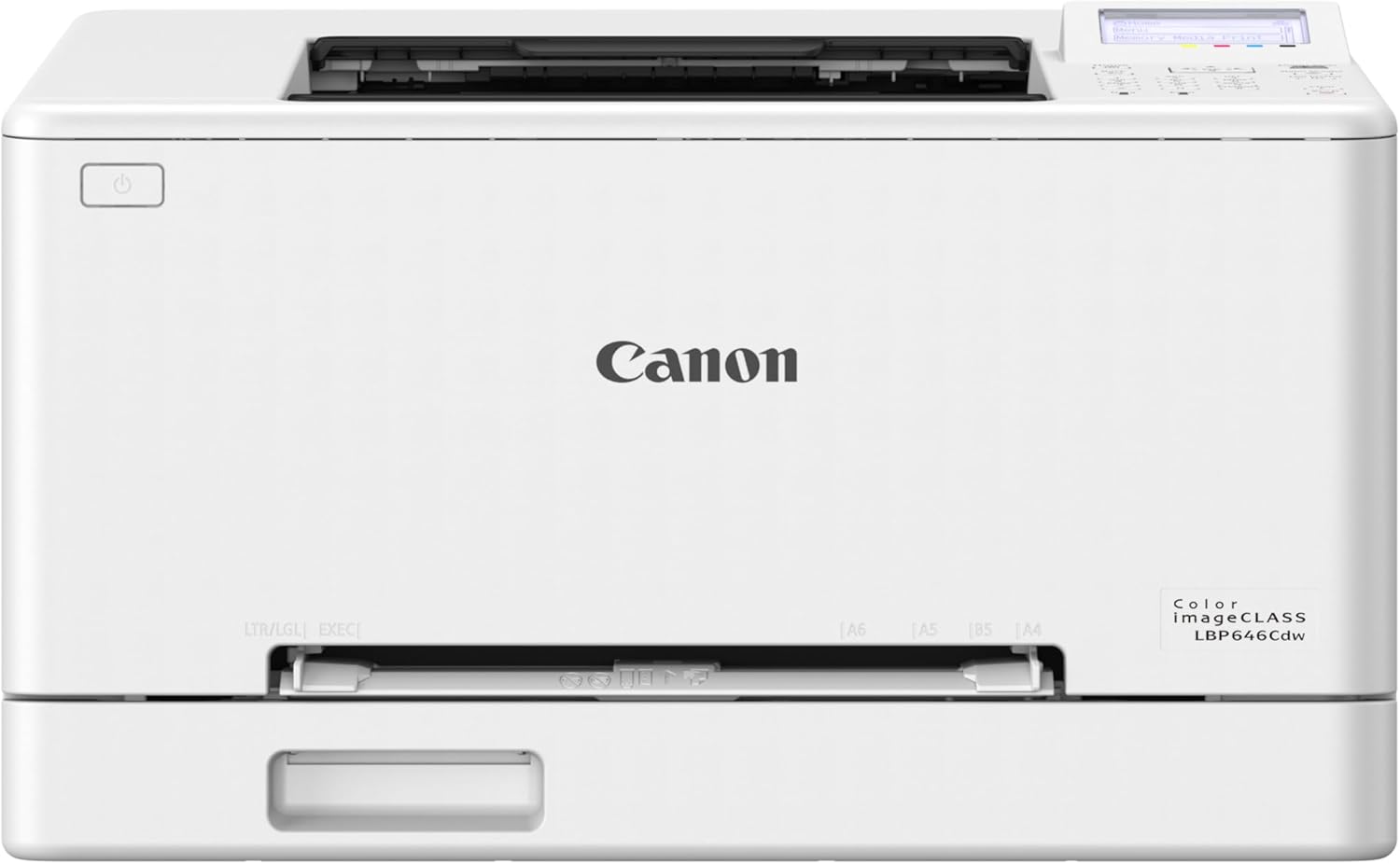
Canon Color imageCLASS LBP646Cdw Wireless Laser Printer for Duplex Printing, White - 26 PPM Home Office, Small Office Printer
Want the best price and purchase timing?
Our AI advisor analyzes real-time pricing across all channels to find you the best deal.
AI Verdict
This is a 38.4-pound color laser printer with 26 ppm duplex printing, built for home offices needing fast, dedicated printing.
This printer is a situational fit because its 26 ppm color and monochrome printing with duplexing meets the needs of small/home offices, but its 38.4-pound weight and reported wireless connectivity issues could be deal-breakers for some setups. The high cost of Canon Genuine Toner 075 also impacts its long-term value.
If wireless reliability is critical, look for printers with Ethernet connectivity or stronger user reports of stable Wi-Fi performance.
Regret Score™
High RiskLower is better — measures purchase-regret risk from real buyer complaints, review credibility, and product maturity
Issues discovered after purchase
Critically weak dimension
Amazon rating vs actual quality
Chance this product isn't for you
Pros
- Prints up to 26 pages per minute in both color and monochrome.
- Produces crisp, colorful documents.
- Supports automatic two-sided printing.
- Initial wireless setup is straightforward.
- First print time is approximately 10.3 seconds.
- Compatible with mobile printing via Canon PRINT app, Apple AirPrint, and Mopria Print Service.
Cons
- Wireless connectivity can be unreliable, with the printer disconnecting after idle periods.
- Uses Canon Genuine Toner 075, which users report as expensive compared to older toner models.
- Weighs 38.4 pounds, making it bulky to move.
- It is a print-only device, lacking scan, copy, or fax functions.
- Some users found the 5-line LCD screen interface a bit antiquated.
Dimension Scores
As a printer, 'Comfort & Support' isn't directly applicable, but its 5-line LCD screen provides basic navigation for user interaction.
The printer lacks physical adjustability, and its 5-line LCD screen offers limited interface customization.
Weighing 38.4 pounds suggests a substantial build, but one user expressed concern about its robustness for heavy use.
The white finish offers a clean look, and its compact form factor for a color laser printer is appreciated by some users.
Best For
- Small businesses printing invoices and color reports.
- Home offices requiring frequent, high-volume color and monochrome documents.
- Users who prioritize print speed and automatic duplexing over multifunctionality.
Not Recommended For
- Anyone needing scanning, copying, or faxing capabilities.
- Users with limited space or who need to frequently move their printer.
- Budget-conscious users concerned about ongoing toner costs.
Watch Out For
- The printer struggles with wireless network connections, especially mesh Wi-Fi systems, often rejecting correct passwords or disconnecting after being idle.
- Canon Genuine Toner 075 is reportedly significantly more expensive than generic toner options for previous models, with a full set costing around $290.
- The device weighs 38.4 pounds, which some users describe as a 'beast' and 'bulky'.
- Picture-only setup instructions can be confusing for some users.
- One user reported concerns about the printer's construction not seeming robust enough for moderate to heavy use, fearing it might fail within a few years.
Full Specifications
| UPC | 013803382709 |
| ASIN | B0FMBVCX6S |
| Brand | Canon |
| Color | White |
| Duplex | Automatic |
| Wattage | 1080 watts |
| Ink Color | cyan, magenta, yellow, black |
| Model Name | Canon Color imageCLASS LBP646Cdw |
| Sheet Size | Standard Cassette / 1-sheet Manual Feed Slot: 3" x 5" to 8.5" x 14" |
| Item Weight | 38.4 pounds |
| Print media | Banner paper, Paper (plain) |
| Manufacturer | Canon |
| Model Series | imageCLASS |
| Warranty Type | limited |
| Control Method | App |
| Printer Output | Color |
| Number of Trays | 2 |
| Special Feature | Energy Star |
| Total USB Ports | 1 |
| Printer Ink Type | Toner |
| Item model number | 6929C008 |
| Power Consumption | 1080 Watts |
| Compatible Devices | Laptops, PC, Smartphones |
| Hardware Interface | Ethernet, USB |
| Maximum Media Size | Legal (8.5 x 14 inches) |
| Product Dimensions | 16.5"D x 16.8"W x 10.5"H |
| Dual-sided printing | Yes |
| Included Components | Canon Genuine Toner 075 CMYK Starter: 500 Yield CMY, 700 Yield Black, Documentation, Power Cord, imageCLASS LBP646Cdw Printer |
| Printing Technology | Laser |
| Compatible Cartridge | Canon Genuine Toner 075 |
| Output sheet capacity | 251 |
| Supported Media Sizes | 11 x 14 inches, 3 x 4 inches, 3 x 5 inches |
| Connectivity Technology | Ethernet, USB, Wi-Fi |
| Initial page print time | 10.3 Seconds |
| Max Input Sheet Capacity | 251 |
| Max Printspeed Monochrome | 26 ppm |
| Max copy resolution color | 600 dpi |
| Specific Uses For Product | Home, Office |
| Maximum Print Speed (Color) | 26 ppm |
| Additional Printer functions | Print Only |
| Max Copy Speed (Black & White) | 26 ppm |
| Maximum Color Print Resolution | 1200 x 1200 Dots Per Inch |
| Max copy resolution black-white | 600 dpi |
| EU Spare Part Availability Duration | 1 Years |
| Maximum Black and White Print Resolution | 600 dots_per_inch |
What Buyers Say
The biggest surprise from user feedback is the recurring struggle with wireless connectivity, despite an easy initial setup process. Many users reported the printer dropping off Wi-Fi networks or refusing to connect, even to strong mesh systems, forcing some to use wired connections. On the flip side, the print quality for both color and monochrome documents consistently receives praise, along with its fast 26 ppm speed. The high cost of the Canon Genuine Toner 075 is a frequent point of contention, suggesting a higher running cost than some might expect.
“Honestly, this printer prints fast and looks good, but the Wi-Fi is a nightmare, I'm constantly unplugging it to get it back online, and the toner prices are gonna kill me.”
Common Praise
- Print quality is clear and vibrant for both color and monochrome documents.
- Prints quickly at 26 pages per minute.
- Automatic duplex printing works seamlessly.
- Initial setup, especially connecting to Wi-Fi, is straightforward.
- Mobile printing from phones and laptops works without issues once connected.
Common Complaints
- Wireless connectivity is unreliable; the printer often disconnects or fails to connect to Wi-Fi.
- Canon Genuine Toner 075 is expensive, making ongoing costs high.
- The printer is bulky and heavy at 38.4 pounds.
- The 5-line LCD screen interface feels outdated.
- Picture-only instructions for setup can be annoying.
Ownership Tips
- The printer might require frequent power cycling to re-establish a wireless connection after being idle.
- Expect to spend a significant amount on replacement toner cartridges if using genuine Canon 075.
- The 38.4-pound weight means it's not a printer you'll want to move often.
- Despite initial setup ease, troubleshooting wireless issues can be time-consuming.
- The printer is a dedicated print-only device, so don't expect any scanning or copying functions.
Frequently Asked Questions
Does this printer scan or copy documents?
No, the Canon Color imageCLASS LBP646Cdw is a print-only device. It does not have scanning, copying, or faxing capabilities.
What kind of toner does this printer use?
It uses Canon Genuine Toner 075 and 075 high-capacity cartridges. Users have noted these can be expensive.
How fast does this printer print?
It prints up to 26 pages per minute (ppm) for both color and monochrome documents. The first page prints in approximately 10.3 seconds.
Is the printer easy to set up wirelessly?
Initial wireless setup is generally reported as easy. However, some users experience issues with the printer maintaining a stable Wi-Fi connection, especially after being idle.
Can I print from my phone or tablet?
Yes, you can print from compatible mobile devices using the free Canon PRINT app, Apple AirPrint, and Mopria Print Service.
Does this printer support two-sided printing?
Yes, it features automatic duplex printing, allowing it to print on both sides of the paper without manual intervention.
Buying Guide
When looking at a laser printer like this Canon, you need to think about how much you print and what you print. Laser printers use toner, which won't dry out like inkjet ink, making them ideal if you print infrequently but in large batches. Pay attention to the 'pages per minute' (ppm) for speed and whether it does automatic two-sided (duplex) printing, which saves paper. Also, consider the physical size and weight, as laser printers are often heavier than inkjets.
26 ppm (pages per minute)
This tells you how fast the printer can spit out pages. 26 ppm is quick for a color laser, meaning you won't be waiting around for long print jobs, similar to how a fast car gets you to your destination quicker.
Duplex Printing
This means the printer can automatically print on both sides of a sheet of paper. It's like having a built-in assistant that flips your paper for you, saving paper and making multi-page documents look professional without extra effort.
Wireless Connectivity
This allows the printer to connect to your home or office network without cables, so you can print from any device on that network. Think of it like a smart speaker connecting to your Wi-Fi; it gives you flexibility in where you place the printer.
Laser Printer
Unlike inkjet printers that use liquid ink, laser printers use toner powder. This is crucial if you don't print every day, as toner won't dry out. It's like buying powdered coffee that lasts longer than liquid coffee concentrate.
Alternatives
If this printer doesn't fit, look for models with stronger wireless connectivity reviews or an Ethernet port for stable networking. If ongoing toner costs are a concern, research printers known for lower-cost third-party toner options or models with a drum unit separate from the toner cartridge.
You Might Also Like

LYMAX Computer Monitor Light Bar with Wireless Remote, Motion Sensor, Fit for Flat/Curved Monitor, Adjustable Color Temperature with Auto-Dimming, Eye-Care USB-C Monitor Lamp, No Glare Desk Lamp
$50-$99A 15.7-ounce aluminum monitor light bar with motion sensing, auto-dimming, and stepless 2700K-6500K color temperature adjustment for flat or curved screens.

Computer Monitor Lamp, Screen Monitor Light Bar for Eye Caring, Screen Monitor Light Bar with Backlight for Eye Caring, E-Reading LED Task Lamp with Dimming Adjustment, Perfect for Reading and Study
$0-$49This BLYGACN monitor lamp offers 3 color temperatures (3000K-6500K), dimming, and a 60-minute timer, powered by USB, for monitors 15-24 inches.

Monitor Light Bar with Touch Control, RGB Desk Lamp Full Spectrum Screen Lamp, Glare-Free Low Blue Light Monitor Lamp with Memory Mode, USB Powered for Gaming, Office & Work
$0-$49A USB-powered plastic monitor light bar with touch controls, RGB modes, and glare-free illumination for basic desk setups.

RGB Monitor Light Bar, Eye-Care Dual Light Reading Screen Lamp, 9 Modes Gaming Backlight LED Computer Lamp, 3 Colors Dimmable Frontlight, 15.75'' USB Desk Lights for Home, Office
$0-$49This is a budget-focused 6.4-ounce plastic monitor light bar with dual-mode lighting and 9 RGB backlight modes, designed for users needing basic task and ambient lighting without cluttering their desk