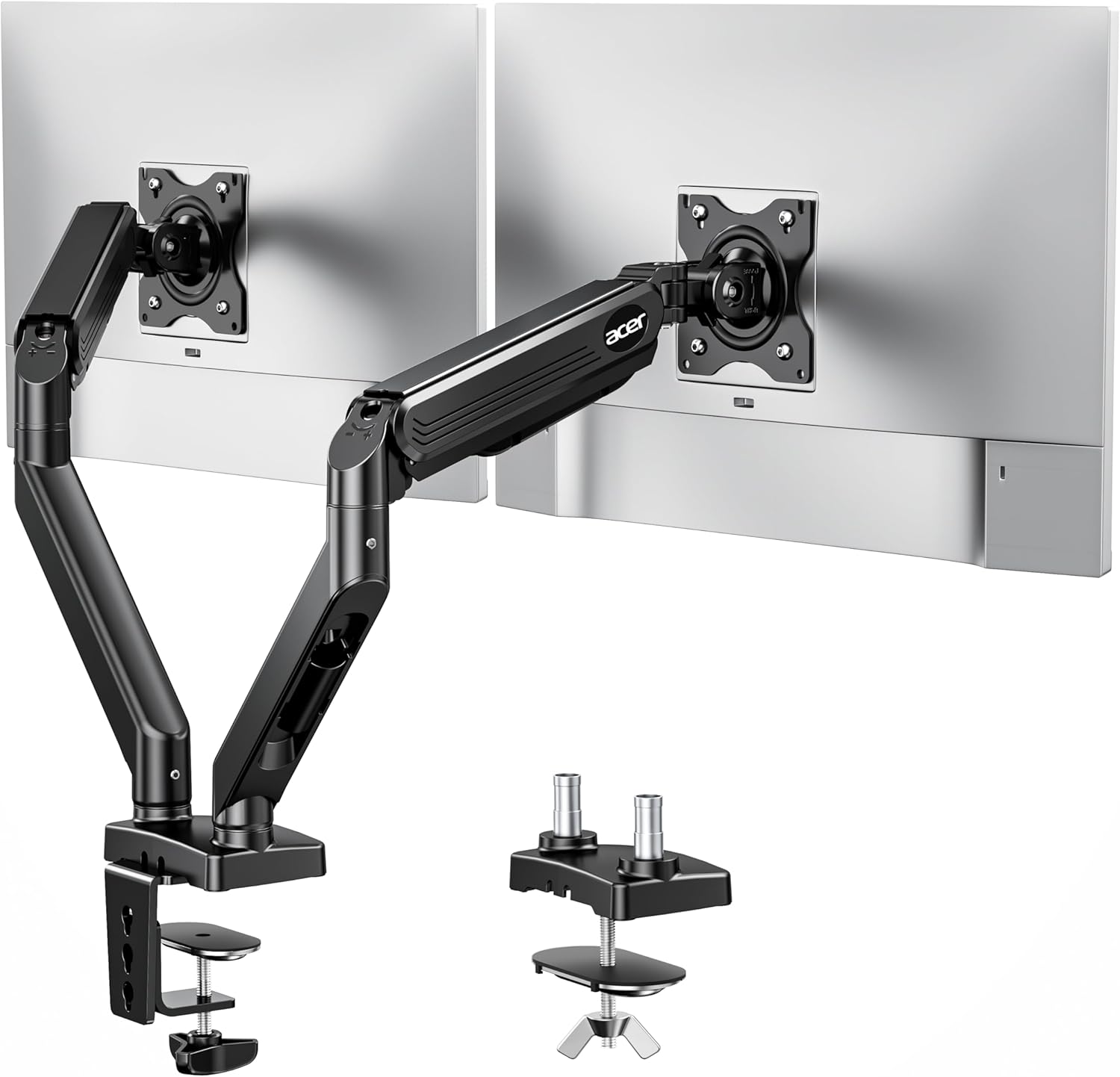
Acer Dual Monitor Arm, Computer Desk Arm with VESA Mounts for 17–32″ Screens, Fully Adjustable Gas Spring Monitor Stand, C-Clamp and Grommet Mounting Base, Fits 4.4 to 19.8lbs Computer Monitors
Want the best price and purchase timing?
Our AI advisor analyzes real-time pricing across all channels to find you the best deal.
AI Verdict
This Acer dual monitor arm, built with alloy steel and aluminum, supports two 17-32″ screens up to 19.8 lbs each, freeing up desk space with full ergonomic adjustment.
This Acer arm is a strong fit for users with two 17-32″ VESA-compatible monitors, each weighing up to 19.8 lbs, who need comprehensive ergonomic adjustments. Its robust alloy steel and aluminum construction, combined with gas spring technology, provides stable support and smooth movement.
If you need to support monitors heavier than 19.8 lbs per arm, look for arms with a higher stated weight capacity.
Regret Score™
Medium RiskLower is better — measures purchase-regret risk from real buyer complaints, review credibility, and product maturity
Issues discovered after purchase
Critically weak dimension
Amazon rating vs actual quality
Chance this product isn't for you
Pros
- Supports two 17-32″ monitors, each weighing between 4.4 and 19.8 lbs, accommodating a wide range of displays.
- Offers extensive ergonomic adjustments including 360° rotation, +90°/-60° tilt, and ±90° swivel, with an 18.1-inch height range and 21.25-inch extension.
- Includes both C-Clamp and Grommet mounting options, fitting desks from 0.59 to 3.15 inches thick, providing flexible installation choices.
- Features gas-assisted lifting technology, tested over 20,000 durability cycles, for stable and smooth monitor positioning.
- Integrated cable clips on both arms help maintain a tidy workspace.
- Constructed with alloy steel and aluminum, contributing to a strong and durable feel.
Cons
- The cable management system, while present, uses plastic parts for the wire routing, which might feel less robust than the main metal components.
- Requires careful adjustment of tension screws with an Allen key based on monitor weight, which can be a trial-and-error process during initial setup.
- Not suitable for glass or plastic surface desks, limiting mounting options for some users.
- Dual monitor arms generally require significant space behind the desk for full articulation, which can be an issue in tight workspaces.
Dimension Scores
The gas spring mechanism and wide adjustment ranges (18.1-inch height, 21.25-inch extension, 360° rotation, +90°/-60° tilt, ±90° swivel) offer extensive customization for comfortable viewing positions.
With 360° rotation, +90°/-60° tilt, ±90° swivel, 18.1-inch height adjustment, and 21.25-inch extension, this arm provides comprehensive movement for dual monitors.
Constructed from alloy steel and aluminum, with gas-assisted lifting technology tested over 20,000 cycles, users describe it as 'really strong' and durable.
The design includes hidden cable clips for a cleaner look, and the metal construction provides a functional, modern appearance.
Best For
- Dual-monitor home office setups needing to reclaim desk surface.
- Users requiring extensive monitor adjustability for varied viewing angles, including portrait mode.
- Desks between 0.59 and 3.15 inches thick that can accommodate C-clamp or grommet mounting.
- Workstations with 17-32″ VESA-compatible monitors weighing up to 19.8 lbs each.
Not Recommended For
- Desks with glass or plastic surfaces.
- Users with monitors heavier than 19.8 lbs per arm.
- Minimalist setups where any visible cable management is undesirable.
Watch Out For
- Initial setup requires adjusting tension screws with an Allen key to match monitor weight, which can be tricky to dial in for optimal movement.
- The cable routing sections are plastic, which might not hold up as well as the metal arm components over time.
- Like many dual monitor arms, it needs enough clearance behind the desk for full extension and rotation, potentially pushing your desk away from the wall.
- Monitors must have 75x75mm or 100x100mm VESA mounting patterns; non-VESA monitors will require an adapter.
Full Specifications
| UPC | 195133332484 |
| ASIN | B0FKTF1KJ5 |
| Brand | acer |
| Color | Black |
| Material | Alloy Steel, Aluminum |
| Brand Name | acer |
| Color Name | Black |
| Item Weight | 8.47 pounds |
| Manufacturer | acer |
| Mounting Type | C-clamp or Option Grommet Mount |
| Movement Type | Rotation 360°, Tilt +90°/-60°, Swivel ±90°l, Articulating |
| Item model number | AMS002 |
| Maximum Tilt Angle | 90 Degrees |
| Product Dimensions | 17.32 x 10.63 x 4.25 inches |
What Buyers Say
Users are finding this Acer dual monitor arm surprisingly robust and straightforward to set up, especially considering its price point. The metal construction of the main components and the ease of assembly are frequently mentioned, though some plastic elements for cable routing are noted. The gas spring adjustment works as expected once the tension is correctly set for the monitor weight.
“Honestly, this Acer arm felt way stronger than I thought it would for the money. Setup was a breeze, just had to mess with the tension a bit for my monitors, but now they're rock solid.”
Common Praise
- Main components are metal, contributing to a strong feel.
- Installation is reported as 'super easy' with clear instructions and labeled parts.
- The arm is described as 'really strong' and durable, holding monitors securely.
- Cable management clips are present on both arms, helping to organize wires.
- Provides flexible mounting options with both C-clamp and grommet bases.
Common Complaints
- The wire routing parts are made of plastic, which contrasts with the metal main structure.
- Adjusting the gas spring tension with the Allen key can require some trial and error to get it just right for specific monitor weights.
- Not suitable for glass or plastic desks, which limits compatibility for some users.
- Like most dual arms, it can take up significant depth behind the desk when fully extended.
Ownership Tips
- The initial tension adjustment is crucial; take your time to fine-tune it for each monitor's weight to ensure smooth movement.
- While the main arm is metal, the cable management covers are plastic, so handle them with a bit more care during installation and cable routing.
- Ensure your desk material is compatible (not glass or plastic) before committing to purchase.
- Measure the depth behind your desk if space is tight, as the arms will extend backward, especially with larger monitors.
Frequently Asked Questions
What size monitors can this arm hold?
It supports two monitors between 17 and 32 inches, with each monitor weighing from 4.4 to 19.8 pounds.
How does it attach to the desk?
You get both a C-clamp for quick, drill-free installation and a grommet mount for maximum stability on solid wood desks. Your desk needs to be between 0.59 and 3.15 inches thick.
Can I rotate my monitors to portrait mode?
Yes, the arm allows for 360° rotation, so you can easily switch your monitors between landscape and portrait orientations.
Is the installation difficult?
Users report the installation is straightforward, with clear labeling and all necessary tools provided. You will need to adjust the tension based on your monitor's weight using an Allen key.
Does it have cable management?
Yes, it includes hidden cable clips on both arms to help keep your workspace organized and free of clutter.
Buying Guide
When you're looking at a dual monitor arm, you need to think about more than just getting your screens off the desk. You want to make sure your monitors fit the weight and size limits, and that the arm can actually move them where you need them to go. Also, how it attaches to your desk matters a lot – you don't want it wobbling or damaging your surface.
Weight Capacity (4.4-19.8 lbs per monitor)
This tells you how heavy each of your monitors can be. If your monitors are too light, the gas spring might not stay down; too heavy, and it won't stay up. Think of it like a car's suspension – it needs to be tuned for the right load.
VESA Compatibility (75x75/100x100 mm)
This is the standard hole pattern on the back of your monitor where the arm attaches. Almost all modern monitors have this, but double-check yours. It's like making sure your TV has the right mounting holes for a wall bracket.
Adjustment Ranges (360° rotation, +90°/-60° tilt, ±90° swivel, 18.1-inch height, 21.25-inch extension)
These numbers tell you how much you can move your monitors. High numbers mean you can position your screens exactly where you need them to reduce neck and eye strain, whether you're sitting, standing, or showing something to a colleague.
Mounting Options (C-Clamp and Grommet)
This is how the arm attaches to your desk. A C-clamp is easy to install without drilling, like a vice grip. A grommet mount goes through a hole in your desk for a super secure, flush fit, like a bolt through a wall.
Alternatives
If this arm doesn't fit, look for dual monitor arms with higher individual arm weight capacities, wider desk thickness compatibility, or specific mounting solutions for non-standard desk materials.
You Might Also Like

LYMAX Computer Monitor Light Bar with Wireless Remote, Motion Sensor, Fit for Flat/Curved Monitor, Adjustable Color Temperature with Auto-Dimming, Eye-Care USB-C Monitor Lamp, No Glare Desk Lamp
$50-$99A 15.7-ounce aluminum monitor light bar with motion sensing, auto-dimming, and stepless 2700K-6500K color temperature adjustment for flat or curved screens.

Computer Monitor Lamp, Screen Monitor Light Bar for Eye Caring, Screen Monitor Light Bar with Backlight for Eye Caring, E-Reading LED Task Lamp with Dimming Adjustment, Perfect for Reading and Study
$0-$49This BLYGACN monitor lamp offers 3 color temperatures (3000K-6500K), dimming, and a 60-minute timer, powered by USB, for monitors 15-24 inches.

Monitor Light Bar with Touch Control, RGB Desk Lamp Full Spectrum Screen Lamp, Glare-Free Low Blue Light Monitor Lamp with Memory Mode, USB Powered for Gaming, Office & Work
$0-$49A USB-powered plastic monitor light bar with touch controls, RGB modes, and glare-free illumination for basic desk setups.

RGB Monitor Light Bar, Eye-Care Dual Light Reading Screen Lamp, 9 Modes Gaming Backlight LED Computer Lamp, 3 Colors Dimmable Frontlight, 15.75'' USB Desk Lights for Home, Office
$0-$49This is a budget-focused 6.4-ounce plastic monitor light bar with dual-mode lighting and 9 RGB backlight modes, designed for users needing basic task and ambient lighting without cluttering their desk