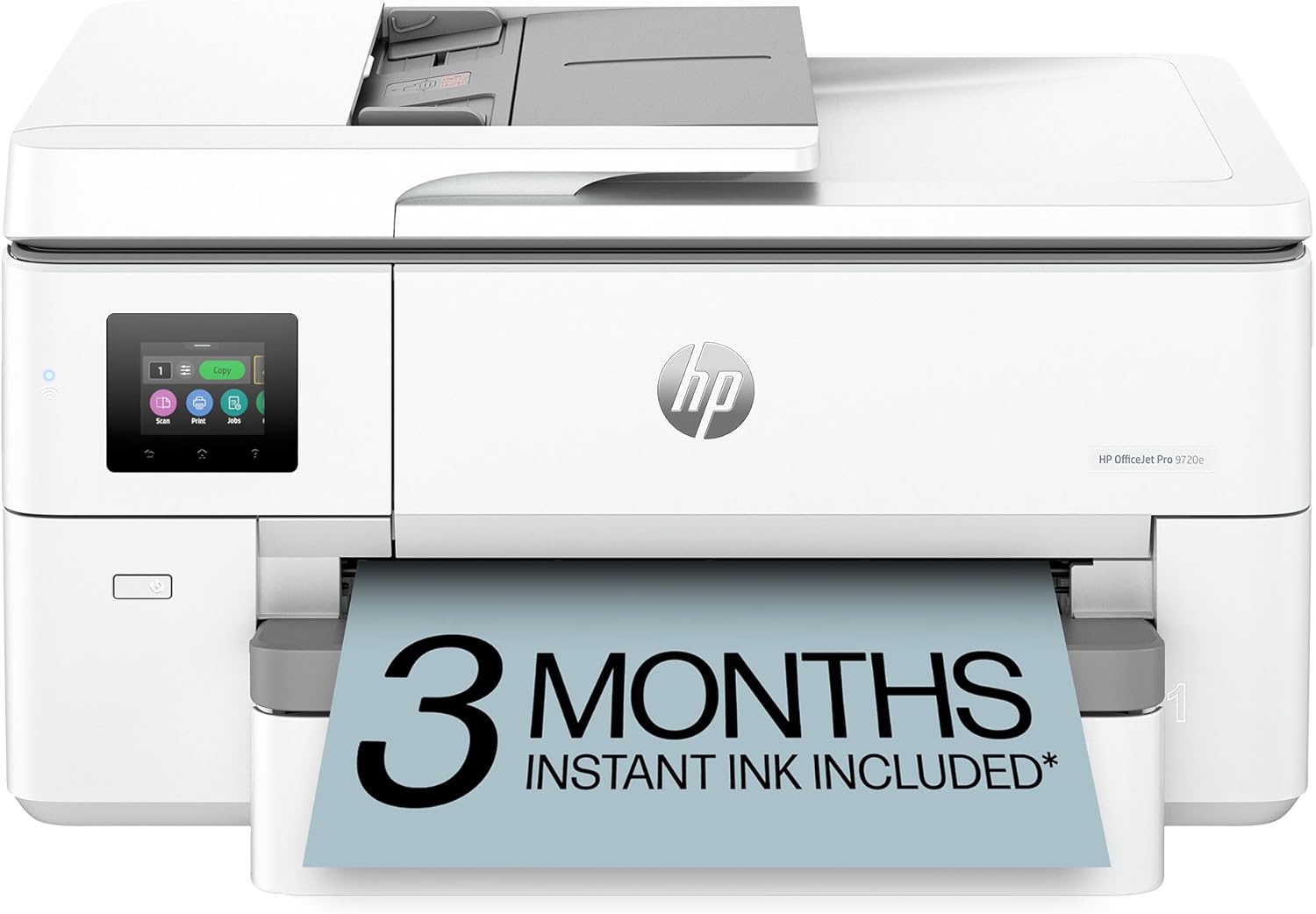
HP OfficeJet Pro 9720e Wide Format Wireless All-in-One Color Inkjet Printer, Print, scan, Copy, ADF, Duplex Printing Best for Office, 3 Month Instant Ink Trial Included, AI-Enabled (53N95A)
Want the best price and purchase timing?
Our AI advisor analyzes real-time pricing across all channels to find you the best deal.
AI Verdict
This 32.2-pound wide-format inkjet prints up to 11x17" and scans up to 8.5x14", ideal for small offices needing larger document handling.
This printer is a situational fit for users who specifically need 11x17" printing capabilities for documents like floorplans or spreadsheets, alongside standard office functions. Its 35-sheet ADF and automatic duplex printing streamline document handling, but the 8.5x14" scan/copy limit and fixed display are compromises.
If wide-format scanning and copying are as critical as printing, look for a model that supports 11x17" for all functions.
Regret Score™
Very High RiskLower is better — measures purchase-regret risk from real buyer complaints, review credibility, and product maturity
Issues discovered after purchase
Critically weak dimension
Amazon rating vs actual quality
Chance this product isn't for you
Pros
- Prints wide-format documents up to 11x17 inches, expanding in-house production capabilities.
- Features a 35-sheet, 2-sided automatic document feeder for efficient multi-page scanning and copying.
- Offers automatic duplex printing, reducing paper consumption and producing professional-looking documents.
- Includes self-healing dual-band Wi-Fi and Ethernet for consistent network connectivity.
- Users report an easy setup process, often completed in minutes via a smartphone app.
- Delivers print speeds of up to 22 ppm for black and 18 ppm for color documents (ISO).
Cons
- The 2.7-inch color touchscreen display is fixed flat, making it difficult to view from certain angles.
- Dynamic security measures block non-HP ink cartridges, limiting third-party ink options.
- Scanning and copying are limited to 8.5x14 inches, not matching the 11x17-inch print capability.
- At 32.2 pounds, it requires a dedicated, sturdy space.
- Some users report issues with 11x17" prints only utilizing half the sheet, indicating potential software or setup complexities.
Dimension Scores
The fixed, flat 2.7-inch touchscreen can be awkward to use, requiring specific positioning for visibility.
The display lacks any tilt or swivel, limiting ergonomic adjustment for users.
Weighing 32.2 pounds, it feels substantial, and users report it handles different paper types without issue.
The design is a standard office printer aesthetic, with a white finish, not particularly sleek or modern.
Best For
- Small businesses creating marketing materials like floorplans or mood boards up to 11x17 inches.
- Home offices needing to digitize multi-page legal-sized documents with the 35-sheet ADF.
- Users who value consistent wireless connectivity and printing from multiple devices via Wi-Fi or Ethernet.
- Those who print frequently and can benefit from the 3-month Instant Ink trial to manage ink costs.
Not Recommended For
- Users requiring wide-format scanning or copying beyond 8.5x14 inches.
- Anyone unwilling to commit to HP's Instant Ink program or use only HP-chipped cartridges.
- Spaces with limited desk space, given its 32.2-pound weight and physical footprint.
Watch Out For
- The 2.7-inch display is flat and does not swivel, making it hard to read without standing directly over the printer.
- HP's dynamic security feature means the printer will block ink cartridges without an HP chip, forcing reliance on official HP supplies.
- One user reported that 11x17" prints sometimes only use half the sheet, suggesting potential setup or driver issues for wide-format printing.
- Despite printing 11x17", the scanner and copier only handle documents up to 8.5x14 inches.
- The product description mentions 'AI-enabled' features like removing unwanted content and optimizing ink, but specific user experiences or detailed explanations of these functions are not widely reported.
Full Specifications
| UPC | 196337488014 |
| ASIN | B0FJRSYQJV |
| Brand | HP |
| Color | black |
| Duplex | Automatic (A4/Letter) |
| Ink Color | Black, cyan, magenta, yellow |
| Model Name | HP OfficeJet Pro 9720e WF AiO Printer |
| Sheet Size | 8.5 x 11;8.27 x 11.7;8.5 x 14;7.16 x 10.12;11 x 17;11.69 x 16.54; Inches |
| Color Depth | 24 Bits |
| Item Weight | 32.2 pounds |
| Print media | Glossy photo paper, Unknown |
| Manufacturer | HP |
| Model Series | OfficeJet Pro |
| Scanner Type | Flatbed |
| Warranty Type | One-year limited hardware warranty with option to extend to 2 years with HP+ Offer. For more info please visit us at support.hp.com |
| Printer Output | Color |
| Number of Trays | 1 |
| Processor Count | 1 |
| Total USB Ports | 1 |
| Printer Ink Type | Dye-Based Ink |
| Item model number | 53N95A#B1H |
| Power Consumption | 0.11 Watts |
| Compatible Devices | Laptops, PC, Smartphones |
| Hardware Interface | Ethernet, USB |
| Maximum Media Size | 8.5 x 14 in |
| Product Dimensions | 17.5"D x 22.9"W x 12.1"H |
| Dual-sided printing | Yes |
| Included Components | HP OfficeJet Pro 9720e Wide Format AiO Printer; HP 936 Setup Black Ink Cartridge; HP 936 Setup Cyan Ink Cartridge; HP 936 Setup Magenta Ink Cartridge; HP 936 Setup Yellow Ink Cartridge; Regulatory Flyer; Ink Caution Flyer; Power Cord; Setup Poster; Reference Guide; [For more information about fill and yield, see http://www.hp.com/go/learnaboutsupplies] |
| Printing Technology | HP Thermal Inkjet |
| Compatible Cartridge | HP 936 Black Original Ink Cartridge 4S6V2LN, HP 936 Cyan Original Ink Cartridge 4S6U9LN; HP 936 Magenta Original Ink Cartridge 4S6V0LN; HP 936 Yellow Original Ink Cartridge 4S6V1LN; HP EvoMore planned to be available April 2024: HP 936e EvoMore Black Original Ink Cartridge 4S6V6LN; HP 936e EvoMore Cyan Original Ink Cartridge 4S6V3LN; HP 936e EvoMore Magenta Original Ink Cartridge 4S6V4LN; HP 936e EvoMore Yellow Original Ink Cartridge 4S6V5LN |
| Maximum copies per run | Up to 99 copies |
| Connectivity Technology | Apple AirPrint; Wireless direct printing; Wireless (Wi-Fi); Ethernet networking; USB |
| Initial page print time | 13 Seconds |
| Memory Storage Capacity | 512 MB |
| Max Input Sheet Capacity | 250 |
| Max Printspeed Monochrome | 22 ppm |
| Max copy resolution color | Up to 600 dpi |
| Specific Uses For Product | Small medium business, Small work team |
| Maximum Print Speed (Color) | 18 ppm |
| Additional Printer functions | All In One |
| Max Copy Speed (Black & White) | 18 ppm |
| Maximum Color Print Resolution | Up to 4800 by 1200 optimized dpi on HP Advance Photo Paper 1200 by 1200 dpi input Dots Per Inch |
| Max copy resolution black-white | Up to 600 dpi |
| Maximum Black and White Print Resolution | Up to 1200 x 1200 rendered dpi Dots Per Inch |
What Buyers Say
The most surprising aspect is how many users highlight the straightforward setup, often completed in minutes from a phone, which is a common pain point for printers. Many appreciate its ability to print 11x17" documents, expanding capabilities for small businesses. However, the fixed display and the limitation of scanning/copying to 8.5x14" are recurring practical drawbacks. The dynamic security blocking non-HP ink is also a point of contention for some.
“Honestly, I just needed something to print my big drawings, and this thing actually does 11x17 without a fuss, even if the screen is a pain to look at.”
Common Praise
- Setup was surprisingly painless and quick, often done via a smartphone app.
- Prints 11x17" documents with clarity and vibrant colors.
- The HP Smart app makes managing printer functions and ink levels simple.
- Automatic duplex printing and the 35-sheet ADF save time on multi-page tasks.
- Wireless connectivity is reliable and works across multiple devices.
Common Complaints
- The 2.7-inch control screen is flat and doesn't tilt, making it hard to see.
- Scanning and copying functionality is limited to 8.5x14 inches, not the full 11x17 inch print size.
- Dynamic security prevents the use of non-HP ink cartridges, increasing running costs.
- Some users experienced issues with 11x17" prints only using half the sheet.
- The printer's physical size and 32.2-pound weight require a dedicated space.
Ownership Tips
- The 'AI-enabled' features are not immediately obvious in daily use, and their impact on workflow or ink optimization is subtle.
- The 3-month Instant Ink trial is a real convenience, but remember to manage or cancel the subscription to avoid unexpected charges.
- While it prints wide-format, the inability to scan or copy at that size means you'll still need other solutions for large document digitization.
- The self-healing Wi-Fi actually works, maintaining a stable connection even in busy network environments.
- The printer is quieter than expected, especially when using the quiet mode feature.
Frequently Asked Questions
Can this printer scan documents larger than standard letter size?
Yes, it can scan and copy documents up to 8.5x14 inches (legal size). However, it cannot scan or copy the larger 11x17 inch wide-format documents it can print.
Does this printer come with ink?
Yes, it includes ink cartridges and a 3-month trial for HP's Instant Ink subscription service.
Is the HP OfficeJet Pro 9720e difficult to set up?
Many users report an easy and quick setup process, often completed in about 5 minutes using the HP Smart app on a phone.
Can I print from my phone or tablet?
Yes, it supports wireless printing from smartphones and tablets via Wi-Fi, Apple AirPrint, and the HP Smart app.
Does this printer use a lot of ink?
Some users find the ink cost-effective, especially with the Instant Ink subscription, which automatically orders new cartridges when levels are low.
What is 'AI-enabled' about this printer?
HP states it's AI-enabled to adapt to your workflow, remove unwanted content from prints, and optimize ink usage.
Buying Guide
When looking at a wide-format printer like this, you need to consider if you actually need to print larger than standard letter or legal size. This model handles 11x17" prints, which is a specific need for things like architectural plans or large spreadsheets. Also, pay attention to the scanning and copying limits; often, they don't match the maximum print size.
Wide-format printing (up to 11x17")
This means you can print documents twice the size of a standard letter page, like posters or detailed diagrams, without needing an external print shop. Think of it like having a bigger canvas for your ideas.
Automatic Document Feeder (ADF)
The 35-sheet ADF lets you load a stack of pages and scan or copy them all at once, automatically. It's like having a digital assistant feed documents for you, saving you from manually placing each page.
Duplex Printing
This feature automatically prints on both sides of the paper. It's like folding a single sheet of paper in half to get two pages, but the printer does it for you, saving paper and making your reports look more professional.
Dynamic Security
This is HP's way of ensuring you use their branded ink cartridges. It means the printer will only work with cartridges that have an HP chip, so you can't use cheaper third-party inks. It's like a car that only accepts a specific brand of fuel.
Alternatives
If you need wide-format scanning or copying, look for models explicitly stating 11x17" support for all-in-one functions. If you prefer using third-party ink, seek printers without dynamic security features.
You Might Also Like

LYMAX Computer Monitor Light Bar with Wireless Remote, Motion Sensor, Fit for Flat/Curved Monitor, Adjustable Color Temperature with Auto-Dimming, Eye-Care USB-C Monitor Lamp, No Glare Desk Lamp
$50-$99A 15.7-ounce aluminum monitor light bar with motion sensing, auto-dimming, and stepless 2700K-6500K color temperature adjustment for flat or curved screens.

Computer Monitor Lamp, Screen Monitor Light Bar for Eye Caring, Screen Monitor Light Bar with Backlight for Eye Caring, E-Reading LED Task Lamp with Dimming Adjustment, Perfect for Reading and Study
$0-$49This BLYGACN monitor lamp offers 3 color temperatures (3000K-6500K), dimming, and a 60-minute timer, powered by USB, for monitors 15-24 inches.

Monitor Light Bar with Touch Control, RGB Desk Lamp Full Spectrum Screen Lamp, Glare-Free Low Blue Light Monitor Lamp with Memory Mode, USB Powered for Gaming, Office & Work
$0-$49A USB-powered plastic monitor light bar with touch controls, RGB modes, and glare-free illumination for basic desk setups.

RGB Monitor Light Bar, Eye-Care Dual Light Reading Screen Lamp, 9 Modes Gaming Backlight LED Computer Lamp, 3 Colors Dimmable Frontlight, 15.75'' USB Desk Lights for Home, Office
$0-$49This is a budget-focused 6.4-ounce plastic monitor light bar with dual-mode lighting and 9 RGB backlight modes, designed for users needing basic task and ambient lighting without cluttering their desk