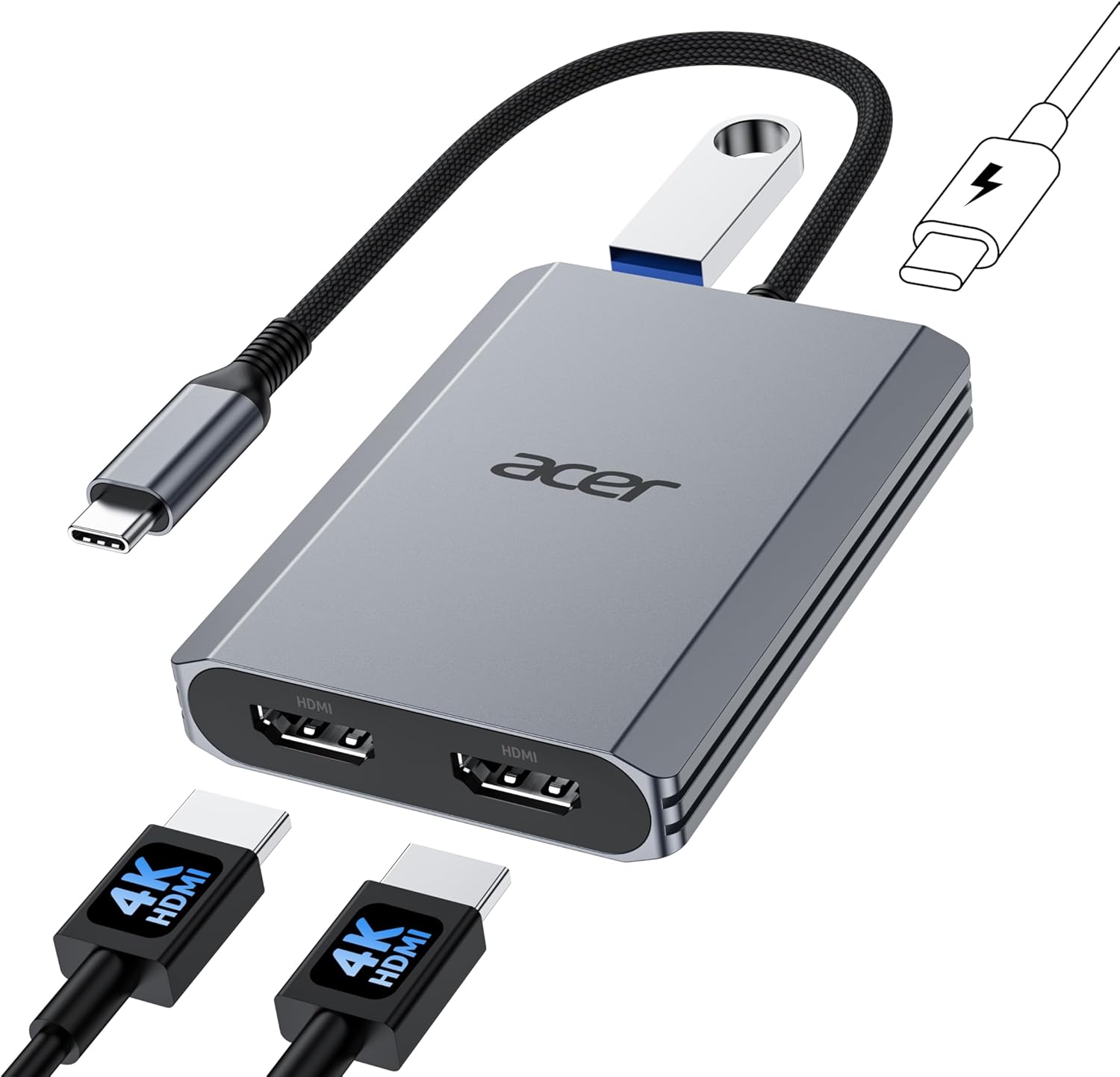
Acer USB C to Dual HDMI Adapter 4K@60Hz, 4-in-1 HDMI Splitter for Dual Monitors with 100W PD, USB 3.0, Docking Station Dual Monitor Compatible with Acer, MacBook Air/Pro, Dell XPS, HP, etc
Want the best price and purchase timing?
Our AI advisor analyzes real-time pricing across all channels to find you the best deal.
AI Verdict
A 4-in-1 USB-C adapter with dual 4K@60Hz HDMI, 5Gbps USB-A, and 90W power delivery for DP Alt Mode compatible laptops.
This adapter is a situational fit because its core functionality of dual 4K@60Hz display and 90W power delivery is strong, but it hinges entirely on specific compatibility requirements of the user's laptop and external devices. The 20 cm cable length also dictates a close-proximity setup.
If this adapter doesn't fit your needs, look for a docking station with a longer host cable and explicit support for MST (Multi-Stream Transport) on macOS if you need three independent displays.
Regret Score™
Medium RiskLower is better — measures purchase-regret risk from real buyer complaints, review credibility, and product maturity
Issues discovered after purchase
Critically weak dimension
Amazon rating vs actual quality
Chance this product isn't for you
Pros
- Supports dual 4K@60Hz display output from a single USB-C port, enhancing screen real estate for multitasking.
- Provides up to 90W power delivery to a connected laptop, keeping it charged during use.
- Includes a USB-A 3.0 port for 5Gbps data transfers, allowing quick movement of large files.
- Weighs 3.87 ounces and features a plug-and-play design, making it easy to carry and use without drivers.
- Compatible with a wide range of Windows and macOS devices that support DisplayPort Alternate Mode.
Cons
- Requires the laptop's USB-C port to support DisplayPort Alt Mode for video output to function.
- Both the laptop, cables, and monitors must support HDMI 2.0 or higher to achieve 4K@60Hz resolution.
- Mac users are limited to AAA or ABB display configurations, preventing three independent displays.
- The integrated cable is only 20 cm (0.66 ft) long, which might restrict placement options.
- A 65W or higher power adapter and cable are required for power delivery and are not included.
Dimension Scores
The lightweight 3.87-ounce design makes it portable, but the short 20 cm cable can limit comfortable placement on a desk.
As a fixed adapter, it offers no physical adjustability, relying entirely on the host device's port placement and monitor stands.
The product is from Acer and includes fast charging and data transfer features, suggesting standard component quality for its price band.
Its compact and portable design is functional, but it's a utilitarian device without specific aesthetic flourishes.
Best For
- Users needing to connect two 4K@60Hz monitors to a compatible USB-C laptop.
- Professionals who frequently transfer large files and require fast data speeds.
- Individuals seeking a lightweight, portable hub for travel or flexible workspace setups.
- Laptops with a single USB-C port that supports DisplayPort Alt Mode and needs charging.
Not Recommended For
- Mac users expecting three independent external displays (ABC configuration).
- Users whose laptops lack a USB-C port with DisplayPort Alt Mode support.
- Setups requiring a longer connection cable between the adapter and the host device.
- Anyone without a separate 65W+ USB-C power adapter and cable for charging.
Watch Out For
- The laptop's USB-C port must specifically support DisplayPort Alt Mode, otherwise, video output will not work.
- Achieving dual 4K@60Hz requires all connected devices (laptop, cables, monitors) to be HDMI 2.0 compatible or better.
- Mac users cannot achieve an ABC triple-display setup; only mirrored (AAA) or extended (ABB) modes are supported.
- The attached cable is only 20 cm (0.66 ft), which can be too short for many desk arrangements.
- Power delivery requires a separate 65W or higher USB-C power adapter and cable, which are not included.
Full Specifications
| ASIN | B0FJCR2JS5 |
| Brand | acer |
| Color | Grey |
| Item Weight | 3.87 ounces |
| Manufacturer | acer |
| Special Feature | Fast Charging, Fast Data Transfer, Lightweight, Plug and Play, Portable |
| Item model number | ODK540 |
| Hardware Interface | HDMI, USB 3.0, USB Type C |
| Package Dimensions | 6.42 x 6.42 x 0.28 inches |
What Buyers Say
This Acer USB-C adapter is a compact solution for dual 4K@60Hz displays and power delivery, but users absolutely need to check their laptop's USB-C port for DisplayPort Alt Mode support before buying. The 20 cm cable means it'll sit right next to your laptop, and Mac users will hit a wall with independent triple monitors. Don't forget you'll need your own 65W+ power brick for charging.
“Ugh, my laptop's USB-C port doesn't do video, so this thing is useless for my monitors, and the cable is so short it barely reaches from my desk to my laptop. Should've read the fine print better.”
Common Praise
- Outputs dual 4K@60Hz video, making it easy to run two high-resolution screens.
- Delivers 90W of power to the laptop, keeping it charged through the USB-C connection.
- Offers 5Gbps data transfer speeds via its USB-A 3.0 port for quick file handling.
- Its lightweight design (3.87 ounces) makes it easy to toss in a bag.
- Works as a plug-and-play device without needing extra software installation.
Common Complaints
- Many users might find their laptop's USB-C port doesn't support DisplayPort Alt Mode, rendering the video output useless.
- The requirement for HDMI 2.0 on all devices for 4K@60Hz can be a hidden compatibility issue.
- Mac users are stuck with mirrored or duplicate external displays, not truly independent ones.
- The 20 cm (0.66 ft) cable is often too short for typical desk setups, forcing the adapter to be very close to the laptop.
- The need to supply your own 65W or higher power adapter for charging is an additional cost and inconvenience.
Ownership Tips
- The short 20 cm cable means this adapter will likely dangle or sit right next to your laptop, possibly cluttering your workspace.
- You'll definitely need to verify your laptop's USB-C port capabilities; 'USB-C' alone isn't enough for video output.
- Plan on purchasing a separate, powerful USB-C charger if you intend to use the 90W power delivery feature.
- If you're a Mac user, understand that 'dual monitor' here means duplicated or mirrored, not three distinct screens.
Frequently Asked Questions
Can this adapter extend my desktop across two external monitors at 4K@60Hz?
Yes, it supports dual 4K@60Hz displays, but your laptop's USB-C port must support DisplayPort Alt Mode, and all connected devices (laptop, cables, monitors) need to be HDMI 2.0 compatible or higher for this resolution.
Will this charge my laptop while I use it?
Yes, it supports up to 100W power input and delivers 90W to your laptop, provided your laptop's USB-C port supports power delivery and you use a 65W or higher power adapter and cable (not included).
Is this compatible with my MacBook Pro for dual extended displays?
For Mac users, dual display support is limited to AAA (mirror) or ABB (extended, but both external monitors show the same content) configurations. It does not support ABC (three independent displays) due to macOS limitations.
What is the length of the cable connecting the adapter to my laptop?
The adapter comes with a fixed 20 cm (0.66 ft) cable.
Do I need to install any drivers for this adapter?
No, this adapter is designed to be plug-and-play, meaning it should work without needing to install any specific drivers.
Buying Guide
When looking at USB-C adapters like this, you need to be a detective about your laptop's USB-C port. Not all USB-C ports are created equal; many only handle data or charging, not video. If your port doesn't support 'DisplayPort Alt Mode,' this adapter won't show anything on your external monitors. Also, consider where you want this adapter to sit, because a 20 cm cable means it's staying close to your laptop.
DisplayPort Alt Mode (DP Alt Mode)
This is the secret handshake your laptop's USB-C port needs to do with the adapter to send video signals. Without it, the adapter can't display anything on your monitors, no matter how fancy they are. Think of it like a special language your laptop needs to speak for video output.
4K@60Hz
This means the adapter can push a very sharp image (4K resolution) that refreshes smoothly 60 times per second (60Hz). It's important for clear text and fluid motion, but your monitors and HDMI cables also need to support this high standard to actually see it.
100W Power Delivery (PD)
This isn't just about charging; it means the adapter can pass through a lot of power to your laptop. If your laptop charges via USB-C, this feature lets you use one port for video, data, and charging, cleaning up your desk. Just remember, you need a powerful charger plugged into the adapter itself.
Alternatives
If this adapter doesn't meet your needs, search for USB-C docking stations with longer host cables, more varied port selections (like DisplayPort or Ethernet), and explicit support for MST on macOS for true triple-display setups.
You Might Also Like

LYMAX Computer Monitor Light Bar with Wireless Remote, Motion Sensor, Fit for Flat/Curved Monitor, Adjustable Color Temperature with Auto-Dimming, Eye-Care USB-C Monitor Lamp, No Glare Desk Lamp
$50-$99A 15.7-ounce aluminum monitor light bar with motion sensing, auto-dimming, and stepless 2700K-6500K color temperature adjustment for flat or curved screens.

Computer Monitor Lamp, Screen Monitor Light Bar for Eye Caring, Screen Monitor Light Bar with Backlight for Eye Caring, E-Reading LED Task Lamp with Dimming Adjustment, Perfect for Reading and Study
$0-$49This BLYGACN monitor lamp offers 3 color temperatures (3000K-6500K), dimming, and a 60-minute timer, powered by USB, for monitors 15-24 inches.

Monitor Light Bar with Touch Control, RGB Desk Lamp Full Spectrum Screen Lamp, Glare-Free Low Blue Light Monitor Lamp with Memory Mode, USB Powered for Gaming, Office & Work
$0-$49A USB-powered plastic monitor light bar with touch controls, RGB modes, and glare-free illumination for basic desk setups.

RGB Monitor Light Bar, Eye-Care Dual Light Reading Screen Lamp, 9 Modes Gaming Backlight LED Computer Lamp, 3 Colors Dimmable Frontlight, 15.75'' USB Desk Lights for Home, Office
$0-$49This is a budget-focused 6.4-ounce plastic monitor light bar with dual-mode lighting and 9 RGB backlight modes, designed for users needing basic task and ambient lighting without cluttering their desk