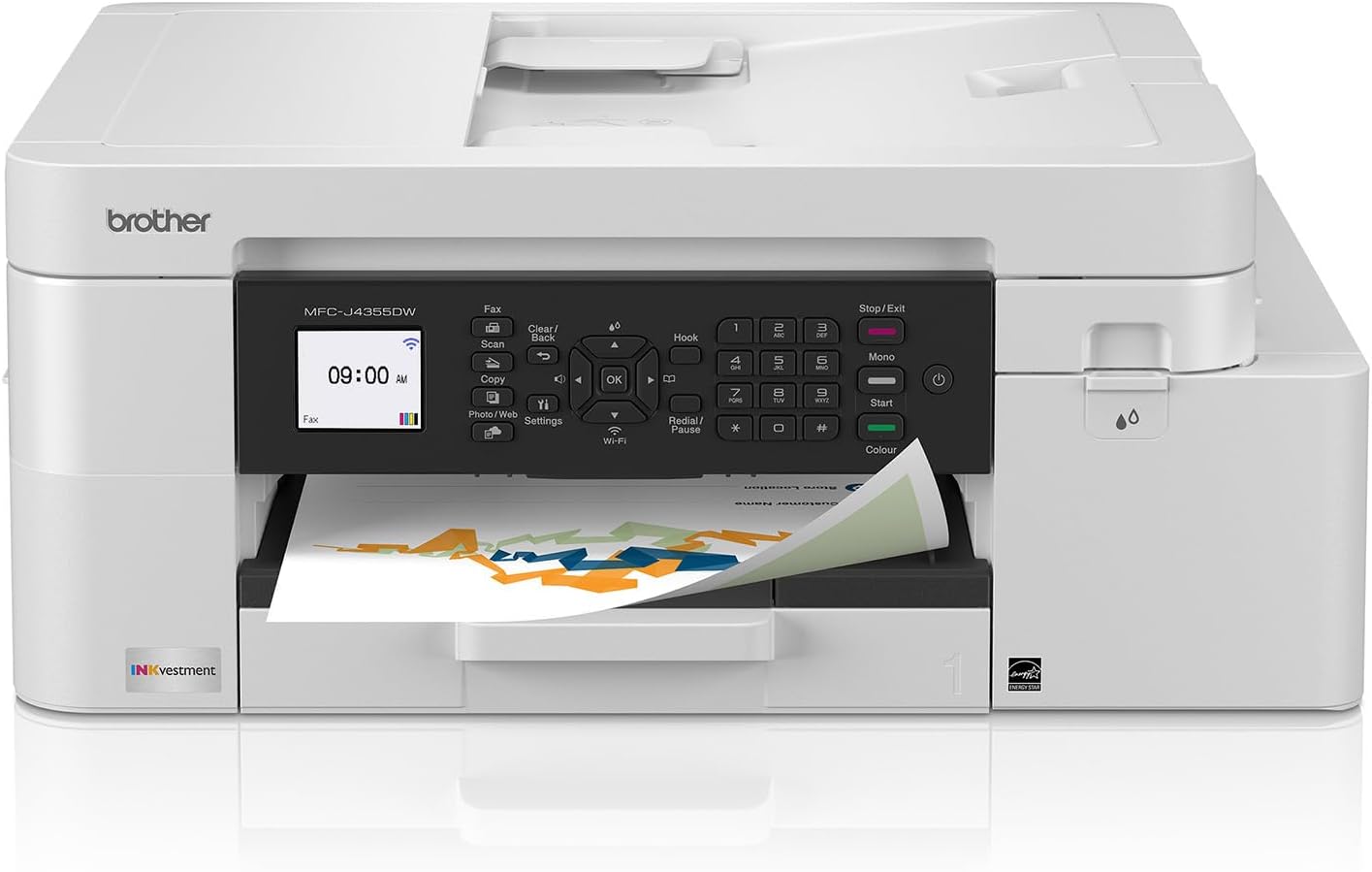
Brother INKvestment 4355 Wireless Color Inkjet All-in-One Printer with 1.8” Color Display and Manual Feed Slot | Includes Refresh Subscription Trial(1) (MFC-J4355DW)
Want the best price and purchase timing?
Our AI advisor analyzes real-time pricing across all channels to find you the best deal.
AI Verdict
This is a 19.6-pound, 4-in-1 inkjet with a 20-page single-sided ADF and 1.8-inch non-touch color display, best for home offices needing high-yield ink and basic duplex printing.
This printer is a situational fit for home and small offices that prioritize high-yield ink and automatic duplex printing over advanced scanning features. Its 20 ppm black print speed and 150-sheet paper tray handle daily document tasks efficiently, but the single-sided ADF and non-touch display are compromises.
If automatic duplex scanning is a must-have, look for a model specifically listing 'single-pass duplex ADF' or 'two-sided scanning' in its specifications.
Regret Score™
Medium RiskLower is better — measures purchase-regret risk from real buyer complaints, review credibility, and product maturity
Issues discovered after purchase
Critically weak dimension
Amazon rating vs actual quality
Chance this product isn't for you
Pros
- Includes one 1,800-page yield black cartridge and 750-page yield cartridges for each color (cyan, yellow, magenta) in the box.
- Prints at speeds up to 20 pages per minute (ppm) black and 19 ppm color.
- Features automatic duplex (2-sided) printing for paper saving.
- Connects wirelessly via Wi-Fi, Wi-Fi Direct, or USB, and supports cloud app connections like Google Drive and Dropbox.
- Has a 150-sheet paper tray and a 1-sheet manual feed slot for specialty media.
- The Brother Mobile Connect app allows printing, copying, scanning, and device management from a mobile device.
Cons
- The 20-page automatic document feeder (ADF) only supports single-sided scanning, not duplex.
- The 1.8-inch color display is not a touchscreen, requiring button navigation.
- Requires periodic print head cleaning if not used often, which can consume ink.
- A USB cable for wired connection is not included in the box.
- Lacks an Ethernet port for wired network connections.
Dimension Scores
The 1.8-inch color display is functional for basic navigation but its small size and lack of touch input make it less comfortable for extended use.
The printer offers a 150-sheet paper tray and a 1-sheet manual feed slot for different media types, but the ADF is limited to single-sided scanning.
User feedback suggests the printer feels sturdy for a consumer-class all-in-one, with trays and compartments feeling robust enough for regular use.
The printer has a compact design and comes in white, which is a common and unobtrusive aesthetic for home office equipment.
Best For
- Home offices needing to print, copy, scan, and fax with high-yield ink.
- Users who frequently print multi-page documents and need automatic 2-sided printing.
- Individuals who need to print from or scan to cloud services like Google Drive or OneDrive.
- Small office environments that handle occasional specialty media like cardstock or envelopes via a manual feed slot.
Not Recommended For
- Users requiring automatic double-sided scanning for multi-page documents.
- Anyone expecting a touchscreen interface for printer navigation.
- Environments where an Ethernet connection is preferred or required over Wi-Fi.
Watch Out For
- The 1.8-inch color display is not a touchscreen, so you'll be navigating menus with physical buttons, which feels dated in 2025.
- The automatic document feeder (ADF) only scans one side of a document at a time, making scanning double-sided documents a manual, multi-step process.
- If you don't print regularly, you might need to perform print head cleaning periodically, which can use up ink.
- The printer weighs 19.6 pounds, so it's not something you'll want to move around frequently once set up.
- You'll need to provide your own USB cable if you plan on a wired connection, as it's not included.
Full Specifications
| UPC | 012502680703 |
| ASIN | B0FGCCWV6T |
| Brand | Brother |
| Color | White |
| Duplex | Automatic |
| Ink Color | Gray |
| Model Name | MFCJ4355DW |
| Sheet Size | up to 8.5 x 14 |
| Item Weight | 19.6 pounds |
| Print media | Envelopes, Glossy photo paper, Paper (plain) |
| Manufacturer | Brother |
| Model Series | MFC-J4355 |
| Scanner Type | Flatbed, Sheetfed |
| Warranty Type | Limited |
| Control Method | Push Button |
| Printer Output | Color |
| Number of Trays | 1 |
| Special Feature | Auto Document Feeder, Auto-Duplex, Energy Star, Network-Ready |
| Total USB Ports | 1 |
| Printer Ink Type | Inkjet Ink Cartridges |
| Item model number | MFCJ4355DW |
| Power Consumption | 21 Watts |
| Compatible Devices | Laptops, PC, Smartphones, Tablets |
| Hardware Interface | Ethernet, USB 2.0 |
| Maximum Media Size | 8.5 x 14 inch |
| Product Dimensions | 13.5"D x 17.1"W x 7.1"H |
| Dual-sided printing | Yes |
| Included Components | Inkjet Cartridges |
| Printing Technology | Inkjet |
| Number of USB 2 Ports | 1 |
| Output sheet capacity | 100 |
| Supported Media Sizes | Legal (8.5 x 14 inches) |
| Maximum copies per run | 99 |
| Connectivity Technology | USB, Wi-Fi |
| Initial page print time | Black: Approx. 5.8 seconds; Color: Approx. 5.9 seconds Seconds |
| Memory Storage Capacity | 256 MB |
| Max Input Sheet Capacity | 150 |
| Max Printspeed Monochrome | 20 ppm |
| Max copy resolution color | 1200 x 1200 |
| Specific Uses For Product | Home, Office |
| Maximum Print Speed (Color) | 19 ppm |
| Additional Printer functions | Copy, Fax, Scan |
| Max Copy Speed (Black & White) | 13 ppm |
| Maximum Color Print Resolution | Up to 1,200 x 4,800 dpi Dots Per Inch |
| Max copy resolution black-white | 1200 x 1200 |
| Maximum Black and White Print Resolution | Up to 1,200 x 4,800 dpi Dots Per Inch |
What Buyers Say
Many users appreciate the included high-yield ink cartridges, noting that the ink lasts a long time and contributes to a low cost per print. The setup process is generally described as easy, especially when using the Brother Mobile Connect app. While print quality for both documents and color images is frequently praised for sharpness and accurate color reproduction, a recurring complaint is the automatic document feeder's inability to scan both sides of a page automatically. The 1.8-inch display, while color, is not a touchscreen, which some users find inconvenient.
“This printer is okay, but seriously, no duplex scanning on the ADF? And a non-touch screen in 2025? It's like they almost got it right but then cheaped out on the things that would make it actually useful for my home office. Ink lasts forever though, so that's something.”
Common Praise
- Ink cartridges last a long time, reducing the frequency of replacements.
- Setup is straightforward, especially with the mobile app.
- Print quality is sharp for text and vivid for color images.
- Automatic duplex printing saves paper.
- Wireless connectivity is reliable and easy to use.
- Manual feed slot handles specialty papers like cardstock and envelopes.
Common Complaints
- The automatic document feeder (ADF) only scans one side of a document.
- The 1.8-inch color display is not a touchscreen.
- Print heads may require periodic cleaning if the printer isn't used frequently.
- No Ethernet port for a wired network connection.
- USB cable is not included.
Ownership Tips
- The manual feed slot at the back needs clearance, and it's also where you'd access for paper jams.
- You might find yourself needing to clean the print heads if you go a while without printing, which uses up some ink.
- The printer's Wi-Fi Direct password is on a sticker, usually on the back left corner.
- While the mobile app makes setup easier, you can technically set it up entirely from the printer's onboard controls.
- The flatbed scanner requires at least 18 inches of clearance above it to open fully.
Frequently Asked Questions
Does this printer scan double-sided documents automatically?
No, the 20-page automatic document feeder (ADF) on the MFC-J4355DW only scans one side of a document at a time. You would need to manually flip the pages to scan the other side.
Is the 1.8-inch color display a touchscreen?
No, the 1.8-inch color display is not a touchscreen. You navigate the printer's menus and settings using the physical buttons located next to the display.
What kind of ink does this printer use and how long does it last?
This printer uses Brother Genuine LC506 INKvestment cartridges. It comes with an 1,800-page yield black cartridge and 750-page yield cartridges for each color (cyan, yellow, magenta).
Can I connect this printer to my computer with a cable?
Yes, you can connect it via USB. However, a USB cable is not included with the printer, so you'll need to purchase one separately.
Does this printer have an Ethernet port for a wired network connection?
No, the Brother MFC-J4355DW does not have an Ethernet port. It relies on wireless connectivity (Wi-Fi, Wi-Fi Direct) or a direct USB connection.
Can I print from my phone or tablet?
Yes, you can print wirelessly from your mobile devices using the Brother Mobile Connect app, Wi-Fi Direct, AirPrint, or Mopria.
Buying Guide
When you're looking at an all-in-one printer like this, you're basically getting a Swiss Army knife for your documents. You need to think about how much you print, if you need color, and what kind of scanning you'll actually do. Don't just assume 'all-in-one' means it does everything perfectly; some features, like duplex scanning, are often cut to hit a price point. Pay attention to the ink system, as that's where your long-term costs will really hit.
INKvestment Tank Technology
This isn't your typical tiny ink cartridge. INKvestment means larger ink reservoirs, often giving you hundreds or thousands of pages before needing a refill, similar to how a large gas tank in a car means fewer stops at the pump. This saves you money and hassle over time.
Automatic Document Feeder (ADF)
If you have a stack of papers to scan or copy, an ADF is a lifesaver. Instead of placing each page on the scanner glass individually, you load the stack, and the printer feeds them through. However, check if it's 'single-sided' or 'duplex' – single-sided means you still have to flip pages for two-sided documents.
Pages Per Minute (PPM)
This tells you how fast the printer spits out pages. Higher PPM means less waiting, especially for large documents. Think of it like the speed limit on a highway; a higher limit gets you to your destination faster. This model prints at 20 ppm black and 19 ppm color.
1.8-inch Color Display
This is your control panel for the printer. A color display helps with navigation, but its size and whether it's a touchscreen or button-operated impacts how easy and intuitive it is to use. A non-touch screen means more button presses to get where you need to go.
Alternatives
If this printer doesn't quite fit, look for models with 'duplex ADF' or 'single-pass two-sided scanning' if you scan double-sided documents often. For a more modern interface, search for printers with 'touchscreen display' or 'larger display size'.
You Might Also Like

LYMAX Computer Monitor Light Bar with Wireless Remote, Motion Sensor, Fit for Flat/Curved Monitor, Adjustable Color Temperature with Auto-Dimming, Eye-Care USB-C Monitor Lamp, No Glare Desk Lamp
$50-$99A 15.7-ounce aluminum monitor light bar with motion sensing, auto-dimming, and stepless 2700K-6500K color temperature adjustment for flat or curved screens.

Computer Monitor Lamp, Screen Monitor Light Bar for Eye Caring, Screen Monitor Light Bar with Backlight for Eye Caring, E-Reading LED Task Lamp with Dimming Adjustment, Perfect for Reading and Study
$0-$49This BLYGACN monitor lamp offers 3 color temperatures (3000K-6500K), dimming, and a 60-minute timer, powered by USB, for monitors 15-24 inches.

Monitor Light Bar with Touch Control, RGB Desk Lamp Full Spectrum Screen Lamp, Glare-Free Low Blue Light Monitor Lamp with Memory Mode, USB Powered for Gaming, Office & Work
$0-$49A USB-powered plastic monitor light bar with touch controls, RGB modes, and glare-free illumination for basic desk setups.

RGB Monitor Light Bar, Eye-Care Dual Light Reading Screen Lamp, 9 Modes Gaming Backlight LED Computer Lamp, 3 Colors Dimmable Frontlight, 15.75'' USB Desk Lights for Home, Office
$0-$49This is a budget-focused 6.4-ounce plastic monitor light bar with dual-mode lighting and 9 RGB backlight modes, designed for users needing basic task and ambient lighting without cluttering their desk