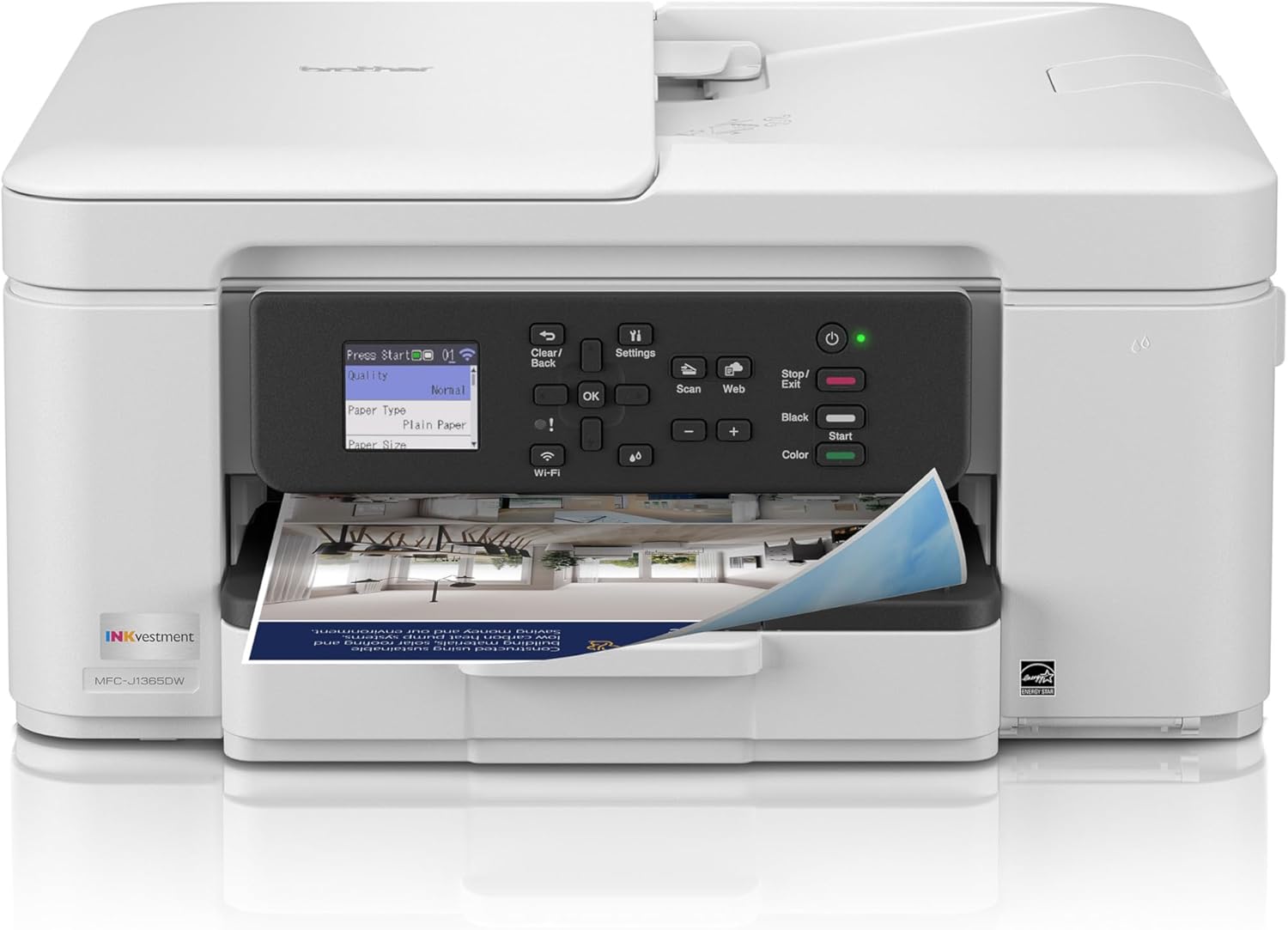
Brother INKvestment 1365 Wireless Color Inkjet All-in-One Printer with Automatic Duplex Printing and 1.8” Color Display | Includes Refresh Subscription Trial(1) (MFC-J1365DW)
Want the best price and purchase timing?
Our AI advisor analyzes real-time pricing across all channels to find you the best deal.
AI Verdict
A 16 ppm black/9 ppm color inkjet with 20-page ADF and 1.8” display for home offices needing basic print, scan, copy.
This printer offers essential features like automatic duplex printing and a 20-page ADF, making it suitable for home offices with moderate document handling. Its wireless and cloud connectivity enhance convenience for users who print from various devices and platforms. However, the 1.8” non-touch display and single-sided ADF scanning limit its utility for more complex tasks or users expecting modern interface standards.
If you need faster print speeds or automatic duplex scanning, look for models with higher ppm ratings and a duplex ADF.
Regret Score™
High RiskLower is better — measures purchase-regret risk from real buyer complaints, review credibility, and product maturity
Issues discovered after purchase
Critically weak dimension
Amazon rating vs actual quality
Chance this product isn't for you
Pros
- Automatic duplex (2-sided) printing saves paper.
- Features a 20-page single-sided automatic document feeder (ADF) for multi-page scanning and copying.
- Offers versatile connectivity including wireless, Wi-Fi Direct, and USB options.
- Supports cloud app integration with Google Drive, Dropbox, Box, and OneDrive via its 1.8” color display.
- Includes one 1,200-page yield black cartridge and three 500-page yield color cartridges.
- Achieves print speeds of up to 16 pages per minute (ppm) for black and 9 ppm for color.
Cons
- The 1.8” color display is small and not a touchscreen, making menu navigation less intuitive.
- The 20-page ADF is single-sided, not capable of automatic duplex scanning.
- The 150-sheet paper tray capacity is standard, requiring more frequent refills for higher volume printing.
- The inclusion of a 'Refresh Subscription Trial' implies ongoing ink costs and potential pressure to subscribe.
Dimension Scores
This is a printer, so comfort and support are not applicable dimensions in the traditional sense.
The 1.8” color display is fixed, and the paper tray is a standard pull-out, offering no physical adjustments beyond paper loading.
Brother printers in this category typically feature a sturdy plastic construction that holds up to regular home office use.
The design is a standard white or black office appliance look, functional and compact (7.5” high, 15.5” wide and 13.5” deep), but not designed for visual flair.
Best For
- Home offices with moderate printing, copying, and scanning needs.
- Users who frequently print from cloud services like Google Drive or Dropbox.
- Environments needing wireless printing directly from mobile devices without an external network via Wi-Fi Direct.
- Individuals needing basic automatic two-sided document printing.
Not Recommended For
- Offices requiring high-volume, fast printing (16 ppm black/9 ppm color is not suitable for enterprise speeds).
- Users needing automatic duplex scanning from the ADF for two-sided documents.
- Anyone who wants to avoid ink subscription models or being tied to genuine ink cartridges.
Watch Out For
- The 1.8” color display is not a touchscreen, making menu navigation less direct than some users might expect.
- Some users report difficulty connecting to Wi-Fi initially or frequent disconnections after about a year of use.
- The included ink cartridges, while more generous than typical starter inks (1,200 black, 500 color), are part of a system that promotes the Refresh EZ Print subscription service.
- Print quality for photos, while described as 'very good,' might be slightly desaturated compared to professional photo printers.
Full Specifications
| UPC | 012502679745 |
| ASIN | B0FGC1V3TH |
| Brand | Brother |
| Color | White |
| Duplex | Automatic |
| Ink Color | Gray |
| Model Name | MFCJ1365DW |
| Sheet Size | up to 8.5 x 14 |
| Item Weight | 16.8 pounds |
| Print media | Envelopes, Glossy photo paper, Paper (plain) |
| Manufacturer | Brother |
| Model Series | MFC-J |
| Scanner Type | Flatbed, Sheetfed |
| Warranty Type | Limited |
| Control Method | Push Button |
| Printer Output | Color |
| Number of Trays | 1 |
| Special Feature | Auto Document Feeder, Auto-Duplex, Energy Star |
| Total USB Ports | 1 |
| Printer Ink Type | Liquid Ink |
| Item model number | MFCJ1365DW |
| Compatible Devices | Laptops, PC, Smartphones, Tablets |
| Hardware Interface | USB 2.0 |
| Maximum Media Size | 8.5 x 14 inch |
| Product Dimensions | 13.5"D x 15.4"W x 7.2"H |
| Dual-sided printing | Yes |
| Included Components | Inkjet Cartridges |
| Printing Technology | Inkjet |
| Output sheet capacity | 150 |
| Supported Media Sizes | Legal (8.5 x 14 inches) |
| Maximum copies per run | 99 |
| Connectivity Technology | USB, Wi-Fi |
| Initial page print time | Black: Approx. 6.2 seconds; Color: Approx. 9.6 seconds Seconds |
| Memory Storage Capacity | 256 MB |
| Max Input Sheet Capacity | 150 |
| Max Printspeed Monochrome | 16 ppm |
| Specific Uses For Product | Home, Office |
| Maximum Print Speed (Color) | 9 ppm |
| Additional Printer functions | Copy, Scan |
| Max Copy Speed (Black & White) | 11 ppm |
| Maximum Color Print Resolution | Windows: Up to 1,200 x 6,000 dpi; Mac: 1,200 x 3,600 dpi Dots Per Inch |
| Max copy resolution black-white | 1,200 x 6,000 dpi |
| Maximum Black and White Print Resolution | Windows: Up to 1,200 x 6,000 dpi; Mac: 1,200 x 3,600 dpi Dots Per Inch |
What Buyers Say
Many users are pleasantly surprised by the print quality, especially the crispness of black text and the vibrancy of colors, even for photos, despite some minor desaturation reported in photo prints. The setup process is frequently praised for being quick and easy, often completed within minutes using the Brother Mobile Connect app. However, the small 1.8-inch display and its non-touch functionality are common points of frustration, making navigation less user-friendly. Some users also experience Wi-Fi connectivity issues, ranging from initial difficulty pairing to regular disconnections over time.
“Ugh, this printer is okay for basic stuff, but that tiny screen is a nightmare to use and the Wi-Fi keeps dropping, seriously annoying when I just need to print one thing!”
Common Praise
- Crisp, clear black text output.
- Vibrant color representation in documents and photos.
- Quick and easy setup process via the Brother Mobile Connect app.
- Automatic duplex printing saves paper and time.
- Quiet operation during printing.
Common Complaints
- Small 1.8-inch non-touch display makes navigation cumbersome.
- Wi-Fi connectivity can be unreliable, with reports of frequent disconnections.
- ADF only scans single-sided documents, requiring manual flipping for duplex scanning.
- Color photos might appear slightly desaturated compared to professional photo printers.
- The ink subscription trial and push for genuine cartridges are a concern for some users.
Ownership Tips
- The included 'INKvestment' cartridges are more generous than typical starter inks, but the printer will still push the Refresh EZ Print subscription.
- The physical footprint is compact, fitting well into smaller home office spaces (7.5” high, 15.5” wide and 13.5” deep).
- Print quality remains consistent over time for documents, but photo quality might not meet expectations for enthusiasts.
- The Brother Mobile Connect app is crucial for a smooth setup and ongoing mobile printing experience.
Frequently Asked Questions
Does this printer scan double-sided documents automatically?
No, the 20-page automatic document feeder (ADF) is single-sided, meaning you would need to manually flip documents for two-sided scanning.
What type of ink cartridges does the MFC-J1365DW use?
It uses Brother Genuine LC504 ink cartridges, and Brother recommends only using their genuine ink for optimal performance.
Can I print directly from my smartphone or tablet?
Yes, you can print wirelessly from your mobile device using the Brother Mobile Connect app or via Wi-Fi Direct, even without an external network connection.
What is the paper capacity of this printer?
The printer has a 150-sheet paper tray for standard paper input.
Is the Brother MFC-J1365DW energy efficient?
Yes, the printer is Energy Star certified.
Buying Guide
When you're looking at an all-in-one inkjet like this, you need to think about how much you actually print and what kind of documents. If you're mostly doing basic documents and occasional color prints for a home office, features like automatic duplex printing and a 20-page ADF are super handy. Don't get caught up in the 'INKvestment' name without understanding the ongoing ink costs, especially with subscription trials.
Print Speed (16 ppm black/9 ppm color)
This tells you how fast your documents will come out. 16 pages per minute for black and white is fine for occasional use, but if you're printing hundreds of pages daily, it'll feel slow, like waiting for a slow elevator when you're in a hurry.
Automatic Duplex Printing
This means the printer can automatically print on both sides of a page without you having to manually flip it. It's like having a built-in assistant for saving paper and making multi-page documents look professional.
20-page Single-sided Automatic Document Feeder (ADF)
This lets you load multiple pages for scanning or copying, and the printer feeds them one by one. Think of it as a stack of papers you can put in a slot, and the machine handles the rest, but remember it only scans one side at a time, so you'll have to flip two-sided originals yourself.
1.8” Color Display
This is your control panel. A small display like this, especially if it's not a touchscreen, means you'll be doing a lot of button-pushing to navigate menus, which can be tedious, like trying to text on an old flip phone.
Alternatives
If you need faster speeds or automatic two-sided scanning, look for printers with higher ppm ratings and a duplex ADF. For lower running costs without subscription pressure, consider models with refillable ink tanks.
You Might Also Like

LYMAX Computer Monitor Light Bar with Wireless Remote, Motion Sensor, Fit for Flat/Curved Monitor, Adjustable Color Temperature with Auto-Dimming, Eye-Care USB-C Monitor Lamp, No Glare Desk Lamp
$50-$99A 15.7-ounce aluminum monitor light bar with motion sensing, auto-dimming, and stepless 2700K-6500K color temperature adjustment for flat or curved screens.

Computer Monitor Lamp, Screen Monitor Light Bar for Eye Caring, Screen Monitor Light Bar with Backlight for Eye Caring, E-Reading LED Task Lamp with Dimming Adjustment, Perfect for Reading and Study
$0-$49This BLYGACN monitor lamp offers 3 color temperatures (3000K-6500K), dimming, and a 60-minute timer, powered by USB, for monitors 15-24 inches.

Monitor Light Bar with Touch Control, RGB Desk Lamp Full Spectrum Screen Lamp, Glare-Free Low Blue Light Monitor Lamp with Memory Mode, USB Powered for Gaming, Office & Work
$0-$49A USB-powered plastic monitor light bar with touch controls, RGB modes, and glare-free illumination for basic desk setups.

RGB Monitor Light Bar, Eye-Care Dual Light Reading Screen Lamp, 9 Modes Gaming Backlight LED Computer Lamp, 3 Colors Dimmable Frontlight, 15.75'' USB Desk Lights for Home, Office
$0-$49This is a budget-focused 6.4-ounce plastic monitor light bar with dual-mode lighting and 9 RGB backlight modes, designed for users needing basic task and ambient lighting without cluttering their desk