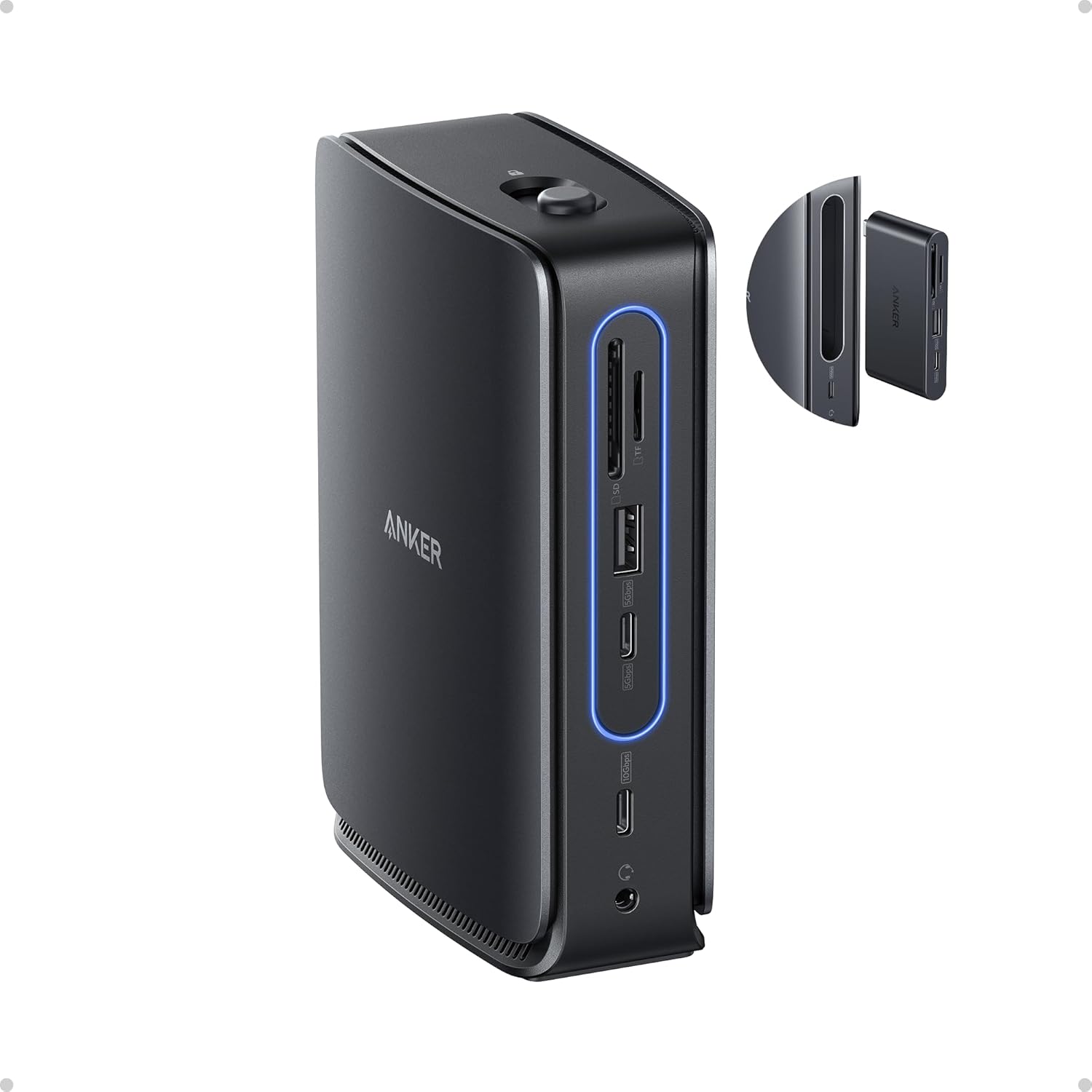
Anker Nano Laptop Docking Station with Detachable Hub, 13-in-1 USB-C Triple Display Docking with 2 HDMI+1 DP, 10 Gbps USB-C, 3 USB-A, Audio, SD/TF, Ethernet, 100W Max PD for Dell, Lenovo, HP, and More
Want the best price and purchase timing?
Our AI advisor analyzes real-time pricing across all channels to find you the best deal.
AI Verdict
This 13-in-1 USB-C dock with a detachable 6-in-1 hub delivers 100W PD and triple 4K@60Hz display output for Windows users needing a flexible desktop and mobile setup.
This dock is a strong fit for Windows users who need extensive connectivity and triple 4K@60Hz display support, coupled with 100W power delivery. The detachable hub adds significant value for mobile use, making it adaptable for both desk-bound and on-the-go workflows.
If you're a macOS user needing independent extended displays, look for docks specifically advertising DisplayLink technology.
Regret Score™
Medium RiskLower is better — measures purchase-regret risk from real buyer complaints, review credibility, and product maturity
Issues discovered after purchase
Critically weak dimension
Amazon rating vs actual quality
Chance this product isn't for you
Pros
- Provides 100W Power Delivery to your laptop, ensuring consistent power for demanding tasks.
- Features triple display output (2x HDMI, 1x DisplayPort) supporting up to 4K@60Hz for multi-monitor Windows setups.
- Includes a detachable 6-in-1 hub for essential connections like HDMI, USB-C, USB-A, SD, and TF card slots on the go.
- Offers 10 Gbps data transfer speeds via its USB-C data ports for quick file movement.
- Comes with a 140W power adapter and a 3 ft 10 Gbps USB-C cable, so you're ready to connect out of the box.
- Integrates a 1 Gbps Ethernet port for stable wired internet connections.
Cons
- All external monitors on macOS mirror the same content, preventing extended desktop functionality.
- The two front USB-C data ports do not support video output, limiting display options to HDMI and DisplayPort.
- Downstream USB-A and USB-C ports provide standard power for operation but do not support device charging.
- Some laptops might display a 'slow charging' warning even when receiving 100W, due to proprietary charging protocols.
- The detachable hub might block adjacent ports on some laptop models, requiring careful placement.
Dimension Scores
The dock's 2.16-pound weight and non-slip rubber base provide stability on a desk, preventing accidental movement.
The detachable 6-in-1 hub offers significant adjustability, allowing users to switch between a full desktop setup and portable connectivity.
The dock features a sturdy build and a non-slip rubber base, suggesting durable construction.
The product is described as having a 'modern aesthetic' with refined status lighting, contributing to a clean workspace.
Best For
- Windows users requiring a triple-monitor workstation with 4K@60Hz resolution for productivity.
- Professionals who frequently switch between a fixed desk setup and mobile work, utilizing the detachable hub.
- Users needing to connect multiple USB-A and USB-C peripherals, SD/TF cards, and wired Ethernet to their laptop.
- Laptops that require up to 100W Power Delivery for charging while connected to peripherals.
Not Recommended For
- macOS users expecting independent extended displays across multiple external monitors.
- Users who need to charge devices like phones or tablets directly from the dock's downstream USB ports.
- Laptops with USB-C ports that do not support DP Alt Mode or Power Delivery.
Watch Out For
- macOS users will find all connected external displays show the same mirrored content, not an extended desktop.
- The USB-C data ports on the dock do not transmit video, so don't plan on connecting a USB-C monitor directly to them.
- Your laptop might show a 'slow charging' notification even when receiving 100W if it uses a non-standard charging protocol.
- The detachable hub, while convenient, could physically obstruct neighboring ports on certain laptops.
- The dock's downstream USB-A and USB-C ports are for data transfer only and won't charge your phone or other devices.
Full Specifications
| UPC | 194644243289 |
| ASIN | B0FCLC1RMM |
| Brand | Anker |
| Color | Black |
| Wattage | 100 |
| Item Weight | 2.16 pounds |
| Manufacturer | Anker |
| Number of Ports | 13 |
| Total USB Ports | 5 |
| Total HDMI Ports | 2 |
| Item model number | A83C3 |
| Hardware Interface | DisplayPort, Ethernet, HDMI, USB Type C |
| Product Dimensions | 3.74 x 1.57 x 5.51 inches |
What Buyers Say
The standout feature here is definitely that detachable 6-in-1 hub; it's a clever way to get full desktop connectivity at home and still have essential ports for when you're working from a coffee shop or traveling. Windows users seem to really dig the triple 4K display setup, but if you're on a Mac, prepare for mirrored screens, which is a bummer. The 100W power delivery is a big plus for keeping laptops juiced, though some folks report 'slow charging' warnings even when it's delivering full power.
“Seriously, this thing is a lifesaver for my work setup, but man, I wish my MacBook could actually extend to three screens instead of just mirroring them, it's so annoying! But for my Windows machine, it's perfect.”
Common Praise
- The detachable hub is super convenient for mobile use, just grab it and go.
- Triple display support works flawlessly for Windows, making multi-tasking a breeze.
- Provides plenty of power to keep my laptop charged, even under heavy load.
- Lots of ports, including Ethernet and SD/TF card slots, means I don't need a bunch of adapters.
- The build feels solid and it stays put on my desk with the rubber base.
Common Complaints
- My MacBook only mirrors displays, I can't get three independent screens.
- The USB-C ports on the front are only for data, can't plug in a USB-C monitor.
- My laptop sometimes says 'slow charging' even though it's getting 100W.
- Wish the downstream USB ports could charge my phone, they're just for data.
- The removable hub can block other ports on my laptop if I'm not careful.
Ownership Tips
- The included 3 ft USB-C cable is crucial; using other cables can cause weird connection issues.
- You really need to check if your laptop's USB-C port supports DP Alt Mode and Power Delivery, otherwise, some features won't work.
- The 140W power adapter is a bit chunky but necessary to power everything stably.
- The dock itself doesn't get excessively hot, even with multiple devices connected and charging.
- The Ethernet port provides a much more stable connection than Wi-Fi, especially for video calls.
Frequently Asked Questions
Can this dock extend my desktop across three monitors on a MacBook?
No, due to macOS limitations, all external monitors connected to this dock will mirror the same content, not provide an extended desktop.
Do the USB-C ports on the front support video output?
No, the two front USB-C data ports are for data transfer only and do not support video output to monitors.
Will this dock charge my laptop?
Yes, the dock delivers up to 100W of Power Delivery to your laptop, sufficient for most modern laptops.
Can I charge my phone or tablet from the USB ports on the dock?
The downstream USB-A and USB-C ports are designed for data transfer and device operation, but they do not support charging other devices.
What kind of cable do I need to connect the dock to my laptop?
Anker recommends using the included 3 ft USB 3.2 Gen 2 USB-C to USB-C cable for optimal compatibility and performance.
Is this dock compatible with Linux operating systems?
No, the product specifications state that this docking station is not compatible with Linux devices.
Buying Guide
When looking at a docking station like this, you're essentially buying a central hub to expand your laptop's capabilities. You need to know what kind of displays you want to connect and how many, as well as the power requirements of your laptop. Don't just assume all USB-C ports are equal; your laptop's USB-C port needs to support specific features like DisplayPort Alt Mode and Power Delivery for the dock to function fully. Also, if you're a Mac user, be aware of Apple's limitations on external displays.
100W Power Delivery (PD)
This tells you how much power the dock can send to your laptop. If your laptop needs 100W or less to charge, this dock can replace your laptop's charger, reducing cable clutter. If your laptop needs more, it might charge slower or require its original charger.
Triple Display (2x HDMI + 1x DP) up to 4K@60Hz
This means you can connect up to three external monitors, and each can display a sharp 4K image at a smooth 60 frames per second. This is crucial for productivity if you need a lot of screen space, but remember macOS has limitations here.
Detachable 6-in-1 Hub
This is like getting two products in one. The main dock stays on your desk for your full setup, and you can pull out a smaller, portable hub with essential ports (like HDMI, USB, and card readers) to take with you for on-the-go connectivity.
Alternatives
If this dock doesn't fit your needs, especially for macOS users, look for docks that explicitly mention DisplayLink support for extended multi-monitor functionality. If you need device charging from the dock's downstream ports, search for models with 'BC 1.2' or 'fast charging' on their USB ports.
You Might Also Like

LYMAX Computer Monitor Light Bar with Wireless Remote, Motion Sensor, Fit for Flat/Curved Monitor, Adjustable Color Temperature with Auto-Dimming, Eye-Care USB-C Monitor Lamp, No Glare Desk Lamp
$50-$99A 15.7-ounce aluminum monitor light bar with motion sensing, auto-dimming, and stepless 2700K-6500K color temperature adjustment for flat or curved screens.

Computer Monitor Lamp, Screen Monitor Light Bar for Eye Caring, Screen Monitor Light Bar with Backlight for Eye Caring, E-Reading LED Task Lamp with Dimming Adjustment, Perfect for Reading and Study
$0-$49This BLYGACN monitor lamp offers 3 color temperatures (3000K-6500K), dimming, and a 60-minute timer, powered by USB, for monitors 15-24 inches.

Monitor Light Bar with Touch Control, RGB Desk Lamp Full Spectrum Screen Lamp, Glare-Free Low Blue Light Monitor Lamp with Memory Mode, USB Powered for Gaming, Office & Work
$0-$49A USB-powered plastic monitor light bar with touch controls, RGB modes, and glare-free illumination for basic desk setups.

RGB Monitor Light Bar, Eye-Care Dual Light Reading Screen Lamp, 9 Modes Gaming Backlight LED Computer Lamp, 3 Colors Dimmable Frontlight, 15.75'' USB Desk Lights for Home, Office
$0-$49This is a budget-focused 6.4-ounce plastic monitor light bar with dual-mode lighting and 9 RGB backlight modes, designed for users needing basic task and ambient lighting without cluttering their desk