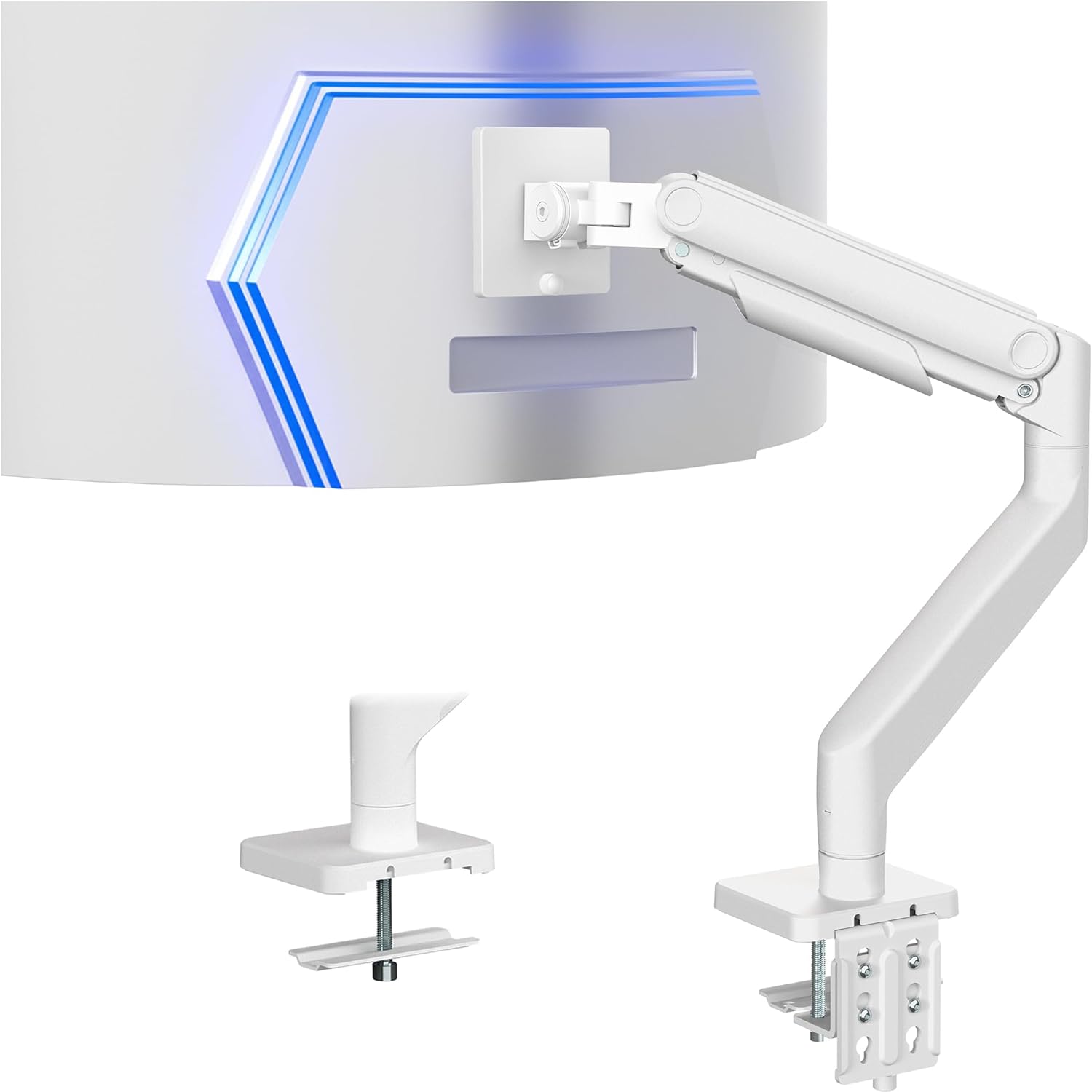
VIVO Heavy Duty Aluminum Ultrawide Monitor Tension Arm for up to 49 inch Screens, Holds 44 lbs, Premium Desk Mount Stand Designed for Samsung Odyssey G9 and More, White, STAND-V101VW
Want the best price and purchase timing?
Our AI advisor analyzes real-time pricing across all channels to find you the best deal.
AI Verdict
This VIVO arm handles 49-inch ultrawides up to 44 lbs with 11 inches of spring-assist height adjustment, but don't expect effortless repositioning.
This arm is a situational fit because it capably supports large 49-inch ultrawide monitors weighing up to 44 lbs, offering significant ergonomic adjustments like 11 inches of height travel. However, user feedback indicates that while it holds the monitor, frequent repositioning isn't smooth, and there are historical concerns about the long-term stability of VIVO heavy-duty arms with such large displays.
If you need buttery-smooth, frequent monitor adjustments for a heavy ultrawide, look for arms explicitly praised for their dynamic movement and higher-end gas spring mechanisms.
Regret Score™
Medium RiskLower is better — measures purchase-regret risk from real buyer complaints, review credibility, and product maturity
Issues discovered after purchase
Critically weak dimension
Amazon rating vs actual quality
Chance this product isn't for you
Pros
- Supports ultrawide monitors up to 49 inches and 44 lbs, including heavy models like the Samsung Odyssey G9.
- Offers 11 inches of smooth height adjustment via a spring-assist arm.
- Provides extensive articulation with +50° to -20° tilt, 180° swivel, and 360° rotation.
- Includes integrated cable management covers to keep cords tidy.
- Mounts securely to desks up to 3.2 inches thick with a C-clamp or 1.4 inches with a grommet mount.
- Features a detachable VESA plate (75x75mm or 100x100mm) for easier monitor installation.
Cons
- Users report that constant repositioning of the monitor can be stiff and not as fluid as more expensive alternatives.
- Some users experienced the desk clamp lifting slightly when the monitor was mounted off-center, indicating potential torque issues on the desktop.
- Cable management covers can be difficult to work with, with one user reporting nicking their hand during installation.
- There are historical user reports of previous VIVO heavy-duty arms failing or sagging with large ultrawides, raising concerns about long-term reliability for expensive monitors.
Dimension Scores
The arm supports monitors up to 44 lbs and 49 inches, providing necessary support for heavy ultrawides.
It offers 11 inches of height adjustment, +50° to -20° tilt, 180° swivel, and 360° rotation, but users report stiffness in frequent movement.
Constructed from aluminum, steel, and plastic, it feels beefy and sturdy, though some users have raised concerns about long-term reliability for heavy monitors.
The white finish and integrated cable management contribute to a clean, organized appearance, freeing up desk space.
Best For
- Ultrawide monitor users needing to free up desk space for a 49-inch screen weighing up to 44 lbs.
- Gaming setups where the monitor position is set once and rarely adjusted.
- Workstations requiring a fixed ergonomic height for a large display, with occasional tilt or swivel.
- Budget-conscious buyers looking for a heavy-duty arm for a large ultrawide.
Not Recommended For
- Users who frequently need to reposition their ultrawide monitor throughout the day.
- Desks with thin tops or those not robust enough to handle potential torque from heavy, off-center loads.
- Individuals unwilling to risk potential long-term reliability issues with very expensive ultrawide monitors, given past model concerns.
Watch Out For
- The arm's movement can be stiff; users report it's not ideal if you need to move your monitor constantly.
- Mounting a heavy ultrawide off-center can cause the desk clamp to lift slightly, putting stress on the desk.
- Cable management covers are a bit fiddly and one user reported cutting their hand during installation.
- Some older VIVO heavy-duty ultrawide arms had issues with sagging or failure, leading to concerns about the brand's reliability for expensive monitors.
Full Specifications
| UPC | 840408805025 |
| ASIN | B0F9ZTLS7R |
| Brand | VIVO |
| Color | White |
| Material | Aluminum, Steel, Plastic |
| Item Weight | 11.97 pounds |
| Manufacturer | VIVO |
| Mounting Type | Tabletop Mount |
| Movement Type | Articulating |
| Item model number | STAND-V101VW |
| Compatible Devices | Monitor |
| Maximum Tilt Angle | 50 Degrees |
| Product Dimensions | 26.6 x 5.3 x 19.7 inches |
| Item Dimensions LxWxH | 26.6 x 5.3 x 19.7 inches |
What Buyers Say
Users frequently highlight this VIVO arm's ability to actually hold massive ultrawide monitors like the Samsung Odyssey G9, which is a big win for its price point. However, don't expect to be swinging your monitor around constantly; many found the movement stiff once set, making it less ideal for dynamic adjustments. There's also a recurring concern about the desk clamp's stability, with some noticing it lifting slightly under off-center loads, and past VIVO models have had issues with sagging, which is a real worry when you're trusting it with a $1000+ monitor. The cable management is there, but a bit of a pain to use, with one user even nicking their hand.
“Dude, it actually holds my G9, which is insane for the money, but don't even think about moving it more than once a week unless you want a workout. And watch your fingers with those cable covers, seriously.”
Common Praise
- Holds a 49-inch Samsung Odyssey G9 without sagging.
- Frees up a significant amount of desk space compared to stock stands.
- Assembly is straightforward with all necessary hardware included.
- The spring-assist arm makes initial height setting relatively easy.
- Offers a wide range of tilt, swivel, and rotation for finding a comfortable viewing angle.
Common Complaints
- Monitor movement is stiff, making frequent adjustments difficult.
- Desk clamp can lift or put significant torque on the desk, especially with off-center mounting.
- Cable management covers are hard to open and close, with sharp edges reported.
- Concerns about long-term reliability and potential for sagging, referencing issues with previous VIVO heavy-duty models.
Ownership Tips
- The tension adjustment for the spring arm needs to be dialed in precisely for your monitor's weight to get any 'smooth' movement.
- If your desk isn't super sturdy, especially a standing desk, the arm can introduce wobble, particularly at higher extensions.
- The white finish can show dust and grime more easily than black arms.
- Re-tightening the desk clamp periodically might be necessary, especially if you notice any shifting or lifting.
- The VESA plate attachment is a lifesaver for getting a heavy monitor onto the arm without needing three hands.
Frequently Asked Questions
What size and weight monitor can this arm hold?
This arm is designed for single ultrawide monitors up to 49 inches in size and can support monitors weighing up to 44 lbs.
Does this arm work with the Samsung Odyssey G9?
Yes, it is specifically designed for and compatible with heavy ultrawide monitors like the Samsung Odyssey G9.
How much height adjustment does it offer?
The arm provides 11 inches of smooth height adjustment through its spring-assist mechanism.
Can I mount this arm on a thick desk?
It can secure to desks up to 3.2 inches thick using the heavy-duty C-clamp, or up to 1.4 inches with the optional grommet mount.
Is the VESA plate easy to attach to my monitor?
Yes, it features a detachable VESA plate (75x75mm or 100x100mm) which makes mounting your ultrawide monitor easier.
Are the cables hidden with this arm?
Yes, it has integrated cable management covers to help keep your cords neatly organized and out of sight.
Buying Guide
When you're looking at monitor arms, especially for huge ultrawides, you need to think about more than just if it 'fits.' You need to know if it can actually *hold* the weight without sagging over time, and if you can move your monitor around easily or if it's going to be a wrestling match. Also, consider your desk's strength; a heavy monitor arm puts a lot of leverage on that clamp.
Weight Capacity (44 lbs)
This isn't just about the monitor not falling off; it's about the arm maintaining its position without slowly drooping. If your monitor is close to the limit, the arm will work harder and might not last as long or move as smoothly.
Screen Size (up to 49 inches)
Larger screens create more leverage, even if they're within the weight limit. An arm rated for a 49-inch ultrawide is designed to handle that extra torque and prevent wobbling or instability that a smaller-screen-rated arm might experience.
Spring-Assist Arm
This is the mechanism that counterbalances your monitor's weight, making it feel lighter when you adjust the height. A good spring-assist means you don't have to fight gravity every time you want to move your screen up or down.
Desk Clamp Thickness (up to 3.2 inches)
This tells you if the arm will physically attach to your desk. More importantly, for heavy monitors, a thicker, sturdier desk will better withstand the forces exerted by the arm, preventing damage or instability to your workspace.
Alternatives
If this arm doesn't cut it, look for models with higher weight capacities, more robust all-metal construction, and explicit user feedback praising smooth, effortless dynamic adjustments, even if it means spending more.
You Might Also Like

LYMAX Computer Monitor Light Bar with Wireless Remote, Motion Sensor, Fit for Flat/Curved Monitor, Adjustable Color Temperature with Auto-Dimming, Eye-Care USB-C Monitor Lamp, No Glare Desk Lamp
$50-$99A 15.7-ounce aluminum monitor light bar with motion sensing, auto-dimming, and stepless 2700K-6500K color temperature adjustment for flat or curved screens.

Computer Monitor Lamp, Screen Monitor Light Bar for Eye Caring, Screen Monitor Light Bar with Backlight for Eye Caring, E-Reading LED Task Lamp with Dimming Adjustment, Perfect for Reading and Study
$0-$49This BLYGACN monitor lamp offers 3 color temperatures (3000K-6500K), dimming, and a 60-minute timer, powered by USB, for monitors 15-24 inches.

Monitor Light Bar with Touch Control, RGB Desk Lamp Full Spectrum Screen Lamp, Glare-Free Low Blue Light Monitor Lamp with Memory Mode, USB Powered for Gaming, Office & Work
$0-$49A USB-powered plastic monitor light bar with touch controls, RGB modes, and glare-free illumination for basic desk setups.

RGB Monitor Light Bar, Eye-Care Dual Light Reading Screen Lamp, 9 Modes Gaming Backlight LED Computer Lamp, 3 Colors Dimmable Frontlight, 15.75'' USB Desk Lights for Home, Office
$0-$49This is a budget-focused 6.4-ounce plastic monitor light bar with dual-mode lighting and 9 RGB backlight modes, designed for users needing basic task and ambient lighting without cluttering their desk