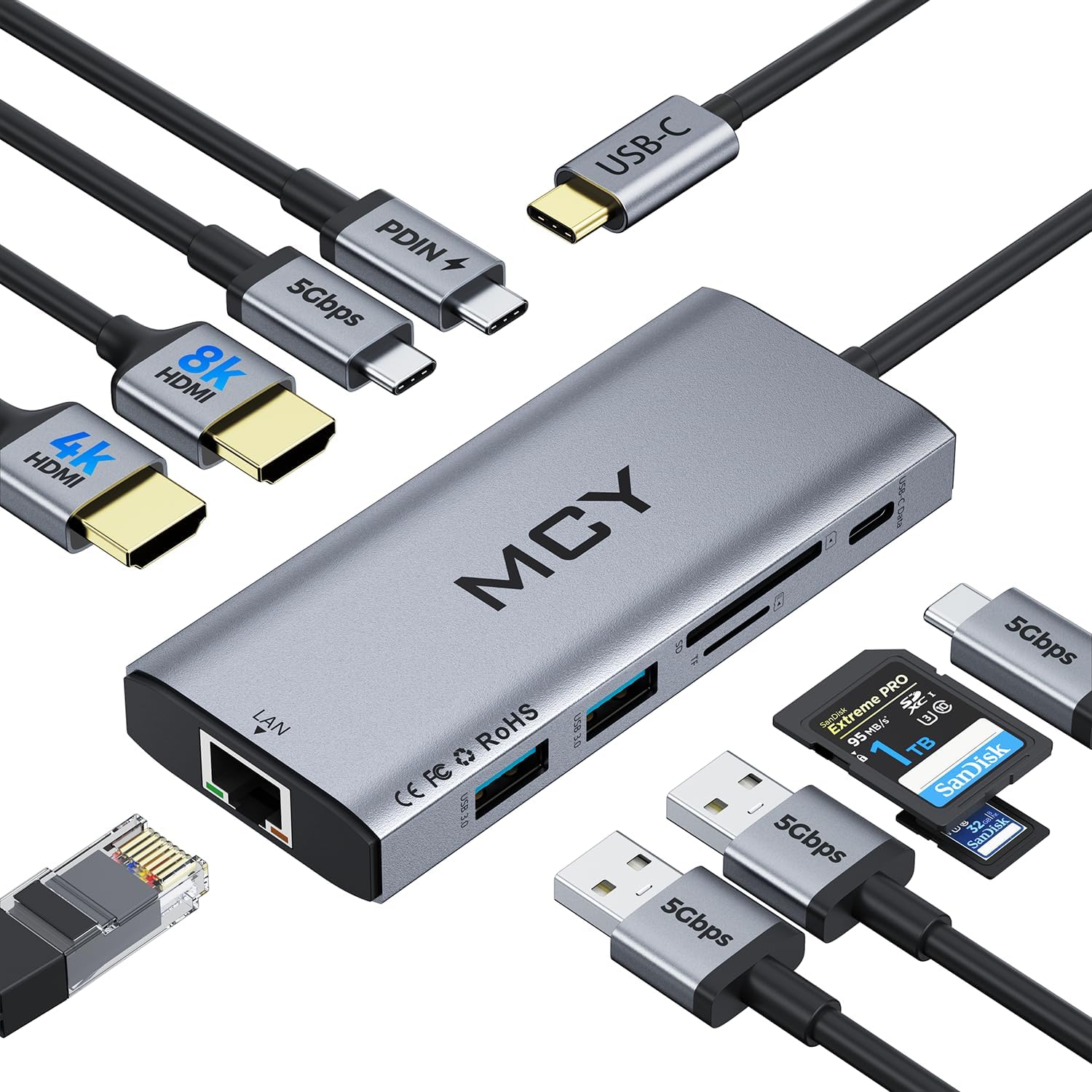
MCY USB C Hub,Laptop Docking Station Dual Monitor Single 8K,2x4K@60Hz,10 in 1 Type-C Multiport Adapter with 2 HDMI,PD100W,Extender Splitter,Card Reader,Ethernet Dock for Mac/Dell/HP/Surface/Steam Deck
Want the best price and purchase timing?
Our AI advisor analyzes real-time pricing across all channels to find you the best deal.
AI Verdict
This 10-in-1 USB-C hub delivers dual 4K@60Hz or single 8K video output, 100W power delivery, and 5Gbps data transfer across four ports.
This hub is a situational fit, offering robust dual 4K@60Hz or single 8K display capabilities and 100W PD, which is strong for Windows users. However, the limitation of identical external displays for Mac users and the inability to read SD/TF cards simultaneously narrow its appeal to specific workflows.
If you're a Mac user needing independent extended displays, look for a docking station explicitly stating 'DisplayLink' support or 'MST' for Mac, which is rare for USB-C hubs.
Regret Score™
Medium RiskLower is better — measures purchase-regret risk from real buyer complaints, review credibility, and product maturity
Issues discovered after purchase
Critically weak dimension
Amazon rating vs actual quality
Chance this product isn't for you
Pros
- Provides 100W Power Delivery pass-through charging, keeping your laptop powered while using other ports.
- Supports dual 4K@60Hz or single 8K video output via HDMI, enhancing visual workspace.
- Features two USB-A 3.0 and two USB-C data ports, all offering 5Gbps data transfer speeds.
- Includes a 1000Mbps Ethernet port for a stable, wired internet connection.
- Weighs 2.82 ounces, making it lightweight for portability.
- Offers broad compatibility with USB-C and Thunderbolt 3/4 devices across Windows, MacOS, ChromeOS, UNIX, and LINUX systems.
Cons
- Mac systems only support 4K resolution on HDMI1, not 8K, and both external monitors will display identical content.
- The SD and TF card readers cannot be used simultaneously.
- Achieving 8K output on HDMI1 requires the host PC to support DP1.4 protocol.
- The product does not include any cables, SD cards, or flash drives.
Dimension Scores
The hub's 2.82-ounce weight and 'Anti-Slip' and 'Portable' special features contribute to its ease of use and placement on a desk.
As a fixed hub, it offers no physical adjustability, which is standard for this product type.
User feedback mentions a 'compact and portable design with solid build quality', and it includes 'Anti-Slip' features.
While specific aesthetic details aren't provided, its compact and portable nature suggests a functional and unobtrusive design, typical for a hub.
Best For
- Users needing to connect two 4K@60Hz monitors to a Windows laptop for extended desktop space.
- Creative professionals using Windows laptops who require high-resolution external displays for editing or design.
- Individuals with a Steam Deck or other compatible USB-C device looking to expand connectivity and display options.
- Anyone needing a portable hub with 100W power passthrough and multiple 5Gbps data ports.
Not Recommended For
- Mac users who need independent extended displays, as external monitors will mirror each other.
- Users who frequently need to read both SD and TF cards at the same time.
- Those with older laptops or devices that do not support DP Alt Mode or DP1.4 protocol on their USB-C port.
Watch Out For
- Mac users will find that both connected external monitors display the same content, limiting true extended desktop functionality.
- If your PC doesn't support DP1.4 protocol, the 8K HDMI port will not achieve its advertised 8K resolution.
- You cannot read an SD card and a TF card at the same time, requiring you to swap them if you need to access both.
- The hub requires your computer's USB-C port to support audio and video transmission (DP Alt Mode) for display output, which some older or basic USB-C ports lack.
Full Specifications
| ASIN | B0DYNNJ524 |
| Brand | MCY |
| Color | Gray |
| Item Weight | 2.82 ounces |
| Manufacturer | Shenzhen HongTian Electronics Co.,Ltd. |
| Special Feature | Anti-Slip, Fast Charging, Plug and Play, Portable |
| Item model number | KCH101-GY |
| Compatible Devices | MacBook Air |
| Hardware Interface | USB 3.0 |
| Package Dimensions | 6.1 x 3.27 x 0.75 inches |
What Buyers Say
This MCY USB C Hub is getting a lot of attention for its ability to handle dual 4K@60Hz displays or even a single 8K monitor, which is a big deal for people who need a lot of screen real estate. The 100W power delivery is a recurring highlight, meaning your laptop won't die mid-task. People are also pointing out the fast 5Gbps data transfer on its USB ports and the stable 1000Mbps Ethernet connection. However, Mac users are consistently noting the limitation where external monitors just mirror each other, which is a bummer if you need separate displays.
“Look, if you're on Windows and need to run two 4K screens or even one 8K, and want to charge your laptop at the same time, this thing actually does it. But for my Mac, the dual screens just mirror, which is kinda annoying when I need to spread out my work.”
Common Praise
- Supports dual 4K@60Hz HDMI output for expanded visual workspace.
- Provides 100W Power Delivery pass-through charging for connected laptops.
- Offers fast 5Gbps data transfer speeds across its USB-A and USB-C data ports.
- Includes a stable 1000Mbps Ethernet connection for reliable internet.
- Plug-and-play setup means no drivers are needed for most systems.
- Its compact and portable design makes it easy to carry.
Common Complaints
- External monitors connected to Mac systems will only mirror each other, not extend independently.
- The 8K HDMI output requires specific DP1.4 protocol support from the host device.
- SD and TF card readers cannot be used at the same time.
- Some users might find the requirement for DP Alt Mode on the host USB-C port restrictive.
Ownership Tips
- The hub can get warm during prolonged use, especially when charging a laptop and running multiple displays.
- The length of the integrated USB-C cable might be a constraint for some desk setups, requiring careful placement.
- Actual 100W PD output can vary slightly depending on the laptop's power draw and the number of connected peripherals.
- Ensuring your laptop's USB-C port supports DP Alt Mode is crucial, as display functionality won't work otherwise.
Frequently Asked Questions
Can I use this hub to connect two different external monitors to my MacBook Pro?
Yes, you can connect two external monitors, but on Mac systems, both external displays will show identical content, not an extended desktop.
Does this hub support 8K resolution?
Yes, it supports single 8K output via HDMI1, but your PC must support DP1.4 protocol for this to work. Mac systems are limited to 4K on this port.
Can I charge my laptop through this hub?
Yes, the hub features a 100W PD pass-through charging port, allowing you to power your laptop while using the hub's other functions.
What data transfer speeds can I expect?
The two USB-A 3.0 and two USB-C data ports all support 5Gbps data transfer, which can move 1GB files in 3-5 seconds.
Are the SD and TF card readers independent?
No, the SD and TF card readers cannot be read simultaneously; you'll need to use them one at a time.
Buying Guide
When you're looking at a USB-C hub like this, you need to think about what you actually plug into your laptop every day. This isn't just about adding more ports; it's about how those ports handle power, video, and data simultaneously. Make sure your laptop's USB-C port can even handle video output (DP Alt Mode), or you'll be disappointed when your monitors don't light up.
100W PD Pass-Through Fast Charging
This means the hub can take power from your laptop's charger and pass it through to your laptop, while also powering the hub itself and any connected devices. It's like a power strip for your USB-C port, so you only need one cable to your laptop for power and all your peripherals.
Dual 4K@60Hz / Single 8K Output
This tells you the maximum resolution and refresh rate you can get on external monitors. 4K@60Hz is smooth and sharp for most work and media. Single 8K is for cutting-edge displays, but your computer needs to be powerful enough and have the right USB-C version (DP1.4) to push that many pixels.
5Gbps Data Transfer (USB 3.0/3.1 Gen 1)
This is how fast files move between your laptop and external drives or flash drives connected to the hub. 5Gbps is fast enough for most external SSDs and transferring large files quickly, much faster than older USB 2.0 (480Mbps).
Alternatives
If this hub doesn't fit, look for docking stations with 'DisplayLink' technology for independent multi-monitor support on Macs, or hubs with higher data transfer speeds like 10Gbps (USB 3.1 Gen 2) if you're moving extremely large files frequently.
You Might Also Like

LYMAX Computer Monitor Light Bar with Wireless Remote, Motion Sensor, Fit for Flat/Curved Monitor, Adjustable Color Temperature with Auto-Dimming, Eye-Care USB-C Monitor Lamp, No Glare Desk Lamp
$50-$99A 15.7-ounce aluminum monitor light bar with motion sensing, auto-dimming, and stepless 2700K-6500K color temperature adjustment for flat or curved screens.

Computer Monitor Lamp, Screen Monitor Light Bar for Eye Caring, Screen Monitor Light Bar with Backlight for Eye Caring, E-Reading LED Task Lamp with Dimming Adjustment, Perfect for Reading and Study
$0-$49This BLYGACN monitor lamp offers 3 color temperatures (3000K-6500K), dimming, and a 60-minute timer, powered by USB, for monitors 15-24 inches.

Monitor Light Bar with Touch Control, RGB Desk Lamp Full Spectrum Screen Lamp, Glare-Free Low Blue Light Monitor Lamp with Memory Mode, USB Powered for Gaming, Office & Work
$0-$49A USB-powered plastic monitor light bar with touch controls, RGB modes, and glare-free illumination for basic desk setups.

RGB Monitor Light Bar, Eye-Care Dual Light Reading Screen Lamp, 9 Modes Gaming Backlight LED Computer Lamp, 3 Colors Dimmable Frontlight, 15.75'' USB Desk Lights for Home, Office
$0-$49This is a budget-focused 6.4-ounce plastic monitor light bar with dual-mode lighting and 9 RGB backlight modes, designed for users needing basic task and ambient lighting without cluttering their desk