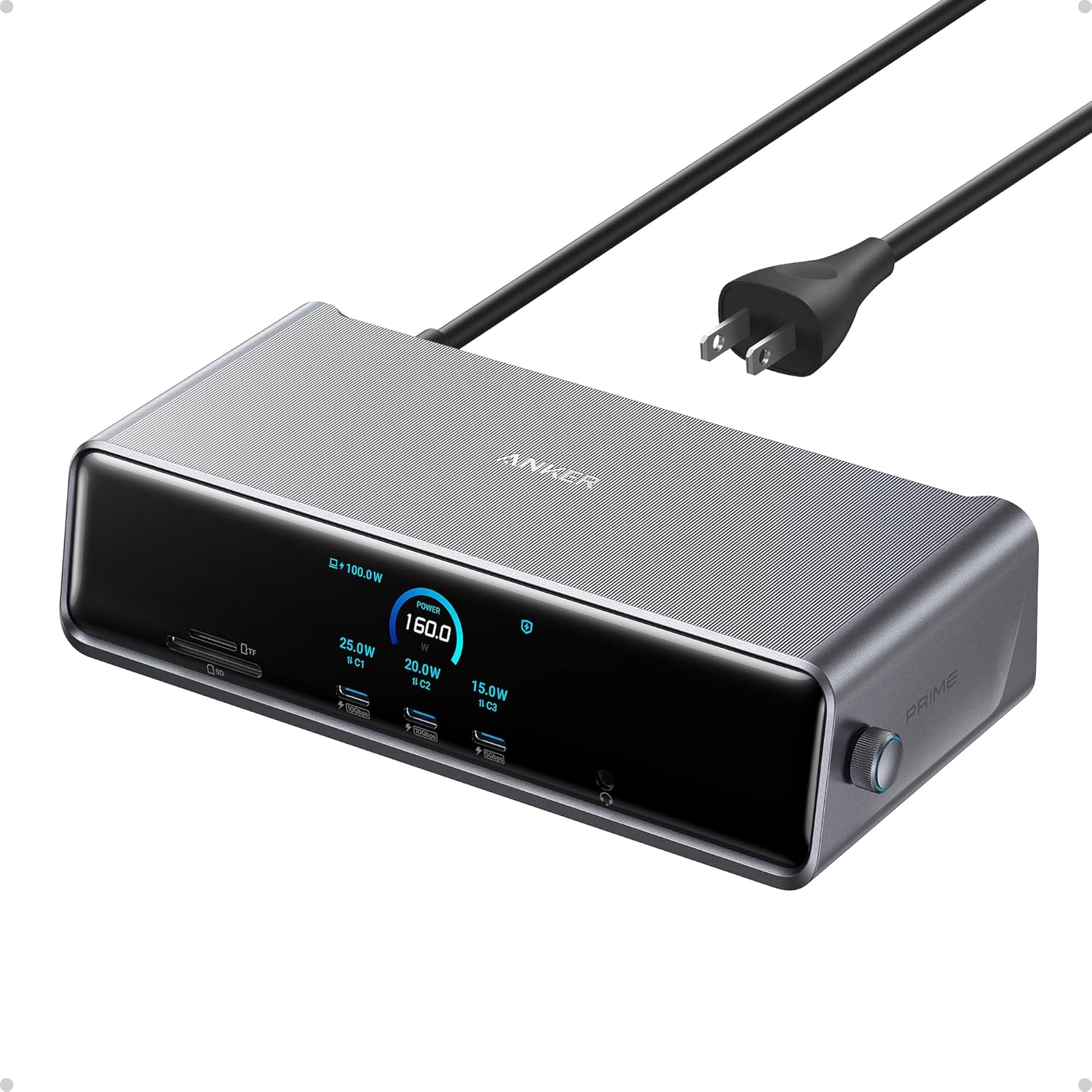
Anker Prime Docking Station (DL7400), 14-Port Triple Display with DisplayLink, 140W Max, Smart Display, Triple 4K 60Hz, Cooling Fan, for macOS and Windows (The Latest DisplayLink Driver Required)
Want the best price and purchase timing?
Our AI advisor analyzes real-time pricing across all channels to find you the best deal.
AI Verdict
A 14-port DisplayLink dock with 140W laptop charging and triple 4K 60Hz display output, for macOS and Windows users needing extensive connectivity.
This dock is a strong fit for users, especially those with macOS, who need to drive multiple external displays and require high-wattage charging for their laptop and other devices. Its 140W upstream power and triple display support directly address common limitations of many laptops. The integrated GaN power supply and smart display are significant convenience features.
If you need even higher total power output for simultaneous max-speed charging across all ports, look for docks with a total power budget exceeding 200W.
Regret Score™
Low RiskLower is better — measures purchase-regret risk from real buyer complaints, review credibility, and product maturity
Issues discovered after purchase
Critically weak dimension
Amazon rating vs actual quality
Chance this product isn't for you
Pros
- Delivers up to 140W to your laptop via the upstream USB-C port, keeping high-power devices charged quickly.
- Features two front-facing 100W 10Gbps USB-C ports for rapid charging of peripherals like phones and tablets.
- Supports triple external displays, including one 8K output via DisplayPort, for expanded workspace.
- Integrates a GaN power supply internally, eliminating a bulky external power brick and reducing cable clutter.
- Includes a smart display that shows real-time charging power, display performance, and fan cooling mode.
- Equipped with a 2.5Gbps Ethernet port for faster wired network connections.
Cons
- Requires installation of the latest DisplayLink driver for multi-monitor functionality on macOS and Windows.
- The total power output of the dock is 160W, meaning not all 100W USB-C ports can deliver full power simultaneously if the laptop draws 140W.
- DisplayLink technology can introduce a slight delay, making it unsuitable for fast-paced video gaming.
- The vertical tower design (7.68 × 3.62 × 1.85 inches) might be too tall for some monitor risers or compact desk setups.
- One of the USB-A ports operates at 480Mbps, which is slower than the other 5Gbps USB-A ports.
Dimension Scores
The internal GaN power supply and vertical design contribute to a cleaner, less cluttered desk, improving workspace comfort.
The dock itself has no physical adjustability, but its 14 ports offer extensive connectivity options for various peripherals.
Features like a built-in cooling fan, ActiveShield 3.0, and an integrated GaN power supply indicate a focus on robust internal components and thermal management.
The vertical tower design with a smart display and integrated power supply offers a modern, clean look that reduces desk clutter.
Best For
- macOS users needing to connect more than one external monitor via DisplayLink.
- Professionals requiring 140W power delivery to their laptop and multiple high-speed charging ports for other devices.
- Users aiming to minimize desk clutter with a docking station that has an integrated power supply.
- Anyone needing a wide array of ports including 2.5Gbps Ethernet, SD/TF card slots, and multiple USB-C/A connections.
Not Recommended For
- Gamers who require zero latency for fast-paced titles, as DisplayLink can introduce minor delays.
- Users of Linux or ChromeOS, as these operating systems are not officially supported.
- Individuals with extremely limited desk space who cannot accommodate a vertical dock measuring 7.68 inches tall.
Watch Out For
- The dock's total power budget is 160W; if your laptop pulls the full 140W, only 20W remains for all other ports, limiting simultaneous high-power charging.
- You absolutely need to install the DisplayLink driver for multi-monitor support, which is an extra step in setup.
- The vertical form factor, at 7.68 inches tall, might not fit under all monitor risers or shelves, so measure your space first.
- The SD and TF card slots are limited to UHS-I speeds, which might be slower than what professional photographers or videographers need.
Full Specifications
| ASIN | B0DTSZC5Y7 |
| Brand | Anker |
| Color | Phantom Gray |
| Wattage | 160 |
| Item Weight | 1.84 pounds |
| Manufacturer | Anker |
| Number of Ports | 14 |
| Total USB Ports | 7 |
| Total HDMI Ports | 2 |
| Item model number | A83B3 |
| Compatible Devices | MacBooks, USB C Windows laptops |
| Hardware Interface | 3.5mm Audio, DisplayPort, Ethernet, HDMI, MicroSD, USB |
| Product Dimensions | 7.67 x 3.62 x 1.89 inches |
What Buyers Say
Many users highlight the integrated GaN power supply as a standout feature, praising how it cleans up their desk by eliminating a bulky power brick. The ability to drive multiple external monitors, especially for Mac users, is frequently cited as a primary reason for purchase. The smart display, showing real-time power and fan status, is also a commonly appreciated detail. However, the requirement to install DisplayLink drivers is a recurring point, and some note the dock's total power budget can be a limitation if many devices are drawing high power simultaneously.
“Okay, so I got this Anker dock because my M3 Air was stuck on one monitor, and this thing actually lets me run three screens, which is a game changer for work. The built-in power supply is awesome, no more giant brick under my desk, and my laptop charges super fast. Just remember to install that DisplayLink driver, it's not plug-and-play for the displays.”
Common Praise
- Eliminates the need for a separate, bulky power brick due to its internal GaN power supply.
- Provides 140W power delivery to the host laptop, keeping it fully charged even under heavy load.
- Allows macOS users to connect and run three external monitors without issues after driver installation.
- The front USB-C ports deliver 100W, enabling fast charging for phones and tablets directly from the dock.
- The built-in fan keeps the unit cool and operates quietly, even when pushing high power.
- The smart display provides useful real-time information about power draw and operational status.
Common Complaints
- Requires a DisplayLink driver installation, which is an extra step and can be a hurdle for some users.
- The total power output of 160W means you can't simultaneously use all 100W USB-C ports at full power if the laptop is drawing 140W.
- DisplayLink introduces a slight delay, making it not ideal for gaming or other latency-sensitive applications.
- The vertical design is taller than expected, potentially not fitting under certain monitor risers.
- The 480Mbps USB-A port is noticeably slower for data transfer compared to other ports.
- SD and TF card slots are limited to UHS-I speeds, which can be slow for large file transfers from high-speed cards.
Ownership Tips
- The smart display can be turned off completely, which is useful if the dock is in a bedroom or dark environment.
- Swapping between different laptops (e.g., MacBook and ThinkPad) is seamless, with the dock adapting power delivery.
- The cooling fan is genuinely quiet and keeps the unit from getting hot, even during extended use.
- The vertical orientation, while space-saving, requires specific desk clearance, so measure before committing.
- The included USB-C 3.2 Gen 2 cable is crucial; using other cables might cause connectivity issues.
Frequently Asked Questions
Do I need to install software for this docking station to work?
Yes, you need to install the latest DisplayLink driver for multi-monitor functionality on both macOS 13.5 or later and Windows 10/11.
Can this dock charge my laptop at 140W?
Yes, the upstream USB-C port can deliver up to 140W of power to your connected laptop.
How many external monitors can I connect, and at what resolution?
You can connect up to three external monitors. It supports one 8K output (via DisplayPort at 60Hz or HDMI at 30Hz) and two 4K outputs at 60Hz via HDMI.
Does this docking station have a fan, and is it noisy?
Yes, it has a built-in cooling fan and ActiveShield 3.0 to keep it cool. User reports indicate it stays whisper quiet.
What does the smart display show?
The smart display shows real-time updates on charging power, display performance, fan cooling mode, and settings. It can also function as a clock.
Buying Guide
When looking at docking stations, you're essentially buying a central hub to expand your laptop's capabilities. You need to consider how many external monitors you want to run, what resolution and refresh rate, and how much power your laptop needs to charge. Also, think about the types of peripherals you'll connect – USB-A, USB-C, Ethernet, and card readers. The 'DisplayLink' part means it uses software to drive displays, which is key for Macs that usually limit external monitors, but it can introduce a tiny bit of lag.
140W Max Upstream Power
Triple Display with DisplayLink
2.5Gbps Ethernet Port
Integrated GaN Power Supply
Alternatives
If you prioritize gaming or need native GPU-driven display output without DisplayLink, look for Thunderbolt 4 or Thunderbolt 5 docks with fewer display outputs but direct video connections. If you need more total power output for many high-draw peripherals, search for docks with a higher overall power budget.
You Might Also Like

LYMAX Computer Monitor Light Bar with Wireless Remote, Motion Sensor, Fit for Flat/Curved Monitor, Adjustable Color Temperature with Auto-Dimming, Eye-Care USB-C Monitor Lamp, No Glare Desk Lamp
$50-$99A 15.7-ounce aluminum monitor light bar with motion sensing, auto-dimming, and stepless 2700K-6500K color temperature adjustment for flat or curved screens.

Computer Monitor Lamp, Screen Monitor Light Bar for Eye Caring, Screen Monitor Light Bar with Backlight for Eye Caring, E-Reading LED Task Lamp with Dimming Adjustment, Perfect for Reading and Study
$0-$49This BLYGACN monitor lamp offers 3 color temperatures (3000K-6500K), dimming, and a 60-minute timer, powered by USB, for monitors 15-24 inches.

Monitor Light Bar with Touch Control, RGB Desk Lamp Full Spectrum Screen Lamp, Glare-Free Low Blue Light Monitor Lamp with Memory Mode, USB Powered for Gaming, Office & Work
$0-$49A USB-powered plastic monitor light bar with touch controls, RGB modes, and glare-free illumination for basic desk setups.

RGB Monitor Light Bar, Eye-Care Dual Light Reading Screen Lamp, 9 Modes Gaming Backlight LED Computer Lamp, 3 Colors Dimmable Frontlight, 15.75'' USB Desk Lights for Home, Office
$0-$49This is a budget-focused 6.4-ounce plastic monitor light bar with dual-mode lighting and 9 RGB backlight modes, designed for users needing basic task and ambient lighting without cluttering their desk