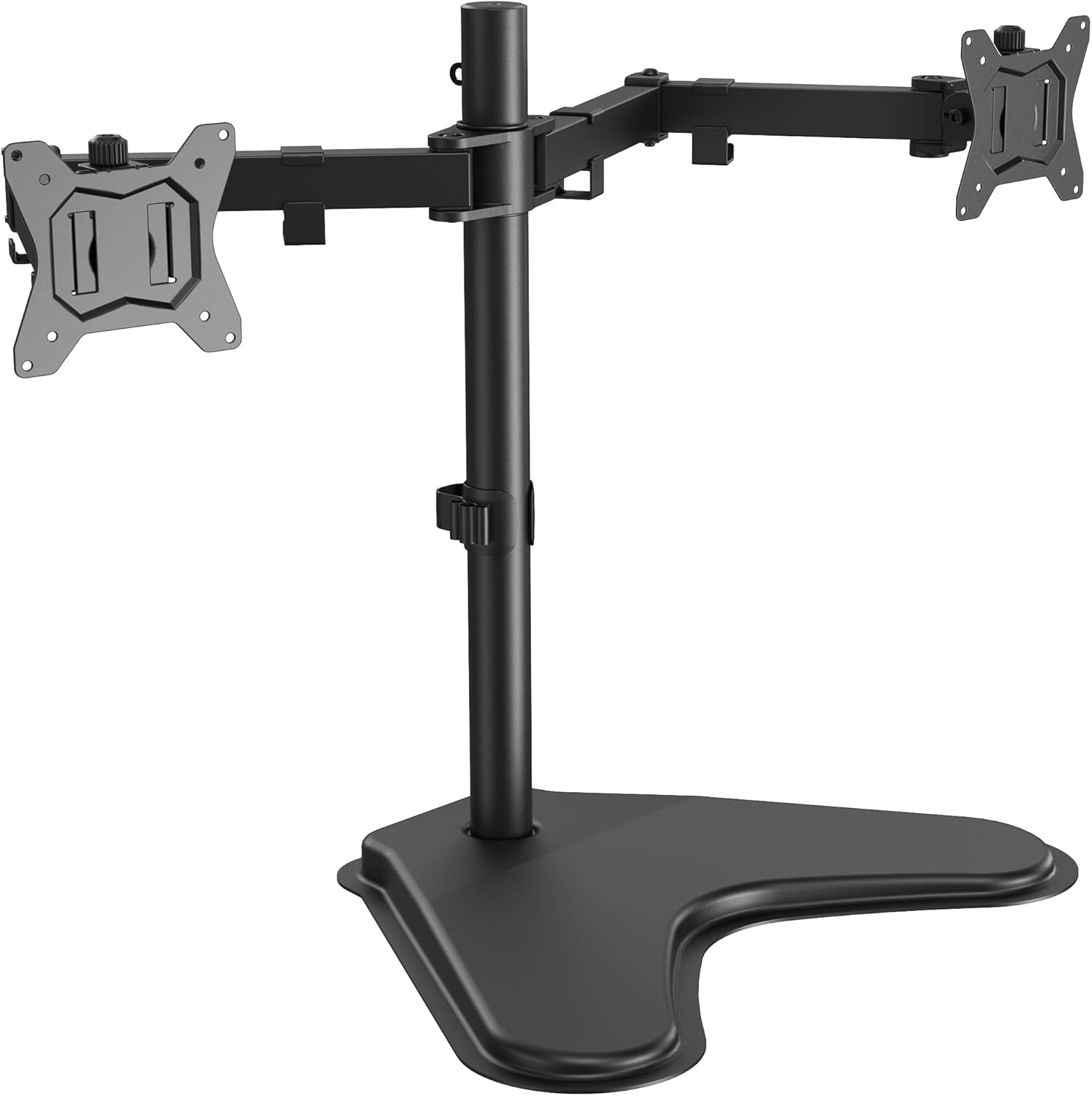
ErGear Freestanding Dual Monitor Stand for 2 Screens up to 32 inch, Heavy Duty Monitor Mount Holds Max 17.6 lbs per Arm, Height Adjustable Gaming Monitor Stand for Desk, VESA 75x75/ 100x100mm, Black
Want the best price and purchase timing?
Our AI advisor analyzes real-time pricing across all channels to find you the best deal.
AI Verdict
This freestanding dual monitor stand supports two 32-inch, 17.6 lbs monitors with +/-90° tilt/swivel and 360° rotation, freeing up desk space.
This stand is a situational fit because it capably supports two large 32-inch monitors up to 17.6 lbs each with a range of adjustments, but its freestanding base and manual tightening for adjustments mean it's best for static setups. The 15.4″ x 11″ base also dictates desk space usage.
If you need fluid, dynamic monitor adjustments or want to maximize desk surface area, look for a gas spring monitor arm with a clamp or grommet mount.
Regret Score™
Medium RiskLower is better — measures purchase-regret risk from real buyer complaints, review credibility, and product maturity
Issues discovered after purchase
Critically weak dimension
Amazon rating vs actual quality
Chance this product isn't for you
Pros
- Constructed from alloy steel and aluminum, supporting two 32-inch monitors each weighing up to 17.6 lbs.
- Offers extensive screen adjustments including +/-90° tilt, +/-90° swivel, and 360° rotation for flexible viewing.
- Elevates screens up to 18.2 inches above the desktop, promoting an ergonomic viewing height.
- Integrated cable clips along the arms help route cables, contributing to a clutter-free workspace.
- Users report easy assembly, with clear instructions and all necessary parts included.
Cons
- The 15.4″ x 11″ V-shaped base occupies a fixed footprint on the desktop, which can limit usable space.
- Adjustments for tilt, swivel, and height require manual tightening, lacking the fluid movement of gas spring arms.
- Some users reported monitors not staying in position, even after tightening, potentially requiring extra effort to secure.
- Stability can be compromised if monitor arms are extended too far forward or backward, requiring careful positioning.
Dimension Scores
The stand provides ergonomic elevation up to 18.2 inches and offers +/-90° tilt and swivel, allowing for customized viewing angles to reduce strain.
It features +/-90° tilt, +/-90° swivel, and 360° rotation, along with height adjustment, but these are manual adjustments and not as fluid as gas spring arms.
Constructed from alloy steel and aluminum, it's designed for stability and supports up to 17.6 lbs per arm, with users reporting it holds dual 32-inch monitors well.
The V-shaped base and black finish offer a functional look, and cable clips help manage wires, but it doesn't stand out with a particularly sleek or premium design.
Best For
- Dual 32-inch monitor setups where monitors are generally left in a static position.
- Users needing to free up desktop space underneath their monitors.
- Budget-conscious individuals seeking a sturdy, non-gas-spring monitor solution.
- Home office environments where a freestanding base is preferred over drilling or clamping.
Not Recommended For
- Users who frequently adjust monitor positions throughout the day, requiring fluid, one-handed movement.
- Desks with limited depth where the 15.4″ x 11″ base would consume too much surface area.
- Monitors exceeding 17.6 lbs per arm, as this can lead to instability or sag.
Watch Out For
- Monitors may not hold their position securely if the mounting screws are not tightened 'the hell out of it,' as one user reported.
- The V-shaped base, measuring 15.4″ x 11″, takes up a significant and permanent area on your desk.
- Achieving optimal balance requires keeping monitors within a 'designated zone,' meaning arms cannot be fully extended forward or backward without risk of tipping.
- Adjusting monitor height or angle is a manual process involving loosening and re-tightening, not a smooth, dynamic movement like gas spring arms provide.
Full Specifications
| UPC | 810158826793 |
| ASIN | B0D7Q493TN |
| Brand | ErGear |
| Color | Black |
| Material | Alloy Steel, Aluminum |
| Brand Name | ErGear |
| Color Name | Black |
| Item Weight | 7.39 pounds |
| Manufacturer | ErGear |
| Mounting Type | Tabletop Mount |
| Movement Type | Articulating, Tilt, Swivel, Rotation |
| Item model number | EGCM25-US |
| Compatible Devices | Monitor |
| Maximum Tilt Angle | 90 Degrees |
| Package Dimensions | 17.09 x 11.61 x 3.94 inches |
What Buyers Say
Many users found this ErGear stand surprisingly capable for its price, easily assembling it in under 30 minutes and appreciating its ability to hold two 32-inch monitors without issue. The integrated cable management was also a recurring positive point, helping to keep workspaces tidy. However, a significant concern for some was the stability, with reports of monitors not staying in their set positions unless all screws were exceptionally tight. The large V-shaped base, while providing stability, also takes up a fixed amount of desk real estate.
“Dude, it holds my two 32s but I had to crank those screws down so hard my fingers hurt, otherwise they just flopped around. Still, for the price, it works.”
Common Praise
- Assembly is straightforward and quick, often completed within 15-30 minutes.
- Holds two 32-inch monitors, even those weighing close to the 17.6 lbs limit, without sagging.
- Effectively frees up valuable space underneath the monitors on the desktop.
- The included cable clips are effective at organizing and hiding monitor cables.
- Offers a wide range of motion for tilt, swivel, and rotation once secured.
Common Complaints
- Monitors can sag or not maintain position if the mounting points are not extremely tightened.
- The 15.4″ x 11″ V-shaped base occupies a substantial and immovable area on the desk.
- Adjustments are manual and require loosening/tightening, making frequent changes less convenient than gas spring arms.
- Stability issues can arise if the arms are extended too far forward or backward from the base.
Ownership Tips
- You'll need to really torque down on all adjustment screws to prevent monitor drift, especially with heavier screens.
- The large V-shaped base, while stable, means you lose a significant portion of your desk to its footprint.
- Plan your monitor positions carefully, as extending the arms too far can make the whole setup feel less secure.
- Cable management clips are functional but can be a bit fiddly to open and close if you frequently add or remove cables.
Frequently Asked Questions
What size and weight monitors can this stand support?
It supports two monitors between 13 and 32 inches, with each arm holding up to 17.6 lbs.
Is this monitor stand VESA compatible?
Yes, it is compatible with VESA patterns of 75x75mm and 100x100mm.
How much desk space does the base of the stand take up?
The V-shaped base measures 15.4 inches by 11 inches.
How easy is it to assemble this monitor stand?
Users generally report that assembly is straightforward, with clear instructions and all parts included, typically taking 15-30 minutes.
Can I easily adjust the height of my monitors?
Yes, the stand is height adjustable, elevating screens up to 18.2 inches above the desktop, but adjustments are manual and require tightening, not a fluid gas-spring mechanism.
Buying Guide
When looking at monitor stands, you need to decide if you want a freestanding one like this, or one that clamps to your desk. Freestanding means no drilling, but the base takes up desk space. You also need to check the weight capacity per arm and the VESA compatibility (the square hole pattern on the back of your monitor) to make sure your monitors will fit. Finally, consider how often you'll move your monitors; manual adjustments are fine for static setups, but gas spring arms are better for frequent changes.
VESA Compatibility (75x75mm, 100x100mm)
This refers to the standard pattern of mounting holes on the back of your monitor. Your monitor must have one of these patterns for the stand to attach. It's like making sure your TV mount matches the holes on your TV.
Max Weight per Arm (17.6 lbs)
This is the maximum weight each arm can safely support. If your monitor is heavier, the arm might sag or fail, like trying to lift something too heavy with a weak crane. Always check your monitor's weight without its original stand.
Freestanding Base (15.4″ x 11″)
This means the stand sits directly on your desk, rather than clamping to the edge or through a grommet hole. The base dimensions tell you exactly how much desk surface it will occupy, which is important for planning your workspace layout.
Adjustability (Tilt, Swivel, Rotation, Height)
These describe how you can move your monitors. Tilt lets you angle them up or down, swivel moves them side to side, rotation lets you switch between landscape and portrait, and height adjustment moves them up and down the pole. More options mean better ergonomics and flexibility for your viewing comfort.
Alternatives
If you need more dynamic, fluid monitor movement, look for gas spring monitor arms. For maximum desk space and a cleaner look, consider clamp-on or grommet-mount monitor arms.
You Might Also Like

LYMAX Computer Monitor Light Bar with Wireless Remote, Motion Sensor, Fit for Flat/Curved Monitor, Adjustable Color Temperature with Auto-Dimming, Eye-Care USB-C Monitor Lamp, No Glare Desk Lamp
$50-$99A 15.7-ounce aluminum monitor light bar with motion sensing, auto-dimming, and stepless 2700K-6500K color temperature adjustment for flat or curved screens.

Computer Monitor Lamp, Screen Monitor Light Bar for Eye Caring, Screen Monitor Light Bar with Backlight for Eye Caring, E-Reading LED Task Lamp with Dimming Adjustment, Perfect for Reading and Study
$0-$49This BLYGACN monitor lamp offers 3 color temperatures (3000K-6500K), dimming, and a 60-minute timer, powered by USB, for monitors 15-24 inches.

Monitor Light Bar with Touch Control, RGB Desk Lamp Full Spectrum Screen Lamp, Glare-Free Low Blue Light Monitor Lamp with Memory Mode, USB Powered for Gaming, Office & Work
$0-$49A USB-powered plastic monitor light bar with touch controls, RGB modes, and glare-free illumination for basic desk setups.

RGB Monitor Light Bar, Eye-Care Dual Light Reading Screen Lamp, 9 Modes Gaming Backlight LED Computer Lamp, 3 Colors Dimmable Frontlight, 15.75'' USB Desk Lights for Home, Office
$0-$49This is a budget-focused 6.4-ounce plastic monitor light bar with dual-mode lighting and 9 RGB backlight modes, designed for users needing basic task and ambient lighting without cluttering their desk