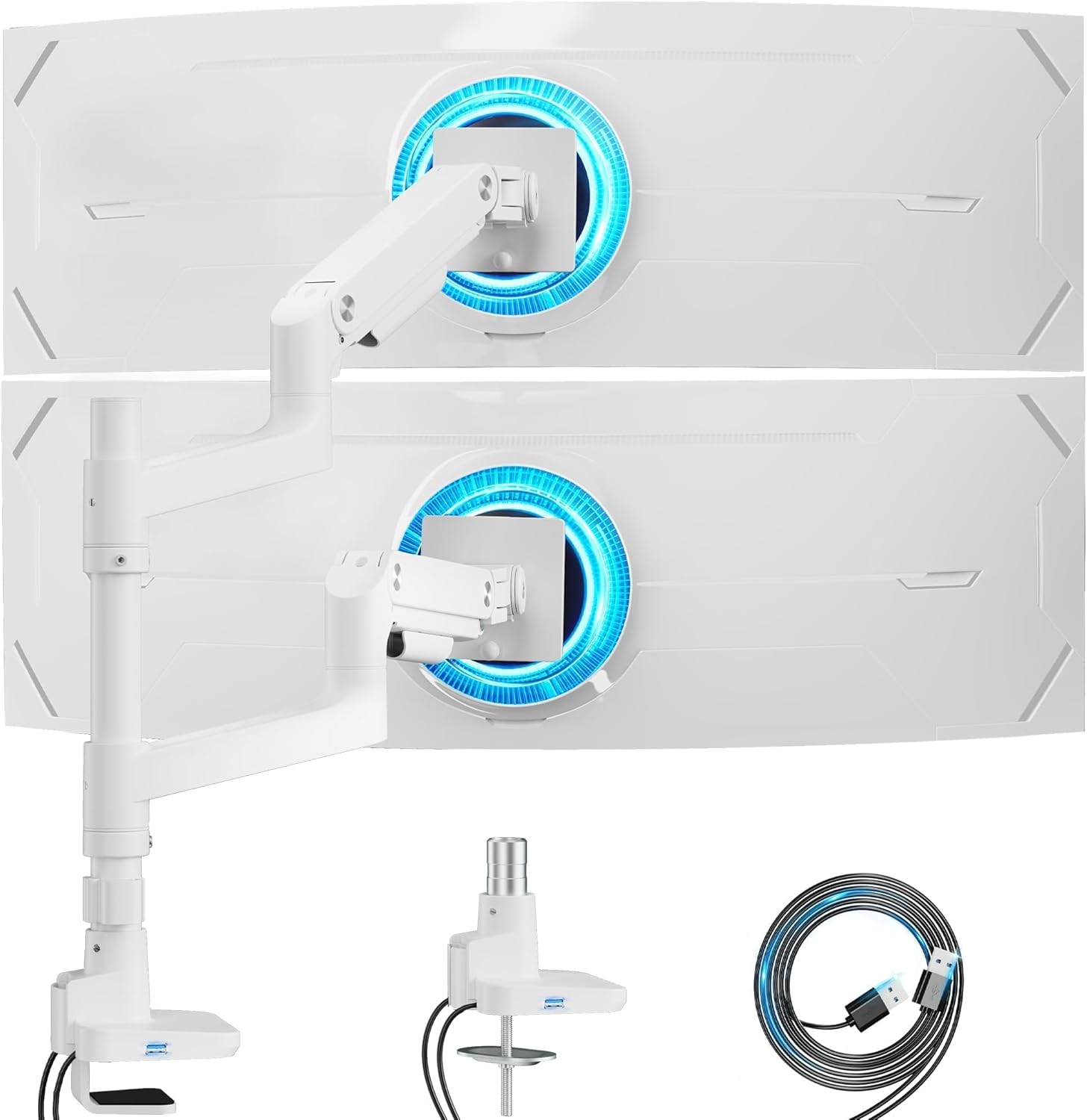
ARES WING Dual Monitor Stand for Ultrawide Heavy Duty Curved Monitor Stacking, Fits 17-49 Inch, Vertical Gas Spring Double Monitor Mount with USB, Adjustable Dual Monitor Mount for Desk, White
Want the best price and purchase timing?
Our AI advisor analyzes real-time pricing across all channels to find you the best deal.
AI Verdict
This is a 16.59-pound aluminum dual monitor arm that supports two 17-49 inch monitors up to 44 lbs each, with integrated USB-C and USB-A charging ports.
This arm is a strong fit for users with large or ultrawide monitors up to 49 inches and 44 lbs each, offering extensive adjustability for both stacked and side-by-side configurations. The integrated USB ports and robust gas spring design provide practical benefits for a clean and ergonomic workspace.
If you need even more extreme height or reach for specialized setups, look for arms with a maximum height exceeding 27.9 inches and arm extension beyond 22.4 inches.
Regret Score™
Very Low RiskLower is better — measures purchase-regret risk from real buyer complaints, review credibility, and product maturity
Issues discovered after purchase
Critically weak dimension
Amazon rating vs actual quality
Chance this product isn't for you
Pros
- Supports two monitors up to 49 inches and 44 lbs each, including large ultrawides like the Samsung Odyssey G9.
- Offers extensive adjustability with 27.9 inches maximum height, 22.4 inches arm extension, -50° to +20° tilt, ±90° swivel, and 360° rotation.
- Features integrated USB-C (5V/2A) and USB-A (5V/2A) ports in the base for convenient device charging.
- Includes quick-release VESA panels and supports both C-clamp (0.5-1.8'' desk thickness) and grommet mount (0.5-2'' desk thickness) for straightforward installation.
- Constructed with industrial-grade gas springs, tested over 20,000 times for stability and smooth adjustments.
- The design allows for vertical stacking of monitors, providing more layout options compared to some other dual arms.
Cons
- Some monitors with recessed VESA holes might have fit issues with the quick-connect bracket, requiring direct screwing of the arm to the monitor.
- While designed for ultrawides, stacking two very tall ultrawides (like a G9X with another monitor) might be problematic due to height limitations or leverage.
- The product weighs 16.59 pounds, which is heavier than some alternatives, potentially making initial setup more cumbersome.
- Requires an extra VESA mount adapter if your monitor does not have VESA holes.
Dimension Scores
The arm's ability to support two monitors up to 49 inches and 44 lbs each, combined with extensive tilt, swivel, and rotation, allows for highly customized and ergonomic viewing angles.
With a maximum height of 27.9 inches, 22.4 inches arm extension, -50° to +20° tilt, ±90° swivel, and 360° rotation, this arm offers near best-in-class flexibility for positioning two displays.
Constructed from aluminum with industrial-grade gas springs tested over 20,000 cycles, users report a heavy, sturdy feel with minimal wobble even under heavy loads.
The white matte finish and integrated cable management system contribute to a clean, organized look, with users noting a good fit and finish out of the box.
Best For
- Users with two large or ultrawide monitors (up to 49 inches, 44 lbs each) needing vertical stacking or side-by-side arrangements.
- Anyone looking to free up desk space and improve ergonomics with extensive monitor positioning options.
- Workspaces where integrated USB-C and USB-A charging ports on the monitor arm are a priority for device connectivity.
- Desks with thickness between 0.5-1.8 inches (C-clamp) or 0.5-2 inches (grommet) that can accommodate a heavy-duty mount.
Not Recommended For
- Users with monitors exceeding 44 lbs per arm or larger than 49 inches.
- Desks with very thin or very thick surfaces outside the 0.5-2 inch range for mounting.
- Individuals who frequently adjust monitor height on a pole-mounted arm, as individual monitor height adjustment on a single pole can be less fluid than arms with independent height adjustment mechanisms.
Watch Out For
- If your monitor has recessed VESA holes, the quick-connect bracket might not work, forcing you to screw the arm directly to the monitor, which is harder with large ultrawides.
- Attempting to stack two extremely tall ultrawide monitors, such as a Samsung G9X with another large display, can lead to height clearance issues or instability, despite the arm's 49-inch compatibility.
- You'll need to buy a separate VESA mount adapter if your monitor lacks standard VESA holes.
Full Specifications
| ASIN | B0D2JX2M1B |
| Brand | ARES WING |
| Color | White with USB |
| Material | Aluminum |
| Brand Name | ARES WING |
| Color Name | White with USB |
| Item Weight | 16.59 pounds |
| Manufacturer | ARES WING |
| Mounting Type | Tabletop Mount |
| Movement Type | Rotate, Swivel, Tilt |
| Item model number | GDT1004UCP-2WH |
| Compatible Devices | Monitor |
| Maximum Tilt Angle | 50 Degrees |
| Product Dimensions | 12 x 11.8 x 18 inches |
What Buyers Say
This ARES WING dual monitor arm is a beast, capable of handling two 49-inch ultrawide monitors, which is a big deal for anyone with a serious setup. Users frequently mention how much desk space it frees up and how clean their workspace looks after installation, thanks to the integrated cable management and USB ports. The gas spring system gets a lot of praise for making adjustments smooth and stable, even with heavy screens. However, some folks trying to stack two super-tall ultrawides ran into issues, so be realistic about your monitor dimensions if you're going for a vertical stack.
“Dude, this thing actually holds my massive 49-inch ultrawide AND my 27-inch above it without sagging, and the USB ports are a game-changer for my phone. My desk looks so much cleaner now, totally worth it!”
Common Praise
- Supports two large 34-inch ultrawide monitors side-by-side or stacked vertically without issue.
- The industrial-grade gas springs provide smooth and stable adjustments, even with heavy monitors.
- Integrated USB-C and USB-A ports in the base are incredibly convenient for charging devices.
- The quick-release VESA panels and clear instructions make installation straightforward.
- Cable management system effectively hides wires, contributing to a clean desk.
- Does not protrude backwards much, which is helpful for desks close to a wall.
Common Complaints
- Stacking two very large ultrawide monitors, like a G9X, can be problematic due to overall height and leverage, leading to instability or inability to achieve desired positioning.
- Monitors with deeply recessed VESA holes can make the quick-connect bracket difficult to use, requiring a more involved mounting process.
- The arm is quite heavy at 16.59 pounds, which can make initial handling and installation a bit cumbersome.
- Requires an additional VESA adapter if your monitor doesn't have standard VESA mounting holes.
Ownership Tips
- After a few weeks, the gas springs maintain their tension, keeping monitors exactly where you set them without drifting.
- The integrated USB ports are consistently used for charging phones and headphones, reducing clutter from separate chargers.
- The cable management channels are effective, but if you frequently change cables, snapping them open and closed can be a minor chore.
- The white finish holds up well to daily use, resisting smudges and maintaining its appearance.
- Even with heavy monitors, the arm's stability means less screen shake when typing or bumping the desk.
Frequently Asked Questions
Can this arm hold two 49-inch ultrawide monitors?
Yes, it's designed to hold two monitors up to 49 inches and 44 lbs each. However, stacking two very tall ultrawides might present challenges with overall height and leverage.
Does this monitor arm have USB ports?
Yes, it includes both a USB-C port (5V/2A) and a USB-A port (5V/2A) for charging devices directly from the arm's base.
What desk thickness does this mount support?
It supports desks between 0.5 to 1.8 inches thick for C-clamp installation and 0.5 to 2 inches thick for grommet mounting.
Is installation difficult?
Installation is described as straightforward, with quick-release VESA panels and comprehensive instructions. It offers both C-clamp and grommet mounting options.
Will this arm wobble with heavy monitors?
The arm features industrial-grade gas springs tested over 20,000 times for stability, with users reporting minimal wobble even with large monitors.
Buying Guide
When you're looking at monitor arms, especially for big screens, you need to think about how much weight it can actually hold and the size of your monitors. Don't just look at the maximum weight; consider the monitor's dimensions, especially if it's an ultrawide, because that extra width creates more leverage. Also, check your desk's thickness to make sure the clamp or grommet mount will fit securely and won't damage your desk over time.
Monitor Weight Capacity (per arm)
This tells you the maximum weight each arm can safely support. If your monitor is heavier, the arm will sag or fail. Always leave a little buffer; don't push it right to the limit for better longevity.
Monitor Size Compatibility
Beyond weight, the physical size (especially width) of your monitor affects how well it balances on the arm. Ultrawide monitors, even if they meet the weight limit, can create leverage that some arms struggle with, leading to tilt or wobble.
Adjustability (Tilt, Swivel, Rotation, Height, Extension)
These numbers dictate how much you can move your monitor to find your perfect ergonomic position. More range means more flexibility to reduce neck strain and glare. Gas spring arms offer smoother, one-handed adjustments compared to friction-based ones.
Alternatives
If this arm doesn't fit your needs, look for single-pole arms with independent articulating arms for each monitor if you need more precise individual height adjustments, or arms with a higher weight capacity per arm if your monitors are exceptionally heavy.
You Might Also Like

LYMAX Computer Monitor Light Bar with Wireless Remote, Motion Sensor, Fit for Flat/Curved Monitor, Adjustable Color Temperature with Auto-Dimming, Eye-Care USB-C Monitor Lamp, No Glare Desk Lamp
$50-$99A 15.7-ounce aluminum monitor light bar with motion sensing, auto-dimming, and stepless 2700K-6500K color temperature adjustment for flat or curved screens.

Computer Monitor Lamp, Screen Monitor Light Bar for Eye Caring, Screen Monitor Light Bar with Backlight for Eye Caring, E-Reading LED Task Lamp with Dimming Adjustment, Perfect for Reading and Study
$0-$49This BLYGACN monitor lamp offers 3 color temperatures (3000K-6500K), dimming, and a 60-minute timer, powered by USB, for monitors 15-24 inches.

Monitor Light Bar with Touch Control, RGB Desk Lamp Full Spectrum Screen Lamp, Glare-Free Low Blue Light Monitor Lamp with Memory Mode, USB Powered for Gaming, Office & Work
$0-$49A USB-powered plastic monitor light bar with touch controls, RGB modes, and glare-free illumination for basic desk setups.

RGB Monitor Light Bar, Eye-Care Dual Light Reading Screen Lamp, 9 Modes Gaming Backlight LED Computer Lamp, 3 Colors Dimmable Frontlight, 15.75'' USB Desk Lights for Home, Office
$0-$49This is a budget-focused 6.4-ounce plastic monitor light bar with dual-mode lighting and 9 RGB backlight modes, designed for users needing basic task and ambient lighting without cluttering their desk