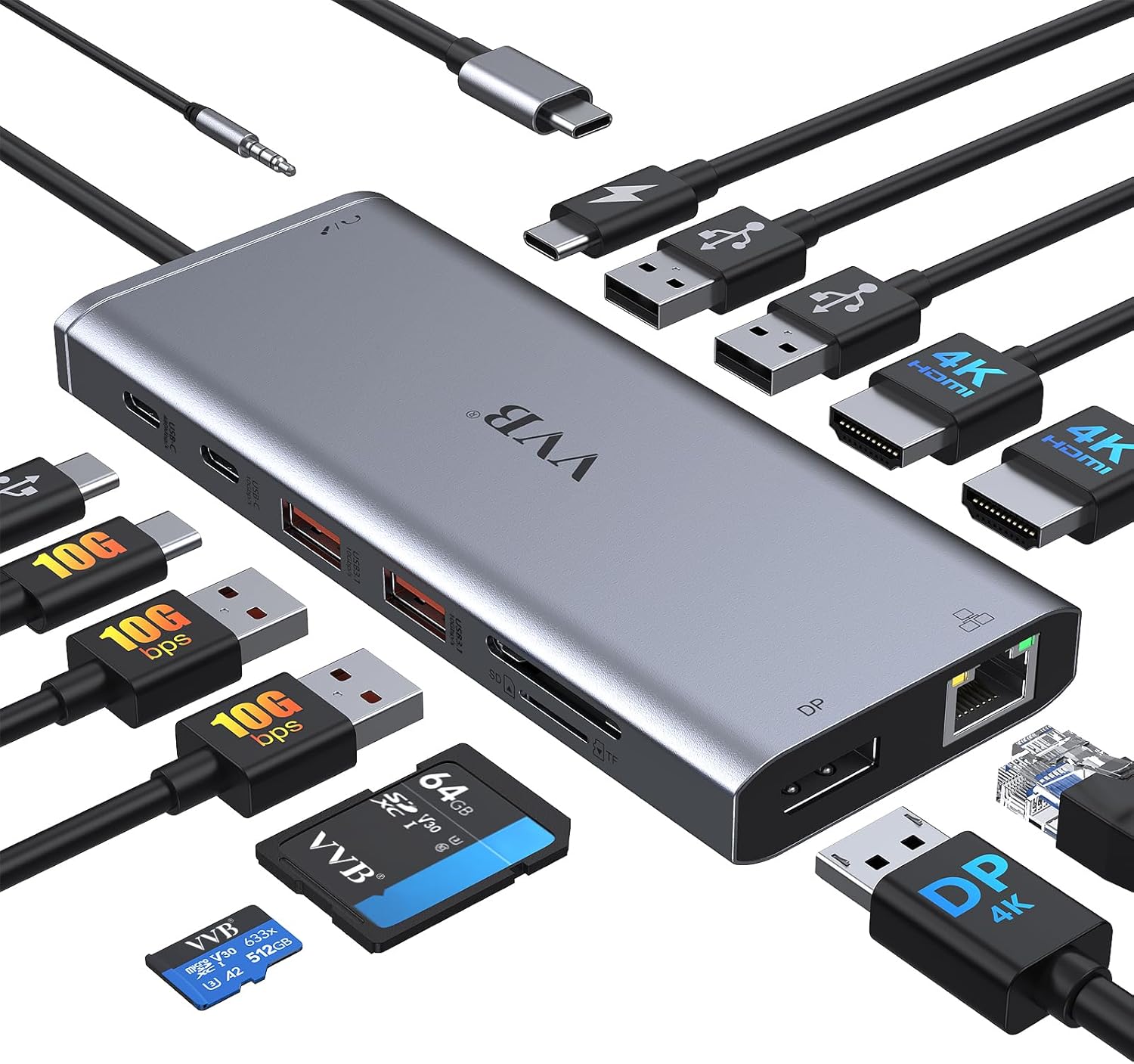
USB C Laptop Docking Station Dual Monitor HDMI for Dell/Lenovo/HP Laptop 14 in 1 USB C Hub Multiport Adapter Dongle Dock USB C to 2 HDMI 4K+DisplayPort+Ethernet+4USB+2USB C+100W PD Charger+SD/TF+Audio
Want the best price and purchase timing?
Our AI advisor analyzes real-time pricing across all channels to find you the best deal.
AI Verdict
This VVB 14-in-1 USB-C dock delivers 2 HDMI (4K@60Hz/30Hz), 1 DisplayPort (4K@60Hz), 100W PD input, and 10Gbps USB ports, making it a budget option for Windows users needing extensive port expansion.
This VVB dock is a situational fit, offering a broad range of 14 ports including triple display support for Windows and 87W power delivery. However, its compatibility limitations for macOS and reported inconsistencies with multi-monitor stability and power output mean it won't work for everyone.
If this dock doesn't cut it, look for a Thunderbolt 4 dock for more consistent multi-monitor support and power delivery, especially for macOS.
Regret Score™
High RiskLower is better — measures purchase-regret risk from real buyer complaints, review credibility, and product maturity
Issues discovered after purchase
Critically weak dimension
Amazon rating vs actual quality
Chance this product isn't for you
Pros
- Expands a single USB-C port into 14, including 2 HDMI, 1 DisplayPort, Ethernet, and 7 USB ports.
- Supports triple displays for Windows laptops, with resolutions up to 4K@60Hz for a single monitor or 1080P for three monitors.
- Features 10Gbps data transfer speeds via one USB C 3.1 and two USB A 3.1 ports.
- Provides up to 87W power output for laptop charging from a 100W USB-C PD input.
- Includes a Gigabit Ethernet port for stable wired network connections.
- Weighs 6.4 ounces, making it lightweight for portability.
Cons
- MacBook laptops only support mirrored external monitors, not extended displays.
- Power delivery output can be limited to 55W for some laptops, even with a 100W input.
- Some users report displays stopping or not being recognized when connecting multiple HDMI inputs.
- Requires the host laptop's USB-C port to support DisplayPort Alt Mode for video output.
- Can cause interference with headsets connected to other USB-C ports on a MacBook.
Dimension Scores
As a docking station, it doesn't offer direct comfort or support, but its plug-and-play nature contributes to ease of use.
The dock itself has no adjustable parts, but it enables flexible monitor arrangements for Windows users.
While some users report it working for a period, there are complaints of the device stopping working after a few months, indicating inconsistent durability.
The dock is described as compact and portable, suggesting a functional and unobtrusive design.
Best For
- Windows laptop users needing to connect three external 1080P monitors.
- Home office setups requiring numerous peripheral connections and wired internet.
- Users with USB-C laptops needing 87W power delivery and 10Gbps data transfer.
- Individuals who frequently transfer photos and videos with SD/Micro SD cards.
Not Recommended For
- MacBook users needing extended multi-monitor setups.
- Users whose laptops do not support USB-C DisplayPort Alt Mode or Power Delivery.
- Anyone needing consistent 100W power delivery to their laptop through the dock.
Watch Out For
- Some users experienced displays stopping or not recognizing HDMI inputs when connecting multiple monitors.
- The power delivery can be lower than advertised, with one user reporting only 55W to their laptop despite the 100W input claim.
- Connecting the dock to a MacBook can cause interference with headsets plugged into other USB-C ports.
- The dock may stop working after a few months, with one user reporting failure after 6 months.
- Losing one or both displays can occur, potentially related to laptop security features.
Full Specifications
| ASIN | B0D2BW24HM |
| Brand | VVB |
| Color | 14 Ports 2HDMI+Displayport |
| Item Weight | 6.4 ounces |
| Manufacturer | VVB |
| Special Feature | Fast Charging, Lightweight, Plug and Play |
| Compatible Devices | Dell, HP, Lenovo |
| Hardware Interface | Ethernet, HDMI, USB 2.0, USB 3.0, USB Type C |
| Product Dimensions | 3.15 x 0.65 x 6.22 inches |
What Buyers Say
User feedback for this VVB docking station highlights a mixed experience, particularly around multi-monitor stability and power delivery. While many appreciate the extensive port selection and triple display capability for Windows, specific complaints detail issues like displays dropping or not being recognized when connecting multiple HDMI inputs. Some users also reported receiving less power than the advertised 87W for laptop charging, requiring them to purchase a separate 100W power supply. There's also a concern about the device's longevity, with one user noting it stopped working after six months.
“Seriously, I bought this thing to simplify my setup, but now I'm unplugging and replugging monitors constantly, and my laptop's still complaining about low power. It's a headache.”
Common Praise
- Provides a wide range of connectivity options from a single USB-C port.
- Supports dual and triple monitor setups for Windows laptops.
- Offers 4K video output for connected displays.
- Includes a Gigabit Ethernet port for a stable internet connection.
- Features fast data transfer speeds with 10Gbps USB ports.
Common Complaints
- External displays can stop working or not be recognized when multiple HDMI inputs are used.
- Power delivery to the laptop can be lower than the stated 87W output.
- The dock can cause interference with headsets connected to other USB-C ports on a MacBook.
- The device may cease to function after several months of use.
- MacBook users are limited to mirrored displays, not extended.
Ownership Tips
- You might need to purchase a separate 100W USB-C power adapter if your laptop isn't getting enough charge through the dock.
- Be prepared to troubleshoot display issues, especially if you're using multiple HDMI connections.
- If you own a MacBook, understand that extended multi-monitor setups are not possible; only mirroring.
- Ensure your laptop's USB-C port specifically supports DisplayPort Alt Mode for video output, or the display features won't work.
- The dock's cable length might be a factor for desk organization, as it's not specified but typically short for these devices.
Frequently Asked Questions
Does this docking station support extended displays on a MacBook?
No, MacBook laptops only support mirrored external monitors, meaning all external displays will show the same content.
What resolution can I expect for multiple monitors on Windows?
For dual monitors, you can get 4K@30Hz and 1080P@60Hz. For triple monitors, the resolution will be 1080P.
Do I need to install any drivers for this dock?
No, this docking station is designed for plug-and-play functionality and does not require any drivers.
Will this dock charge my laptop?
Yes, it supports up to 100W power input and provides up to 87W for laptop charging, provided your laptop's USB-C port supports Power Delivery. The charging cable and adapter are not included.
What kind of USB-C port does my laptop need to have for this to work?
Your laptop's USB-C port must be full-featured, supporting video output (DisplayPort Alt Mode) and Power Delivery.
Buying Guide
When looking at USB-C docking stations, you need to know what your laptop's USB-C port can actually do. Not all USB-C ports are created equal; some only handle data, while others support video output (DisplayPort Alt Mode) and power delivery. If your laptop's port doesn't support video, no dock will magically make it happen. Also, consider your monitor setup: how many screens, what resolution, and what refresh rate you need, as these docks have specific limits.
100W USB C Power Delivery (PD) Charger
4K@60Hz HDMI/DisplayPort
10Gbps USB 3.1 ports
Alternatives
If this dock's multi-monitor limitations or power delivery issues are a deal-breaker, look for docks with Thunderbolt 4 certification for guaranteed performance across more displays and higher, more consistent power output, or consider DisplayLink-based docks if your laptop lacks DisplayPort Alt Mode.
You Might Also Like

LYMAX Computer Monitor Light Bar with Wireless Remote, Motion Sensor, Fit for Flat/Curved Monitor, Adjustable Color Temperature with Auto-Dimming, Eye-Care USB-C Monitor Lamp, No Glare Desk Lamp
$50-$99A 15.7-ounce aluminum monitor light bar with motion sensing, auto-dimming, and stepless 2700K-6500K color temperature adjustment for flat or curved screens.

Computer Monitor Lamp, Screen Monitor Light Bar for Eye Caring, Screen Monitor Light Bar with Backlight for Eye Caring, E-Reading LED Task Lamp with Dimming Adjustment, Perfect for Reading and Study
$0-$49This BLYGACN monitor lamp offers 3 color temperatures (3000K-6500K), dimming, and a 60-minute timer, powered by USB, for monitors 15-24 inches.

Monitor Light Bar with Touch Control, RGB Desk Lamp Full Spectrum Screen Lamp, Glare-Free Low Blue Light Monitor Lamp with Memory Mode, USB Powered for Gaming, Office & Work
$0-$49A USB-powered plastic monitor light bar with touch controls, RGB modes, and glare-free illumination for basic desk setups.

RGB Monitor Light Bar, Eye-Care Dual Light Reading Screen Lamp, 9 Modes Gaming Backlight LED Computer Lamp, 3 Colors Dimmable Frontlight, 15.75'' USB Desk Lights for Home, Office
$0-$49This is a budget-focused 6.4-ounce plastic monitor light bar with dual-mode lighting and 9 RGB backlight modes, designed for users needing basic task and ambient lighting without cluttering their desk