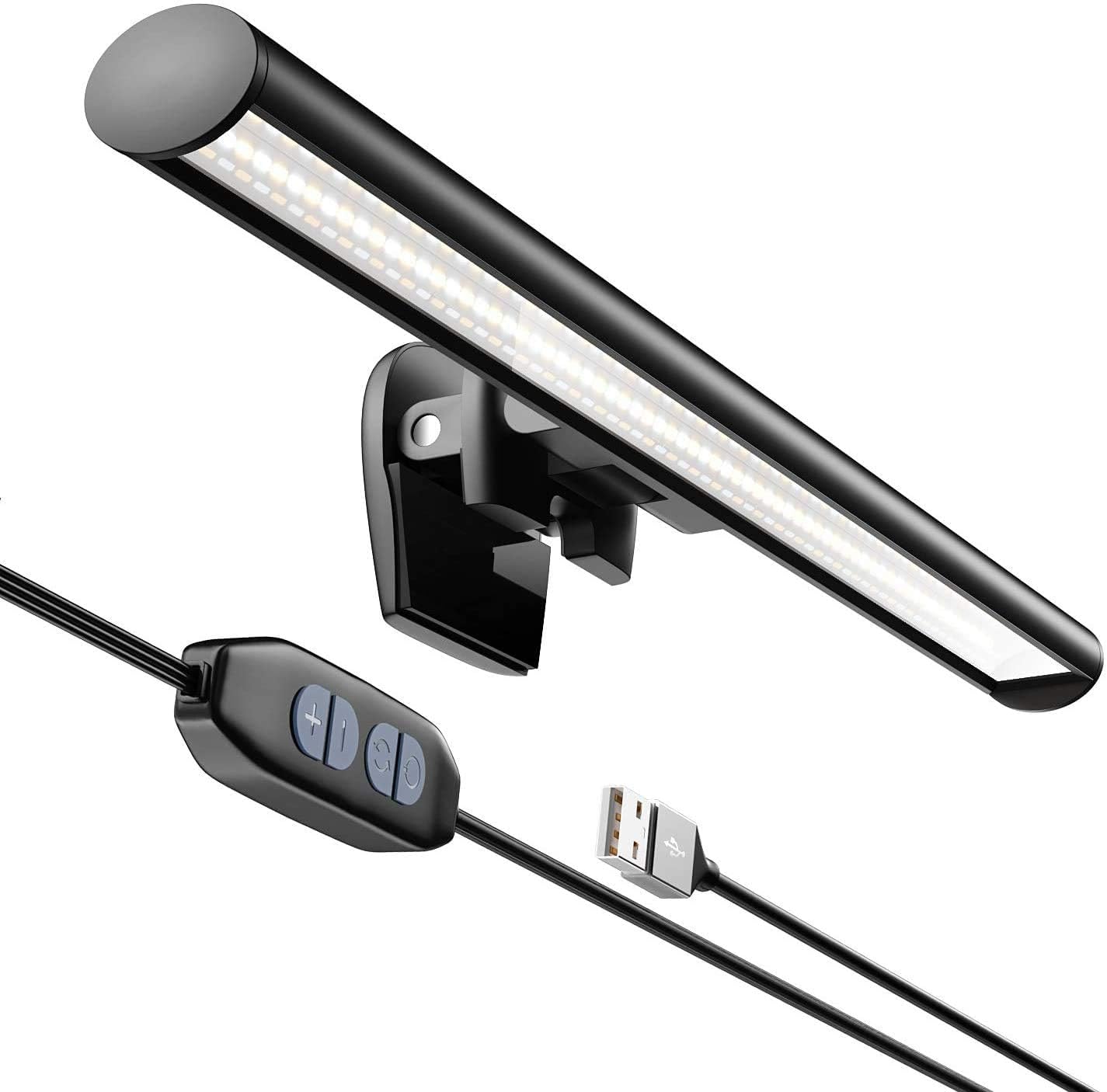
CATPOWER Portable Laptop Monitor Light Bar with USB Connection, e-Reading LED Task Lamp, 3 Color Temperature Settings, 10 Levels of Brightness Adjustment, No Glare on The Screen, Saves Space
Want the best price and purchase timing?
Our AI advisor analyzes real-time pricing across all channels to find you the best deal.
AI Verdict
This 4.6-ounce USB-powered light bar offers 3 color modes and 10 brightness levels, ideal for laptop users needing focused, flicker-free task lighting.
This light bar is a situational fit for laptop users needing a compact, USB-powered lighting solution with adjustable color temperature and brightness. Its 4.6-ounce weight and USB power make it highly portable, but potential monitor fit issues and webcam interference mean it won't work for every setup.
If monitor fit is a concern, look for light bars with more adjustable or universal mounting mechanisms.
Regret Score™
Medium RiskLower is better — measures purchase-regret risk from real buyer complaints, review credibility, and product maturity
Issues discovered after purchase
Critically weak dimension
Amazon rating vs actual quality
Chance this product isn't for you
Pros
- Offers 3 color modes (warm, white, cool) and 10 brightness levels for varied lighting needs.
- Flicker-free design aims to reduce eye strain during prolonged computer use.
- Powered by a USB cable, allowing connection to laptops, power banks, or other USB-enabled devices.
- Weighs 4.6 ounces, making it lightweight and portable for use in different locations.
- Features a touch sensor control panel for adjusting brightness and color temperature.
- Illuminates the desk surface without casting glare on the screen when properly angled.
Cons
- Monitor fit can be an issue with monitors that are too thin, have rounded backs, or are too thick for the clamp system.
- May interfere with webcam placement, potentially requiring the webcam to be moved.
- General light bar designs can have limited color customization beyond the stated modes.
- Some light bars, even with "no glare" claims, can still produce monitor glare if not positioned correctly.
Dimension Scores
Flicker-free design and adjustable color/brightness directly address eye comfort during long sessions.
Offers 3 color modes and 10 brightness levels, plus flexible positioning, but lacks physical height or angle adjustments beyond its flexible nature.
Made from Acrylonitrile Butadiene Styrene with an Aluminum base, described as durable, but no specific durability ratings or certifications beyond 'long lifespan' for LEDs.
Slim, cylindrical design (0.79 inches diameter) and black finish are unobtrusive, fitting modern desk setups.
Best For
- Laptop users needing focused task lighting for reading or working.
- Individuals seeking to reduce eye strain during long hours of computer use.
- Workspaces with limited desk space where a traditional lamp is impractical.
- Travelers or students who need portable lighting for various locations.
Not Recommended For
- Users with monitors that have unusual thickness or curved backs, which might affect secure mounting.
- Setups where a webcam is mounted directly on top of the monitor, as the light bar might obstruct it.
- Those expecting extensive color customization beyond 3 temperature modes.
Watch Out For
- Monitor thickness can prevent a secure fit; some monitors are too thin, have rounded backs, or are too thick for the clamp system.
- Webcam placement can be problematic, as the light bar might occupy the same space, making it "almost impossible" to fit both.
- Despite "no glare" claims, some light bars can still cause monitor glare if not angled precisely, potentially requiring tilting the bar outward.
- The touch sensor, while generally preferred, might still require some pressure that could unintentionally shift the light bar if not firmly secured.
Full Specifications
| ASIN | B0CZ46G1F2 |
| Size | Laptop Monitor Light |
| Brand | CATPOWER |
| Color | Black |
| Shape | Cylinder |
| Style | Modern |
| Theme | Space |
| Voltage | 5 Volts |
| Wattage | 5 watts |
| Material | Acrylonitrile Butadiene Styrene |
| Bulb Base | E10 |
| Lamp Type | LED |
| Room Type | Bedroom, Classroom, Deck, Living Room, Office |
| Efficiency | Highly Efficient |
| Model Name | Smart Screen e-Reading Lamp |
| Finish Type | Painted |
| Item Weight | 4.6 ounces |
| Light Color | Warm White, White |
| Part Number | JD-A1 |
| Shade Color | black |
| Switch Type | Push Button |
| Finish types | Painted |
| Is Cordless? | No |
| Manufacturer | Shenzhen Xusheng Lighting Technology Co., Limited |
| Power Source | Corded Electric |
| Base Material | Aluminum |
| Is Waterproof | False |
| Mounting Type | Desktop |
| Control Method | Touch |
| Shade Material | Aluminum |
| Lighting Method | Adjustable |
| Number of Items | 1 |
| Special Feature | Adjustable Color Temperature, Dimmable, Lightweight, Portable |
| Number of Pieces | 1 |
| Product Benefits | Reduces eye strain and improves productivity |
| Special Features | Adjustable Color Temperature, Dimmable, Lightweight, Portable |
| Color Temperature | 6500 Kelvin |
| Installation Type | Clip On |
| Item model number | JD-A1 |
| Light Source Type | LED |
| Sensor Technology | touch |
| Product Dimensions | 0.8"D x 26"W x 0.8"H |
| Batteries Included? | No |
| Batteries Required? | No |
| Included Components | Power Cable |
| Indoor/Outdoor Usage | Indoor |
| Water Resistance Level | Not Water Resistant |
| Number of Light Sources | 54 |
| Specific Uses For Product | Reading, Reading, traveling, business trips, office work, conference rooms, students, designers,, Computer monitor light bar for office working, reading, studying, painting, design, games, fit for monitor with thickness from 0.3" to 1.4" |
| Recommended Uses For Product | Office, Reading, reading,Work |
What Buyers Say
User feedback often highlights the space-saving design and the ability to customize lighting with 3 color modes and 10 brightness levels. Many users find it effective for illuminating their workspace without occupying desk space. However, some general light bar complaints point to potential issues with monitor fit, especially for very thin or rounded monitors, and interference with webcam placement. The touch sensor controls are generally preferred over physical buttons.
“Dude, this thing actually works for my late-night coding, no more squinting at my keyboard, but I had to fiddle with it to get my webcam to fit.”
Common Praise
- Provides 3 distinct color temperatures (warm, white, cool) for varied tasks.
- Offers 10 levels of brightness adjustment.
- Reduces eye strain with its flicker-free design.
- Connects easily to any USB power source.
- Illuminates the desk surface effectively without screen glare when angled correctly.
- Lightweight at 4.6 ounces and easy to transport.
Common Complaints
- Can be difficult to secure on monitors that are too thin, too thick, or have rounded backs.
- May block or interfere with the placement of a top-mounted webcam.
- Some users report that even with "no glare" claims, glare can occur if not positioned perfectly.
- Limited color customization beyond the three preset temperature modes.
Ownership Tips
- The touch controls are responsive but can sometimes cause the bar to shift if not mounted firmly.
- Finding the perfect angle to eliminate all screen glare takes a few tries.
- The USB power cable length might be a limiting factor for some desk setups.
- The "no glare" claim is largely dependent on the user's monitor type and setup.
Frequently Asked Questions
How many color temperatures and brightness levels does it offer?
It offers 3 color temperature settings (warm, white, cool) and 10 brightness levels.
Is this light bar suitable for reducing eye strain?
Yes, it features a flicker-free design and soft light intended to reduce eye strain during prolonged computer use.
How does the light bar get power?
It is powered via a USB cable, allowing connection to a laptop, computer, power bank, or other USB-enabled device.
Can I adjust the light bar's angle?
Yes, it is flexible and portable, allowing you to adjust the lighting angle and position.
What is the weight of the light bar?
The light bar weighs 4.6 ounces.
Does it have physical buttons or touch controls?
It features a touch sensor control panel for adjustments.
Buying Guide
When considering a monitor light bar, you're looking to illuminate your desk area without adding screen glare or taking up valuable desk space. Pay attention to how it mounts to your monitor and if it will interfere with other peripherals like your webcam. The ability to adjust both brightness and color temperature is key for adapting to different tasks and times of day.
3 Color Temperature Settings
10 Levels of Brightness Adjustment
USB Power Supply
Weight: 4.6 ounces
Alternatives
If this light bar doesn't fit your monitor due to thickness or shape, look for models with spring-loaded clamps or magnetic mounts with wider compatibility ranges; if webcam interference is a dealbreaker, seek light bars designed with integrated webcam cutouts or alternative mounting.
You Might Also Like

LYMAX Computer Monitor Light Bar with Wireless Remote, Motion Sensor, Fit for Flat/Curved Monitor, Adjustable Color Temperature with Auto-Dimming, Eye-Care USB-C Monitor Lamp, No Glare Desk Lamp
$50-$99A 15.7-ounce aluminum monitor light bar with motion sensing, auto-dimming, and stepless 2700K-6500K color temperature adjustment for flat or curved screens.

Computer Monitor Lamp, Screen Monitor Light Bar for Eye Caring, Screen Monitor Light Bar with Backlight for Eye Caring, E-Reading LED Task Lamp with Dimming Adjustment, Perfect for Reading and Study
$0-$49This BLYGACN monitor lamp offers 3 color temperatures (3000K-6500K), dimming, and a 60-minute timer, powered by USB, for monitors 15-24 inches.

Monitor Light Bar with Touch Control, RGB Desk Lamp Full Spectrum Screen Lamp, Glare-Free Low Blue Light Monitor Lamp with Memory Mode, USB Powered for Gaming, Office & Work
$0-$49A USB-powered plastic monitor light bar with touch controls, RGB modes, and glare-free illumination for basic desk setups.

RGB Monitor Light Bar, Eye-Care Dual Light Reading Screen Lamp, 9 Modes Gaming Backlight LED Computer Lamp, 3 Colors Dimmable Frontlight, 15.75'' USB Desk Lights for Home, Office
$0-$49This is a budget-focused 6.4-ounce plastic monitor light bar with dual-mode lighting and 9 RGB backlight modes, designed for users needing basic task and ambient lighting without cluttering their desk