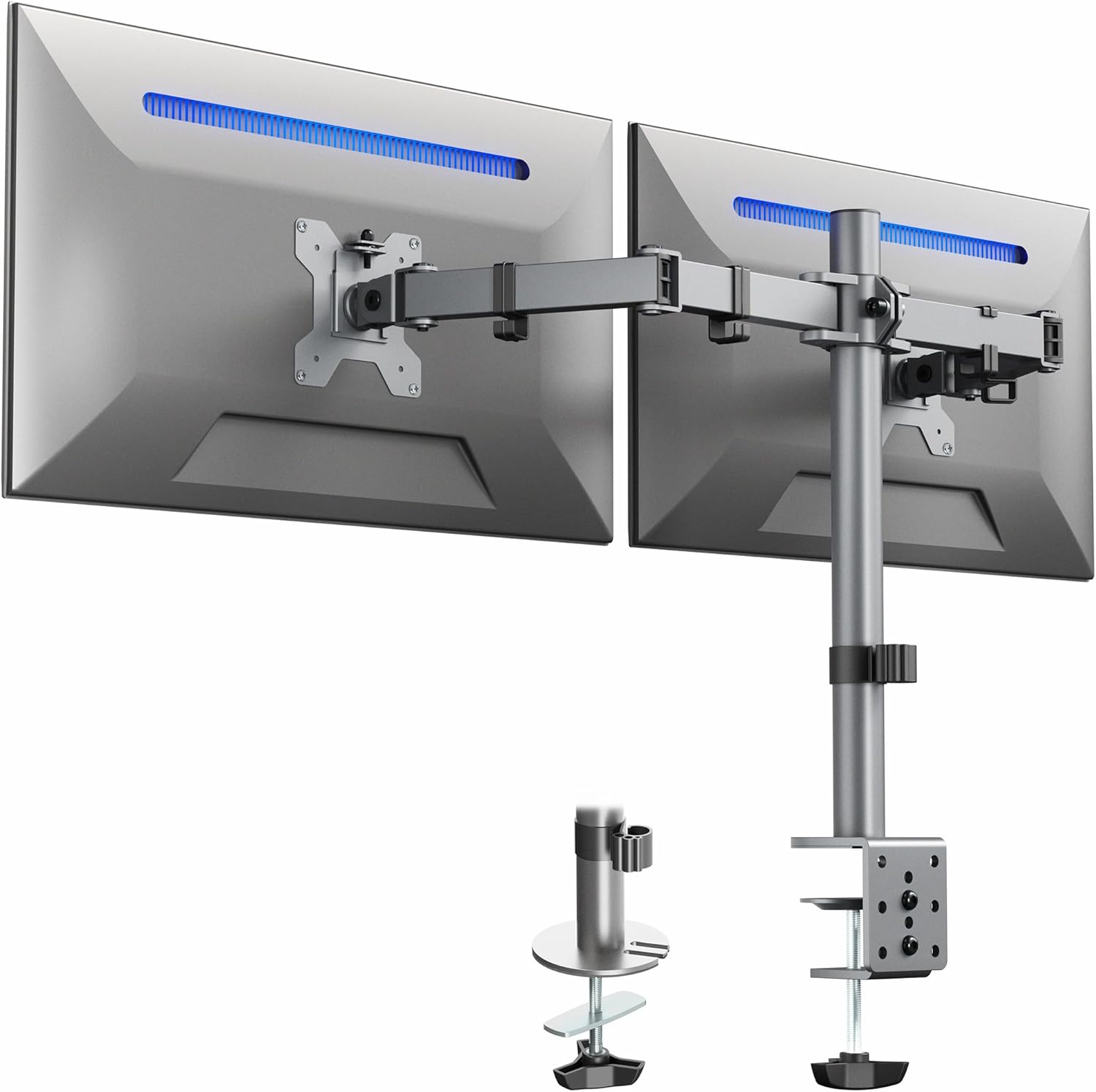
VIVO Dual Monitor Desk Mount, Heavy Duty Fully Adjustable Steel Stand, Holds 2 Computer Screens up to 30 inches and Max 22lbs Each, Gray Color, STAND-V002-GY
Want the best price and purchase timing?
Our AI advisor analyzes real-time pricing across all channels to find you the best deal.
AI Verdict
This is a budget-friendly steel dual monitor mount for screens up to 30 inches and 22 lbs each, best for a static setup.
This VIVO mount is a situational fit for users needing to mount two monitors up to 30 inches and 22 lbs each, offering good static adjustability like +90° to -90° tilt and 360° rotation. Its budget price point and included C-clamp/grommet options make it accessible, but the steel and plastic construction and reported stiffness in adjustments mean it's not ideal for dynamic monitor movement.
If you need fluid, frequent monitor adjustments, look for mounts with gas spring arms for easier repositioning.
Regret Score™
Medium RiskLower is better — measures purchase-regret risk from real buyer complaints, review credibility, and product maturity
Issues discovered after purchase
Critically weak dimension
Amazon rating vs actual quality
Chance this product isn't for you
Pros
- Fits two screens from 13" to 30" with VESA 75x75mm or 100x100mm mounting holes.
- Offers +90° to -90° tilt, 180° swivel, 360° rotation, and height adjustment along the center pole.
- Includes both heavy-duty C-clamp (up to 3.25" thick) and grommet mounting options.
- Cable management clips are provided along the arms and center pole for organization.
- Detachable VESA plates simplify monitor installation.
- Individual VESA plates can be adjusted vertically by 0.5 inches for precise monitor alignment.
Cons
- Adjustments can be stiff and require a hex wrench to loosen bolts, making frequent repositioning difficult.
- Some users report monitor wobbling, especially with lighter desk surfaces or when the desk is bumped.
- The mount's design might not provide enough forward extension for certain desk setups, particularly in corners.
- The weight of the mount and monitors can warp thinner desks, like IKEA tabletops.
- The mount is primarily steel and plastic, which might not feel as premium as aluminum options.
Dimension Scores
Offers +90° to -90° tilt, 180° swivel, and 360° rotation for viewing angles, but frequent adjustments are stiff.
Provides height adjustment along the center pole and individual VESA plate vertical adjustment of 0.5 inches, but arm movement is not fluid and requires tools for repositioning.
Constructed from steel and plastic, users describe it as heavy-duty and sturdy once set, but some report wobbling with less stable desks.
The gray color and visible center pole design are functional, with cable management clips helping to maintain a clean appearance.
Best For
- Setting up a dual-monitor workstation with monitors up to 30 inches.
- Users who need to free up desk space by mounting monitors.
- Environments where monitors will be set once and rarely repositioned.
- Desks with a thickness up to 3.25 inches that can support 7.9 lbs plus two 22 lb monitors.
Not Recommended For
- Users who frequently adjust monitor positions throughout the day.
- Desks made of thin or fragile materials that cannot support concentrated weight.
- Setups requiring extensive monitor extension or dynamic movement.
Watch Out For
- Adjusting monitor positions after initial setup often requires loosening bolts with a hex wrench, which users describe as a "pain".
- The mount can cause monitors to wobble if the desk is not sturdy or is lightly touched, with some users reporting the mount and monitors falling and damaging their desk.
- Some users found the rod and arms were not long enough for optimal adjustability in their specific setups.
- The heavy C-clamp can deform or warp thinner desk surfaces, such as those found on IKEA desks.
Full Specifications
| UPC | 840408800068 |
| ASIN | B0CV9Q241M |
| Brand | VIVO |
| Color | Gray |
| Material | Steel, Plastic |
| Item Weight | 7.9 pounds |
| Manufacturer | VIVO |
| Mounting Type | Tabletop Mount |
| Movement Type | Articulating |
| Item model number | STAND-V002-GY |
| Compatible Devices | Monitor |
| Maximum Tilt Angle | 90 Degrees |
| Product Dimensions | 34 x 3.8 x 20.5 inches |
| Global Trade Identification Number | 00840408800068 |
What Buyers Say
Many users found this VIVO dual monitor mount to be a cost-effective solution for getting monitors off their desk, often praising its sturdiness once locked down. However, a recurring issue is the stiffness of the adjustments, which makes dynamic repositioning a chore, requiring tools to loosen bolts. Some buyers also reported significant wobbling, particularly with lighter desks, and a few even experienced desk damage from the clamp or monitors falling. The mount's ability to precisely align monitors with 0.5-inch VESA plate adjustments is a specific highlight.
“Dude, it's cheap and it works, but don't expect to be moving your screens around like a fancy gas spring arm, and seriously, reinforce your desk if it's not a tank.”
Common Praise
- Holds two 24-inch monitors securely without sagging once tightened down.
- The C-clamp feels really solid on my 1.5-inch thick wooden desk.
- Cable clips actually keep my power and display cables tucked away neatly.
- Detachable VESA plates made attaching my monitors way less awkward than other mounts.
- The individual VESA plate height adjustment of 0.5 inches was crucial for getting my mismatched monitors perfectly level.
Common Complaints
- Adjusting the tilt or swivel means getting out a hex wrench every single time, it's not a smooth movement.
- My monitors shake a lot if I bump my desk, even with everything tightened.
- The clamp left a noticeable indentation on my IKEA desk after a few weeks.
- Wish the arms extended further forward; my monitors feel a bit too close to the pole in a corner setup.
- One of my monitors started to slouch after a while, even after tightening the VESA screw.
Ownership Tips
- The stiffness of the arm joints means you'll likely set your monitor positions once and leave them there.
- Regularly check the C-clamp tension, especially on softer desk materials, to prevent loosening or damage.
- The cable management clips are functional but can be a bit fiddly to open and close with multiple thick cables.
- If you have monitors with different bezel sizes, the 0.5-inch VESA plate adjustment is a lifesaver for visual alignment.
- The gray finish is a matte, utilitarian look that blends into most office environments without standing out.
Frequently Asked Questions
Can this mount hold two 27-inch monitors?
Yes, this mount is designed to fit two screens from 13" to 30" in size, so two 27-inch monitors will fit within its specifications.
Is it easy to install?
Many users found the installation process straightforward due to detachable VESA plates and included hardware, though some parts may come pre-assembled.
Does this mount work with VESA 75x75mm?
Yes, it supports VESA 75x75mm and 100x100mm mounting patterns.
Can I adjust the height of each monitor independently?
While the main height adjustment is along the center pole, each individual VESA plate can be adjusted vertically by 0.5 inches for fine-tuning monitor alignment.
Will this mount damage my desk?
The heavy-duty C-clamp can potentially warp or damage thinner desk surfaces, especially those made of particle board or hollow core, if not properly reinforced.
Does it have cable management?
Yes, clips are provided along the arms and center pole to help organize cables.
Buying Guide
When looking at a dual monitor mount like this, you need to think about how you actually use your monitors. If you're someone who sets their screens in one spot and rarely touches them, a pole-mounted system like this can save you a ton of desk space. But if you're constantly pushing monitors back, pulling them forward, or switching between portrait and landscape, the fixed nature of these arms will frustrate you. Also, seriously consider your desk's construction; a heavy mount with two monitors puts a lot of stress on a small area.
Screen Size & Weight Capacity (13" to 30", 22 lbs each)
This tells you the physical limits of the monitors the mount can safely hold. If your monitors are bigger or heavier, they won't fit or could cause the mount to fail.
Articulation (+90° to -90° tilt, 180° swivel, 360° rotation)
These numbers describe how much you can angle, turn, and spin your monitors. High numbers here mean you have more flexibility to get rid of glare or share your screen with someone next to you.
Mounting Options (C-clamp up to 3.25" thick, Grommet)
This is how the mount attaches to your desk. A C-clamp grips the edge, while a grommet mount goes through a hole in your desk. Knowing your desk thickness and whether you have a hole is crucial for compatibility.
Alternatives
If you need more dynamic movement and easier adjustments, look for mounts with gas spring arms. If your desk is thin or fragile, consider a freestanding mount with a larger base to distribute the weight.
You Might Also Like

LYMAX Computer Monitor Light Bar with Wireless Remote, Motion Sensor, Fit for Flat/Curved Monitor, Adjustable Color Temperature with Auto-Dimming, Eye-Care USB-C Monitor Lamp, No Glare Desk Lamp
$50-$99A 15.7-ounce aluminum monitor light bar with motion sensing, auto-dimming, and stepless 2700K-6500K color temperature adjustment for flat or curved screens.

Computer Monitor Lamp, Screen Monitor Light Bar for Eye Caring, Screen Monitor Light Bar with Backlight for Eye Caring, E-Reading LED Task Lamp with Dimming Adjustment, Perfect for Reading and Study
$0-$49This BLYGACN monitor lamp offers 3 color temperatures (3000K-6500K), dimming, and a 60-minute timer, powered by USB, for monitors 15-24 inches.

Monitor Light Bar with Touch Control, RGB Desk Lamp Full Spectrum Screen Lamp, Glare-Free Low Blue Light Monitor Lamp with Memory Mode, USB Powered for Gaming, Office & Work
$0-$49A USB-powered plastic monitor light bar with touch controls, RGB modes, and glare-free illumination for basic desk setups.

RGB Monitor Light Bar, Eye-Care Dual Light Reading Screen Lamp, 9 Modes Gaming Backlight LED Computer Lamp, 3 Colors Dimmable Frontlight, 15.75'' USB Desk Lights for Home, Office
$0-$49This is a budget-focused 6.4-ounce plastic monitor light bar with dual-mode lighting and 9 RGB backlight modes, designed for users needing basic task and ambient lighting without cluttering their desk