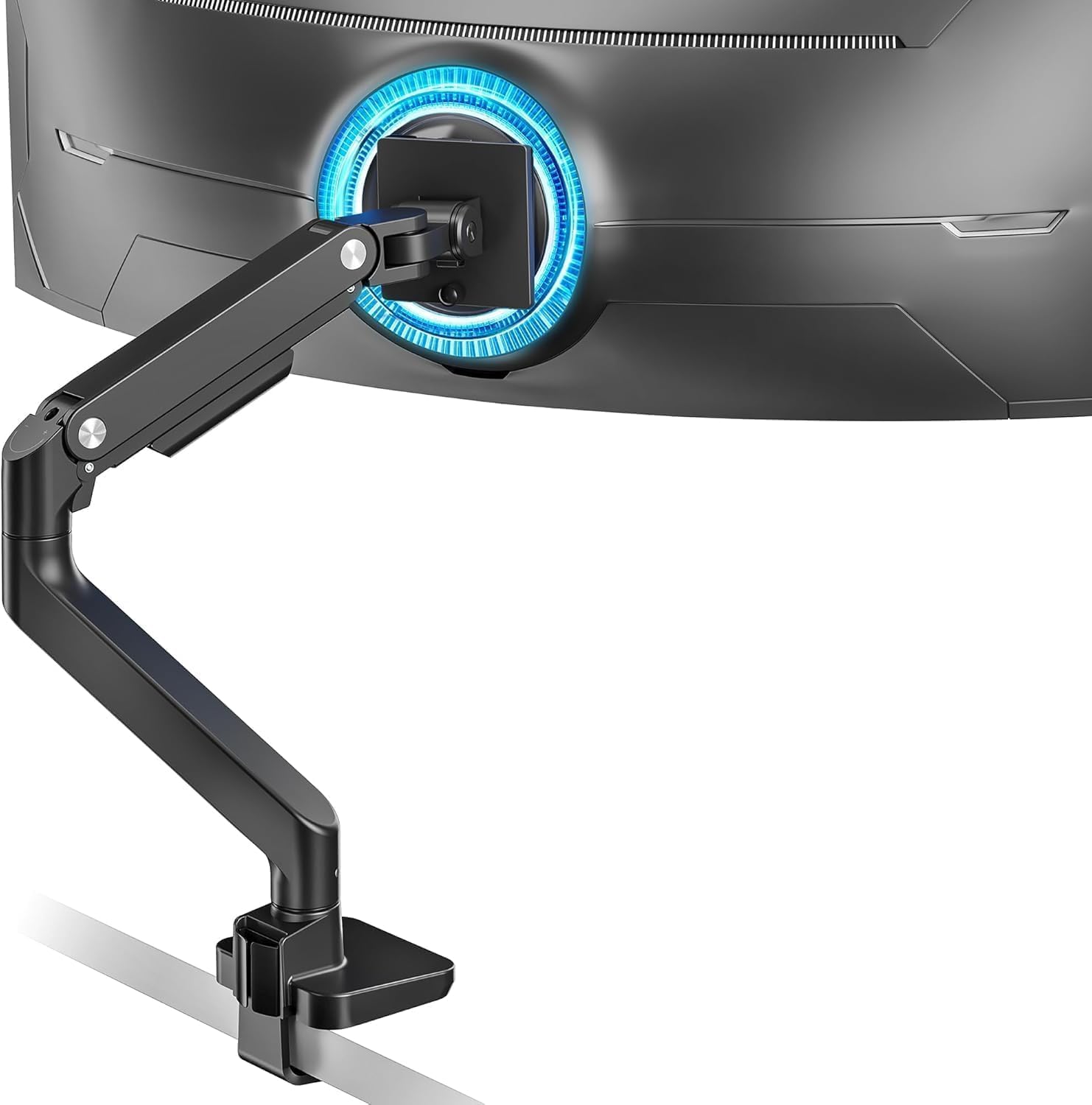
ARES WING Ultrawide Monitor Arm for 17 to 49 Inch Heavy Duty Curved Screen, Holds 44 Lbs, Adjustable Gas Spring Monitor Arm Desk Mount with C Clamp, Grommet Base, 75/100 Vesa Mount, Black
Want the best price and purchase timing?
Our AI advisor analyzes real-time pricing across all channels to find you the best deal.
AI Verdict
This ARES WING arm supports 17-49 inch monitors up to 44 lbs with +50°/-20° tilt, 180° swivel, and 360° rotation.
This arm is a strong fit for anyone with a single ultrawide monitor up to 49 inches and 44 pounds, especially given its broad adjustability and robust build from aluminum and steel. The gas spring mechanism makes adjustments smooth, which is crucial for heavy displays.
If you need to stack multiple ultrawide monitors, look for arms with a higher maximum vertical extension or a dedicated dual-arm setup designed for vertical stacking.
Regret Score™
Very Low RiskLower is better — measures purchase-regret risk from real buyer complaints, review credibility, and product maturity
Issues discovered after purchase
Critically weak dimension
Amazon rating vs actual quality
Chance this product isn't for you
Pros
- Supports ultrawide monitors up to 49 inches and 44 pounds, including models like the Samsung Odyssey G9.
- Offers a full range of motion with +50° to -20° tilt, 180° swivel, and 360° rotation for ergonomic positioning.
- Features a height adjustable range from 8.7 inches to 18.7 inches and a maximum arm extension of 22.4 inches.
- Installation is straightforward with C-clamp (0.5-1.8 inch desks) or grommet mount (0.5-2 inch desks) and a detachable VESA plate.
- Includes built-in cable management to keep your desk organized.
- Constructed from aluminum and steel with a gas spring mechanism for durability and smooth adjustments.
Cons
- Desk thickness compatibility is limited to 0.5-1.8 inches for C-clamp and 0.5-2 inches for grommet, which might exclude some thicker or thinner desks.
- Some users report that for very large or stacked monitors, the maximum height adjustment of 18.7 inches might be insufficient.
- Requires a separate VESA mount adapter if your monitor lacks VESA holes, which is an additional purchase.
- The product is only available in black, limiting aesthetic choices for some setups.
Dimension Scores
The gas spring mechanism and 44-pound weight capacity provide stable support for heavy ultrawide monitors, preventing sag.
With +50° to -20° tilt, 180° swivel, 360° rotation, and 8.7-18.7 inch height adjustment, it offers extensive positioning flexibility.
Constructed from aluminum and steel, with a gas spring that has undergone fatigue tests, it feels durable for its price point.
The black aluminum design is functional and unobtrusive, but lacks specific design flair or color options beyond black.
Best For
- Mounting a single heavy ultrawide monitor (up to 49 inches, 44 lbs) like the Samsung Odyssey G9.
- Users needing to free up significant desk space by elevating their monitor.
- Achieving a specific ergonomic viewing angle with extensive tilt, swivel, and rotation options.
- Desks within the 0.5-1.8 inch (C-clamp) or 0.5-2 inch (grommet) thickness range.
Not Recommended For
- Desks outside the specified 0.5-2 inch thickness range for mounting options.
- Users planning to stack two large ultrawide monitors, as the height might be restrictive.
- Monitors without VESA mounting holes, as an adapter is required.
Watch Out For
- The C-clamp only works for desks between 0.5 and 1.8 inches thick, and the grommet mount for 0.5 to 2 inches, so measure your desk carefully.
- If your monitor doesn't have 75x75mm or 100x100mm VESA holes, you'll need to buy a VESA adapter separately.
- One user trying to stack a 45-inch ultrawide and a 32-inch monitor found the arm's maximum height of 18.7 inches forced the bottom monitor too low.
Full Specifications
| ASIN | B0CRVB3VGL |
| Brand | ARES WING |
| Color | Black |
| Material | Aluminum |
| Brand Name | ARES WING |
| Color Name | Black |
| Item Weight | 9.24 pounds |
| Manufacturer | ARES WING |
| Mounting Type | Tabletop Mount |
| Movement Type | Rotate, Swivel, Tilt |
| Item model number | GDT1004BK |
| Compatible Devices | Monitor |
| Maximum Tilt Angle | 50 Degrees |
| Package Dimensions | 16.69 x 7.6 x 5.67 inches |
What Buyers Say
Users are generally impressed with this arm's ability to handle large, heavy ultrawide monitors, often mentioning its stability and ease of installation. The gas spring system is frequently cited for making adjustments smooth and secure, even with substantial weight. However, some users note that while it handles a single ultrawide well, attempting to stack multiple large monitors can lead to height limitations, making the lower screen uncomfortably close to the desk. The integrated cable management is a recurring positive point for maintaining a clean workspace.
“Dude, this thing actually holds my G9 like a champ, no wobble, and I can finally push it back enough to actually use my desk. Setup was way easier than I thought, but seriously, measure your desk thickness first, almost didn't fit my chunky butcher block.”
Common Praise
- Holds a 49-inch Samsung Odyssey G9 securely without sagging.
- Installation is quick and easy, especially with the top-side mounting and detachable VESA plate.
- The gas spring allows for smooth and precise adjustments of monitor height and position.
- Cable management clips effectively hide monitor cables, contributing to a tidy desk.
- The arm feels sturdy and well-built, especially considering its price.
- Provides a wide range of motion, including significant tilt and swivel, for optimal viewing angles.
Common Complaints
- Maximum height adjustment of 18.7 inches can be too low for stacking a large ultrawide with another monitor.
- Desk thickness limits for the C-clamp (1.8 inches) and grommet mount (2 inches) can be restrictive for some desks.
- Some users might need to purchase a separate VESA adapter if their monitor doesn't have standard VESA holes.
- The arm is only available in black, which doesn't match all desk setups.
Ownership Tips
- The gas spring tension might need fine-tuning after a few days to perfectly balance the monitor's weight, especially for monitors at the higher end of the weight capacity.
- The cable management covers are effective but can be a bit fiddly to open and close if you frequently add or remove cables.
- The arm maintains its position well over time; no noticeable sagging or drift after initial setup and tension adjustment.
- The arm's reach of 22.4 inches is sufficient for most deep desks, allowing the monitor to be positioned far back or pulled forward as needed.
- The C-clamp provides a very secure grip, but ensure the desk edge is flat and strong enough to prevent damage over time.
Frequently Asked Questions
What size monitors can this arm support?
It supports most flat and curved computer screens ranging from 17 to 49 inches.
What is the maximum weight capacity?
The arm can hold monitors weighing between 4.4 and 44 pounds.
Does it work with Samsung Odyssey G9 monitors?
Yes, it is compatible with Samsung Odyssey G9 and other 49-inch ultrawide monitors, though a VESA adapter might be needed if your monitor doesn't have VESA holes.
What are the available mounting options?
You can install it using either a C-clamp for desks 0.5-1.8 inches thick or a grommet mount for desks 0.5-2 inches thick.
How much can the monitor arm extend?
The arm has a maximum extension of 22.4 inches from the mounting point.
Does this arm have RGB lighting?
No, the specific model (ASIN B0CRVB3VGL) does not include RGB lighting, though other ARES WING models might.
Buying Guide
When you're looking at monitor arms, you need to think about how heavy your monitor is and how big it is, not just the screen size but its actual weight. Also, check your desk's thickness where you plan to clamp it, because if it's too thick or too thin, the mount won't work. Finally, consider how much you need to move your monitor around—do you just need to raise it, or do you need to tilt, swivel, and rotate it a lot?
Weight Capacity (4.4 to 44 lbs)
This is the most critical spec; if your monitor is heavier than 44 lbs, the arm won't hold it up, and it will sag or even break. Think of it like a shelf: if you put too many books on it, it'll collapse.
Screen Size (17 to 49 inches)
While related to weight, this indicates the physical dimensions the arm is designed to accommodate. A 49-inch ultrawide has a much wider center of gravity than a standard 27-inch monitor, and the arm needs to be engineered to handle that leverage.
Adjustability (+50°/-20° tilt, 180° swivel, 360° rotation, 8.7-18.7 inch height)
These numbers tell you how much freedom you have to position your screen. High tilt means you can point the screen up or down significantly, swivel lets you turn it side-to-side, and rotation allows portrait or landscape orientation. Height adjustment is key for ergonomic viewing at eye level.
Mounting Options (C-clamp 0.5-1.8 inch, Grommet 0.5-2 inch)
This dictates if the arm will even attach to your desk. The C-clamp grips the edge, while the grommet mount goes through a hole. If your desk is outside these thickness ranges, the arm won't install securely.
Alternatives
If this arm's height range isn't enough for stacking monitors, look for arms with a greater maximum vertical extension. If your desk is outside the thickness limits, search for arms with wider clamp or grommet compatibility.
You Might Also Like

LYMAX Computer Monitor Light Bar with Wireless Remote, Motion Sensor, Fit for Flat/Curved Monitor, Adjustable Color Temperature with Auto-Dimming, Eye-Care USB-C Monitor Lamp, No Glare Desk Lamp
$50-$99A 15.7-ounce aluminum monitor light bar with motion sensing, auto-dimming, and stepless 2700K-6500K color temperature adjustment for flat or curved screens.

Computer Monitor Lamp, Screen Monitor Light Bar for Eye Caring, Screen Monitor Light Bar with Backlight for Eye Caring, E-Reading LED Task Lamp with Dimming Adjustment, Perfect for Reading and Study
$0-$49This BLYGACN monitor lamp offers 3 color temperatures (3000K-6500K), dimming, and a 60-minute timer, powered by USB, for monitors 15-24 inches.

Monitor Light Bar with Touch Control, RGB Desk Lamp Full Spectrum Screen Lamp, Glare-Free Low Blue Light Monitor Lamp with Memory Mode, USB Powered for Gaming, Office & Work
$0-$49A USB-powered plastic monitor light bar with touch controls, RGB modes, and glare-free illumination for basic desk setups.

RGB Monitor Light Bar, Eye-Care Dual Light Reading Screen Lamp, 9 Modes Gaming Backlight LED Computer Lamp, 3 Colors Dimmable Frontlight, 15.75'' USB Desk Lights for Home, Office
$0-$49This is a budget-focused 6.4-ounce plastic monitor light bar with dual-mode lighting and 9 RGB backlight modes, designed for users needing basic task and ambient lighting without cluttering their desk