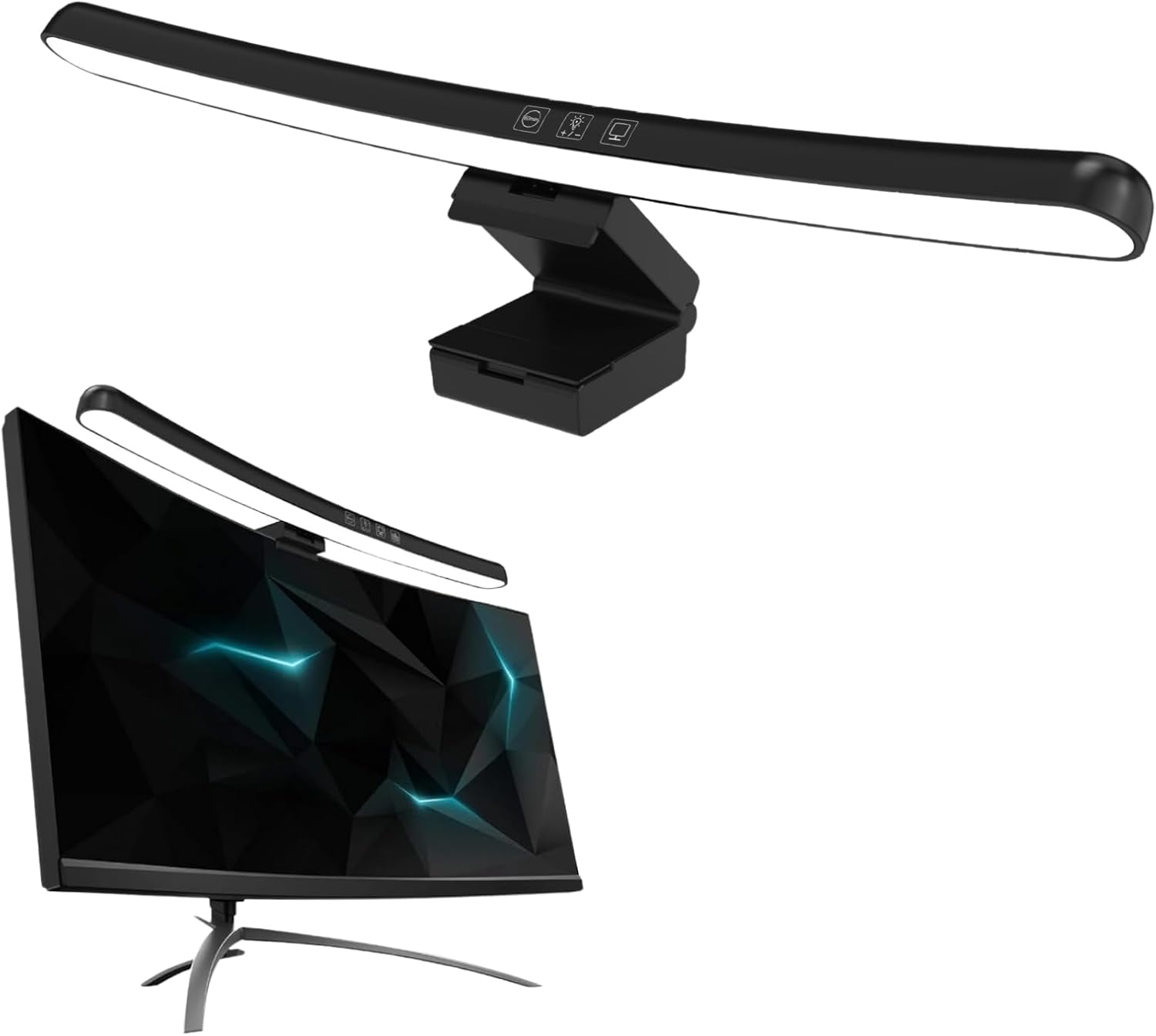
Bewinner Curved Monitor Light Bar 40cm, Asymmetrical Light Source No Glare Blue Light Blocking Stepless Dimming, 3 Color Temperatures Touch Control Type C Powered for 0.6-1.6in Curved Screens
Want the best price and purchase timing?
Our AI advisor analyzes real-time pricing across all channels to find you the best deal.
AI Verdict
A 40cm, Type-C powered light bar with asymmetrical light, blue light blocking, stepless dimming, and three color temperatures for 0.6-1.6 inch curved screens.
This light bar is a situational fit for users with curved monitors within the 0.6-1.6 inch thickness range, offering targeted desk lighting and eye protection features. Its Type C power and touch controls provide convenience, but the lack of detailed performance specs means its effectiveness in glare reduction and light quality is unconfirmed beyond its design claims.
If you need guaranteed performance in glare reduction and color accuracy, look for light bars with specified lux output, high CRI (90+), and proven asymmetrical optical designs from user reviews.
Regret Score™
High RiskLower is better — measures purchase-regret risk from real buyer complaints, review credibility, and product maturity
Issues discovered after purchase
Critically weak dimension
Amazon rating vs actual quality
Chance this product isn't for you
Pros
- Asymmetrical optical design illuminates the desktop and keyboard without screen glare or reflections.
- Blocks harmful blue light and reduces screen radiation to alleviate eye fatigue.
- Offers stepless dimming and three adjustable color temperatures (warm white, cool white, natural light) via touch control.
- Type C interface allows power from computers, phone chargers, or portable power banks.
- 40cm length and sturdy clamp with two adjustable cover plates accommodate curved screens from 0.6 to 1.6 inches thick.
- Weighs 13.4 ounces, making it relatively light for monitor mounting.
Cons
- Lacks specific brightness (lux) or color rendering index (CRI) specifications.
- Touch controls on budget light bars can sometimes be overly sensitive or difficult for precise dimming adjustments.
- No mention of a built-in timer in the provided specs, though one search result mentioned it for the brand.
- Mounting system relies on a clamp and cover plates, which might not be universally stable on all monitor back shapes.
Dimension Scores
The asymmetrical light source and blue light blocking features are designed to alleviate eye fatigue during long hours of use.
It offers stepless dimming and three color temperature settings (warm white, cool white, natural light) via touch control.
Constructed from Acrylonitrile Butadiene Styrene and Aluminum, which are common materials for budget-friendly electronics, but without specific durability claims.
The rectangular shape and black finish are functional and unobtrusive, typical for a monitor accessory, but without unique design elements.
Best For
- Users with curved monitors between 0.6 and 1.6 inches thick needing targeted desk illumination.
- Students or office workers who spend extended hours in front of a screen and want to reduce eye strain.
- Individuals seeking a space-saving lighting solution for their desk without a traditional lamp.
- Anyone looking for a budget-friendly monitor light bar with basic dimming and color temperature adjustments.
Not Recommended For
- Users requiring precise color accuracy for professional graphic design or photo editing due to unspecified CRI.
- Those with monitors outside the 0.6-1.6 inch thickness range for curved screens.
- Individuals who prefer physical buttons over touch controls for lighting adjustments.
Watch Out For
- Some budget light bars, despite claiming asymmetrical lighting, can still cause light bleed onto the screen, potentially creating glare.
- Touch sensors on similar products have been reported as overly sensitive, making fine-tuning brightness or color temperature frustrating.
- The clamp-based mounting system, while designed for curved screens, might not sit perfectly stable on all monitor back designs, especially very thin or unusually shaped ones.
- A light bar, if not positioned carefully, could potentially scratch a monitor's casing.
Full Specifications
| ASIN | B0CJDWCVS4 |
| Brand | Bewinner |
| Color | Blue |
| Shape | Rectangular |
| Style | Modern |
| Theme | Space |
| Wattage | 5 watts |
| Material | Acrylonitrile Butadiene Styrene |
| Bulb Base | E26 |
| Lamp Type | Desk Lamp |
| Room Type | Office |
| Efficiency | energy_efficient |
| Finish Type | Finished |
| Item Weight | 13.4 ounces |
| Part Number | Bewinner3t5piy6rm8 |
| Shade Color | Blue |
| Switch Type | Touch |
| Finish types | Finished |
| Is Cordless? | No |
| Manufacturer | Bewinner |
| Power Source | Corded Electric |
| Base Material | Aluminum |
| Is Waterproof | False |
| Mounting Type | Desktop |
| Control Method | Touch |
| Shade Material | Acrylonitrile Butadiene Styrene |
| Bulb Shape Size | A19 |
| Lighting Method | Adjustable |
| Number of Items | 1 |
| Special Feature | Adjustable Color Temperature, Dimmable |
| Number of Pieces | 3 |
| Special Features | Adjustable Color Temperature, Dimmable |
| Installation Type | clip-on |
| Item model number | Bewinner3t5piy6rm8 |
| Light Source Type | LED |
| Package Dimensions | 16.73 x 5.63 x 2.2 inches |
| Batteries Included? | No |
| Batteries Required? | No |
| Included Components | Light Kit |
| Indoor/Outdoor Usage | Indoor |
| Water Resistance Level | Not Water Resistant |
| Number of Light Sources | 1 |
| Specific Uses For Product | computer monitor usage |
| Recommended Uses For Product | Reading |
What Buyers Say
With only two reviews available, there isn't enough specific user feedback to form a comprehensive picture of common praise or complaints for this Bewinner light bar. Generally, monitor light bars aim to reduce eye strain by illuminating the desk without creating screen glare, and this product's features align with that goal.
“Needed something for my curved monitor that wouldn't break the bank, and this light bar does the job for basic desk lighting, keeps the screen clear enough.”
Ownership Tips
- Light bars in this price range often require careful positioning to truly eliminate all screen glare, despite asymmetrical design claims.
- The touch controls might take some getting used to, as sensitivity can vary and lead to accidental adjustments.
- The stability of the clamp on your specific curved monitor's thickness and back shape will be a key factor in daily use.
- While it blocks blue light, the actual impact on eye comfort over extended periods can be subjective and depends on individual sensitivity.
Frequently Asked Questions
Does this light bar work with flat monitors?
The product description specifically mentions accommodating 'curved screen computer monitors ranging from 0.6 inches to 1.6 inches thick'. It does not specify compatibility with flat monitors.
How do I control the brightness and color temperature?
You control the lighting with a touch switch on the lamp, offering seamless stepless dimming and three adjustable color temperature settings.
What kind of power source does it use?
It uses a Type C interface for power, allowing you to connect it to your computer, phone charger, or a portable power bank.
Will this light bar cause glare on my screen?
The light bar features an asymmetrical optical design intended to illuminate only the desktop and keyboard, specifically to eliminate screen glare and reflections.
What is the length of the light bar?
The light strip is 40cm (15.7 inches) in length.
Buying Guide
When you're looking at monitor light bars, you're essentially trying to get light onto your desk and keyboard without it bouncing off your screen or shining directly into your eyes. This helps reduce eye strain, especially if you work in a dimly lit room. You want to make sure it fits your monitor type and thickness, and that the controls are easy to use for adjusting brightness and color.
Asymmetrical Light Source
This means the light is directed downwards and forwards onto your desk, not onto your screen. Think of it like a spotlight that only hits your workspace, keeping your monitor free from distracting reflections.
Blue Light Blocking
Just like some glasses, this feature aims to filter out a portion of the blue light emitted by the light bar itself. Less blue light can potentially reduce eye fatigue, especially during long work sessions, similar to how 'night mode' on your phone changes screen colors.
Stepless Dimming & 3 Color Temperatures
Stepless dimming means you can adjust the brightness smoothly, not just in fixed steps, giving you precise control. The three color temperatures (warm, neutral, cool) let you match the light to your environment or preference – warm for relaxation, cool for focus, like changing a regular light bulb from soft white to daylight.
Curved Screen Compatibility (0.6-1.6 inches)
This is crucial for curved monitors. The light bar's design and clamp system are specifically made to sit securely and direct light properly on a curved surface within this thickness range. A flat monitor light bar won't work well on a curved screen, and vice-versa, due to the different angles and mounting needs.
Alternatives
If this light bar doesn't fit your needs, look for models with higher specified lux output for brighter illumination, a wider range of color temperatures, or a wireless remote control for easier adjustments.
You Might Also Like

LYMAX Computer Monitor Light Bar with Wireless Remote, Motion Sensor, Fit for Flat/Curved Monitor, Adjustable Color Temperature with Auto-Dimming, Eye-Care USB-C Monitor Lamp, No Glare Desk Lamp
$50-$99A 15.7-ounce aluminum monitor light bar with motion sensing, auto-dimming, and stepless 2700K-6500K color temperature adjustment for flat or curved screens.

Computer Monitor Lamp, Screen Monitor Light Bar for Eye Caring, Screen Monitor Light Bar with Backlight for Eye Caring, E-Reading LED Task Lamp with Dimming Adjustment, Perfect for Reading and Study
$0-$49This BLYGACN monitor lamp offers 3 color temperatures (3000K-6500K), dimming, and a 60-minute timer, powered by USB, for monitors 15-24 inches.

Monitor Light Bar with Touch Control, RGB Desk Lamp Full Spectrum Screen Lamp, Glare-Free Low Blue Light Monitor Lamp with Memory Mode, USB Powered for Gaming, Office & Work
$0-$49A USB-powered plastic monitor light bar with touch controls, RGB modes, and glare-free illumination for basic desk setups.

RGB Monitor Light Bar, Eye-Care Dual Light Reading Screen Lamp, 9 Modes Gaming Backlight LED Computer Lamp, 3 Colors Dimmable Frontlight, 15.75'' USB Desk Lights for Home, Office
$0-$49This is a budget-focused 6.4-ounce plastic monitor light bar with dual-mode lighting and 9 RGB backlight modes, designed for users needing basic task and ambient lighting without cluttering their desk