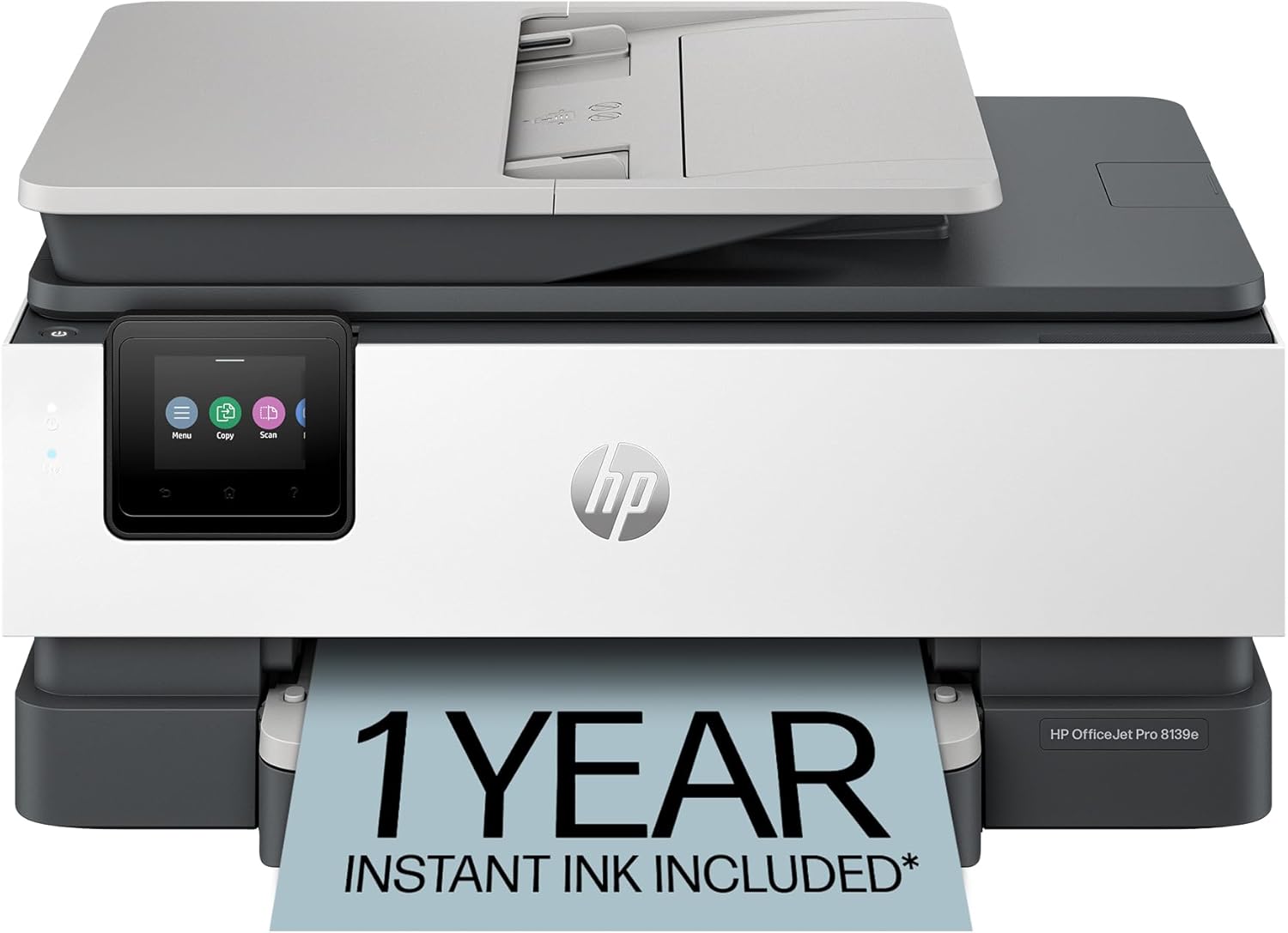
HP OfficeJet Pro 8139e Wireless All-in-One Color Inkjet Printer, Print, scan, copy, fax, ADF, Duplex printing Best-for-home office, 1 year Instant Ink trial included, AI-enabled (40Q51A)
Want the best price and purchase timing?
Our AI advisor analyzes real-time pricing across all channels to find you the best deal.
AI Verdict
This 17.6-pound color inkjet printer delivers 10 ppm color and 20 ppm black printing with a 225-sheet tray, ideal for home offices embracing HP's Instant Ink ecosystem.
This printer is a situational fit because its features like 10 ppm color/20 ppm black printing and ADF are solid for home office use, but the mandatory HP+ activation and subsequent lock-in to Original HP Ink cartridges with the Instant Ink trial creates a specific ecosystem commitment.
If you need more ink flexibility or print extremely high volumes, look for a laser printer or an inkjet model without HP+ restrictions.
Regret Score™
Low RiskLower is better — measures purchase-regret risk from real buyer complaints, review credibility, and product maturity
Issues discovered after purchase
Critically weak dimension
Amazon rating vs actual quality
Chance this product isn't for you
Pros
- Prints color documents at 10 pages per minute and black documents at 20 pages per minute.
- Includes a 225-sheet input tray, reducing frequent paper refills.
- Features an automatic document feeder (ADF) and auto 2-sided printing for efficiency.
- Comes with a 1-year Instant Ink trial upon HP+ activation, delivering ink before you run out.
- Offers dual-band Wi-Fi designed to automatically detect and resolve connection issues.
- HP AI feature aims to perfectly format web pages and emails, removing unwanted content for precise prints.
Cons
- Weighs 17.6 pounds, which might be cumbersome for frequent repositioning or smaller desks.
- HP+ activation requires exclusive use of Original HP Ink cartridges for the printer's life, blocking non-HP chips.
- Some users report initial difficulty pairing the printer with computers and home Wi-Fi networks.
- Small ink cartridges may necessitate frequent replacements for users with high print volumes outside of Instant Ink.
- Slower than laser printers for very high-volume printing tasks.
Dimension Scores
The 2.7-inch color touchscreen and HP Smart App simplify navigation and mobile printing tasks.
Features like a 225-sheet input tray, ADF, and auto 2-sided printing offer practical paper handling options.
The printer weighs 17.6 pounds and is constructed with more than 45% recycled plastic, indicating a sturdy build.
Its design is a fairly straightforward, simple-looking printer, typical for an office all-in-one.
Best For
- Home offices needing professional-quality color documents like reports and presentations.
- Users who print frequently enough to benefit from an Instant Ink subscription model.
- Individuals requiring scan, copy, and fax capabilities with an automatic document feeder.
- Those who value printing, scanning, and faxing directly from a smartphone, PC, or tablet via an app.
Not Recommended For
- Users who prefer to use third-party or refilled ink cartridges due to HP+'s dynamic security.
- Environments with very high print volumes where laser printer speeds are essential.
- Individuals with limited desk space where a 17.6-pound printer might be too large.
Watch Out For
- The printer is intended to work only with cartridges containing original HP chips, and firmware updates can block non-HP chips, limiting ink choices.
- Some users experienced initial connectivity issues, finding it difficult to pair the printer with their computer and home internet, requiring multiple attempts.
- The Instant Ink trial requires HP+ activation, which then locks the printer into using only Original HP Ink cartridges for its entire lifespan.
- Envelope printing can be cumbersome, requiring users to create and delete a specific printer tray setting for each use.
Full Specifications
| UPC | 197029817341 |
| ASIN | B0CFM8KL9G |
| Brand | HP |
| Color | Light Cement |
| Duplex | Automatic (standard) |
| Wattage | 100 watts |
| Ink Color | Black, cyan, magenta, yellow |
| Model Name | 8139e |
| Sheet Size | 8.5 x 11;8.27 x 11.7;8.5 x 14;7.16 x 10.12; Inches |
| Color Depth | 24 Bits |
| Item Weight | 17.6 pounds |
| Print media | Paper (plain) |
| Manufacturer | HP |
| Model Series | 40Q51A#B1H |
| Scanner Type | Flatbed, 1-sided ADF |
| Warranty Type | One-year limited hardware warranty with option to extend to two-years with acceptance of HP+ Offer. For more info please visit us at support.hp.com . |
| Control Method | App |
| Printer Output | Color |
| Controller Type | Android |
| Number of Trays | 1 |
| Total USB Ports | 2 |
| Printer Ink Type | Inkjet |
| Item model number | 40Q51A#B1H |
| Power Consumption | 4.45 Watts |
| Compatible Devices | Laptops, PC, Smartphones |
| Hardware Interface | Ethernet, USB |
| Maximum Media Size | 8.5 x 11.7 in |
| Product Dimensions | 13.29"D x 18.12"W x 9.17"H |
| Dual-sided printing | Yes |
| Included Components | HP 923 Setup Black Ink Cartridge; HP 923 Setup Cyan Ink Cartridge; HP 923 Setup Magenta Ink Cartridge; HP 923 Setup Yellow Ink Cartridge; Power Cord; Regulatory Flyer; Ink Caution Flyer; Setup Poster; Reference Guide |
| Printing Technology | HP Thermal Inkjet |
| Total Ethernet Ports | 1 |
| Number of USB 2 Ports | 2 |
| Output sheet capacity | 60 |
| Supported Media Sizes | 11 x 14 inches, Half Letter (5.5 x 8.5 inches), Legal (8.5 x 14 inches), Letter (8.5 x 11 inches) |
| Maximum copies per run | Up to 99 copies |
| Connectivity Technology | Ethernet, USB, Wi-Fi |
| Initial page print time | 18 Seconds |
| Memory Storage Capacity | 512 MB |
| Max Input Sheet Capacity | 225 |
| Max Printspeed Monochrome | 20 ppm |
| Max copy resolution color | Up to 600 dpi |
| Specific Uses For Product | Office |
| Maximum Print Speed (Color) | 10 ppm |
| Additional Printer functions | All In One |
| Max Copy Speed (Black & White) | 12 ppm |
| Maximum Color Print Resolution | Up to 4800 x 1200 optimized dpi on HP Advance Photo Paper 1200 x 1200 dpi input Dots Per Inch |
| Max copy resolution black-white | 1200 x 1200 dpi |
| Maximum Black and White Print Resolution | 1200 x 1200 rendered dpi Dots Per Inch |
What Buyers Say
Many users report a frustrating initial setup experience, particularly with wireless connectivity, despite the printer's advertised 'reliable dual-band Wi-Fi'. The HP+ and Instant Ink model is a recurring theme, with some appreciating the convenience of ink delivery, while others express concern over being locked into HP's proprietary cartridges. The printer's performance once connected is generally well-received for its speed and print quality for documents.
“Ugh, getting this thing connected to my Wi-Fi was a nightmare, took like five tries, but once it finally worked, the prints actually look pretty sharp for my reports.”
Common Praise
- Produces high-quality prints with clear text and vibrant colors for documents.
- The automatic document feeder works effectively for scanning multi-page documents.
- Instant Ink service is convenient, delivering ink before it runs out.
- Offers fast print speeds of 20 ppm black and 10 ppm color.
- The HP Smart App allows for easy printing, scanning, and faxing from mobile devices.
Common Complaints
- Initial setup and pairing with Wi-Fi can be difficult and not seamless for some users.
- The HP+ system restricts the printer to using only Original HP Ink cartridges, blocking third-party options.
- Ink cartridges are perceived as small, potentially requiring frequent replacements for heavy users not on Instant Ink.
- Envelope printing is described as cumbersome, requiring manual adjustments to printer settings.
Ownership Tips
- The 'AI-enabled' features for formatting web pages and emails are not universally highlighted as a significant benefit by users.
- The long-term cost of Instant Ink after the first year needs careful consideration based on actual print volume.
- Firmware updates can occur, which may further enforce the use of Original HP Ink cartridges.
- The 17.6-pound weight makes it feel substantial, but also less portable than some smaller home office printers.
Frequently Asked Questions
Does the HP OfficeJet Pro 8139e come with ink?
Yes, it includes a set of ink cartridges, but these are part of the 1-year Instant Ink trial which requires HP+ activation.
Is the 1-year Instant Ink trial mandatory?
To receive the 1-year Instant Ink trial, you must activate HP+, which then requires exclusive use of Original HP Ink cartridges for the printer's life.
Can I use non-HP ink cartridges with this printer?
No, this printer is designed to work only with cartridges containing original HP chips, and firmware updates will block non-HP chips.
What are the print speeds for this model?
It prints black documents at up to 20 pages per minute and color documents at up to 10 pages per minute.
Does it have an automatic document feeder (ADF) and duplex printing?
Yes, it includes both an ADF for multi-page scanning and copying, and automatic 2-sided (duplex) printing.
Buying Guide
When looking at printers like this, you need to understand what 'all-in-one' really means for your workflow—it's print, scan, copy, and fax. Pay attention to the pages per minute (ppm) for both black and color, as this tells you how fast your documents will actually come out. Also, consider if an ink subscription service like Instant Ink fits your printing habits, as it can significantly impact your long-term costs and ink choices.
Pages Per Minute (ppm)
This number tells you how quickly the printer can produce pages. Higher ppm means less waiting, especially for multi-page documents. For example, 20 ppm black is faster than 10 ppm color, so black-and-white reports will print quicker than color presentations.
Automatic Document Feeder (ADF)
An ADF lets you place a stack of documents for scanning, copying, or faxing, instead of manually placing each page on the scanner glass. If you deal with multi-page contracts or reports, this saves a ton of time.
Duplex Printing
This feature automatically prints on both sides of the paper without you having to manually flip and re-feed pages. It saves paper and makes your documents look more professional, like a published book.
Instant Ink Trial
This is a subscription service where HP sends you ink when your printer detects you're running low. The trial period (like 1 year here) is free, but after that, you pay a monthly fee based on pages printed, and it requires you to use only HP's own ink cartridges.
Alternatives
If you need faster speeds for very high volumes or want to use any brand of ink, search for laser printers or inkjet models that do not require an HP+ activation.
You Might Also Like

LYMAX Computer Monitor Light Bar with Wireless Remote, Motion Sensor, Fit for Flat/Curved Monitor, Adjustable Color Temperature with Auto-Dimming, Eye-Care USB-C Monitor Lamp, No Glare Desk Lamp
$50-$99A 15.7-ounce aluminum monitor light bar with motion sensing, auto-dimming, and stepless 2700K-6500K color temperature adjustment for flat or curved screens.

Computer Monitor Lamp, Screen Monitor Light Bar for Eye Caring, Screen Monitor Light Bar with Backlight for Eye Caring, E-Reading LED Task Lamp with Dimming Adjustment, Perfect for Reading and Study
$0-$49This BLYGACN monitor lamp offers 3 color temperatures (3000K-6500K), dimming, and a 60-minute timer, powered by USB, for monitors 15-24 inches.

Monitor Light Bar with Touch Control, RGB Desk Lamp Full Spectrum Screen Lamp, Glare-Free Low Blue Light Monitor Lamp with Memory Mode, USB Powered for Gaming, Office & Work
$0-$49A USB-powered plastic monitor light bar with touch controls, RGB modes, and glare-free illumination for basic desk setups.

RGB Monitor Light Bar, Eye-Care Dual Light Reading Screen Lamp, 9 Modes Gaming Backlight LED Computer Lamp, 3 Colors Dimmable Frontlight, 15.75'' USB Desk Lights for Home, Office
$0-$49This is a budget-focused 6.4-ounce plastic monitor light bar with dual-mode lighting and 9 RGB backlight modes, designed for users needing basic task and ambient lighting without cluttering their desk