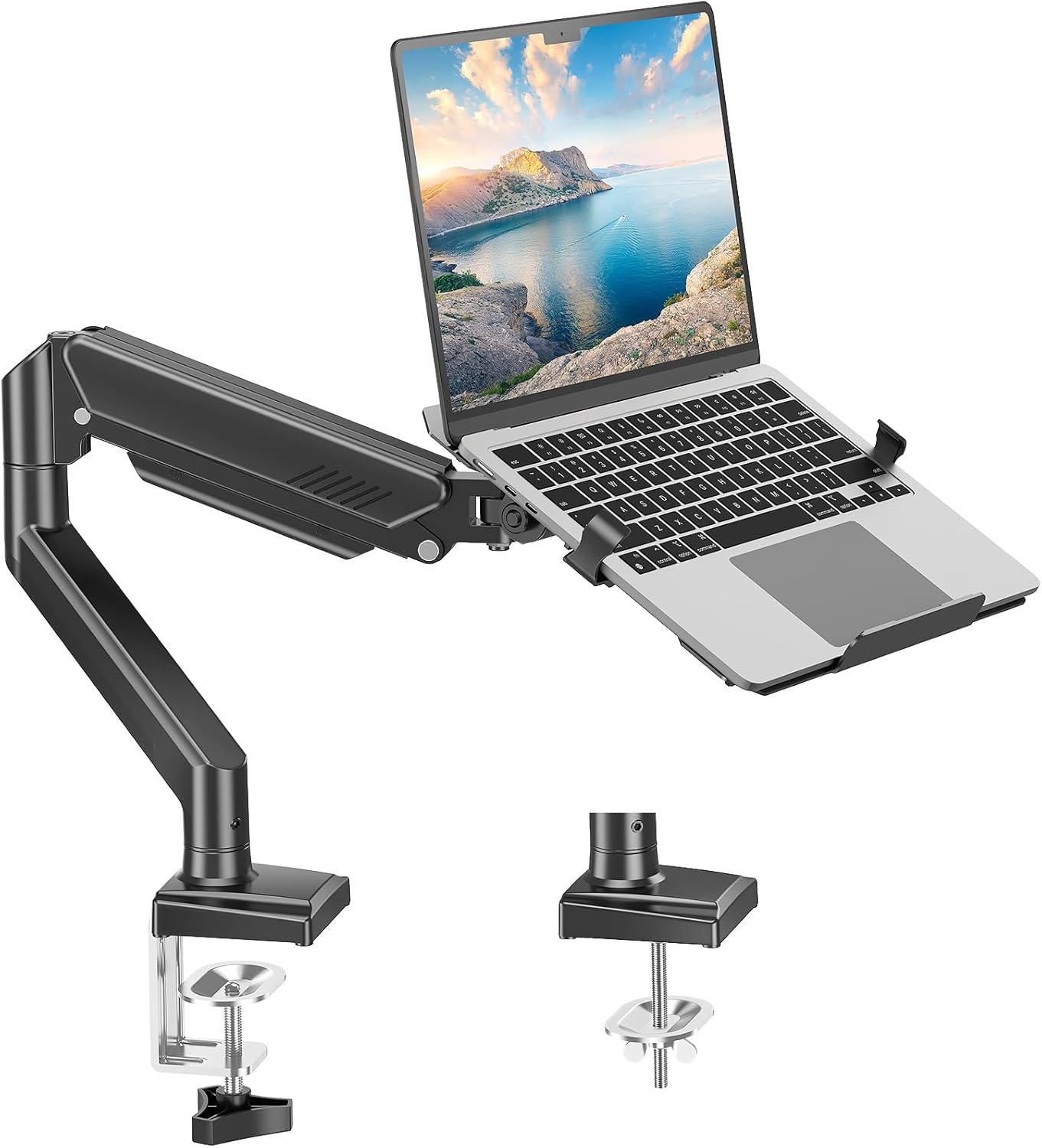
MOUNT PRO Laptop Arm Mount for Desk, 2 in 1 Function Monitor Laptop Stand, Fits Max 17" Notebook and 32" Computer Screen, Aluminum Single Monitor Holder with Adjustable Tray, Holds up to 22lbs
Want the best price and purchase timing?
Our AI advisor analyzes real-time pricing across all channels to find you the best deal.
AI Verdict
This MOUNT PRO arm holds a 17-inch laptop or 32-inch monitor up to 22lbs, offering full motion for a cleaner desk setup.
This arm is a situational fit because it provides adjustable height, tilt, and swivel for a single monitor or laptop, freeing up desk space. However, its specific incompatibility with curved screens and the limitation on laptop tray rotation narrow its ideal use cases.
If you need to mount a curved monitor or require more robust weight capacity, look for arms explicitly stating compatibility with curved displays or a higher weight limit, typically 30lbs or more.
Regret Score™
Medium RiskLower is better — measures purchase-regret risk from real buyer complaints, review credibility, and product maturity
Issues discovered after purchase
Critically weak dimension
Amazon rating vs actual quality
Chance this product isn't for you
Pros
- Supports a 17-inch laptop or 32-inch monitor, accommodating a range of devices.
- Offers -45° to +90° tilt, 180° swivel, and 360° rotation for monitors, allowing precise positioning.
- Frees up desk space by elevating your screen or laptop.
- Includes internal cable management to organize wires.
- Installs with either a clamp or grommet mount on desks 0.39" to 2.76" thick.
- Maximum extension length of 19.9 inches provides reach.
Cons
- Not compatible with 1000R, 1500R, or 1800R curved screens.
- 360° rotation is only recommended for monitor installation, not the laptop tray, limiting laptop positioning.
- Cable management on the lower arm requires unscrewing two screws for access, which is less convenient than snap-on solutions.
- The 22lb weight capacity might be a limitation for heavier 32-inch monitors or specific laptop/monitor combinations.
Dimension Scores
The arm provides adjustable height up to 17.3 inches, -45° to +90° tilt, and 180° swivel, allowing for ergonomic positioning.
It offers a wide range of motion with -45° to +90° tilt, 180° swivel, and 360° rotation for monitors, plus 17.3 inches of height adjustment and a 19.9-inch extension.
Constructed from aluminum and designed to hold up to 22lbs, users report it feels sturdy for its price point.
The arm features internal cable management, contributing to a cleaner workspace, but its design is functional rather than overtly stylized.
Best For
- Home office users needing to elevate a single laptop or monitor to reclaim desk space.
- Students or remote workers using a 17-inch or smaller laptop as a primary screen.
- Anyone with a flat-back monitor up to 32 inches and 22lbs looking for adjustable height and angle.
- Desks between 0.39 and 2.76 inches thick that can accommodate clamp or grommet mounting.
Not Recommended For
- Users with curved monitors (1000R, 1500R, or 1800R) due to incompatibility.
- Setups requiring frequent rotation of a laptop on the tray.
- Desks outside the 0.39" to 2.76" thickness range for mounting.
Watch Out For
- The laptop tray's 360° rotation is explicitly not recommended for safety, meaning you won't get full rotational freedom with a laptop.
- Cable routing for the lower arm requires removing two screws, which is a minor hassle for cable adjustments or additions.
- If your monitor is a 1000R, 1500R, or 1800R curved screen, it won't fit this mount.
- The arm supports a maximum weight of 22lbs, so verify your monitor or laptop's weight to avoid instability.
Full Specifications
| ASIN | B0C65LM31H |
| Brand | MOUNT PRO |
| Color | Black |
| Form Factor | Arm |
| Item Weight | 7.65 pounds |
| Manufacturer | MOUNT PRO |
| Item model number | Laptop Stand Desk Mount |
| Compatible Devices | Laptop, Monitor |
| Product Dimensions | 15.35 x 11.89 x 11.89 inches |
| Compatible Phone Models | Laptop |
What Buyers Say
Users frequently mention how affordable this arm is and how straightforward the installation process is, often taking around 20 minutes to set up. It effectively frees up desk space, which is a common goal for buyers. The arm's ability to hold a 27-inch monitor without issue, even when pushing its stated limits, is a recurring positive observation. However, the cable management on the lower arm, which requires unscrewing, is a minor point of friction for some.
“Needed something to get my laptop off the desk and this thing delivered. Setup was a breeze, took like 15 minutes, and now my workspace actually feels usable. Only wish the cable thing was easier to pop open.”
Common Praise
- Installation is easy and quick, with clear instructions.
- Effectively clears up desk space, making the work area feel less cluttered.
- The arm feels sturdy and holds monitors securely, even larger ones.
- Provides a wide range of motion for monitors, allowing for precise positioning.
- The price point is frequently cited as a significant advantage.
Common Complaints
- Not compatible with curved monitors (1000R/1500R/1800R).
- The laptop tray shouldn't be rotated 360 degrees for safety reasons.
- Cable management on the lower arm requires tools to access, which is inconvenient.
- The maximum weight capacity of 22lbs can be a limiting factor for some setups.
Ownership Tips
- The arm maintains its position without sagging even after weeks of use, indicating stable gas spring performance.
- The included tools are sufficient for assembly, but a personal screwdriver might speed up the process.
- The clamp mount holds firmly without damaging the desk surface if tightened correctly.
- Adjusting the arm tension might be necessary after initial setup to match the weight of your device for smooth movement.
Frequently Asked Questions
What size monitors and laptops can this arm hold?
It can hold laptops up to 17 inches and computer monitors between 13 and 32 inches. The monitor must have VESA 75x75mm or 100x100mm mounting holes.
What is the maximum weight this arm can support?
The arm supports devices weighing between 4.4 and 22 pounds.
Can I use this with a curved monitor?
No, this arm is not compatible with 1000R, 1500R, or 1800R curved screens.
How does it attach to the desk?
You can install it using either a C-clamp or a grommet mount. Both options work with desks between 0.39 and 2.76 inches thick.
Does it have cable management?
Yes, it has internal cable management pass-through features to help organize your wires.
Can I rotate my laptop 360 degrees on the tray?
While the arm offers 360° rotation, it's only recommended for monitor installations. You should not rotate the laptop tray to a vertical position for safety.
Buying Guide
When you're looking at monitor or laptop arms, you need to think about what you're actually putting on it. Don't just assume it'll hold your giant gaming monitor or your heavy work laptop. Check the weight capacity and screen size limits. Also, consider how you want to mount it – clamp or grommet – and if your desk can handle it. These arms are all about getting your screen at eye level and freeing up space, so adjustability is key.
Weight Capacity (4.4-22lbs)
This tells you the minimum and maximum weight your monitor or laptop can be for the arm to function correctly. Too light, and the arm might spring up; too heavy, and it will sag or fail. Think of it like a car's towing capacity – you need to match your load.
VESA Compatibility (75x75mm, 100x100mm)
This refers to the four screw holes on the back of your monitor. Most monitors have these, and they need to match the arm's pattern. It's like matching a bolt to a nut; if they don't fit, you can't attach your monitor.
Desk Thickness (0.39"-2.76")
This is crucial for clamp or grommet mounting. If your desk is too thin or too thick, the mount won't secure properly, leading to instability or damage. Measure your desk's edge or grommet hole before buying.
Adjustability (Tilt, Swivel, Rotation, Height)
These numbers tell you how much you can move your screen. More range means you can fine-tune your ergonomic setup, reduce neck strain, and easily share your screen with others. Think of it like adjusting your car seat and mirrors – you want to get it just right for comfort and visibility.
Alternatives
If this arm doesn't fit your needs, look for models with higher weight capacities, explicit support for curved monitors, or dual-arm configurations if you need to mount two screens.
You Might Also Like

LYMAX Computer Monitor Light Bar with Wireless Remote, Motion Sensor, Fit for Flat/Curved Monitor, Adjustable Color Temperature with Auto-Dimming, Eye-Care USB-C Monitor Lamp, No Glare Desk Lamp
$50-$99A 15.7-ounce aluminum monitor light bar with motion sensing, auto-dimming, and stepless 2700K-6500K color temperature adjustment for flat or curved screens.

Computer Monitor Lamp, Screen Monitor Light Bar for Eye Caring, Screen Monitor Light Bar with Backlight for Eye Caring, E-Reading LED Task Lamp with Dimming Adjustment, Perfect for Reading and Study
$0-$49This BLYGACN monitor lamp offers 3 color temperatures (3000K-6500K), dimming, and a 60-minute timer, powered by USB, for monitors 15-24 inches.

Monitor Light Bar with Touch Control, RGB Desk Lamp Full Spectrum Screen Lamp, Glare-Free Low Blue Light Monitor Lamp with Memory Mode, USB Powered for Gaming, Office & Work
$0-$49A USB-powered plastic monitor light bar with touch controls, RGB modes, and glare-free illumination for basic desk setups.

RGB Monitor Light Bar, Eye-Care Dual Light Reading Screen Lamp, 9 Modes Gaming Backlight LED Computer Lamp, 3 Colors Dimmable Frontlight, 15.75'' USB Desk Lights for Home, Office
$0-$49This is a budget-focused 6.4-ounce plastic monitor light bar with dual-mode lighting and 9 RGB backlight modes, designed for users needing basic task and ambient lighting without cluttering their desk