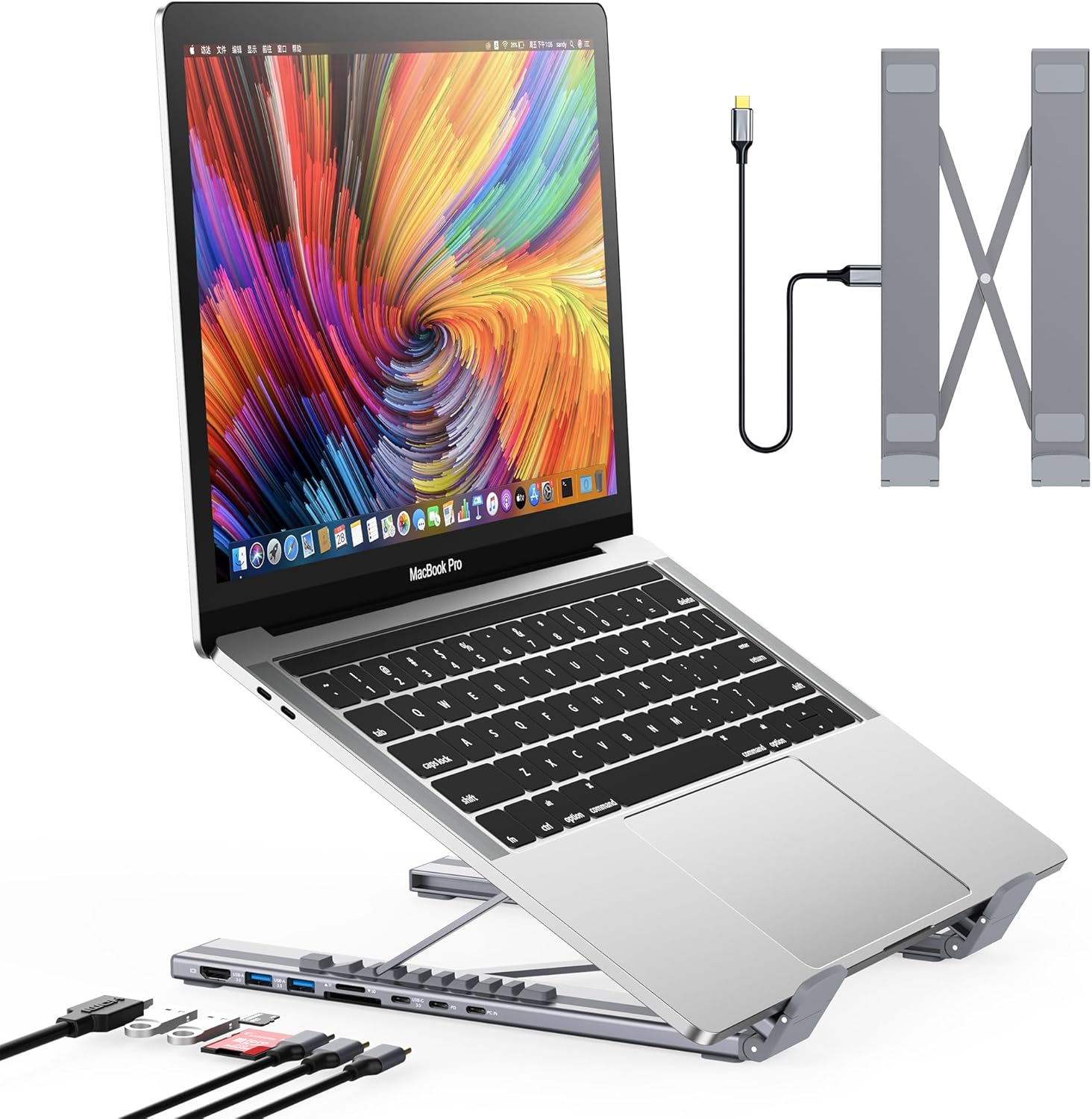
USB C Laptop Docking Station Stand, Dock Tablet Stand, 8 in 1 USB C Hub with 4K HDMI, 2 USB 3.0, PD 100W, Universal Dock Station for MacBook Pro/Air/Dell/HP/Surface/Lenovo, Plug and Play
Want the best price and purchase timing?
Our AI advisor analyzes real-time pricing across all channels to find you the best deal.
AI Verdict
This 8-in-1 USB-C hub and stand offers 4K@30Hz HDMI, 85W power delivery, and 9 height levels for laptops 10-17 inches.
This dock is a strong contender if you prioritize portability and combining a stand with basic port expansion, especially for travel or small workspaces. The 9-level height adjustment and 0.7 lbs weight make it easy to set up an ergonomic station anywhere. However, its 4K@30Hz HDMI and slower data ports mean it won't satisfy power users or those needing advanced display configurations.
If you need 4K@60Hz video, faster USB-C data speeds, or extended dual displays on macOS, look for docks with DisplayPort 1.4 support and USB 3.2 Gen2 or Thunderbolt 3/4/5 ports.
Regret Score™
Medium RiskLower is better — measures purchase-regret risk from real buyer complaints, review credibility, and product maturity
Issues discovered after purchase
Critically weak dimension
Amazon rating vs actual quality
Chance this product isn't for you
Pros
- Integrates an 8-port USB-C hub with a laptop stand, reducing desk clutter.
- Provides 4K UHD (3840x2160@30Hz) video output via HDMI for external displays.
- Delivers up to 85W of power to your laptop through the PD 3.0 port.
- Features 9 levels of height adjustment for ergonomic positioning.
- Includes 2 USB 3.0 ports with 5 Gbps data transfer speeds for peripherals.
- Folds down to 10.5*2.2*0.9 inches and weighs 0.7 lbs for portability.
Cons
- HDMI output is limited to 4K at 30Hz, which might not be smooth enough for some users.
- The USB-C data port only supports GEN1 transfer speeds, not the faster GEN2.
- SD and TF card slots have a slower transfer speed of 25MB/s.
- Mac users are restricted to mirror mode (SST) for external displays, not extended desktop (MST).
- Some users reported the stand can slide slightly when connecting devices if not held.
Dimension Scores
The 9-level height adjustment and open design for ventilation contribute to improved ergonomic posture and reduced laptop heat.
Offers 9 distinct height adjustment levels, allowing users to customize the viewing angle for their laptop.
Constructed from premium aluminum alloy, supporting laptops up to 40 lbs without wobble, and users describe it as sturdy and well-made.
Features a compact, foldable design with a clean aluminum finish, which is functional and unobtrusive.
Best For
- Travelers needing a compact, all-in-one workspace solution with a single USB-C connection.
- Users with limited desk space who want to combine a laptop stand and a docking station.
- Individuals seeking to improve laptop ergonomics with adjustable height and better ventilation.
- MacBook Air or older MacBook Pro users needing to expand their limited port selection.
Not Recommended For
- Users requiring dual extended displays on macOS, as it only supports mirror mode.
- Professionals needing 4K video output at 60Hz for smoother motion or gaming.
- Anyone needing faster than 25MB/s for SD/TF card transfers.
Watch Out For
- HDMI output is capped at 3840x2160@30Hz, which can feel choppy for some users.
- The USB-C data port is limited to GEN1 speeds, meaning slower transfers than newer GEN2 or USB4 ports.
- Mac users will only get mirrored displays, not extended desktop functionality, due to macOS limitations.
- SD and TF card transfer speeds are only 25MB/s, which is slow for large media files.
- The stand might slide when plugging in peripherals if you don't hold it steady.
Full Specifications
| UPC | 652726562296 |
| ASIN | B0BWTQ1Z7Z |
| Brand | Mukiya |
| Color | black |
| Wattage | 85 watts |
| Department | All Ages/Unisex |
| Item Weight | 11.2 ounces |
| Manufacturer | Mukiya |
| Number of Ports | 11 |
| Total USB Ports | 3 |
| Total HDMI Ports | 1 |
| Item model number | HUB-M48 |
| Compatible Devices | Dell, HP, Lenovo, MacBook Air, MacBook Pro, Surface |
| Hardware Interface | USB Type C |
| Package Dimensions | 11.22 x 3.03 x 1.46 inches |
What Buyers Say
Many users are stoked about how this thing combines a laptop stand and a USB-C hub into one portable package, cutting down on travel clutter significantly. People consistently mention the convenience of having all the ports they need built right into their stand, especially for Mac users who are always short on ports. The 9-level height adjustment is a big win for ergonomics, helping to alleviate neck strain during long work sessions. However, some folks have pointed out that the HDMI is only 4K@30Hz, which isn't ideal for everything, and Mac users can't extend their desktop to a second monitor.
“Dude, this thing is a lifesaver for my MacBook, finally I can plug in my monitor and a flash drive without a million dongles, even if the screen isn't super smooth, my neck feels way better.”
Common Praise
- Combines a laptop stand and an 8-in-1 hub into a single device, saving space.
- The 9-level height adjustment significantly improves ergonomic posture.
- Provides proper ventilation for laptops, preventing overheating.
- Lightweight (0.7 lbs) and folds compactly (10.5*2.2*0.9 inches) for travel.
- Sturdy aluminum alloy construction supports laptops up to 40 lbs.
- Plug-and-play functionality, with HDMI auto-detecting screens.
Common Complaints
- HDMI output is limited to 4K at 30Hz, not 60Hz.
- Mac users are restricted to mirror mode (SST) for external displays, not extended desktop (MST).
- The USB-C data port is only GEN1 speed, not faster GEN2.
- SD/TF card transfer speeds are slow at 25MB/s.
- Some users wish it provided even more height.
- Can slide slightly when plugging in devices if not held.
Ownership Tips
- The included storage bag is actually useful for keeping it protected during travel.
- The non-slip silicone pads do a decent job of keeping the laptop in place, even at steeper angles.
- The single USB-C cable connection to the laptop simplifies setup considerably.
- The open design really does help with laptop cooling during extended use.
- You'll still need your laptop's power adapter to connect to the dock's PD port for charging.
Frequently Asked Questions
Does this docking station support dual monitors?
Yes, it supports one external monitor via its 4K HDMI port. For macOS, it only supports mirror mode (SST), not extended desktop (MST).
What is the maximum resolution and refresh rate for the HDMI port?
The HDMI port supports up to 4K UHD (3840x2160) at 30Hz.
How much power can this dock deliver to my laptop?
It supports up to 100W power input and can charge your laptop with a maximum of 85W.
Is this stand adjustable for height?
Yes, it features 9 levels of height adjustment to help you find an ergonomic viewing angle.
Can I use this with my MacBook?
Yes, it's compatible with MacBook Pro/Air, but note that macOS only supports mirror mode for external displays, not extended desktop.
How portable is this docking station stand?
It's crafted from aluminum alloy, folds to 10.5*2.2*0.9 inches, and weighs 0.7 lbs, making it very portable and includes a storage bag.
Buying Guide
When you're looking at a combined laptop stand and docking station like this, you're essentially trading some high-end dock features for portability and desk organization. Think about how you'll use it: if you're constantly moving your setup or have a small workspace, the integrated design is a huge win. But if you need top-tier display performance or blazing-fast data transfers for large files, you might hit some limitations. Always check your laptop's USB-C port capabilities; not all USB-C ports support video output.
4K HDMI @ 30Hz
This means the external display will show a very clear picture, but the motion might not be as fluid as a 60Hz display, especially for fast-paced video or gaming. Think of it like watching a video at 30 frames per second versus 60 frames per second – the difference is in smoothness.
PD 100W (85W to laptop)
This tells you how much power the dock can receive and how much it can pass through to charge your laptop. 85W is enough for most modern laptops, keeping your battery topped up while you work. It's like having a fast charger built into your setup.
USB 3.0 (5Gbps) vs. USB-C Data (GEN1)
The USB 3.0 ports are fast enough for most external drives and peripherals. The USB-C data port being GEN1 means it's the older, slower standard for USB-C data, so don't expect super-quick transfers if you plug a modern USB-C SSD into it.
Alternatives
If you need higher refresh rates for external monitors (like 4K@60Hz or higher), faster USB-C data transfer speeds (USB 3.2 Gen2 or Thunderbolt), or true extended dual display support on macOS, look for docks with DisplayPort 1.4 and more advanced USB-C or Thunderbolt specifications.
You Might Also Like

LYMAX Computer Monitor Light Bar with Wireless Remote, Motion Sensor, Fit for Flat/Curved Monitor, Adjustable Color Temperature with Auto-Dimming, Eye-Care USB-C Monitor Lamp, No Glare Desk Lamp
$50-$99A 15.7-ounce aluminum monitor light bar with motion sensing, auto-dimming, and stepless 2700K-6500K color temperature adjustment for flat or curved screens.

Computer Monitor Lamp, Screen Monitor Light Bar for Eye Caring, Screen Monitor Light Bar with Backlight for Eye Caring, E-Reading LED Task Lamp with Dimming Adjustment, Perfect for Reading and Study
$0-$49This BLYGACN monitor lamp offers 3 color temperatures (3000K-6500K), dimming, and a 60-minute timer, powered by USB, for monitors 15-24 inches.

Monitor Light Bar with Touch Control, RGB Desk Lamp Full Spectrum Screen Lamp, Glare-Free Low Blue Light Monitor Lamp with Memory Mode, USB Powered for Gaming, Office & Work
$0-$49A USB-powered plastic monitor light bar with touch controls, RGB modes, and glare-free illumination for basic desk setups.

RGB Monitor Light Bar, Eye-Care Dual Light Reading Screen Lamp, 9 Modes Gaming Backlight LED Computer Lamp, 3 Colors Dimmable Frontlight, 15.75'' USB Desk Lights for Home, Office
$0-$49This is a budget-focused 6.4-ounce plastic monitor light bar with dual-mode lighting and 9 RGB backlight modes, designed for users needing basic task and ambient lighting without cluttering their desk