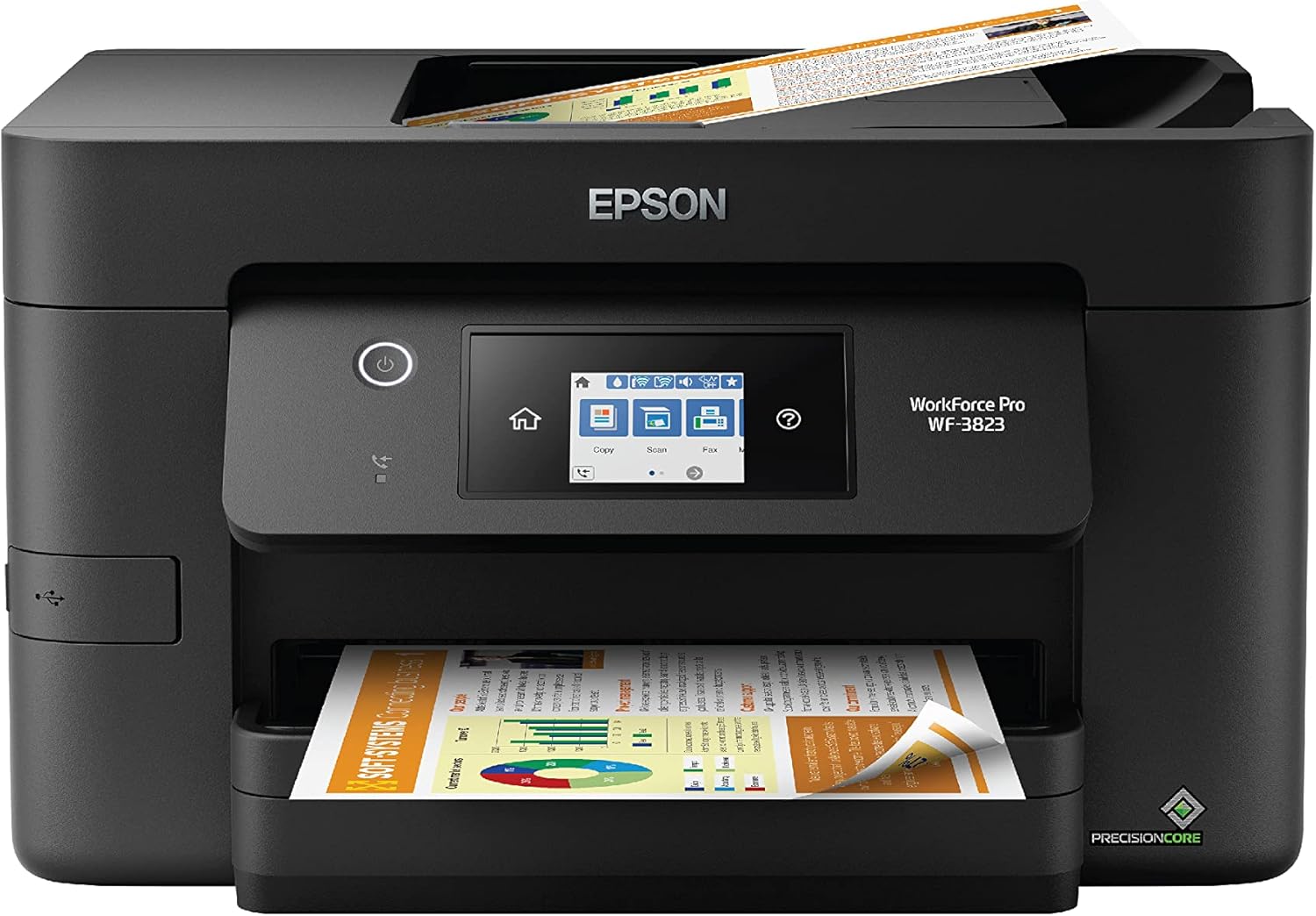
Epson Workforce Pro WF-3823 Wireless All-in-One Printer with Auto 2-Sided Printing, 35-Page ADF, 250-Sheet Paper Tray and 2.7" Color Touchscreen, Black
Want the best price and purchase timing?
Our AI advisor analyzes real-time pricing across all channels to find you the best deal.
AI Verdict
This 19.4-pound all-in-one printer offers 21 black/11 color ISO ppm, a 35-page ADF, and a 250-sheet paper tray for small workgroups needing document handling.
This printer is a situational fit because its 21 black/11 color ISO ppm and 35-page ADF are good for document-heavy small offices, but the strict genuine ink requirement and reported Wi-Fi instability are significant drawbacks. Its 250-sheet capacity is a plus for reducing paper refills.
If consistent wireless connectivity and ink flexibility are paramount, look for models with Ethernet ports and a more open ink policy.
Regret Score™
Low RiskLower is better — measures purchase-regret risk from real buyer complaints, review credibility, and product maturity
Issues discovered after purchase
Critically weak dimension
Amazon rating vs actual quality
Chance this product isn't for you
Pros
- Prints black documents at 21 ISO ppm.
- Handles two-sided documents automatically.
- Scans and copies multi-page documents with a 35-page ADF.
- Holds 250 sheets of paper, reducing refill frequency.
- Features a 2.7" color touchscreen for navigation.
- Uses PrecisionCore Heat-Free Technology for claimed reliability.
Cons
- Requires exclusive use of Epson Genuine Cartridges, potentially blocking third-party ink via firmware updates.
- Color print speed is 11 ISO ppm, slower than black.
- Some users report Wi-Fi connection dropping or being difficult to maintain.
- Ink cartridges can run out quickly for some users, especially with color printing.
- Weighs 19.4 pounds, which is on the heavier side for an entry-level all-in-one.
Dimension Scores
The 2.7" color touchscreen, auto 2-sided printing, and 35-page ADF streamline common tasks.
It features a standard 250-sheet paper tray without additional adjustable elements.
Its PrecisionCore Heat-Free Technology is designed for reliability and reduced downtime.
It presents a standard black office printer design without unique visual elements.
Best For
- Small offices printing high volumes of black and white documents.
- Users who need automatic two-sided printing and multi-page scanning.
- Environments where 250-sheet paper capacity reduces interruptions.
- Those who prioritize fast black document output over color fidelity.
Not Recommended For
- Users expecting to save money with non-Epson ink cartridges.
- Environments with unstable Wi-Fi connections or where consistent wireless printing is critical.
- Individuals needing high-volume, high-quality color photo printing.
Watch Out For
- Firmware updates can prevent the use of non-Epson ink cartridges, forcing reliance on more expensive genuine options.
- Some users experience Wi-Fi connectivity issues, with the printer dropping connection or being hard to reconnect.
- Ink cartridges, particularly color, are reported to deplete quickly by some users.
- Scanning to email functionality can be difficult to set up or use for some individuals.
Full Specifications
| UPC | 010343954557 |
| ASIN | B0BMSS7C2D |
| Brand | Epson |
| Color | Black |
| Duplex | Automatic |
| Wattage | 17 watts |
| Ink Color | Black |
| Model Name | WorkForce Pro WF-3823 |
| Sheet Size | 3.5" x 5", 4" x 6", 5" x 7", 8" x 10", Letter, Legal |
| Color Depth | 24 bpp |
| Item Weight | 19.4 pounds |
| Print media | Paper (plain) |
| Manufacturer | Epson |
| Model Series | WF |
| Scanner Type | Flatbed, Sheetfed |
| Series Number | 3823 |
| Warranty Type | Limited |
| Control Method | App |
| Printer Output | Color |
| Controller Type | Android |
| Number of Trays | 1 |
| Processor Count | 1 |
| Special Feature | Auto Document Feeder, Auto-Duplex, Energy Star |
| Total USB Ports | 1 |
| Printer Ink Type | DURABrite Ultra pigment inks |
| Item model number | C11CJ07202 |
| Power Consumption | 17 Watts |
| Compatible Devices | Smartphones |
| Hardware Interface | Ethernet, USB |
| Maximum Media Size | 8.5 x 14 inch |
| Product Dimensions | 19.4"D x 16.7"W x 9.8"H |
| Dual-sided printing | Yes |
| Included Components | WorkForce Pro WF-3823 printer, quick setup guide, CD-ROM with drivers, power cord, 4x DURABrite Ultra Ink cartridges (1x Black ink cartridge and 3x color ink cartridges: 1x Cyan, 1x Magenta, 1x Yellow) |
| Printing Technology | Inkjet |
| Compatible Cartridge | T822 |
| Supported Media Sizes | Legal (8.5 x 14 inches), Letter (8.5 x 11 inches) |
| Maximum copies per run | 100 |
| Connectivity Technology | wired, wireless |
| Max Input Sheet Capacity | 250 |
| Max Printspeed Monochrome | 21 ppm |
| Max copy resolution color | 4800 x 2400 dpi |
| Maximum Print Speed (Color) | 11 ppm |
| Additional Printer functions | All In One |
| Max Copy Speed (Black & White) | 21 ppm |
| Maximum Color Print Resolution | 4800 x 2400 Dots Per Inch |
| Max copy resolution black-white | 1200 x 1200 dots_per_inch |
| Maximum Black and White Print Resolution | 4800 x 2400 Dots Per Inch |
What Buyers Say
The most surprising finding is the consistent praise for its initial easy wireless setup, even from non-tech-savvy users, contrasting with later reports of Wi-Fi instability. Many users appreciate the fast black print speeds and the convenience of the 35-page ADF. However, the recurring theme of expensive ink and the inability to use third-party cartridges due to firmware updates is a major point of frustration. Some also report ink running out quickly, especially color.
“Ugh, this printer is fast when it actually prints, but the ink costs are killing me and it keeps losing the Wi-Fi connection, I just want to print my kid's homework without a fight!”
Common Praise
- Initial wireless setup is straightforward and quick.
- Prints black documents at 21 ISO ppm.
- Auto 2-sided printing saves paper and time.
- The 35-page ADF handles multi-page documents efficiently.
- 2.7" color touchscreen is intuitive for navigation.
Common Complaints
- Ink cartridges are expensive and deplete quickly for some users.
- Firmware updates can block non-Epson ink, forcing genuine cartridge use.
- Wi-Fi connection can be unstable or drop frequently for some users.
- Scanning to email can be a frustrating process.
Ownership Tips
- The printer might require frequent ink cartridge replacements if you print a lot of color.
- You might need to periodically troubleshoot Wi-Fi connections, even after initial easy setup.
- Consider disabling automatic firmware updates if you want to try non-Epson ink (at your own risk).
- The 250-sheet paper tray is a real time-saver for larger print jobs.
Frequently Asked Questions
Does this printer use a lot of ink?
Some users report ink running out quickly, especially when printing in color. Epson states it's designed for use with genuine cartridges, which can be costly.
Can I use non-Epson ink cartridges with this printer?
Epson states the printer is designed exclusively for genuine Epson cartridges, and firmware updates may prevent non-genuine ink from working.
Is the WF-3823 easy to set up wirelessly?
Many users found the initial wireless setup easy, connecting to Wi-Fi and printing from phones without issues. However, some report later connectivity problems.
What are the print speeds for this model?
It prints at 21 ISO ppm for black documents and 11 ISO ppm for color documents.
Does it have an automatic document feeder for scanning?
Yes, it includes a 35-page automatic document feeder (ADF) for scanning and copying multiple pages.
Buying Guide
When buying an all-in-one printer like this, you need to think about how much you print and what kind of documents. Fast ISO ppm numbers are great for documents, but color speed is often lower. Also, consider the cost of replacement ink – some brands lock you into their expensive cartridges. An Automatic Document Feeder (ADF) is a must if you scan or copy multi-page documents often.
ISO ppm (pages per minute)
This tells you how fast the printer spits out pages. Higher numbers mean less waiting, especially for big reports. Think of it like the speed limit on a highway – it's about how quickly you get from point A to point B.
ADF (Automatic Document Feeder) capacity
If you need to scan or copy a stack of papers, the ADF automatically feeds them one by one. A 35-page ADF means you don't have to manually place each sheet, saving you a ton of time. It's like having a robot assistant for your scanning tasks.
Paper tray capacity
This is how many sheets of paper the printer can hold at once. A 250-sheet tray means you won't be refilling paper constantly, which is a big deal if you print a lot. It's like having a bigger gas tank in your car – fewer stops at the pump.
Alternatives
If ink costs are a major concern, look for printers with refillable ink tanks or models known for accepting third-party cartridges without issues. If Wi-Fi is unreliable in your space, prioritize models with a dedicated Ethernet port.
You Might Also Like

LYMAX Computer Monitor Light Bar with Wireless Remote, Motion Sensor, Fit for Flat/Curved Monitor, Adjustable Color Temperature with Auto-Dimming, Eye-Care USB-C Monitor Lamp, No Glare Desk Lamp
$50-$99A 15.7-ounce aluminum monitor light bar with motion sensing, auto-dimming, and stepless 2700K-6500K color temperature adjustment for flat or curved screens.

Computer Monitor Lamp, Screen Monitor Light Bar for Eye Caring, Screen Monitor Light Bar with Backlight for Eye Caring, E-Reading LED Task Lamp with Dimming Adjustment, Perfect for Reading and Study
$0-$49This BLYGACN monitor lamp offers 3 color temperatures (3000K-6500K), dimming, and a 60-minute timer, powered by USB, for monitors 15-24 inches.

Monitor Light Bar with Touch Control, RGB Desk Lamp Full Spectrum Screen Lamp, Glare-Free Low Blue Light Monitor Lamp with Memory Mode, USB Powered for Gaming, Office & Work
$0-$49A USB-powered plastic monitor light bar with touch controls, RGB modes, and glare-free illumination for basic desk setups.

RGB Monitor Light Bar, Eye-Care Dual Light Reading Screen Lamp, 9 Modes Gaming Backlight LED Computer Lamp, 3 Colors Dimmable Frontlight, 15.75'' USB Desk Lights for Home, Office
$0-$49This is a budget-focused 6.4-ounce plastic monitor light bar with dual-mode lighting and 9 RGB backlight modes, designed for users needing basic task and ambient lighting without cluttering their desk