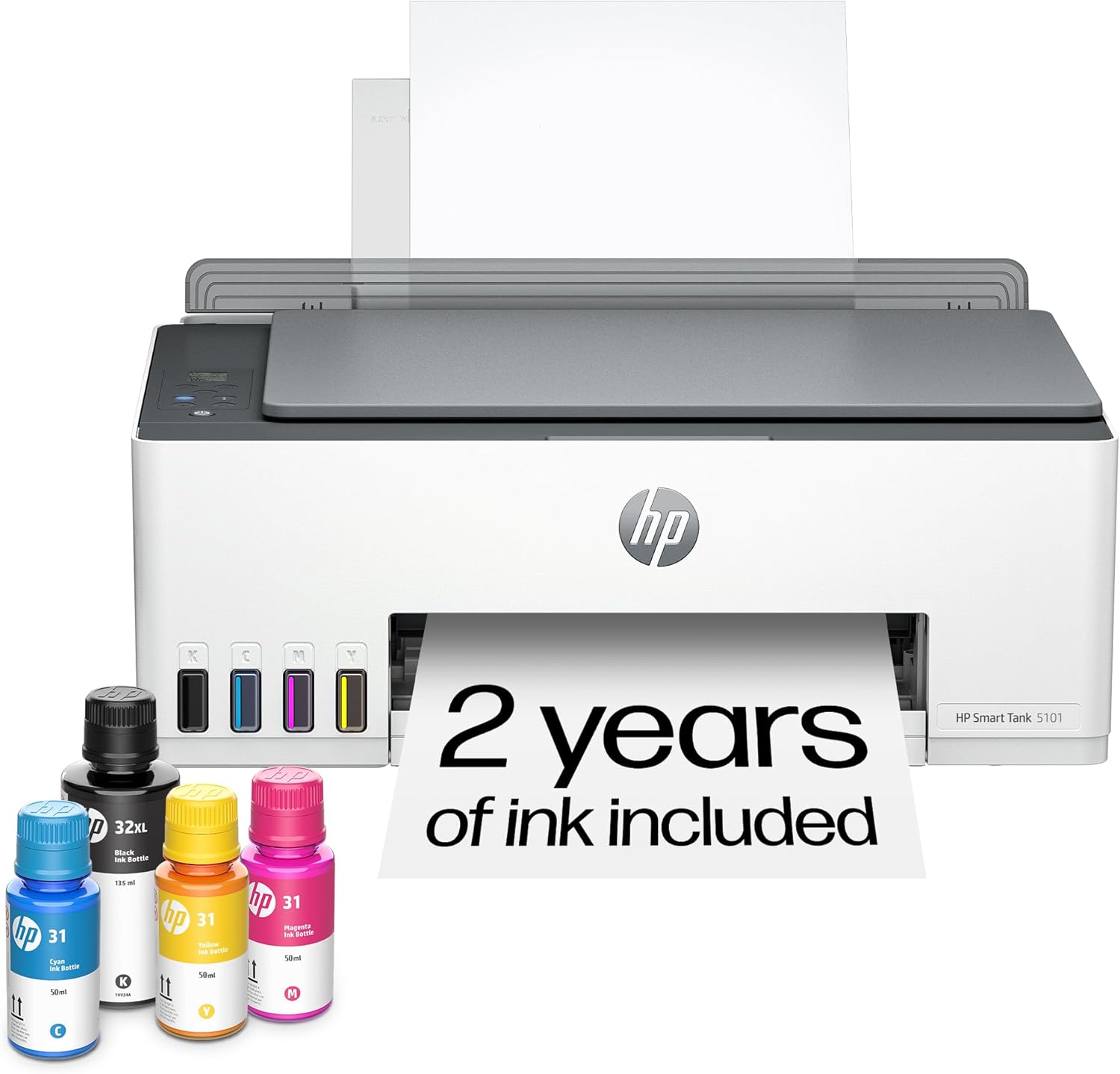
HP Smart Tank 5101 Wireless All-in-One Ink Tank Printer with up to 2 years of ink included (1F3Y0A)
Want the best price and purchase timing?
Our AI advisor analyzes real-time pricing across all channels to find you the best deal.
AI Verdict
This 11.09-pound all-in-one printer with refillable ink tanks delivers 12 ppm black and 5 ppm color, ideal for high-volume document printing at home.
This printer is a situational fit for users who print a lot of black and white documents and prioritize extremely low ink costs, thanks to its refillable tanks and included ink for up to two years. However, its slow print speeds (12 ppm black, 5 ppm color) and lack of automatic duplexing make it less ideal for time-sensitive tasks or complex printing needs.
If speed and convenience are more important than the absolute lowest ink cost, look for models with faster print speeds and automatic duplexing.
Regret Score™
High RiskLower is better — measures purchase-regret risk from real buyer complaints, review credibility, and product maturity
Issues discovered after purchase
Critically weak dimension
Amazon rating vs actual quality
Chance this product isn't for you
Pros
- Includes up to 2 years of ink, yielding 6,000 color or black pages out of the box, significantly reducing running costs.
- Black and white documents print with crisp, clean text.
- Ink tanks are designed for spill-resistant, mess-free refilling.
- Print heads are user-replaceable at home, which can extend the printer's lifespan compared to models requiring professional servicing for clogs.
- Features self-healing Wi-Fi for more stable wireless connections.
- Compact footprint at 6.2 x 17.1 x 14.2 inches (HWD) with trays closed, fitting on most desks.
Cons
- Lacks automatic duplex printing, requiring manual page flipping for double-sided documents.
- Prints slowly at 12 pages per minute for black and 5 pages per minute for color in draft mode, with higher quality settings taking longer.
- The display screen is tiny and can be difficult to read due to reflections.
- Printheads are prone to clogging and can be challenging to unclog, requiring regular maintenance.
- Color document and photo print quality can appear washed out, dull, or inaccurate due to a narrow color range.
- Sheet rollers occasionally leave marks on printed pages.
Dimension Scores
This dimension is not applicable for a printer; it does not offer ergonomic comfort or support features.
Adjustability is limited by the lack of automatic duplex printing, a basic flatbed scanner without an ADF, and a tiny, non-articulating display screen.
While it feels 'well put together', recurring issues like printhead clogging and sheet rollers leaving marks detract from its overall durability and reliability.
The printer features a 'clean and modern' design with a compact footprint that blends into home or office environments.
Best For
- Home users printing high volumes of black and white text documents, like school assignments or invoices.
- Families needing an all-in-one for occasional color prints and scans without frequent ink cartridge purchases.
- Small home offices prioritizing low cost per page over print speed or advanced features.
Not Recommended For
- Users requiring automatic double-sided printing for efficiency.
- Anyone needing fast color printing or professional-grade photo output.
- Offices that frequently scan multi-page documents, due to the lack of an Automatic Document Feeder.
Watch Out For
- No automatic duplexing means you'll manually flip pages for two-sided prints, which is a pain for anything over a few sheets.
- Printheads frequently clog, and while replaceable, it's a recurring maintenance task that users report as frustrating.
- Color prints, especially photos, often look dull and inaccurate, not suitable if you need vibrant images.
- The tiny, reflective display screen makes navigating settings or checking status unnecessarily difficult.
- Slow print speeds mean a 10-page color document can take a while, especially on higher quality settings.
Full Specifications
| UPC | 196068963484 |
| ASIN | B0BL466Y41 |
| Brand | HP |
| Color | White |
| Duplex | Manual |
| Ink Color | Black, Cyan, Magenta, Yellow |
| Model Name | ST 5101 AIO |
| Sheet Size | 3.5" x 5", 4" x 6", 5" x 7", 8" x 10", 8.5" x 11", 8.5" x 14", A4, A6, half letter, legal, executive) Inches |
| Color Depth | 24 bpp |
| Item Weight | 11.09 pounds |
| Print media | Envelopes, Glossy photo paper, Paper (plain) |
| Manufacturer | HP |
| Model Series | Smart Tank 5101 |
| Scanner Type | Flatbed |
| Series Number | 5101 |
| Warranty Type | Limited |
| Control Method | App, Touch |
| Printer Output | Color |
| Controller Type | Amazon Alexa, Android, IOS, Hand Control |
| Number of Trays | 1 |
| Processor Count | 1 |
| Special Feature | Refillable Ink Tank, Network-Ready , Auto Power On, Borderless Printing, Energy Star |
| Total USB Ports | 1 |
| Printer Ink Type | Pigment-based (black); Dye-based (color) |
| Item model number | ST 5101 AIO |
| Power Consumption | 0.11 Watts |
| Compatible Devices | Laptops, PC, Smartphones, Tablets |
| Hardware Interface | USB 2.0 |
| Maximum Media Size | 8.5 x 14 inch |
| Product Dimensions | 14.23"D x 17.11"W x 6.19"H |
| Dual-sided printing | No |
| Included Components | HP 31 Cyan Original Ink Bottle (50ml), HP 31 Magenta Original Ink Bottle (50ml), HP 31 Yellow Original Ink Bottle (50ml), HP 32XL Black Original Ink Bottle (135ml), HP Smart Tank 5101 All-in-One Printer |
| Printing Technology | HP Thermal Inkjet |
| Compatible Cartridge | North America: HP 32XL 135-ml Black Original Ink Bottle 1VV24AN; HP 31 Cyan Original Ink Bottle 1VU26AN; HP 31 Magenta Original Ink Bottle 1VU27AN; HP 31 Yellow Original Ink Bottle 1VU28AN. |
| Number of USB 2 Ports | 1 |
| Supported Media Sizes | 4 x 6 inches, 5 x 7 inches, A4, Half Letter (5.5 x 8.5 inches), Legal (8.5 x 14 inches), Letter (8.5 x 11 inches) |
| Maximum copies per run | 99 |
| Connectivity Technology | Wireless |
| Initial page print time | A4 Black 14 sec; A4 Color 21 sec Seconds |
| Memory Storage Capacity | 64 MB |
| Max Input Sheet Capacity | 100 |
| Max Printspeed Monochrome | 12 ppm |
| Max copy resolution color | Up to 600 dpi |
| Specific Uses For Product | Home and home office |
| Maximum Print Speed (Color) | 5 ppm |
| Additional Printer functions | Copy, Scan |
| Maximum Color Print Resolution | 4800 x 1200 Dots Per Inch |
| Max copy resolution black-white | 600 |
| Maximum Black and White Print Resolution | 1200 x 1200 Dots Per Inch |
What Buyers Say
The biggest takeaway from users is the incredibly low cost of printing, thanks to the refillable ink tanks and the generous ink supply included. However, this cost-saving comes with some significant trade-offs, primarily the snail-like print speeds and the constant headache of manually flipping pages for double-sided prints. Many users also report frustration with printhead clogging, which requires frequent attention to maintain print quality. The tiny, hard-to-read display screen is another recurring annoyance, making basic operations more cumbersome than they should be.
“Ugh, this printer saves me so much on ink, it's insane, but seriously, why can't it just print double-sided by itself? And the screen is so tiny I need a magnifying glass!”
Common Praise
- The included ink lasts for a very long time, significantly reducing the need to buy replacements.
- Black text documents are consistently sharp and professional-looking.
- Refilling the ink tanks is surprisingly easy and mess-free.
- The ability to replace print heads at home is a major plus for long-term maintenance.
- Wireless setup and connectivity through the HP Smart app generally work smoothly.
Common Complaints
- No automatic double-sided printing is a constant frustration for anyone printing more than a single page.
- Print speeds are noticeably slow, especially for color documents or higher quality settings.
- Printheads frequently clog, leading to print quality issues and requiring regular cleaning cycles.
- The small, reflective display screen is difficult to see and use.
- Color prints, particularly photos, often lack vibrancy and accurate color reproduction.
- The sheet rollers sometimes leave faint marks on the paper.
Ownership Tips
- You'll quickly get used to manually flipping pages for two-sided prints, but it never stops being annoying for larger documents.
- Regularly printing, even just a few pages, helps prevent printhead clogs; if you let it sit, expect maintenance.
- The HP Smart app is pretty much essential for setup and managing the printer, so get comfortable with it.
- Don't expect 'frame-worthy' photos; the color output is fine for casual use but not for anything important.
- The initial ink supply really does last a long time, making the upfront cost feel more justified over months of use.
Frequently Asked Questions
Does this printer automatically print on both sides of the paper?
No, the HP Smart Tank 5101 does not support automatic duplex printing. You will need to manually flip the pages to print on the second side.
How long does the included ink last?
The printer comes with enough ink to last up to two years, or approximately 6,000 color or black pages, depending on your printing volume.
Is the HP Smart Tank 5101 good for printing photos?
While it can print photos, user reviews indicate that photo quality is often dull and colors can be inaccurate due to a narrow color range, so it's not its strong suit.
Can I connect this printer to my phone?
Yes, it supports mobile and wireless printing through the HP Smart app, which is compatible with 2.4 GHz Wi-Fi networks.
Does this printer have an Automatic Document Feeder (ADF)?
No, it only has a basic flatbed scanner and does not include an Automatic Document Feeder.
Buying Guide
When buying a printer like this, you're trading upfront cost for long-term ink savings. Think about how much you print and what kind of documents. If you're churning out hundreds of pages of text every month, the refillable tanks are a game-changer for your wallet. But if you need fast, high-quality color prints or often scan multi-page documents, you'll feel the limitations quickly.
Refillable Ink Tank System
Instead of small, expensive cartridges, this printer uses large, refillable tanks. It's like buying a big jug of milk instead of tiny cartons – much cheaper per ounce, saving you a lot of money on ink over time, especially if you print frequently.
Pages Per Minute (PPM)
This number tells you how fast the printer spits out pages. 12 ppm black and 5 ppm color is on the slower side, meaning you'll be waiting a bit longer for your documents, especially if they're in color or multi-page.
Automatic Duplex Printing
This feature automatically prints on both sides of a page without you having to manually flip the paper. Without it, you'll be standing by the printer, flipping pages, which can be a real hassle for longer documents and wastes time.
Alternatives
If you need faster printing and automatic double-sided capabilities, look for models with higher PPM ratings and 'auto-duplex' listed in their features. For frequent multi-page scanning, prioritize printers with an Automatic Document Feeder (ADF).
You Might Also Like

LYMAX Computer Monitor Light Bar with Wireless Remote, Motion Sensor, Fit for Flat/Curved Monitor, Adjustable Color Temperature with Auto-Dimming, Eye-Care USB-C Monitor Lamp, No Glare Desk Lamp
$50-$99A 15.7-ounce aluminum monitor light bar with motion sensing, auto-dimming, and stepless 2700K-6500K color temperature adjustment for flat or curved screens.

Computer Monitor Lamp, Screen Monitor Light Bar for Eye Caring, Screen Monitor Light Bar with Backlight for Eye Caring, E-Reading LED Task Lamp with Dimming Adjustment, Perfect for Reading and Study
$0-$49This BLYGACN monitor lamp offers 3 color temperatures (3000K-6500K), dimming, and a 60-minute timer, powered by USB, for monitors 15-24 inches.

Monitor Light Bar with Touch Control, RGB Desk Lamp Full Spectrum Screen Lamp, Glare-Free Low Blue Light Monitor Lamp with Memory Mode, USB Powered for Gaming, Office & Work
$0-$49A USB-powered plastic monitor light bar with touch controls, RGB modes, and glare-free illumination for basic desk setups.

RGB Monitor Light Bar, Eye-Care Dual Light Reading Screen Lamp, 9 Modes Gaming Backlight LED Computer Lamp, 3 Colors Dimmable Frontlight, 15.75'' USB Desk Lights for Home, Office
$0-$49This is a budget-focused 6.4-ounce plastic monitor light bar with dual-mode lighting and 9 RGB backlight modes, designed for users needing basic task and ambient lighting without cluttering their desk