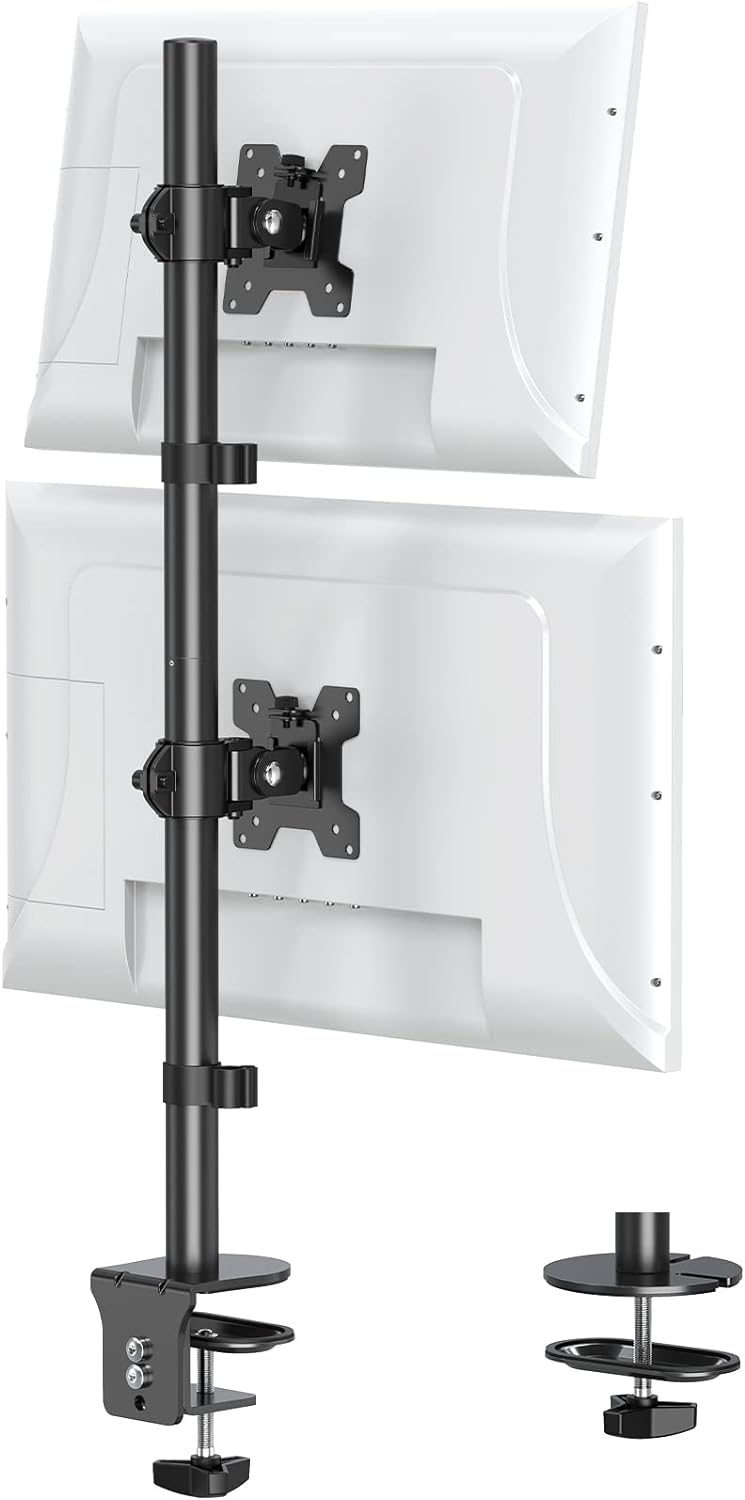
MOUNT PRO Vertical Dual Monitor Stand, Stacked Monitor Mount for 2 Monitors Up to 32 inches, Computer Monitor Arm with Swivel, Tilt, Height Adjustable, Each Monitor Desk Mount Holds up to 17.6 lbs
Want the best price and purchase timing?
Our AI advisor analyzes real-time pricing across all channels to find you the best deal.
AI Verdict
This MOUNT PRO vertical dual monitor stand supports two 13-32 inch monitors up to 17.6 lbs each, ideal for maximizing desk space in a stacked configuration.
This mount is a strong fit for its budget price band, offering comprehensive adjustability including tilt, swivel, rotation, and height on a 31-inch pole for two monitors up to 32 inches and 17.6 lbs each. Its dual mounting options and VESA compatibility make it adaptable for many desks and monitors.
If you need more dynamic, single-hand monitor repositioning or support for heavier displays, look for monitor arms with gas spring mechanisms and higher weight capacities.
Regret Score™
Low RiskLower is better — measures purchase-regret risk from real buyer complaints, review credibility, and product maturity
Issues discovered after purchase
Critically weak dimension
Amazon rating vs actual quality
Chance this product isn't for you
Pros
- Supports two monitors from 13 to 32 inches, accommodating a wide range of display sizes.
- Each arm holds up to 17.6 lbs, suitable for many common monitors.
- Offers 30 degrees of tilt, 90 degrees of swivel, and 180 degrees of rotation for each monitor independently.
- The 31-inch center pole allows for significant height adjustment, supporting standing or sitting postures.
- Includes both C-clamp (up to 3.15" desk thickness) and grommet (up to 1.57" desk thickness) mounting options.
- Features integrated cable management to keep cords tidy.
Cons
- Mounting two 32-inch monitors vertically may position the top screen uncomfortably high for some users, requiring excessive neck tilt.
- The alloy steel construction, while sturdy, might not offer the same refined movement or aesthetic as higher-end aluminum arms.
- Cable management consists of small holes, which may be less robust than fully integrated channels found on more premium stands.
- Aligning two monitors perfectly on a vertical pole can be a tedious process.
Dimension Scores
The 31-inch pole and 17.89 inches of height movement allow for significant ergonomic positioning, supporting both sitting and standing.
Offers 30-degree tilt, 90-degree swivel, and 180-degree rotation for each monitor, providing extensive customization of viewing angles.
Constructed from alloy steel, it feels sturdy and holds monitors securely, with users reporting no issues with movement or instability.
The design is functional and aims to reduce desktop clutter, though its appearance is not highlighted as particularly sleek or premium.
Best For
- Dual-monitor home office setups needing to reclaim horizontal desk space.
- Users who primarily consume content or monitor data on a secondary, stacked display.
- Workflows involving design, data analysis, or coding where vertical screen real estate is beneficial.
Not Recommended For
- Users with monitors heavier than 17.6 lbs per arm.
- Desks thicker than 3.15 inches for C-clamp or 1.57 inches for grommet mounting.
- Individuals who frequently adjust monitor height or position dynamically throughout the day.
Watch Out For
- Desks exceeding 3.15 inches in thickness cannot use the C-clamp mounting option.
- Desks exceeding 1.57 inches in thickness cannot use the grommet mounting option.
- Attempting to stack two 32-inch monitors might place the top monitor's upper edge significantly above comfortable eye level for many users, potentially causing neck strain.
- Achieving precise alignment between two monitors can be time-consuming and require patience during initial setup.
Full Specifications
| ASIN | B0BG59PZRW |
| Brand | MOUNT PRO |
| Color | Black, white |
| Material | Alloy Steel |
| Brand Name | MOUNT PRO |
| Color Name | Black, white |
| Item Weight | 7.98 pounds |
| Manufacturer | MOUNT PRO |
| Mounting Type | Tabletop Mount |
| Movement Type | Rotate, Swivel, Tilt |
| Compatible Devices | Monitor |
| Maximum Tilt Angle | 30 Degrees |
| Package Dimensions | 17.01 x 6.06 x 3.7 inches |
What Buyers Say
Users frequently highlight how this mount effectively frees up horizontal desk space by stacking monitors, which is a major win for smaller setups. Many appreciate the straightforward installation process, often noting it takes under 15 minutes to assemble. The ability to adjust each monitor's angle, including full rotation, is a recurring positive, especially for specific tasks like data analysis. The stand's reported sturdiness, even with two 32-inch monitors, gives buyers confidence in its ability to hold their displays securely.
“Honestly, this thing saved my desk from becoming a monitor graveyard! My neck still hurts a bit looking at the top 32-inch screen, but hey, at least I can actually see my desk now. Setup was surprisingly quick, didn't even need my husband's help. Totally worth it for the price.”
Common Praise
- Significantly reduces desktop footprint by stacking two monitors.
- Installation is quick and easy, with clear instructions and all necessary hardware included.
- Monitors can be independently tilted, swiveled, and rotated 180 degrees for optimal viewing.
- The 31-inch pole provides ample height adjustment for ergonomic setups.
- Holds two 32-inch monitors securely without wobbling.
- Integrated cable management helps maintain a tidy workspace.
Common Complaints
- The top monitor can be positioned too high for comfortable viewing, especially with two large displays, leading to neck strain.
- Achieving perfect alignment between the two stacked monitors can be a fiddly and time-consuming process.
- The cable management system, while present, is basic and might not accommodate thicker cable bundles.
- Some users find the overall aesthetic to be purely functional rather than visually appealing.
Ownership Tips
- After a few weeks, you'll find yourself using the top monitor primarily for reference or less active tasks due to the vertical distance.
- The C-clamp remains secure over time, but occasional tightening might be needed depending on desk material and monitor movement.
- The cable management clips are functional for standard cables but can be tight if you have many thick display or power cables.
- Dust tends to collect on the flat surfaces of the arms and pole, requiring regular wiping.
Frequently Asked Questions
What size monitors can this stand hold?
It can hold two monitors ranging from 13 to 32 inches.
What is the maximum weight capacity per monitor?
Each monitor arm supports up to 17.6 lbs.
Can I mount my monitors in portrait orientation?
Yes, the monitors can rotate 180 degrees independently into landscape or portrait orientation.
What are the desk thickness limits for installation?
The C-clamp fits desks up to 3.15 inches thick, and grommet mounting works with desks up to 1.57 inches thick.
Does this mount help with cable management?
Yes, it includes integrated cable management features to help keep your workspace tidy.
Is the installation process difficult?
Users report easy installation with clear instructions, often taking less than 15 minutes.
Buying Guide
When looking at a vertical dual monitor stand like this, you're primarily buying back desk space. Think about your monitor sizes and your height; stacking two 32-inch screens means the top one will be pretty high. Consider how often you actually look at the top screen, as it's usually for secondary information. The mounting method is also key: make sure your desk thickness works with either the C-clamp or grommet option.
Monitor Size & Weight Capacity (13-32 inches, 17.6 lbs per arm)
This tells you if your current monitors will fit and be supported. Exceeding the weight limit can lead to instability or damage, while monitors outside the size range might not mount correctly or look awkward.
Center Pole Height (31 inches)
A taller pole means more flexibility to position your monitors ergonomically, especially if you stand or have a tall desk. For stacked setups, it dictates how high your top monitor will sit, impacting neck comfort.
Adjustability (Tilt 30°, Swivel 90°, Rotation 180°)
These numbers define how much you can angle, turn, and rotate your monitors. High adjustability means you can fine-tune your viewing experience, reduce glare, and switch between landscape and portrait modes for different tasks.
Alternatives
If this doesn't fit, search for monitor arms with gas spring mechanisms for easier dynamic adjustment, or for free-standing bases if you cannot clamp to your desk. If you have very large or heavy monitors, look for models with higher weight capacities, often exceeding 20 lbs per arm.
You Might Also Like

LYMAX Computer Monitor Light Bar with Wireless Remote, Motion Sensor, Fit for Flat/Curved Monitor, Adjustable Color Temperature with Auto-Dimming, Eye-Care USB-C Monitor Lamp, No Glare Desk Lamp
$50-$99A 15.7-ounce aluminum monitor light bar with motion sensing, auto-dimming, and stepless 2700K-6500K color temperature adjustment for flat or curved screens.

Computer Monitor Lamp, Screen Monitor Light Bar for Eye Caring, Screen Monitor Light Bar with Backlight for Eye Caring, E-Reading LED Task Lamp with Dimming Adjustment, Perfect for Reading and Study
$0-$49This BLYGACN monitor lamp offers 3 color temperatures (3000K-6500K), dimming, and a 60-minute timer, powered by USB, for monitors 15-24 inches.

Monitor Light Bar with Touch Control, RGB Desk Lamp Full Spectrum Screen Lamp, Glare-Free Low Blue Light Monitor Lamp with Memory Mode, USB Powered for Gaming, Office & Work
$0-$49A USB-powered plastic monitor light bar with touch controls, RGB modes, and glare-free illumination for basic desk setups.

RGB Monitor Light Bar, Eye-Care Dual Light Reading Screen Lamp, 9 Modes Gaming Backlight LED Computer Lamp, 3 Colors Dimmable Frontlight, 15.75'' USB Desk Lights for Home, Office
$0-$49This is a budget-focused 6.4-ounce plastic monitor light bar with dual-mode lighting and 9 RGB backlight modes, designed for users needing basic task and ambient lighting without cluttering their desk