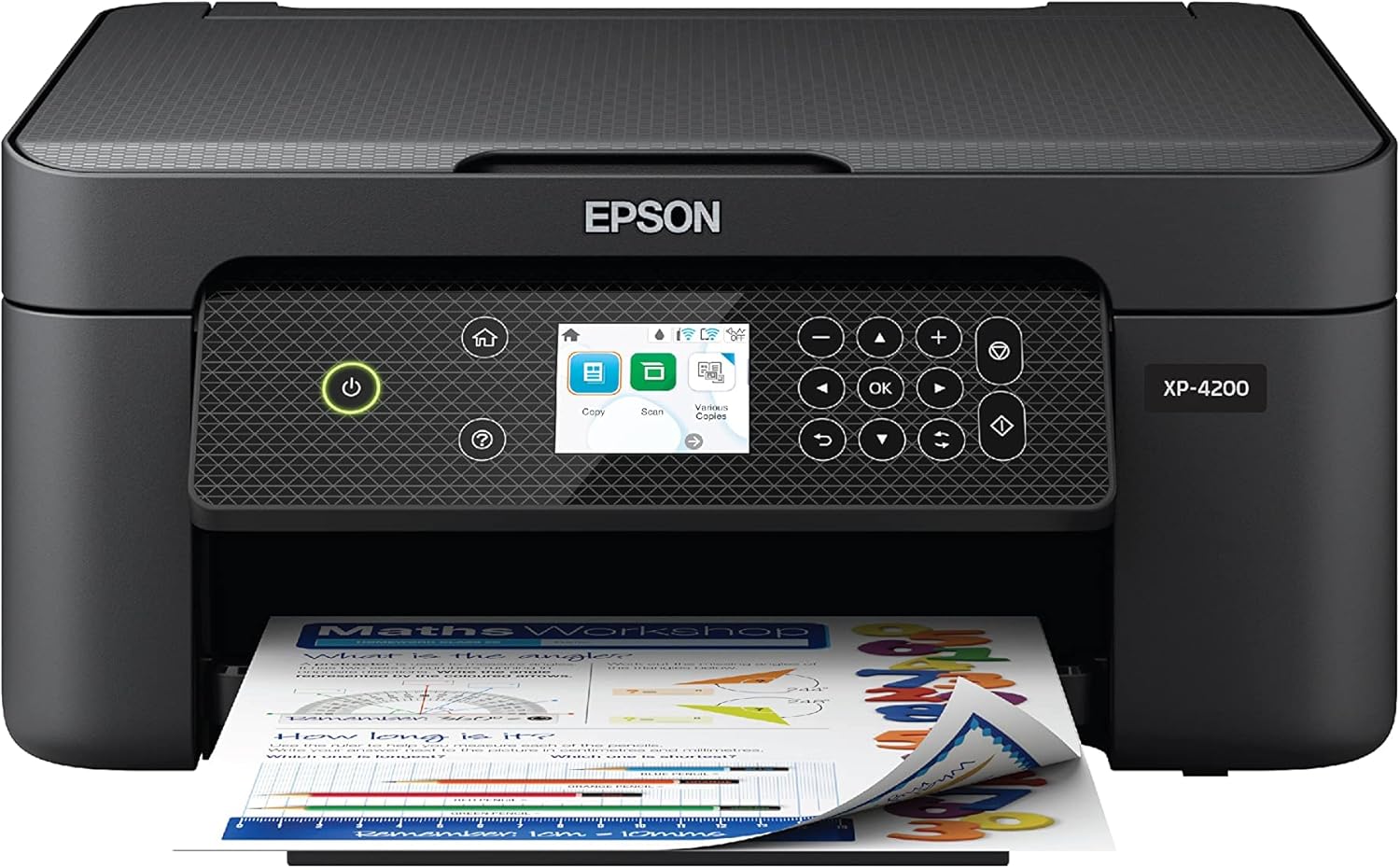
Epson Expression Home XP-4200 Wireless Color All-in-One Printer with Scan Copy, Automatic 2-Sided Printing, Borderless Photos and 2.4" Colorfull Display - Black
Want the best price and purchase timing?
Our AI advisor analyzes real-time pricing across all channels to find you the best deal.
AI Verdict
This 9.5-pound all-in-one printer with a 2.4-inch color display and auto-duplex is for light home use, especially if you print borderless photos occasionally.
This printer is a situational fit for home users with light printing needs, especially if they value wireless connectivity and occasional borderless photo printing. Its 9.5-pound weight and compact design make it suitable for small spaces, but the high ink consumption and inability to print without all colors present significant drawbacks for more frequent use.
If you print more than a few pages a week or need to print black and white reliably, look for a printer with an EcoTank system or one that allows printing with an empty color cartridge.
Regret Score™
High RiskLower is better — measures purchase-regret risk from real buyer complaints, review credibility, and product maturity
Issues discovered after purchase
Critically weak dimension
Amazon rating vs actual quality
Chance this product isn't for you
Pros
- Produces crisp documents and borderless photos with rich colors.
- Features a 2.4-inch color display for menu navigation, which is not a touchscreen.
- Supports easy wireless connections and printing from Android or iOS devices via the Epson Smart Panel app, Mopria Print Service, and Mopria Scan.
- Individual ink cartridges mean you only replace the color that runs out.
- Automatic 2-sided printing helps reduce paper waste.
- The flatbed scanner produces sharp scans with fine details and legible text.
Cons
- Ink cartridges deplete quickly, with some users reporting needing new ink after printing barely 30 pages of black and white text.
- The printer locks down completely and won't print black and white or scan if any color ink cartridge is empty.
- Slower at printing documents compared to other printers in its class.
- The output tray and extender are described as flimsy.
- Lacks an automatic document feeder (ADF), making multi-page scanning time-consuming.
Dimension Scores
The 2.4-inch color display is not a touchscreen and has tiny print, requiring users to crouch to read it comfortably.
The display panel can move at an angle, offering some adjustability for viewing while standing or sitting.
While the main body feels passable, the output tray and extender are described as flimsy plastic, and paper jams are a frequent complaint.
It features a clean, minimal design with a matte finish that keeps fingerprints low, making it unobtrusive on a desk.
Best For
- Printing occasional borderless family photos at home.
- Students needing to print assignments and forms wirelessly from a phone or laptop.
- Users with limited desk space who need a compact all-in-one device.
- Basic document scanning where high color accuracy isn't critical.
Not Recommended For
- Anyone needing to print frequently or in high volumes due to rapid ink consumption.
- Users who require printing black and white documents when a color cartridge is empty.
- Offices or users who regularly scan multi-page documents, as it lacks an ADF.
- Users prioritizing precise color accuracy for professional photo work.
Watch Out For
- The printer will refuse to print anything, including black and white documents, if even one color ink cartridge is empty, forcing you to buy a full set of cartridges.
- Ink cartridges run out very quickly; one user reported needing new ink after printing only about 30 pages of plain black and white text.
- The output tray and paper extender are made of flimsy plastic, which can feel cheap and potentially break with regular use.
- Paper jams are a recurring issue for some users, leading to wasted paper and ink.
- The 2.4-inch color display has tiny print, making it difficult to read without crouching down for some users.
Full Specifications
| UPC | 010343968592 |
| ASIN | B0BDCZKJLS |
| Brand | Epson |
| Color | Black |
| Duplex | Automatic |
| Wattage | 12 watts |
| Ink Color | Black |
| Model Name | XP-4200 |
| Sheet Size | Letter, A4, Legal, 8" x 10", 5" x 7", 4" x 6", 3.5" x 5", Executive, Half Letter, A6; User Defined: 2.2" x 3.4" to 8.5" x 47.2" |
| Color Depth | 48-bit input, 24-bit output |
| Item Weight | 9.5 pounds |
| Print media | Paper (plain) |
| Manufacturer | Epson |
| Model Series | Expression Home |
| Scanner Type | Flatbed |
| Warranty Type | Limited |
| Control Method | Voice |
| Printer Output | Color |
| Controller Type | Android, Google Assistant, iOS |
| Number of Trays | 2 |
| Special Feature | Auto-Duplex, Energy Star |
| Total USB Ports | 1 |
| Printer Ink Type | inkjet |
| Item model number | C11CK65201 |
| Power Consumption | 12 Watts |
| Compatible Devices | Smartphones |
| Hardware Interface | USB |
| Maximum Media Size | 8.5 x 14 inch |
| Product Dimensions | 22.7"D x 14.8"W x 9.5"H |
| Dual-sided printing | Yes |
| Included Components | Expression Home XP-4200 All-in-One Printer, Power Cord, 4 Claria® 232 Ink Cartridges (1x Black, 1x Cyan, 1x Magenta, 1x Yellow) |
| Printing Technology | Inkjet |
| Compatible Cartridge | T232 |
| Output sheet capacity | 150 |
| Supported Media Sizes | 4 x 6 inches, 5 x 7 inches, A4, A6, Half Letter (5.5 x 8.5 inches), Legal (8.5 x 14 inches), Letter (8.5 x 11 inches) |
| Connectivity Technology | USB, Wi-Fi |
| Max Input Sheet Capacity | 100 |
| Max Printspeed Monochrome | 10 ppm |
| Max copy resolution color | 1200 x 2400 dpi |
| Maximum Print Speed (Color) | 5 ppm |
| Additional Printer functions | Copy, Scan |
| Max Copy Speed (Black & White) | 10 ppm |
| Maximum Color Print Resolution | 5760 x 1440 Dots Per Inch |
| Max copy resolution black-white | 5760 x 1440 dots_per_inch |
| Maximum Black and White Print Resolution | 5760 x 1440 Dots Per Inch |
What Buyers Say
The most surprising finding is how aggressively this printer enforces ink cartridge presence, completely locking down all functions, including scanning and black-and-white printing, if any color cartridge is empty. Users frequently report that ink runs out very quickly, sometimes after printing as few as 30 black and white pages. Despite these ink frustrations, many appreciate its straightforward wireless setup and the ability to print directly from mobile devices. The print quality for documents is generally sharp, and it handles borderless photos adequately for casual use.
“This thing is a masterclass in frustration, it will insist you're 'out of ink' after printing barely 30 pages of plain black and white PDF text, and then it won't even let you scan! Do NOT buy an EPSON XP-4200.”
Common Praise
- Wireless setup is easy and seamless, connecting quickly to Wi-Fi and mobile devices.
- Text documents come out sharp and readable.
- Produces detailed and vibrant borderless photos for home use.
- The 2.4-inch color display makes navigating menus easy.
- Compact size fits well on a desk without taking up too much space.
- Individual ink cartridges allow replacing only the color that is depleted.
Common Complaints
- Printer refuses to operate (print or scan) if any color ink cartridge is empty.
- Ink cartridges are consumed very rapidly, even with minimal printing.
- Frequent paper jams are a source of frustration and wasted materials.
- The output tray and paper extender feel flimsy and prone to damage.
- Scanning multi-page documents is tedious due to the lack of an automatic document feeder.
- Slower print speeds compared to other printers in its category.
Ownership Tips
- You'll be buying ink more often than you expect, even if you mostly print in black and white.
- The printer's complete shutdown when a color cartridge is empty is a major inconvenience, impacting scanning functionality as well.
- Despite initial easy setup, maintaining a consistent Wi-Fi connection can sometimes be an issue for some users.
- The small display screen can be annoying to read, especially if the printer is placed low.
- The plastic parts, particularly the paper trays, require careful handling to avoid breakage.
Frequently Asked Questions
Can I print black and white documents if a color ink cartridge is empty?
No, the printer will not function at all, including scanning or printing black and white, if any color ink cartridge is reported as empty.
Does this printer have an automatic document feeder (ADF) for scanning multiple pages?
No, the Epson XP-4200 only features a flatbed scanner, so you'll need to place each page individually for scanning.
Is the setup process complicated for wireless printing?
Users generally find the wireless setup straightforward and easy, especially when using the Epson Smart Panel app on a smartphone or tablet.
How is the print quality for photos?
It produces detailed photos with a decent color range and supports borderless printing, though color accuracy is considered relatively poor compared to dedicated photo printers.
What kind of Wi-Fi connection does this printer require?
This printer requires a 2.4GHz Wi-Fi network connection.
Buying Guide
When you're looking at an all-in-one printer like this, think about how much you actually print and what kind of documents. Don't just look at the upfront price; the cost and frequency of ink cartridge replacements can quickly make a 'cheap' printer expensive. Also, consider if you need to scan multiple pages at once, because a flatbed scanner means you'll be manually placing each sheet.
Auto-Duplex
This means the printer can automatically print on both sides of a sheet of paper without you having to manually flip it. It's like having a built-in assistant for saving paper and making multi-page documents look more professional.
Individual Ink Cartridges
Instead of one big cartridge with all colors, you get separate cartridges for black, cyan, magenta, and yellow. The idea is you only replace the color that runs out, which sounds like it saves money. However, if the printer forces you to replace all colors even when only one is empty, that benefit disappears.
Wireless Connectivity
This lets you print from your computer, phone, or tablet without needing to plug in a USB cable. It's super convenient for printing from anywhere in your home, as long as you're on the same Wi-Fi network.
Alternatives
If you print frequently or need to scan multi-page documents, look for models with an automatic document feeder (ADF) and consider an EcoTank or similar refillable ink system to reduce ongoing ink costs.
You Might Also Like

LYMAX Computer Monitor Light Bar with Wireless Remote, Motion Sensor, Fit for Flat/Curved Monitor, Adjustable Color Temperature with Auto-Dimming, Eye-Care USB-C Monitor Lamp, No Glare Desk Lamp
$50-$99A 15.7-ounce aluminum monitor light bar with motion sensing, auto-dimming, and stepless 2700K-6500K color temperature adjustment for flat or curved screens.

Computer Monitor Lamp, Screen Monitor Light Bar for Eye Caring, Screen Monitor Light Bar with Backlight for Eye Caring, E-Reading LED Task Lamp with Dimming Adjustment, Perfect for Reading and Study
$0-$49This BLYGACN monitor lamp offers 3 color temperatures (3000K-6500K), dimming, and a 60-minute timer, powered by USB, for monitors 15-24 inches.

Monitor Light Bar with Touch Control, RGB Desk Lamp Full Spectrum Screen Lamp, Glare-Free Low Blue Light Monitor Lamp with Memory Mode, USB Powered for Gaming, Office & Work
$0-$49A USB-powered plastic monitor light bar with touch controls, RGB modes, and glare-free illumination for basic desk setups.

RGB Monitor Light Bar, Eye-Care Dual Light Reading Screen Lamp, 9 Modes Gaming Backlight LED Computer Lamp, 3 Colors Dimmable Frontlight, 15.75'' USB Desk Lights for Home, Office
$0-$49This is a budget-focused 6.4-ounce plastic monitor light bar with dual-mode lighting and 9 RGB backlight modes, designed for users needing basic task and ambient lighting without cluttering their desk