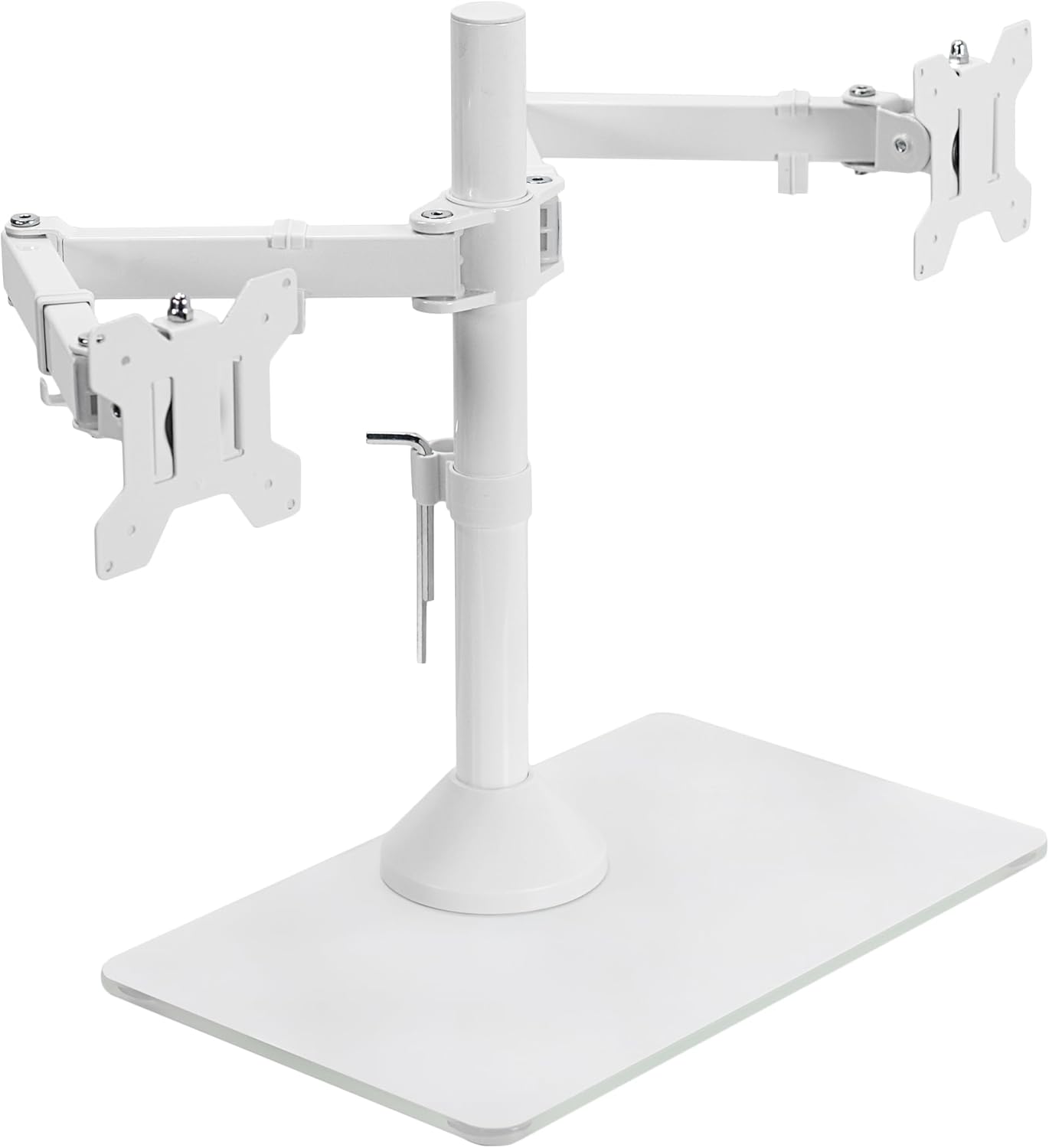
VIVO Freestanding Dual Monitor Stand with Sleek Glass Base and Adjustable Arms, Mounts 2 Screens up to 32 inch and 22 lbs Each, White, STAND-V002FGW
Want the best price and purchase timing?
Our AI advisor analyzes real-time pricing across all channels to find you the best deal.
AI Verdict
This VIVO freestanding dual monitor stand supports two screens up to 32 inches and 22 lbs each, offering full articulation on a stable 15.2” x 10.2" tempered glass base.
This stand is a situational fit for users needing a freestanding dual monitor solution within its 32-inch, 22-pound per screen limits. Its steel construction and tempered glass base provide stability, but the stiff adjustments mean it's best for setups where monitors aren't frequently moved. It's a pragmatic choice for those who can't use clamp mounts.
If you anticipate frequent monitor adjustments, look for stands with gas spring arms for smoother, more effortless movement.
Regret Score™
Low RiskLower is better — measures purchase-regret risk from real buyer complaints, review credibility, and product maturity
Issues discovered after purchase
Critically weak dimension
Amazon rating vs actual quality
Chance this product isn't for you
Pros
- Supports two monitors up to 32 inches and 22 lbs each with 75x75mm or 100x100mm VESA patterns.
- Constructed from alloy steel for the pole and arms, providing a 'heavy duty' feel.
- Tempered glass base (15.2” x 10.2") offers stability and a visually appealing aesthetic.
- Adjustable arms provide +90° to -90° tilt, 360° swivel, 360° rotation, and height adjustment along the center pole.
- Includes removable VESA plates and integrated cable management clips for a cleaner setup.
- Frees up desk space compared to individual monitor stands.
Cons
- Adjustments can be 'a little stiff' and require significant tightening to prevent monitors from tilting downward.
- Initial setup can be 'a pain' and time-consuming to get monitors perfectly aligned.
- The large 15.2” x 10.2" tempered glass base occupies a considerable footprint on the desk.
- Monitors may shake noticeably if the desk is bumped, especially if placed higher on the pole.
Dimension Scores
Supports two screens up to 32 inches and 22 lbs each with a stable tempered glass base measuring 15.2” x 10.2", providing adequate support once configured.
Offers a wide range of motion including +90° to -90° tilt, 360° swivel, 360° rotation, and height adjustment along the center pole, though user feedback indicates stiff adjustments.
Constructed from alloy steel for the pole and arms, with a tempered glass base, reported by users as 'heavy duty' and 'sturdy'.
Features a sleek tempered glass base and white finish, which users find visually appealing and a cleaner alternative to individual monitor stands.
Best For
- Users with thin or non-clampable desks who require a freestanding dual monitor solution.
- Setting up two monitors (up to 32 inches, 22 lbs each) in a fixed position after initial adjustment.
- Creating a cleaner workspace by elevating monitors and managing cables.
- Achieving portrait or landscape monitor orientations with 360° rotation.
Not Recommended For
- Users who frequently need to reposition or adjust their monitors throughout the day.
- Desks with very limited surface area where the 15.2” x 10.2" glass base would be too intrusive.
- Monitors exceeding 32 inches or 22 lbs each, as stability may be compromised.
Watch Out For
- Monitors can gradually tilt downwards if the arm joints are not tightened 'an uncomfortable amount' during setup.
- The adjustment mechanisms can be 'a little stiff' and require force, making fine-tuning frustrating.
- Bumping the desk can cause noticeable shaking in the monitors, particularly if they are positioned higher on the pole.
- Despite freeing up space from individual stands, the 15.2” x 10.2" glass base still consumes a significant portion of the desk surface.
Full Specifications
| UPC | 810080410701 |
| ASIN | B0B198BS41 |
| Brand | VIVO |
| Color | White |
| Material | Alloy Steel |
| Brand Name | VIVO |
| Color Name | White |
| Item Weight | 12.3 pounds |
| Manufacturer | VIVO |
| Mounting Type | Tabletop Mount |
| Movement Type | Articulating |
| Item model number | STAND-V002FGW |
| Compatible Devices | Monitor |
| Maximum Tilt Angle | 90 Degrees |
| Package Dimensions | 17.44 x 11.02 x 4.61 inches |
| Global Trade Identification Number | 00810080410701 |
What Buyers Say
Many users are pleasantly surprised by this VIVO stand's sturdiness, often describing it as 'heavy duty' for its price point. While the initial setup can be a bit challenging due to stiff adjustments and the need for considerable tightening to prevent monitor tilt, once configured, it reliably holds monitors and helps declutter desk space. The tempered glass base is a frequent highlight, praised for both its stability and its contribution to a cleaner aesthetic.
“Honestly, for the price, this thing is way more solid than I expected, but getting the tilt just right without over-tightening was a real struggle, almost stripped a screw trying to get my 32-inchers to stay put!”
Common Praise
- It's 'more heavy duty than the pictures would indicate'.
- Once set up, it 'holds the monitors where you put them'.
- It 'looks nicer than 2 monitor stands' and frees up desk space.
- The ability to 'go from portrait to landscape really quickly' is appreciated.
- The tempered glass base adds a 'classy look' and stability.
Common Complaints
- Adjustments are 'a little stiff' and require effort.
- Users 'needed to tighten it an uncomfortable amount' to prevent monitors from tilting downward.
- The setup process can be 'kind of a pain'.
- Bumping the desk can cause the monitors to shake, especially the top one if stacked.
- The large glass base can still take up significant desk real estate.
Ownership Tips
- Once the monitors are positioned and tightened, they tend to stay put, but don't expect to frequently adjust them with ease.
- The large 15.2” x 10.2" tempered glass base, while stable, still occupies a noticeable footprint on your desk.
- The white finish might show dust or minor scuffs more readily than darker alternatives.
- The included cable management clips are functional but basic, suitable for a few cables.
Frequently Asked Questions
What size monitors can this stand hold?
This stand is compatible with computer monitors ranging from 13 to 32 inches in size, weighing up to 22 lbs each.
Is the stand sturdy?
Many users report the stand is 'heavy duty' and 'super sturdy' once properly assembled and tightened, holding monitors securely in place.
Can I rotate my monitors to portrait mode?
Yes, the adjustable arms offer 360° rotation, allowing you to place monitors in either portrait or landscape positions.
Does it include cable management?
Yes, the stand features integrated cable management with detachable clips on the arms and center pole to help keep your cables organized.
Is assembly difficult?
The stand comes with easy-to-follow instructions and hardware. However, some users found the adjustments 'a little stiff' and the setup process 'a pain' to get everything aligned initially.
Buying Guide
A monitor stand like this VIVO model lifts your screens off the desk, which can significantly reduce clutter and help you achieve a more ergonomic viewing height. Since this is a freestanding design, you won't need to worry about desk clamps or grommet holes, making it suitable for desks that can't accommodate those. However, you'll need to ensure you have enough clear desk space for its 15.2” x 10.2" glass base.
Max Screen Size/Weight (32 inch, 22 lbs each)
This tells you the absolute largest and heaviest monitors the stand can safely support. Think of it like the weight limit on an elevator; exceeding it can lead to instability, damage, or even your monitors crashing down. Always check your monitor's specs before buying.
Adjustability (+90° to -90° tilt, 360° swivel, 360° rotation, height)
These numbers describe how much you can move your monitors once they're mounted. Tilt lets you angle them up or down, swivel moves them side-to-side, rotation lets you switch between horizontal (landscape) and vertical (portrait) views, and height adjustment positions them up or down the central pole. More range means more flexibility for your viewing comfort.
Tempered Glass Base (15.2” x 10.2")
This is the footprint the stand will take up on your desk. It's the foundation that keeps your monitors from tipping over. Measure your available desk space to make sure this base fits comfortably without encroaching on your workspace.
Alternatives
If you need effortless, frequent monitor adjustments, search for stands with gas spring arms. If desk space is extremely limited and you have a sturdy desk, consider a C-clamp or grommet mount that attaches to the edge or through a hole in your desk.
You Might Also Like

LYMAX Computer Monitor Light Bar with Wireless Remote, Motion Sensor, Fit for Flat/Curved Monitor, Adjustable Color Temperature with Auto-Dimming, Eye-Care USB-C Monitor Lamp, No Glare Desk Lamp
$50-$99A 15.7-ounce aluminum monitor light bar with motion sensing, auto-dimming, and stepless 2700K-6500K color temperature adjustment for flat or curved screens.

Computer Monitor Lamp, Screen Monitor Light Bar for Eye Caring, Screen Monitor Light Bar with Backlight for Eye Caring, E-Reading LED Task Lamp with Dimming Adjustment, Perfect for Reading and Study
$0-$49This BLYGACN monitor lamp offers 3 color temperatures (3000K-6500K), dimming, and a 60-minute timer, powered by USB, for monitors 15-24 inches.

Monitor Light Bar with Touch Control, RGB Desk Lamp Full Spectrum Screen Lamp, Glare-Free Low Blue Light Monitor Lamp with Memory Mode, USB Powered for Gaming, Office & Work
$0-$49A USB-powered plastic monitor light bar with touch controls, RGB modes, and glare-free illumination for basic desk setups.

RGB Monitor Light Bar, Eye-Care Dual Light Reading Screen Lamp, 9 Modes Gaming Backlight LED Computer Lamp, 3 Colors Dimmable Frontlight, 15.75'' USB Desk Lights for Home, Office
$0-$49This is a budget-focused 6.4-ounce plastic monitor light bar with dual-mode lighting and 9 RGB backlight modes, designed for users needing basic task and ambient lighting without cluttering their desk