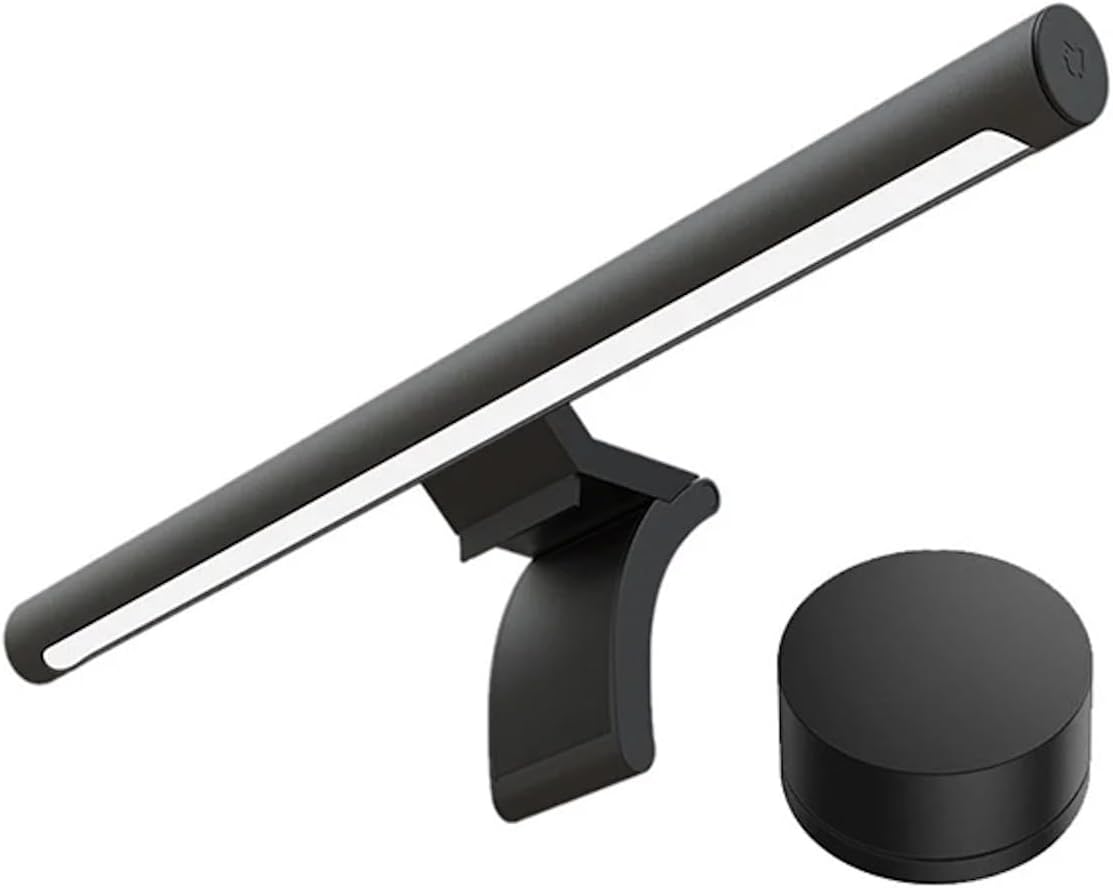
Xiaomi Mi Computer Monitor Light Bar - Easy Installation, Extra Computer Lighting w/o Taking Desktop Space, w/Wireless Remote Control Adjusting Lights Easily
Want the best price and purchase timing?
Our AI advisor analyzes real-time pricing across all channels to find you the best deal.
AI Verdict
This is a 1.37-pound aluminum monitor light bar with Ra95 color rendering and 2700K-6500K adjustable temperature, ideal for reducing desk clutter and eye strain.
This light bar is a strong fit for most office_ergonomic setups due to its space-saving design and adjustable flicker-free lighting with Ra95 color rendering, directly addressing common issues like eye strain and desk clutter. The wireless remote control enhances usability, allowing for easy adjustments of color temperature and brightness without reaching for the bar itself.
If you have a monitor larger than 27 inches or a very thick/curved display, look for light bars with longer lengths or more adaptable clamping mechanisms.
Regret Score™
Low RiskLower is better — measures purchase-regret risk from real buyer complaints, review credibility, and product maturity
Issues discovered after purchase
Critically weak dimension
Amazon rating vs actual quality
Chance this product isn't for you
Pros
- The magnetic attachment system allows for easy installation and angle adjustments without awkward snapping.
- It frees up desktop space by mounting on top of the monitor.
- The 2.4GHz wireless remote control offers smooth, fine-grain adjustments for brightness and color temperature.
- It features a Ra95 color rendering index and flicker-free lighting to reduce eye fatigue during extended use.
- The light bar is powered via USB Type-C, connecting to a computer, monitor, or USB power adapter.
- The asymmetric polished design directs light onto the desk without creating screen reflection or glare.
Cons
- The clamp mechanism may not fit securely on monitors that are very thick or curved, potentially pressing too hard on the screen or not holding tight.
- Some users report intermittent connection issues between the light bar and its magnetic handle, causing the light to blink.
- The wireless remote requires two AAA batteries, which are not included in the box.
- The light bar is 45 cm long and may not adequately cover screens larger than 27 inches.
- The stand can block a monitor's brightness sensor if not positioned carefully.
Dimension Scores
The Ra95 color rendering index and flicker-free output, combined with asymmetric lighting, are specifically designed to reduce eye fatigue during long-term use.
The light bar offers adjustable color temperature from 2700K to 6500K and brightness from 50 to 200 lumens, controlled by a 2.4GHz wireless remote.
It features a metal body and a weighty clamp, contributing to a premium feel, though some users report intermittent connection issues with the magnetic attachment.
The minimalist design with a metal body and matte finish is frequently praised for its sleek appearance, enhancing desk aesthetics without taking up space.
Best For
- Users with limited desk space needing task lighting for their workspace.
- Individuals seeking to reduce eye strain during long work or gaming sessions.
- Anyone wanting adjustable color temperature (2700K-6500K) and brightness (50-200 lumens) for varied lighting conditions.
- Setups where a clean, minimalist aesthetic is desired, without bulky desk lamps.
Not Recommended For
- Monitors with very thick bezels or curved screens, where the clamp might not fit properly or cause damage.
- Users who prefer RGB lighting options, as this light bar does not offer them.
- Desks with monitors larger than 27 inches, as the 45 cm length may not provide full coverage.
Watch Out For
- The magnetic connection between the light bar and its handle can be inconsistent, leading to the light blinking if the table wobbles or after angle adjustments.
- Monitors with thick bezels or curved screens might not accommodate the clamp, with some users reporting it pressing too hard or not securing properly.
- The remote control operates on two AAA batteries, which are not included, requiring an extra purchase to use the wireless functionality.
- The light bar's stand can obstruct a monitor's brightness sensor, forcing users to adjust its position or rely on other brightness controls.
- While the light bar is 45 cm long, it may not provide sufficient light coverage for monitors exceeding 27 inches in width.
Full Specifications
| ASIN | B08W2C5W59 |
| Brand | XIAOMI |
| Color | Black |
| Shape | Round |
| Style | Modern |
| Voltage | 5 Volts |
| Wattage | 5 watts |
| Language | English |
| Material | Aluminum |
| Batteries | 2 AAA batteries required. |
| Bulb Base | B15D |
| Beam Angle | 25 Degrees |
| Brightness | 500 lumen |
| Department | Universal |
| Finish Type | Matte |
| Item Weight | 1.37 pounds |
| Manufacturer | Xiaomi |
| Power Source | Corded Electric |
| Bulb Features | Bluetooth connectivity, anti-flash technology, brightness and temperature regulation, compatible with Mijia apps |
| Mounting Type | Table Mount |
| Shade Material | glass,metal |
| Color Temperature | 2700 Kelvin |
| Item model number | 30769 |
| Light Source Type | Energy Efficient |
| Specification Met | Energy Star |
| Product Dimensions | 1.02 x 1.02 x 0.67 inches |
| Number of Batteries | 2 AAA batteries required. |
| Light Output Maximum | 500 Lumens |
| Color Rendering Index | 95.0 |
| Are Batteries Included | No |
| Number of Light Sources | 1 |
| Is Discontinued By Manufacturer | No |
| Maximum Compatible Light Source Wattage | 5 Watts |
What Buyers Say
The most surprising feedback is how often users mention the light bar's ability to reduce eye strain, even for those initially skeptical about its benefits. Many appreciate the space-saving design and the convenience of the wireless remote for adjusting light settings. However, a recurring issue is the fit on thicker or curved monitors, with some users needing to modify their setup to make it work. The magnetic connection point has also been cited as a potential source of flickering.
“Dude, this light bar actually made my eyes feel way less tired after like, 8 hours staring at spreadsheets, but seriously, check your monitor thickness before you buy or you'll be rigging it with tape like I almost had to.”
Common Praise
- The magnetic attachment makes installation and angle adjustments very easy.
- It significantly reduces eye strain during extended computer use.
- The wireless remote control provides smooth and intuitive adjustments for brightness and color temperature.
- The metal body and overall build quality feel premium for the price.
- It effectively illuminates the desk without causing screen glare or reflection.
- The space-saving design frees up valuable desk space.
Common Complaints
- The clamp doesn't fit well on very thick or curved monitors, potentially damaging the screen or not holding securely.
- The magnetic connection between the light bar and its mount can be loose, causing the light to flicker or blink.
- The remote requires two AAA batteries that are not included.
- The light bar's length (45 cm) is insufficient for monitors larger than 27 inches, leading to uneven lighting.
- The stand can block a monitor's ambient light sensor.
Ownership Tips
- After a few weeks, the wireless remote's battery life seems decent, but keeping spare AAA batteries on hand is a smart move.
- The magnetic pivot for adjusting the light angle is surprisingly useful for fine-tuning the illumination, even if the initial connection can be finicky.
- If your monitor has a glossy finish, the asymmetric design really does prevent reflections, which is a game-changer for long work sessions.
- The auto-on feature when connected to a computer via USB Type-C is a small but appreciated convenience.
- The weight of the clamp feels substantial, giving confidence that it won't easily fall off, despite some fit issues on specific monitors.
Frequently Asked Questions
Does this light bar work with curved monitors?
It might not. Some users have reported that the clamp mechanism struggles with very thick or curved monitors, potentially not securing properly or pressing too hard on the screen.
What kind of batteries does the remote control use?
The wireless remote control requires two AAA batteries, which are not included in the product packaging.
How is the light bar powered?
The light bar is powered via a USB Type-C to USB-A cable, allowing you to plug it into your computer, monitor (if it has a USB-A port), or a USB wall adapter.
Can I adjust the brightness and color of the light?
Yes, the light bar offers adjustable brightness from 50 to 200 lumens and color temperature ranging from 2700K (warm) to 6500K (cool), controlled by the wireless remote.
Does it cause glare on the screen?
No, the asymmetric polished design is specifically made to direct light onto your desk without creating screen reflection or glare, aiming to reduce eye strain.
Buying Guide
When you're looking at a monitor light bar, you're essentially trying to get light onto your desk without it bouncing off your screen or shining directly into your eyes. This helps reduce strain and makes your workspace feel more comfortable. Think about how much space you have on your desk and how thick your monitor is, because that determines if it'll even fit. Also, consider if you want to easily change the light's warmth or brightness, which is where a remote comes in handy.
Asymmetric Polished Design
This isn't just fancy talk; it means the light is shaped so it only illuminates your desk, not your monitor screen. Imagine trying to read a book with a flashlight shining in your face – that's what screen glare feels like. This design avoids that, making it easier on your eyes.
Ra95 Color Rendering Index (CRI)
CRI tells you how accurately a light source shows colors. A Ra95 rating is high, meaning colors under this light will look very natural and true to life, similar to how they'd appear under natural daylight. This is important for tasks where color accuracy matters, or just for a more pleasant visual experience.
Adjustable Color Temperature (2700K-6500K)
This lets you change the 'warmth' or 'coolness' of the light. Lower Kelvin (like 2700K) is a warm, yellowish light, good for evening relaxation, while higher Kelvin (like 6500K) is a cool, bluish-white light, better for focus during the day. It's like having different moods for your workspace, controlled by you.
Wireless Remote Control
This is a big deal for convenience. Instead of fumbling around on top of your monitor to press buttons, you get a little dial on your desk. It's like having a dimmer switch right next to your hand for your desk light, making adjustments quick and effortless.
Alternatives
If this one doesn't fit your monitor, look for light bars with spring-loaded clamps or adjustable counterweights that accommodate a wider range of monitor thicknesses and curvatures. For larger displays, seek models with lengths exceeding 45 cm.
You Might Also Like

LYMAX Computer Monitor Light Bar with Wireless Remote, Motion Sensor, Fit for Flat/Curved Monitor, Adjustable Color Temperature with Auto-Dimming, Eye-Care USB-C Monitor Lamp, No Glare Desk Lamp
$50-$99A 15.7-ounce aluminum monitor light bar with motion sensing, auto-dimming, and stepless 2700K-6500K color temperature adjustment for flat or curved screens.

Computer Monitor Lamp, Screen Monitor Light Bar for Eye Caring, Screen Monitor Light Bar with Backlight for Eye Caring, E-Reading LED Task Lamp with Dimming Adjustment, Perfect for Reading and Study
$0-$49This BLYGACN monitor lamp offers 3 color temperatures (3000K-6500K), dimming, and a 60-minute timer, powered by USB, for monitors 15-24 inches.

Monitor Light Bar with Touch Control, RGB Desk Lamp Full Spectrum Screen Lamp, Glare-Free Low Blue Light Monitor Lamp with Memory Mode, USB Powered for Gaming, Office & Work
$0-$49A USB-powered plastic monitor light bar with touch controls, RGB modes, and glare-free illumination for basic desk setups.

RGB Monitor Light Bar, Eye-Care Dual Light Reading Screen Lamp, 9 Modes Gaming Backlight LED Computer Lamp, 3 Colors Dimmable Frontlight, 15.75'' USB Desk Lights for Home, Office
$0-$49This is a budget-focused 6.4-ounce plastic monitor light bar with dual-mode lighting and 9 RGB backlight modes, designed for users needing basic task and ambient lighting without cluttering their desk