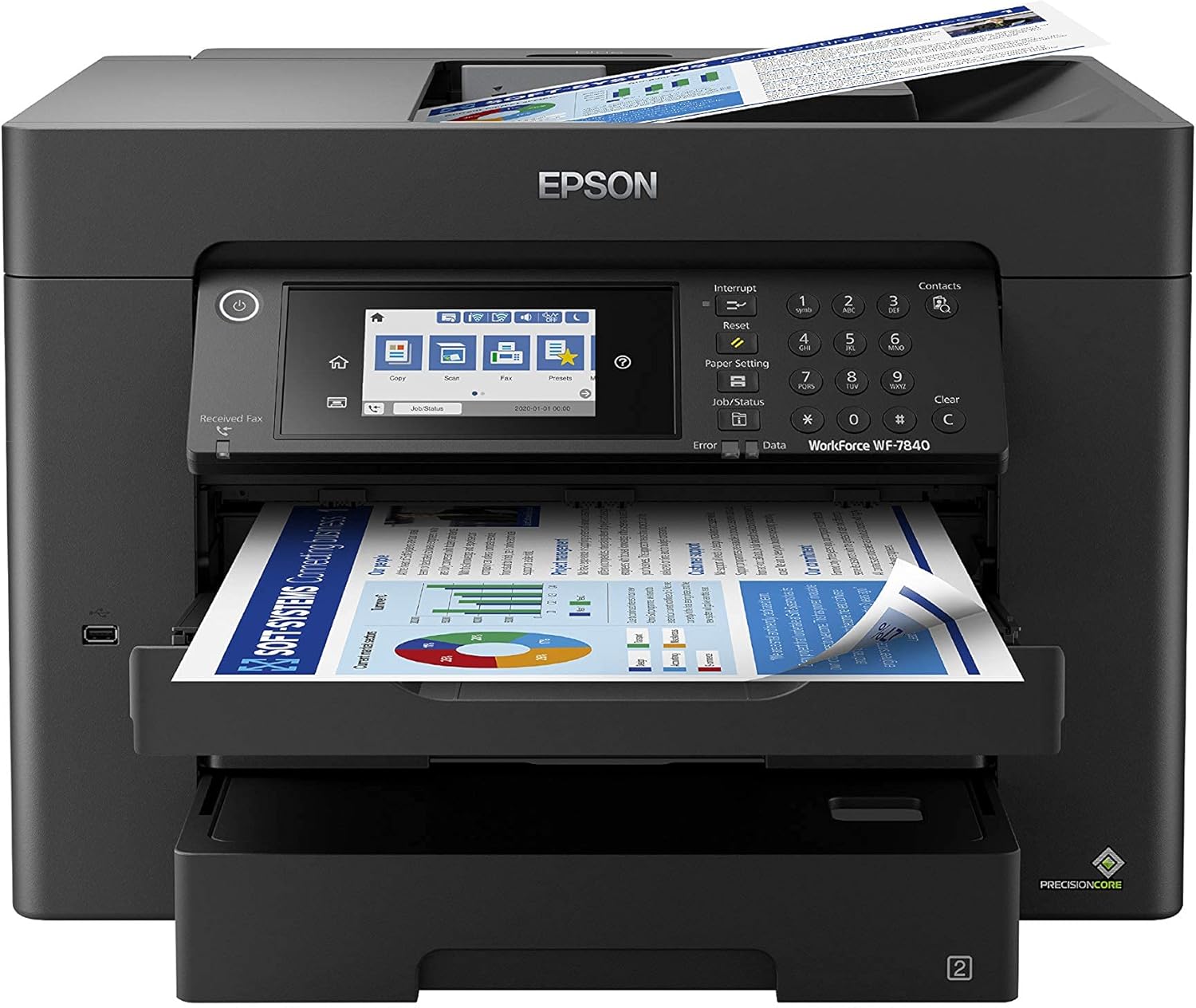
Epson Workforce Pro WF-7840 Wireless All-in-One Wide-Format Printer with Auto 2-Sided Print up to 13" x 19", Copy, Scan and Fax, 50-Page ADF, 500-sheet Paper Capacity, 4.3" Screen,Black
Want the best price and purchase timing?
Our AI advisor analyzes real-time pricing across all channels to find you the best deal.
AI Verdict
A 45.4-pound all-in-one with 500-sheet capacity and 13" x 19" wide-format printing, built for high-volume office tasks.
This printer is a situational fit for businesses that specifically require wide-format printing up to 13" x 19" and high paper capacity (500 sheets) for heavy workloads. Its 45.4-pound weight and reported ink consumption make it less suitable for casual or space-constrained users.
If wide-format printing isn't a must-have, look for a printer with lower ink costs per page and a smaller footprint.
Regret Score™
Very High RiskLower is better — measures purchase-regret risk from real buyer complaints, review credibility, and product maturity
Issues discovered after purchase
Critically weak dimension
Amazon rating vs actual quality
Chance this product isn't for you
Pros
- Prints wide-format documents up to 13" x 19".
- Features a 50-sheet Automatic Document Feeder (ADF) for duplex scanning, copying, and faxing.
- Offers a 500-sheet paper capacity across two 250-sheet trays, plus a 50-sheet rear tray.
- Delivers print speeds of 25 ISO ppm for black and 12 ISO ppm for color.
- Includes built-in wireless (802.11a/b/g/n/ac), Wi-Fi Direct, and Ethernet connectivity.
- Utilizes DURABrite Ultra pigment inks for smudge-free, water-resistant, and fade-resistant results.
Cons
- Users report high ink consumption, especially for color, making it expensive to operate.
- Some users experience persistent Wi-Fi connectivity issues.
- The printer is heavy at 45.4 pounds and takes up significant desk space.
- It may refuse to print black and white if a color ink cartridge is empty.
- Occasional scanning issues or challenges with third-party ink are reported.
Dimension Scores
This dimension is not applicable for a printer product.
This dimension is not applicable for a printer product.
While described as "high-volume reliability" by Epson, user complaints about connectivity issues and specific scanning challenges with third-party ink suggest it's average for its category.
It's a black office machine with a 4.3" color touchscreen, but its 45.4-pound weight and large footprint mean it's not designed for sleekness or to be a space-saver.
Best For
- Small businesses needing to print large spreadsheets or design proofs up to 13" x 19".
- Offices with high-volume printing needs, supported by a 500-sheet paper capacity and 50-sheet ADF.
- Users requiring automatic 2-sided printing, copying, scanning, and faxing.
- Workspaces needing flexible connectivity options including wireless, Ethernet, and mobile printing apps.
Not Recommended For
- Home users with limited desk space, given its 45.4-pound weight and large footprint.
- Budget-conscious individuals due to reported high ink costs.
- Users who frequently print only black and white but might run out of color ink, as it can halt all printing.
Watch Out For
- The printer consumes ink rapidly; one user reported half-gone color ink levels after less than 100 sheets of text with no color use.
- Wi-Fi connection is "CONSTANTLY an issue" for some users, failing to connect repeatedly.
- At 45.4 pounds, it's not a space-saver and is described as taking up "more desk real estate than an old school HP Laser Printer".
- If any color ink runs out, the printer will not allow black and white printing, forcing users to keep color refills on hand to avoid downtime.
- Some owners report occasional scanning issues or challenges when using third-party ink.
Full Specifications
| UPC | 010343924550 010343950405 010343941458 010343923775 010343922686 010343924604 010343923942 |
| ASIN | B08DXKBY6N |
| Brand | Epson |
| Color | Black |
| Duplex | Automatic |
| Wattage | 20 watts |
| Ink Color | Color |
| Model Name | Workforce Pro |
| Sheet Size | 13 x 19 inch |
| Color Depth | 48 bpp |
| Item Weight | 45.4 pounds |
| Print media | Glossy photo paper |
| Manufacturer | Epson |
| Model Series | WF-78 |
| Scanner Type | Image Scanner |
| Series Number | 7840 |
| Control Method | Voice |
| Printer Output | Color |
| Controller Type | Amazon Alexa, Vera |
| Number of Trays | 3 |
| Special Feature | Network-Ready, Touch Screen |
| Printer Ink Type | DURABrite Ultra pigment ink |
| Item model number | WF-7840 |
| Power Consumption | 0.01 Watts |
| Compatible Devices | PC, Smartphones |
| Hardware Interface | USB |
| Maximum Media Size | 13 x 19 inch |
| Product Dimensions | 20.3"D x 38.4"W x 20.5"H |
| Dual-sided printing | Yes |
| Included Components | WorkForce Pro WF-7840 printer, quick setup guide, CD-ROM with drivers, power cord, 4x DURABrite Ultra Ink cartridges (1x Black ink cartridge and 3x color ink cartridges: 1x Cyan, 1x Magenta, 1x Yellow) |
| Printing Technology | Inkjet |
| Supported Media Sizes | 13 x 19 inches |
| Connectivity Technology | Wireless |
| Memory Storage Capacity | 128 MB |
| Max Input Sheet Capacity | 500 |
| Max Printspeed Monochrome | 25 ppm |
| Max copy resolution color | 4800 x 2400 |
| Maximum Print Speed (Color) | 12 ppm |
| Additional Printer functions | Copy |
| Max Copy Speed (Black & White) | 40 ppm |
| Maximum Color Print Resolution | 4800 x 2400 |
| Max copy resolution black-white | 4800 x 2400 |
| Global Trade Identification Number | 00010343922686, 00010343923775, 00010343924604, 00010343950405 |
| Maximum Black and White Print Resolution | 4800 x 2400 |
What Buyers Say
The most surprising finding from user reviews is the recurring complaint about high ink consumption, with one user noting half-empty color cartridges after printing less than 100 text-only sheets. Many users also struggle with inconsistent Wi-Fi connectivity, describing it as "CONSTANTLY an issue". Despite these frustrations, the printer is praised for its ability to handle wide-format prints up to 13" x 19" and its overall speed for an inkjet. Its physical size and weight are frequently mentioned as drawbacks, with one owner stating it takes up "more desk real estate than an old school HP Laser Printer".
“This thing eats ink like crazy, and the Wi-Fi drops all the time, but when it actually prints those big plans, it's a lifesaver. Just wish it wasn't such a pain to keep running.”
Common Praise
- Produces wide-format prints up to 13" x 19".
- Fast print speeds, with 25 ISO ppm for black and 12 ISO ppm for color.
- Automatic 2-sided printing, copying, scanning, and faxing functions well.
- DURABrite Ultra inks deliver smudge-free, water-resistant, and fade-resistant results.
- Large 500-sheet paper capacity across two trays plus a rear tray is convenient for high volume.
Common Complaints
- High ink consumption, leading to frequent and costly cartridge replacements.
- Persistent and unreliable Wi-Fi connectivity issues.
- Printer stops all functions, including black and white, if a color ink cartridge is empty.
- Large physical size and heavy weight (45.4 pounds) make it unsuitable for small spaces.
- Occasional scanning problems or challenges when using non-Epson ink.
Ownership Tips
- Keeping spare color ink cartridges is essential, even if you only print black and white, to avoid printing shutdowns.
- Expect to troubleshoot Wi-Fi connections periodically, as it's a common point of failure for many users.
- The 4.3" color touchscreen makes navigation straightforward without needing a computer for basic tasks.
- The duplex ADF handles both sides of documents efficiently for scanning and copying.
- It's surprisingly quiet for a printer of its size during operation.
Frequently Asked Questions
Can this printer handle large paper sizes?
Yes, it can print wide-format documents up to 13" x 19". It also supports borderless printing up to 11" x 17".
Does it print on both sides automatically?
Yes, the WF-7840 offers automatic 2-sided printing, copying, scanning, and faxing.
What is the paper capacity?
It has a total paper capacity of 500 sheets, split between two 250-sheet trays, plus an additional 50-sheet rear tray for specialized media.
What kind of ink does it use?
It uses DURABrite Ultra instant-dry pigment inks, which are designed to be smudge-free, water-resistant, and fade-resistant.
Is it difficult to connect wirelessly?
While it has built-in wireless connectivity (802.11a/b/g/n/ac) and Wi-Fi Direct, some users have reported persistent issues with maintaining a stable Wi-Fi connection.
Can I print black and white if a color cartridge is empty?
No, users have reported that the printer will not allow black and white printing if any color ink cartridge runs out.
Buying Guide
When looking at a wide-format all-in-one like this, you need to think about more than just the initial price. Consider the ongoing cost of ink, especially since users report high consumption and the printer might refuse to print if any color cartridge is empty. Also, measure your desk space; at 45.4 pounds, this isn't a compact machine.
Wide-format printing up to 13" x 19"
500-sheet paper capacity
PrecisionCore Heat-Free Technology
DURABrite Ultra inks
Alternatives
If wide-format printing isn't a priority, search for printers with lower ink costs per page and a smaller physical footprint, or consider models with ink tank systems for reduced running expenses.
You Might Also Like

LYMAX Computer Monitor Light Bar with Wireless Remote, Motion Sensor, Fit for Flat/Curved Monitor, Adjustable Color Temperature with Auto-Dimming, Eye-Care USB-C Monitor Lamp, No Glare Desk Lamp
$50-$99A 15.7-ounce aluminum monitor light bar with motion sensing, auto-dimming, and stepless 2700K-6500K color temperature adjustment for flat or curved screens.

Computer Monitor Lamp, Screen Monitor Light Bar for Eye Caring, Screen Monitor Light Bar with Backlight for Eye Caring, E-Reading LED Task Lamp with Dimming Adjustment, Perfect for Reading and Study
$0-$49This BLYGACN monitor lamp offers 3 color temperatures (3000K-6500K), dimming, and a 60-minute timer, powered by USB, for monitors 15-24 inches.

Monitor Light Bar with Touch Control, RGB Desk Lamp Full Spectrum Screen Lamp, Glare-Free Low Blue Light Monitor Lamp with Memory Mode, USB Powered for Gaming, Office & Work
$0-$49A USB-powered plastic monitor light bar with touch controls, RGB modes, and glare-free illumination for basic desk setups.

RGB Monitor Light Bar, Eye-Care Dual Light Reading Screen Lamp, 9 Modes Gaming Backlight LED Computer Lamp, 3 Colors Dimmable Frontlight, 15.75'' USB Desk Lights for Home, Office
$0-$49This is a budget-focused 6.4-ounce plastic monitor light bar with dual-mode lighting and 9 RGB backlight modes, designed for users needing basic task and ambient lighting without cluttering their desk