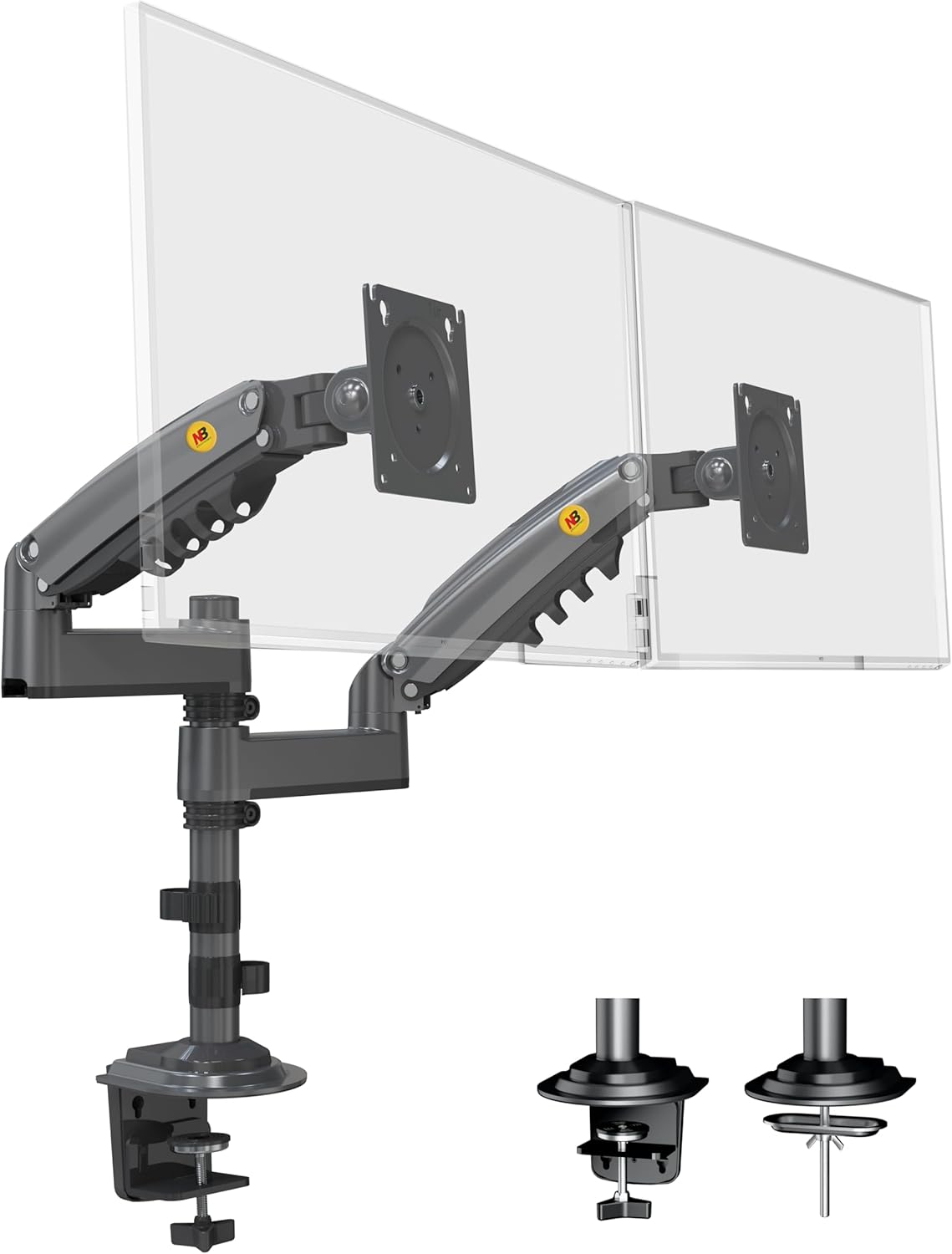
NB North Bayou Dual Monitor Desk Mount Stand Full Motion Swivel Computer Monitor Arm Fits 2 Screens up to 27'' with Load Capacity 4.4~19.8lbs for Each Monitor H180-G
Want the best price and purchase timing?
Our AI advisor analyzes real-time pricing across all channels to find you the best deal.
AI Verdict
This is a dual gas-strut monitor arm for two 17-27 inch displays, each weighing 4.4-19.8lbs, offering extensive adjustability for ergonomic setups.
This monitor arm is a strong fit for most dual-monitor office setups, supporting two 17-27 inch displays each weighing up to 19.8 pounds with extensive gas-strut adjustability. Its dual mounting options for desks between 0.8 and 3.5 inches thick cover a wide range of common desk types.
If you need to mount larger monitors (e.g., 32 inches) or heavier displays, look for arms with higher stated weight capacities and larger screen size compatibility.
Regret Score™
Low RiskLower is better — measures purchase-regret risk from real buyer complaints, review credibility, and product maturity
Issues discovered after purchase
Critically weak dimension
Amazon rating vs actual quality
Chance this product isn't for you
Pros
- Supports two monitors from 17 to 27 inches, each weighing 4.4 to 19.8 pounds.
- Features a gas-strut mechanism allowing +85° to -30° tilt, 360° rotation, and +90° to -90° swivel for each monitor.
- Provides 10.2 inches (260mm) of upright lift and a maximum extension of 22.1 inches (560mm) for flexible positioning.
- Includes integrated cable management to conceal wires, contributing to a cleaner workspace.
- Offers two installation options: clamp for desks 1 to 3.1 inches thick, or grommet for desks 0.8 to 3.5 inches thick.
Cons
- Requires careful gas spring tension adjustment to prevent monitors from sagging, especially if the weight is at the lower or higher end of the capacity.
- Lacks quick-release VESA brackets, making monitor attachment and detachment less convenient.
- May introduce some monitor wobble or bounce, a common characteristic of budget gas spring arms.
- Needs at least six inches of clearance from a wall for the arms to swing freely and achieve full motion.
- Optimal kinematics for monitor placement can be challenging with significantly mismatched monitor sizes.
Dimension Scores
The gas-strut mechanism allows for 10.2 inches of vertical lift and extensive tilt/swivel adjustments, directly addressing ergonomic comfort by reducing eye, neck, and back strain.
With +85° to -30° tilt, 360° rotation, +90° to -90° swivel, 10.2 inches of vertical lift, and 22.1 inches of extension, it offers a wide range of motion for optimal screen positioning.
Constructed from aluminum and featuring a gas-strut mechanism, it supports monitors up to 19.8lbs each, though some users report potential wobble common with budget gas spring arms.
The integrated cable management system helps maintain a clean and uncluttered appearance, contributing to a streamlined desk setup.
Best For
- Users needing to mount two 17-27 inch monitors with VESA 75x75mm or 100x100mm patterns.
- Creating an ergonomic dual-monitor setup on desks between 0.8 and 3.5 inches thick.
- Freeing up desk space by elevating two displays that each weigh between 4.4 and 19.8 pounds.
- Workspaces requiring frequent adjustment of monitor height, tilt, swivel, and rotation.
Not Recommended For
- Monitors exceeding 27 inches or weighing outside the 4.4-19.8lb per arm range.
- Desks thinner than 0.8 inches or thicker than 3.5 inches, as mounting options won't fit.
- Users who need a completely rigid, wobble-free monitor setup for precision tasks.
Watch Out For
- The gas spring tension needs to be manually adjusted with an Allen key; if not set correctly for your monitor's weight, the monitor might sag or not stay in position.
- Installation for the clamp or grommet mount requires access under the desk to tighten, which can be awkward.
- The VESA mounting plates do not feature a quick-release mechanism, meaning monitors must be screwed directly onto the arms.
- Achieving optimal monitor alignment and spacing can be difficult if your two monitors have different screen sizes or aspect ratios.
- The arm's full range of motion requires at least 6 inches of clear space behind the desk, limiting placement against a wall.
Full Specifications
| ASIN | B08CXQDS8M |
| Brand | NB North Bayou |
| Color | Grey Black |
| Material | Aluminum |
| Brand Name | NB North Bayou |
| Color Name | Grey Black |
| Item Weight | 6.6 pounds |
| Manufacturer | KUNSHAN HONGJIE ELECTRONICS CO., LTD |
| Mounting Type | Tabletop Mount |
| Movement Type | Tilt |
| Item model number | H180 |
| Compatible Devices | Monitor |
| Maximum Tilt Angle | 85 Degrees |
| Product Dimensions | 34.65 x 4.72 x 25.2 inches |
What Buyers Say
Users frequently highlight how much desk space this arm frees up, making their workspace feel much larger. The gas spring adjustment is a common point of discussion; while it allows for fluid movement once dialed in, getting the tension just right for your specific monitor weight can be a bit fiddly. Many appreciate the flexibility to position monitors exactly where needed, reducing strain during long work sessions. However, some note that the lack of quick-release VESA plates makes swapping monitors a minor hassle.
“Honestly, this thing is a game-changer for my tiny desk, but man, getting those gas springs to hold my monitors perfectly took like three tries and a lot of Allen wrenching. Still, totally worth it for the space!”
Common Praise
- Frees up a significant amount of desk surface area.
- Allows for precise positioning of monitors to reduce neck and eye strain.
- Supports a wide range of monitor sizes and weights within its specified limits.
- Installation is straightforward with clear instructions and included hardware.
- Integrated cable management effectively hides wires for a cleaner look.
Common Complaints
- Gas spring tension requires careful adjustment to prevent monitors from slowly drooping.
- No quick-release VESA plates, which means screwing monitors on and off for removal.
- Can exhibit some minor wobble, especially when typing vigorously or adjusting the desk.
- Requires a minimum of 6 inches of clearance behind the desk for full arm articulation.
- The clamp or grommet installation process can be awkward, requiring access underneath the desk.
Ownership Tips
- The gas springs might need re-tensioning after a few months as they settle, especially if you frequently adjust monitor positions.
- The plastic covers for cable management can be a bit stiff to open and close initially.
- Dust can accumulate in the arm joints, requiring occasional cleaning to maintain smooth movement.
- If your desk is against a wall, the full range of motion, particularly the arm extension and swivel, will be limited.
- The base clamp feels secure, but checking its tightness periodically is a good idea to prevent any shifting.
Frequently Asked Questions
What size monitors can this arm hold?
It's designed for two monitors between 17 and 27 inches, with each monitor weighing between 4.4 and 19.8 pounds (2-9KG).
Will this work with my desk?
It includes both clamp and grommet mounting options. The clamp fits desks from 1 to 3.1 inches thick, and the grommet mount works with desks from 0.8 to 3.5 inches thick.
How much can the monitors be adjusted?
Each monitor can tilt +85° to -30°, swivel +90° to -90°, and rotate 360° for landscape or portrait orientation. The arms also provide 10.2 inches (260mm) of vertical lift.
Does it have cable management?
Yes, it has integrated cable management channels to route and conceal your monitor cables for a tidier setup.
Is installation difficult?
Installation is generally straightforward with a step-by-step manual and all necessary hardware included. However, adjusting the gas spring tension for your monitor's weight can take some trial and error.
Buying Guide
When you're looking at a monitor arm, you need to think about your monitors first. Check their size and weight, because if they're too big or too heavy for the arm, it just won't work. Also, make sure your monitors have VESA mounting holes (usually 75x75mm or 100x100mm squares on the back) because that's how they attach. Finally, measure your desk thickness and consider how much space you have behind it, as these arms need room to move.
Monitor Size & Weight Capacity
This tells you if your monitors will physically fit and if the arm can actually hold them up. Think of it like a shelf: if your books are too big or too heavy, the shelf will collapse. For this arm, each monitor needs to be between 17-27 inches and weigh 4.4-19.8lbs.
VESA Compatibility
VESA is a standard mounting pattern on the back of most monitors. It's like a universal plug for monitor arms. If your monitor doesn't have 75x75mm or 100x100mm VESA holes, it won't attach to this arm without an adapter.
Desk Thickness & Mounting Type
This determines if the arm can actually attach to your desk. The clamp needs a certain thickness, and the grommet mount needs a hole and a specific thickness. If your desk is too thin, too thick, or lacks a hole, you're out of luck.
Adjustability (Tilt, Swivel, Rotation, Lift)
These numbers tell you how much you can move your monitors around. More adjustability means you can fine-tune your screen position to avoid neck pain and glare, making your workspace much more comfortable for long hours.
Alternatives
If this arm doesn't fit, look for models with higher weight capacities for larger monitors, or consider single arm mounts if you need more independent placement and your desk is against a wall.
You Might Also Like

LYMAX Computer Monitor Light Bar with Wireless Remote, Motion Sensor, Fit for Flat/Curved Monitor, Adjustable Color Temperature with Auto-Dimming, Eye-Care USB-C Monitor Lamp, No Glare Desk Lamp
$50-$99A 15.7-ounce aluminum monitor light bar with motion sensing, auto-dimming, and stepless 2700K-6500K color temperature adjustment for flat or curved screens.

Computer Monitor Lamp, Screen Monitor Light Bar for Eye Caring, Screen Monitor Light Bar with Backlight for Eye Caring, E-Reading LED Task Lamp with Dimming Adjustment, Perfect for Reading and Study
$0-$49This BLYGACN monitor lamp offers 3 color temperatures (3000K-6500K), dimming, and a 60-minute timer, powered by USB, for monitors 15-24 inches.

Monitor Light Bar with Touch Control, RGB Desk Lamp Full Spectrum Screen Lamp, Glare-Free Low Blue Light Monitor Lamp with Memory Mode, USB Powered for Gaming, Office & Work
$0-$49A USB-powered plastic monitor light bar with touch controls, RGB modes, and glare-free illumination for basic desk setups.

RGB Monitor Light Bar, Eye-Care Dual Light Reading Screen Lamp, 9 Modes Gaming Backlight LED Computer Lamp, 3 Colors Dimmable Frontlight, 15.75'' USB Desk Lights for Home, Office
$0-$49This is a budget-focused 6.4-ounce plastic monitor light bar with dual-mode lighting and 9 RGB backlight modes, designed for users needing basic task and ambient lighting without cluttering their desk