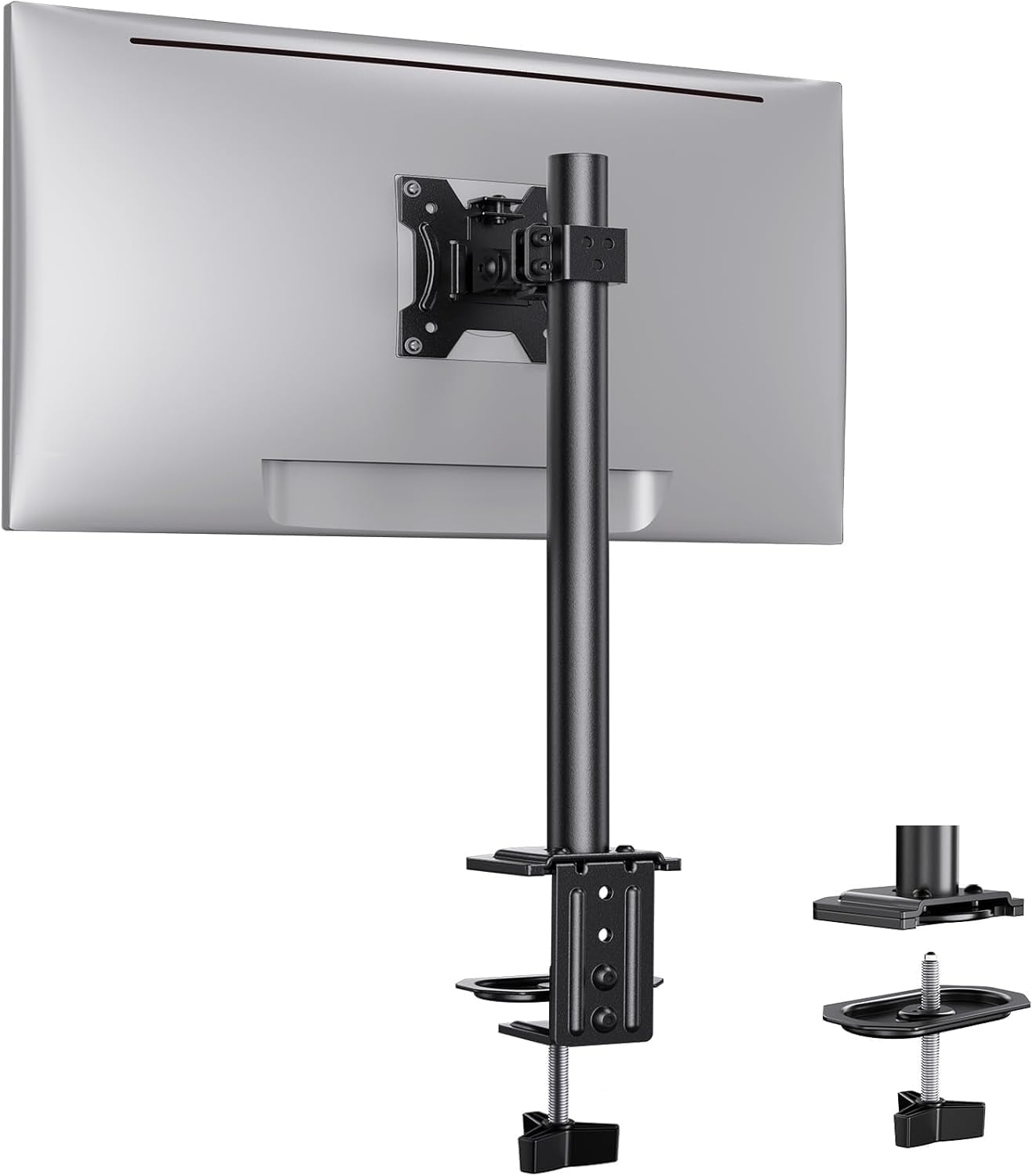
Ergear Monitor Mount for Most 13-32" Computer Screens up to 17.6lbs, Improved LCD LED Monitor Riser, Adjustable Height and Angle, Single Gaming Desk Mount Stand, Black, EGCM12
Want the best price and purchase timing?
Our AI advisor analyzes real-time pricing across all channels to find you the best deal.
AI Verdict
This ErGear EGCM12 is a single pole-mounted arm for 13-32 inch screens up to 17.6 lbs, offering 360° rotation and ±45° tilt for basic ergonomic adjustments.
This monitor mount is a situational fit because it provides essential ergonomic adjustments like height, tilt, and swivel for monitors up to 17.6 lbs, but its pole-mount design limits fluid height changes and horizontal reach. It's a budget option that works well for specific needs, like freeing up desk space for a single, moderately sized monitor.
If you need more dynamic and effortless adjustments, especially for height and horizontal extension, look for a monitor arm with a gas spring mechanism.
Regret Score™
Medium RiskLower is better — measures purchase-regret risk from real buyer complaints, review credibility, and product maturity
Issues discovered after purchase
Critically weak dimension
Amazon rating vs actual quality
Chance this product isn't for you
Pros
- Supports monitors from 13 to 32 inches, accommodating a wide range of screen sizes.
- Handles monitors weighing up to 17.6 lbs, suitable for many standard displays.
- Offers full 360° monitor rotation, ±45° tilt, and ±90° swivel for flexible viewing angles.
- Includes an integrated cable management system with detachable clips for a tidier desk.
- Installation is straightforward with both C-clamp and grommet mounting options.
- The 15.75” steel support pole provides multiple height settings for eye-level comfort.
Cons
- The pole-mount design means less fluid, on-the-fly height adjustments compared to gas spring arms.
- Horizontal reach is limited by the fixed pole and arm length, not extending far from the mounting point.
- Requires a desk thickness between 0.39" and 3.54" for secure C-clamp or grommet installation.
- Monitors heavier than 17.6 lbs are not compatible, restricting use with some larger or older displays.
- Adjustments for tilt and swivel require manual tightening, not a free-moving mechanism.
Dimension Scores
The mount raises the screen to an ergonomic height and supports monitors up to 17.6 lbs, but the pole design means height adjustments aren't as fluid as gas spring arms.
It offers 360° rotation, ±45° tilt, and ±90° swivel, providing a wide range of viewing angle adjustments, though height changes are manual along a fixed pole.
Constructed from alloy steel, it feels sturdy enough for its 17.6 lbs weight capacity, aligning with expectations for its budget price band.
The black finish and integrated cable management contribute to a clean look, but the visible pole and clamp are standard for this budget category.
Best For
- Single monitor setups where desk space is limited.
- Users needing basic height, tilt, and swivel adjustments for a 13-32 inch monitor.
- Budget-conscious buyers looking for an affordable monitor mounting solution.
- Desks with a thickness between 0.39" and 3.54" that can accommodate C-clamp or grommet mounts.
Not Recommended For
- Monitors exceeding 17.6 lbs or outside the 13-32 inch size range.
- Users who require frequent, fluid, and effortless height adjustments throughout the day.
- Desks with irregular undersides or thicknesses outside the 0.39"-3.54" range.
- Setups requiring extensive horizontal monitor extension or complex multi-axis positioning.
Watch Out For
- The 17.6 lbs weight limit is a hard cap; exceeding it risks instability and potential damage.
- Desk thickness must be between 0.39" and 3.54"; thinner or thicker desks won't allow secure mounting.
- The 15.75” steel pole offers fixed height increments, not the continuous, effortless vertical movement of a gas spring arm.
- Horizontal extension is restricted by the arm's design, meaning the monitor won't pull far forward from the pole.
- Monitors without 75x75mm or 100x100mm VESA mounting holes are incompatible.
Full Specifications
| UPC | 769135856141 |
| ASIN | B0859J9FYY |
| Brand | ErGear |
| Color | Black |
| Material | Alloy Steel |
| Brand Name | ErGear |
| Color Name | Black |
| Item Weight | 3.63 pounds |
| Manufacturer | ErGear |
| Mounting Type | Tabletop Mount |
| Movement Type | Tilt |
| Item model number | EGCM12 |
| Compatible Devices | Monitor |
| Maximum Tilt Angle | 45 Degrees |
| Package Dimensions | 17.04 x 5.71 x 3.43 inches |
| Is Discontinued By Manufacturer | No |
What Buyers Say
Users frequently praise this ErGear mount for its straightforward installation process, often noting it takes less than an hour to set up. The ability to free up desk space and achieve a more comfortable viewing height is a recurring positive. While the adjustability for tilt, swivel, and rotation is appreciated, some users imply that the pole-mount design means height adjustments aren't as effortless as more expensive gas spring arms. The included cable management system is a small but welcome addition for keeping workspaces tidy.
“Needed something cheap to get my monitor off the desk, and this thing actually works! Took like 15 mins to put together, now my screen is finally at eye level. Just wish it could pull forward a bit more.”
Common Praise
- Easy and quick installation with clear instructions.
- Frees up significant desk space by elevating the monitor.
- Provides a comfortable and ergonomic viewing height.
- Allows for 360° rotation, ±45° tilt, and ±90° swivel for optimal positioning.
- Cable management clips keep wires organized and out of sight.
Common Complaints
- Height adjustment requires loosening and tightening a collar on the pole, not a fluid motion.
- Horizontal reach is limited, keeping the monitor relatively close to the mounting point.
- The mount might introduce some wobble if the desk isn't perfectly stable or the clamp isn't fully tightened.
- Not suitable for monitors heavier than 17.6 lbs, which can be a limitation for some users.
- The C-clamp or grommet mount requires specific desk thickness, which might not fit all setups.
Ownership Tips
- The monitor stays put once adjusted, but changing height means a bit of a wrestle with the collar.
- The cable clips are a lifesaver for keeping the power and display cables from dangling everywhere.
- If your desk isn't super sturdy, you might notice a slight bounce when typing aggressively.
- The black finish doesn't show fingerprints easily, which is a small win.
- The C-clamp feels really secure, but make sure your desk edge is flat for it to grip properly.
Frequently Asked Questions
What monitor sizes and weights does this mount support?
It supports computer screens from 13 to 32 inches and monitors weighing up to 17.6 lbs, provided they have 75x75mm or 100x100mm VESA mounting holes.
Can I install this mount on any desk?
You can install it on wooden desks with a thickness between 0.39" and 3.54" using either the C-clamp or grommet method. Ensure the underside of your desk is clear of obstructions.
How much adjustment does this monitor arm offer?
It features 360° monitor rotation, ±45° tilt, and ±90° swivel. The 15.75” steel support pole allows for various height options.
Does this mount help with cable management?
Yes, it has an integrated cable management system with detachable clips along the center pole to keep your power and AV cables organized.
Is installation difficult?
No, installation is generally considered easy and can be done with either a C-clamp or grommet hole option, with clear instructions provided.
Buying Guide
When you're looking at monitor mounts, you're basically trying to get your screen off your desk and into a better position for your neck and eyes. You need to check three main things: if your monitor has the right mounting holes (VESA), if it's light enough for the arm, and if your desk can actually hold the mount securely. Don't just guess; measure your monitor and desk.
VESA Compatibility (75x75mm or 100x100mm)
Screen Weight Limit (17.6 lbs)
Desk Thickness (0.39"-3.54")
Alternatives
If this mount doesn't offer enough flexibility, look for arms with a gas spring mechanism for effortless height adjustment and a longer articulating arm for greater horizontal reach.
You Might Also Like

LYMAX Computer Monitor Light Bar with Wireless Remote, Motion Sensor, Fit for Flat/Curved Monitor, Adjustable Color Temperature with Auto-Dimming, Eye-Care USB-C Monitor Lamp, No Glare Desk Lamp
$50-$99A 15.7-ounce aluminum monitor light bar with motion sensing, auto-dimming, and stepless 2700K-6500K color temperature adjustment for flat or curved screens.

Computer Monitor Lamp, Screen Monitor Light Bar for Eye Caring, Screen Monitor Light Bar with Backlight for Eye Caring, E-Reading LED Task Lamp with Dimming Adjustment, Perfect for Reading and Study
$0-$49This BLYGACN monitor lamp offers 3 color temperatures (3000K-6500K), dimming, and a 60-minute timer, powered by USB, for monitors 15-24 inches.

Monitor Light Bar with Touch Control, RGB Desk Lamp Full Spectrum Screen Lamp, Glare-Free Low Blue Light Monitor Lamp with Memory Mode, USB Powered for Gaming, Office & Work
$0-$49A USB-powered plastic monitor light bar with touch controls, RGB modes, and glare-free illumination for basic desk setups.

RGB Monitor Light Bar, Eye-Care Dual Light Reading Screen Lamp, 9 Modes Gaming Backlight LED Computer Lamp, 3 Colors Dimmable Frontlight, 15.75'' USB Desk Lights for Home, Office
$0-$49This is a budget-focused 6.4-ounce plastic monitor light bar with dual-mode lighting and 9 RGB backlight modes, designed for users needing basic task and ambient lighting without cluttering their desk