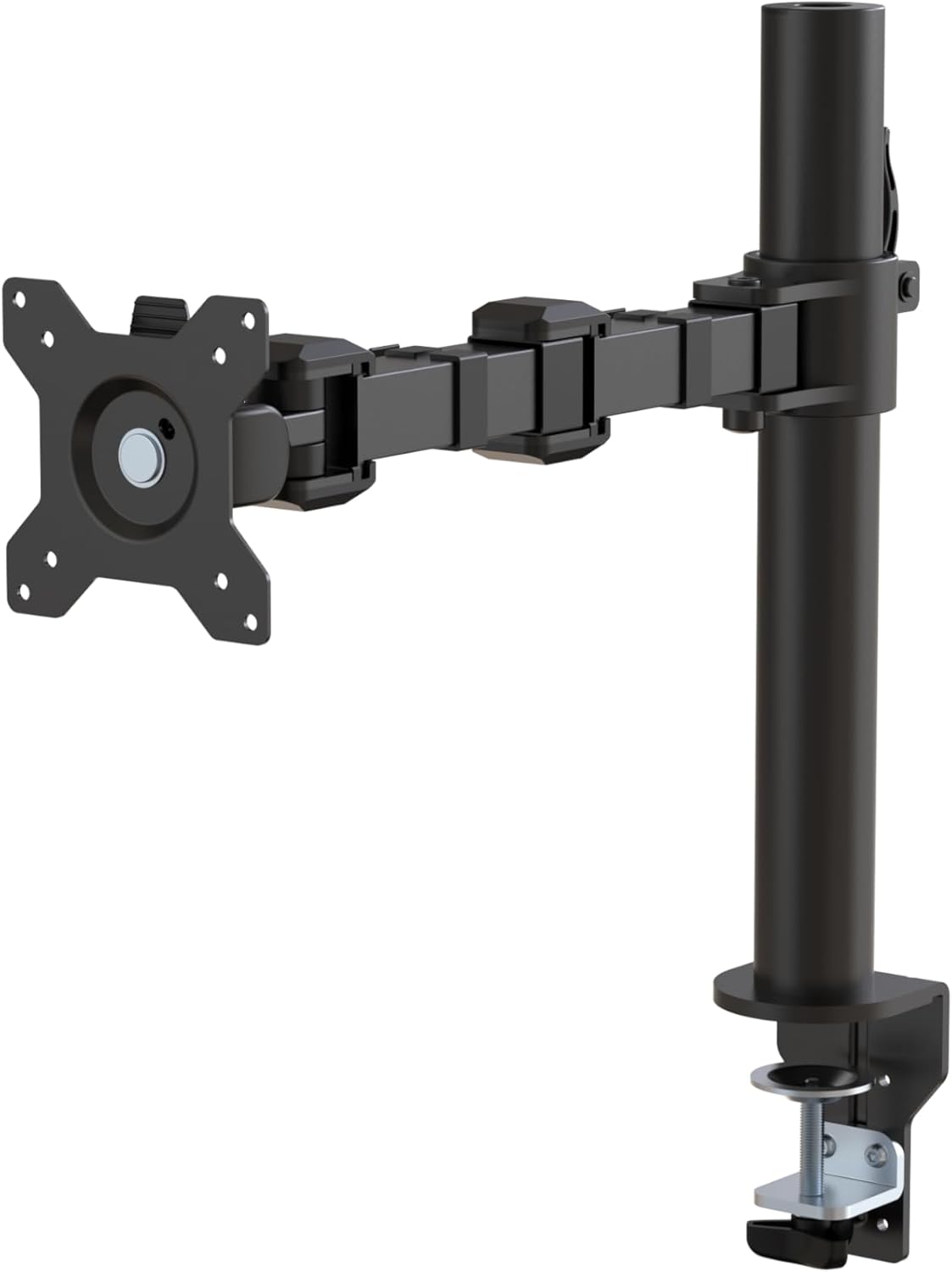
Amazon Basics Single Computer Monitor Stand with Tilt and Rotation, Height Adjustable VESA Desk Arm Mount, Steel, 30 inches, Black
Want the best price and purchase timing?
Our AI advisor analyzes real-time pricing across all channels to find you the best deal.
AI Verdict
This steel, desk-mounted single monitor arm supports 13-30 inch screens up to 22 pounds, offering 360-degree rotation and -15 to +85 degree tilt.
This stand offers significant adjustability with 360-degree rotation, -15 to +85 degree tilt, and height adjustment from 7.9 to 14.2 inches, making it a strong upgrade from basic monitor stands. Its alloy steel construction supports monitors up to 22 pounds and 30 inches, but initial setup requires careful tension adjustment to prevent drooping.
If you need easier tension adjustment or support for monitors over 22 pounds, look for arms with clearer tension indicators or higher weight capacities.
Regret Score™
Low RiskLower is better — measures purchase-regret risk from real buyer complaints, review credibility, and product maturity
Issues discovered after purchase
Critically weak dimension
Amazon rating vs actual quality
Chance this product isn't for you
Pros
- Constructed from durable alloy steel, providing a robust feel.
- Supports monitors up to 30 inches and 22 pounds.
- Offers 360-degree rotation for seamless switching between landscape and portrait modes.
- Features adjustable screen tilt from -15 to +85 degrees for varied viewing angles.
- Includes a cable-management system to organize cords.
- Easy setup with a detachable VESA plate (100x100mm and 75x75mm) simplifies monitor attachment.
Cons
- Initial tension adjustment instructions are unclear, often requiring external resources like YouTube videos to prevent monitor drooping.
- The arm may slowly drop if not properly tightened for heavier monitors.
- Cable management channels might not accommodate unusually thick HDMI or DisplayPort cables.
- The desk clamp officially supports desks 0.8 to 3.9 inches thick, potentially limiting compatibility for thicker surfaces without modification.
- The VESA plate uses a set screw method, which is less convenient than a quick-release system for frequent monitor changes.
Dimension Scores
The arm's full range of motion, including height, tilt, and rotation, significantly improves ergonomic comfort compared to a fixed stand.
It provides 360-degree rotation, -15 to +85 degree tilt, and height adjustment from 7.9 to 14.2 inches, offering substantial flexibility for monitor positioning.
Constructed from alloy steel, users consistently report it feels heavy, solid, and durable, often comparing it to much more expensive arms.
Its black finish and clean lines offer a minimalist look that blends into most workspaces, though some users note exposed bolts.
Best For
- Users needing to free up desk space currently occupied by a monitor's original stand.
- Setting up a single monitor for ergonomic viewing with comprehensive height, tilt, and rotation adjustments.
- Desks between 0.8 and 3.9 inches thick that can accommodate a clamp mount.
- Monitors up to 30 inches and 22 pounds requiring stable positioning.
Not Recommended For
- Users with monitors exceeding 22 pounds, as the arm's capacity is 22 pounds.
- Desks with complex metal frames or skirts that interfere with the clamp, potentially requiring drilling for installation.
- Individuals who need to frequently and effortlessly reposition a monitor without re-adjusting tension.
Watch Out For
- The included instructions do not clearly explain how to tighten the arm's springs and joints, leading to user frustration and monitors slowly dropping until external guides are consulted.
- While the clamp officially supports desks up to 3.9 inches thick, some users found they could extend this to 3.75 inches by flipping an L bracket, indicating a potential limitation for very thick desks.
- The cable management system, while present, may struggle to conceal unusually thick HDMI or DisplayPort cables.
- The monitor plate attaches with screws rather than a quick-release mechanism, making monitor installation or removal less convenient than some competitors.
Full Specifications
| UPC | 855427008715 |
| ASIN | B07DHK5DHN |
| Brand | Amazon Basics |
| Color | Black |
| Material | Alloy Steel |
| Item Weight | 5.59 pounds |
| Manufacturer | Amazon |
| Mounting Type | Tabletop Mount |
| Movement Type | Tilt |
| Item model number | DLB111-US290 |
| Compatible Devices | Monitor |
| Maximum Tilt Angle | 15 Degrees |
| Product Dimensions | 20 x 18.13 x 4.5 inches |
| Global Trade Identification Number | 00855427008715 |
What Buyers Say
A recurring theme in user feedback is the initial confusion around adjusting the arm's tension, with many needing to consult YouTube videos to prevent their monitors from drooping, despite the product's otherwise straightforward assembly. Once properly tightened, users frequently praise its robust, all-metal construction and smooth movement, often noting its surprising quality for the price point and comparing it to premium brands like Ergotron. The cable management system is present, but some find it restrictive for thicker cables.
“Seriously, this thing is built like a tank, but the instructions for tightening it are a joke; my monitor kept drooping until I watched some random YouTube video, now it's solid.”
Common Praise
- "It's a high-quality monitor arm, offers tons of adjustability, and it's designed and built for office use, so I'm fairly confident it will last forever."
- "Every piece is metal and is really nice to adjust, whereas the Vevo one I had before was plastic in the worst places and such a bitch to get setup/adjust."
- "I have this in black and it's been great, holding my 34 inch ultrawide steady with no issues."
- "The arm extends and retracts, tilt to change reading angles, and rotate from landscape-to-portrait mode and increases my desktop space plus it's easy to set up."
- "The stand comes with clear easy to follow instructions, and all the necessary tools, so you can get it set up in just a few minutes."
Common Complaints
- "What I would have really liked to know was how to tighten the springs and joints in the arm. Nowhere in the instructions does it say how to do this, at least we couldn't find it. This was probably our biggest issue/complaint. We had to go on Youtube and watched 3 videos until someone finally mentioned how to do it."
- "The arm comes loosely tightened out of the box so it slowly drops when it's all set up with the monitor."
- "My HDMI and DisplayPort cables are unreasonably thick so it doesn't work for me, and even if they did I probably wouldn't use them anyway just to prevent damage."
- "The base clamp says it only supports a certain desk thickness (0.4-2.4 inches), but you can actually extend the maximum thickness to 3.5 inches if you flip the silver L bracket upside down (opposite of this picture), and if the thickness of your desk is only a thin lip (like a hang-down fascia piece), you can push it to 3.75 inches."
- "This is actually pretty expensive for a monitor arm. Is it a rebadged ergotron or something?"
Ownership Tips
- After a few weeks, the arm maintains its position without sagging once the tension is correctly adjusted for the monitor's weight.
- The included cable management clips are functional but can be a tight squeeze for multiple or thicker cables.
- The desk clamp, while sturdy, might require creative installation for desks with unusual edge profiles or skirts.
- The VESA plate is detachable, which makes mounting the monitor easier than trying to hold it while screwing it in.
Frequently Asked Questions
What size monitors does this arm support?
It supports most screens from 13 to 30 inches and up to 22 pounds.
Can I rotate my monitor to portrait mode?
Yes, it offers 360-degree rotation, allowing for both landscape and portrait orientations.
How thick can my desk be for this mount?
It fits desks between 0.8 and 3.9 inches thick. Some users have found ways to extend this slightly to 3.75 inches.
Is it difficult to assemble?
Setup is generally easy with clear, picture-based instructions and included tools, but tightening the arm's tension for heavier monitors can be confusing without external guidance.
Does it have cable management?
Yes, it includes a cable-management system to keep cords organized and out of the way.
Is this arm comparable to more expensive brands?
Many users compare its quality and performance favorably to more expensive arms like the Ergotron LX, often noting its robust, all-metal construction.
Buying Guide
When picking a monitor arm, you need to think about your monitor's size and weight, and how thick your desk is. This arm clamps onto your desk, so make sure your desk edge is compatible and strong enough to support the weight. You'll also want to consider how much you need to move your monitor around; this one offers a lot of motion once set up, but getting that initial tension right is key.
Monitor Size and Weight Capacity (13-30 inches, up to 22 pounds)
This tells you the physical limits of the arm. If your monitor is bigger than 30 inches or heavier than 22 pounds, it won't hold it securely. Think of it like a weight limit on a shelf – exceed it, and things might fall.
Desk Thickness (0.8 to 3.9 inches)
This is crucial for the clamp. Measure your desk's edge where you plan to mount it. If your desk is too thin or too thick, the clamp won't attach properly, or it might damage your desk.
Adjustable Tilt (-15 to +85 degrees) and Rotation (360 degrees)
These numbers describe how much you can angle your screen up or down, and whether you can spin it from horizontal (landscape) to vertical (portrait) mode. A wider range means more flexibility to find your perfect viewing angle and switch orientations.
Alternatives
If your monitor is heavier than 22 pounds or you need a quick-release VESA plate for frequent monitor swaps, look for arms with higher weight capacities and more advanced mounting mechanisms.
You Might Also Like

LYMAX Computer Monitor Light Bar with Wireless Remote, Motion Sensor, Fit for Flat/Curved Monitor, Adjustable Color Temperature with Auto-Dimming, Eye-Care USB-C Monitor Lamp, No Glare Desk Lamp
$50-$99A 15.7-ounce aluminum monitor light bar with motion sensing, auto-dimming, and stepless 2700K-6500K color temperature adjustment for flat or curved screens.

Computer Monitor Lamp, Screen Monitor Light Bar for Eye Caring, Screen Monitor Light Bar with Backlight for Eye Caring, E-Reading LED Task Lamp with Dimming Adjustment, Perfect for Reading and Study
$0-$49This BLYGACN monitor lamp offers 3 color temperatures (3000K-6500K), dimming, and a 60-minute timer, powered by USB, for monitors 15-24 inches.

Monitor Light Bar with Touch Control, RGB Desk Lamp Full Spectrum Screen Lamp, Glare-Free Low Blue Light Monitor Lamp with Memory Mode, USB Powered for Gaming, Office & Work
$0-$49A USB-powered plastic monitor light bar with touch controls, RGB modes, and glare-free illumination for basic desk setups.

RGB Monitor Light Bar, Eye-Care Dual Light Reading Screen Lamp, 9 Modes Gaming Backlight LED Computer Lamp, 3 Colors Dimmable Frontlight, 15.75'' USB Desk Lights for Home, Office
$0-$49This is a budget-focused 6.4-ounce plastic monitor light bar with dual-mode lighting and 9 RGB backlight modes, designed for users needing basic task and ambient lighting without cluttering their desk