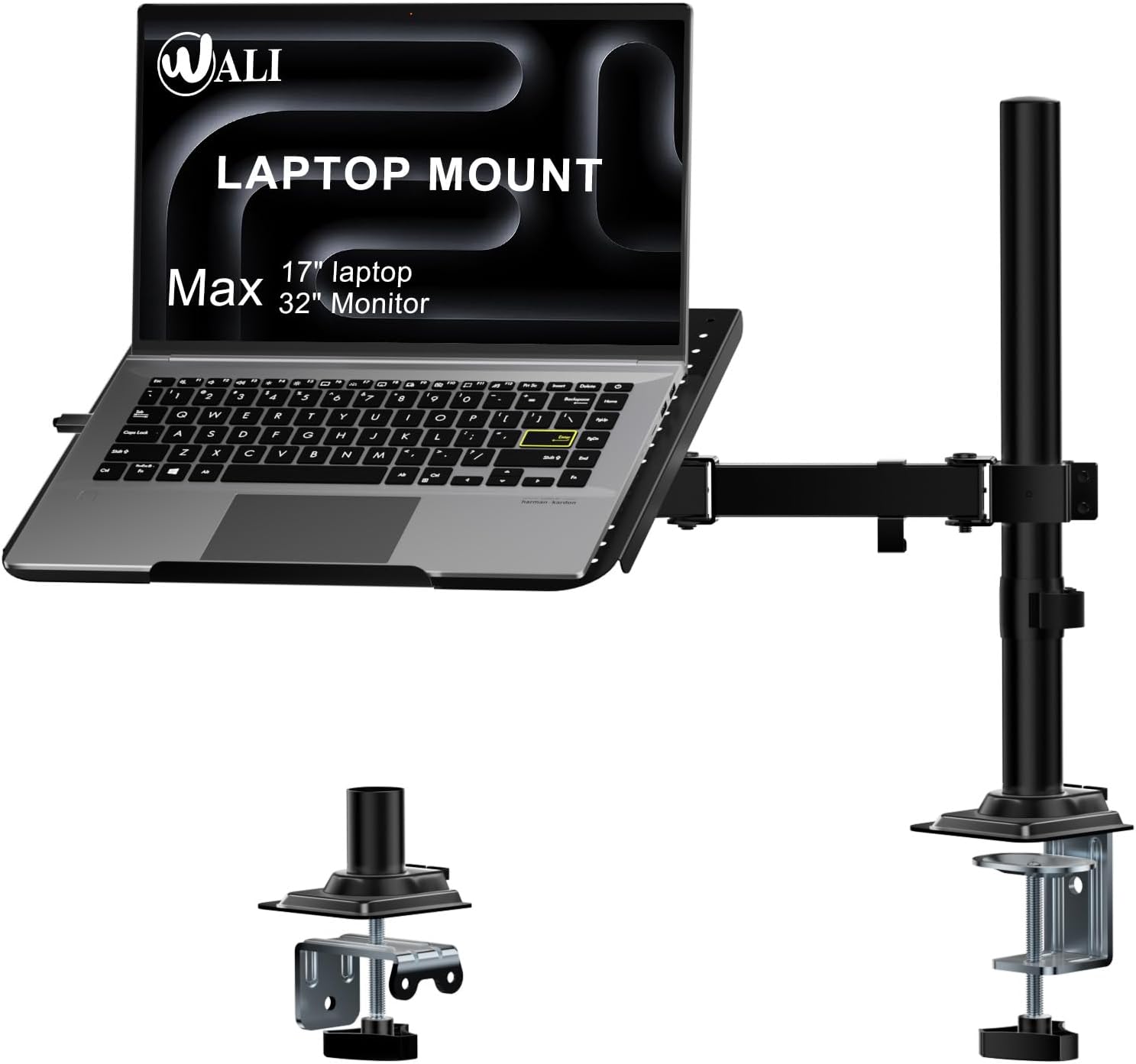
WALI Laptop Tray Desk Mount for 17inch Notebook, Fully Adjustable Laptop Arm up to 22lbs, Monitor Mount with Vented Cooling Platform Stand (M00LP), Black
Want the best price and purchase timing?
Our AI advisor analyzes real-time pricing across all channels to find you the best deal.
AI Verdict
This WALI mount supports one 17-inch laptop up to 22lbs on a 16-inch height pole, suitable for freeing up desk space.
This mount is a situational fit for users needing to elevate a 17-inch laptop up to 22lbs, especially if they use an external keyboard and mouse. Its 16-inch height pole and +/-15° tilt offer decent adjustability, but reported typing wobble and potential leveling issues mean it's not for everyone.
If you need a more stable typing surface or greater weight capacity, look for mounts with gas spring arms designed for heavier loads and specific anti-wobble mechanisms.
Regret Score™
Low RiskLower is better — measures purchase-regret risk from real buyer complaints, review credibility, and product maturity
Issues discovered after purchase
Critically weak dimension
Amazon rating vs actual quality
Chance this product isn't for you
Pros
- Supports laptops up to 17 inches and 22lbs, accommodating a range of devices.
- Offers dual mounting options (C-clamp for 0.4”-3.5” thick desks, Grommet for 0.4”-2.4” thick desks) for installation flexibility.
- Features a 16-inch height pole with +/-15° tilt, +/-90° swivel, and 360° rotation for varied viewing angles.
- Venting holes on the 14 x 11 inch tray promote airflow to prevent laptop overheating.
- Can also mount a monitor with 75x75mm or 100x100mm VESA mounting holes.
Cons
- The laptop tray can exhibit wobble during typing, making it less ideal for active input.
- Some users report the mount not being perfectly level, requiring adjustments like adding washers.
- The tray's fixed incline might not suit users preferring a completely flat typing surface.
- The C-clamp supports desks up to 3.5 inches thick, which may exclude some thicker desk designs.
Dimension Scores
The mount elevates the laptop to eye level, improving posture, but typing directly on the mounted laptop can introduce wobble.
It offers a 16-inch height pole, +/-15° tilt, +/-90° swivel, and 360° rotation, providing a wide range of positioning options.
The construction is reported to be all metal, but some users experience leveling issues, suggesting potential manufacturing inconsistencies.
The black finish and functional design are unobtrusive, but it's a utilitarian piece of office equipment without specific design flourishes.
Best For
- Creating additional desk space by elevating a laptop.
- Users who primarily use an external keyboard and mouse with their laptop.
- Setting up a secondary screen for a laptop in a sitting position.
- Individuals needing a ventilated platform for a laptop that runs hot.
Not Recommended For
- Users who frequently type directly on their laptop while it's mounted, due to reported wobble.
- Desks thicker than 3.5 inches for C-clamp mounting, or 2.4 inches for grommet mounting.
- Those requiring a perfectly level laptop tray without potential minor adjustments.
Watch Out For
- The laptop tray can wobble when typing, making it unsuitable for direct laptop input.
- Some units may not sit perfectly level, with one user reporting a lean to the right.
- The tray's 0.6-inch bottom lip is crucial for securing the laptop; incorrect assembly can lead to the laptop sliding off.
- While adjustable, the arm's elevation might not allow for a completely flat typing surface if that's desired.
Full Specifications
| ASIN | B07BDQQVN2 |
| Brand | WALI |
| Color | Black |
| Form Factor | Tower |
| Item Weight | 3.72 pounds |
| Manufacturer | WALI |
| Mounting Type | Tabletop Mount |
| Special features | Venting holes for cooling, Two-stage locking system |
| Item model number | M00LP |
| Compatible Devices | Laptops or notebooks up to 17 inches and 22lbs |
| Product Dimensions | 17.24 x 4.06 x 11.14 inches |
| Other display features | Wireless |
| Compatible Phone Models | iPhone |
| Is Discontinued By Manufacturer | No |
What Buyers Say
Users frequently highlight the mount's ability to free up desk space and its sturdy, all-metal construction. However, a recurring complaint is the wobble experienced when typing directly on the mounted laptop, which can be distracting. Some individuals have also noted that the tray might not sit perfectly level, occasionally requiring minor adjustments like adding washers to correct a lean. The ventilation holes are appreciated for helping with laptop cooling.
“Look, it clears up my desk and my laptop doesn't cook itself, but if you're gonna type on it, prepare for some jiggle.”
Common Praise
- Frees up significant desk space.
- Construction feels like all metal.
- Venting holes aid in laptop cooling.
- Easy assembly process.
- Allows for a clean desk setup with external peripherals.
Common Complaints
- Wobbles when typing directly on the laptop.
- Tray may not be perfectly level, sometimes leaning to one side.
- Not ideal for a completely flat typing surface.
- Requires careful assembly to ensure the laptop's security on the tray.
Ownership Tips
- The arm's stability is compromised by direct laptop typing, leading to noticeable movement.
- Minor leveling issues might persist, with some users resorting to shims or washers for correction.
- The 0.6-inch bottom lip is critical; ensure it's correctly oriented during assembly to prevent the laptop from sliding.
- It's best suited for setups where the laptop screen is viewed, and input is handled by external devices.
- The ventilation design actually works, helping to keep laptop temperatures down during use.
Frequently Asked Questions
What size laptops does this mount support?
It supports laptops or notebooks up to 17 inches in size.
What is the maximum weight capacity of the mount?
The mount can support devices weighing up to 22lbs.
Can I use this mount with a monitor instead of a laptop?
Yes, it has dual mounting options and can accommodate a monitor with 75x75mm or 100x100mm VESA mounting holes.
What desk thickness does the C-clamp work with?
The C-clamp is designed for desks between 0.4 inches and 3.5 inches thick.
Does the laptop tray have features to prevent overheating?
Yes, the laptop tray includes venting holes to absorb cooling air from the laptop's fan.
Buying Guide
When you're looking at a laptop desk mount, you're essentially buying a way to lift your laptop off your desk and position it more ergonomically. Think about how you use your laptop: do you type on its keyboard, or do you use an external one? This makes a big difference for stability. Also, consider your desk's thickness, as mounts have specific clamp ranges.
Weight Capacity
This tells you the maximum weight the mount can safely hold. If your laptop is heavier than the stated capacity, the mount won't be stable and could fail, like trying to lift a heavy box with a flimsy stick.
Desk Thickness Compatibility
This indicates the range of desk thicknesses the C-clamp or grommet mount can securely attach to. If your desk is too thick or too thin, the mount won't fit properly, similar to trying to wear a shoe that's the wrong size.
Adjustability (Height, Tilt, Swivel, Rotate)
These numbers tell you how much you can move your laptop around. More adjustability means you can fine-tune the screen position to your eye level and preferred angle, which is crucial for comfort and avoiding neck strain, much like adjusting your car seat for a comfortable drive.
Alternatives
If this mount doesn't fit your needs, search for laptop mounts with gas spring arms for smoother, more stable adjustments, or models specifically designed for heavier laptops if yours exceeds 22lbs.
You Might Also Like

LYMAX Computer Monitor Light Bar with Wireless Remote, Motion Sensor, Fit for Flat/Curved Monitor, Adjustable Color Temperature with Auto-Dimming, Eye-Care USB-C Monitor Lamp, No Glare Desk Lamp
$50-$99A 15.7-ounce aluminum monitor light bar with motion sensing, auto-dimming, and stepless 2700K-6500K color temperature adjustment for flat or curved screens.

Computer Monitor Lamp, Screen Monitor Light Bar for Eye Caring, Screen Monitor Light Bar with Backlight for Eye Caring, E-Reading LED Task Lamp with Dimming Adjustment, Perfect for Reading and Study
$0-$49This BLYGACN monitor lamp offers 3 color temperatures (3000K-6500K), dimming, and a 60-minute timer, powered by USB, for monitors 15-24 inches.

Monitor Light Bar with Touch Control, RGB Desk Lamp Full Spectrum Screen Lamp, Glare-Free Low Blue Light Monitor Lamp with Memory Mode, USB Powered for Gaming, Office & Work
$0-$49A USB-powered plastic monitor light bar with touch controls, RGB modes, and glare-free illumination for basic desk setups.

RGB Monitor Light Bar, Eye-Care Dual Light Reading Screen Lamp, 9 Modes Gaming Backlight LED Computer Lamp, 3 Colors Dimmable Frontlight, 15.75'' USB Desk Lights for Home, Office
$0-$49This is a budget-focused 6.4-ounce plastic monitor light bar with dual-mode lighting and 9 RGB backlight modes, designed for users needing basic task and ambient lighting without cluttering their desk